Kind of like an area code for your computer.
Well, to be blunt, it’s something you probably don’t need to know about. You may have to enter one into a router configuration, but it’s typically something you’ll be given without needing to know exactly what it means.
You want to know anyway, don’t you? Fair enough.
A subnet mask is just a nifty way to define sub-networks. Besides being completely unhelpful, that definition actually opens up a slightly larger can of worms.
Become a Patron of Ask Leo! and go ad-free!
Phone numbers
I’m going to use phone numbers as an analogy. It’s an imperfect comparison, but I think it’ll help make the point.
In North America, phone numbers are 10 digits long, and comprised of three parts: 1
- A three-digit area code. Originally, an area code defined exactly that — a geographical area. Area code 206, for example, was, at one time, all of western Washington state.
- A three-digit exchange. The exchange identified the switching equipment that covered a sub-region within the area code. For example, 788 represents the “Duvall” exchange. Located near the city of Duvall in western Washington is a small utility building that houses the equipment that is the 788 exchange.
- And finally, the four-digit line number. It’s this number that identified each pair of wires that left the exchange and arrived at a real telephone set in someone’s home.
So what we take for granted as a 10-digit “phone number” is really a construction of three distinct numbers, each with a specific meaning.
Internet addresses
Now let’s look at the internet.
You already know that each computer connected to the internet has its own equivalent of a phone number called its Internet Protocol or IP address. Names like “askleo.com” actually map to these numeric addresses, such as 52.12.198.95.
Each IP address breaks down into components not unlike the 10-digit phone number. The difference is that the components are not always the same size, which is where the subnet mask comes in.
Each network administrator who is assigned a range of IP addresses is free to create subnets to divide things within that range and to define how large they are.
It’s the subnet mask that defines how big a part of the internet address is to be used as the subnet number.
Unfortunately, this is also where we have to think like computers, meaning we need to think in binary.
Basic subnet mask examples
We’ll use these addresses:
1) 164.109.28.3   [binary: 10100100 01101101 00011100 00000011]
2) 164.109.27.233 [binary: 10100100 01101101 00011011 11101001]
3) 164.109.139.4  [binary: 10100100 01101101 10001011 00000100]
4) 50.28.23.175   [binary: 00110010 00011100 00010111 10101111]
A subnet mask is a binary number (usually expressed in decimal, like an IP address) whose digits are set to 1 to indicate the positions of an internet address that should be “paid attention to” as the subnet. Conversely, it’s set to zero for that portion of the address that defines the specific computer on that subnet.
For example. let’s look at this subnet mask:
255.0.0.0
In binary, that’s:
11111111 00000000 00000000 00000000
Now compare that with the four IP addresses I listed above, and only pay attention to that portion of the IP address where the subnet mask is a 1.
You’ll notice that the subnet mask is only set to one for the binary digits that correspond to the first number of the IP address. With this subnet mask, the IP addresses that begin with “164” are all on the same subnet, and the one beginning with 50 is not.
That could mean that a router would route traffic for all the 164. addresses one way and the traffic for the 50. address another, all by paying attention only to what the subnet mask showed was significant.
Advanced subnet mask example
As internet traffic approaches its destination, it’s common to use subnet masks to further refine how things are divvied up on the network.
Let’s look at this subnet mask.
255.255.128.0
or in binary:
11111111 11111111 10000000 00000000
The ones in the first two groups of eight binary digits are all set, which means that each of the first two numbers in a decimal IP address would be paid attention to. But that third group of eight only has a single one. That means only a part of the third number is significant.
Let’s look at our first three example IP addresses again.
1) 164.109.28.3   [binary: 10100100 01101101 00011100 00000011]
2) 164.109.27.233 [binary: 10100100 01101101 00011011 11101001]
3) 164.109.139.4  [binary: 10100100 01101101 10001011 00000100]
I’ve highlighted the portions of the binary addresses that this subnet mask tells us we need to pay attention to. With that highlighting, it’s easy to see that the highlighted portions of the first two IP addresses are identical — they’re on the same subnet. The third is different, albeit only in that last binary digit. That’s enough to put it in a different subnet than the first two.
Your subnet mask
If you’re using a traditional consumer router of some sort, chances are you have a very simple network configuration and subnet mask.
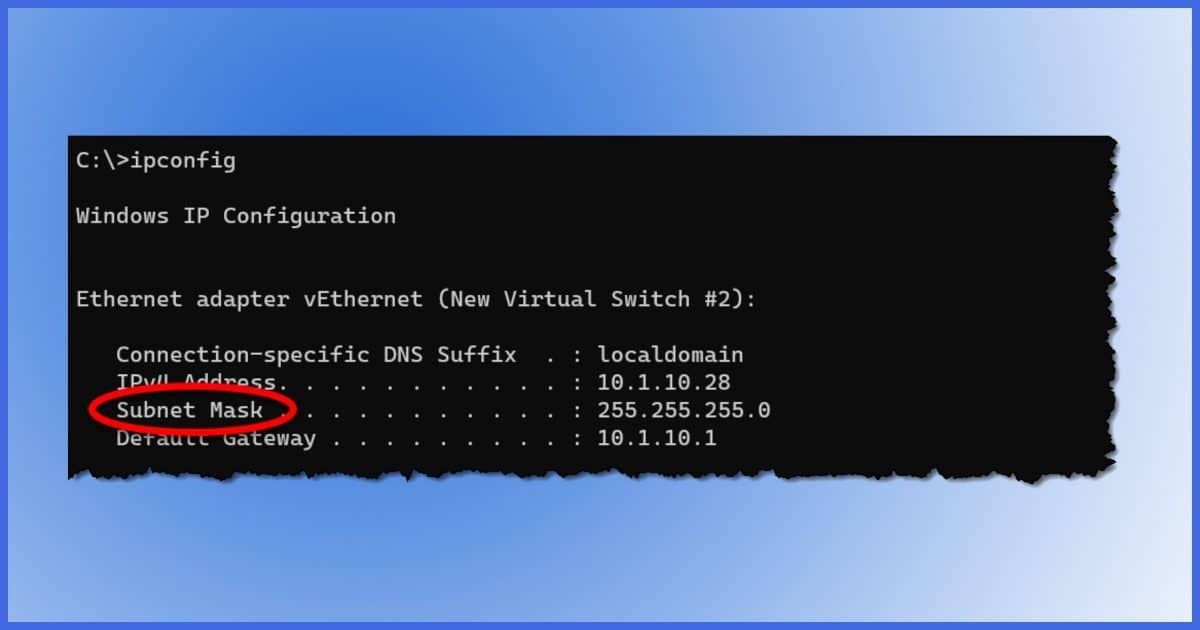
If you’ve ever looked at your IP configuration by running “ipconfig” in Windows Command Prompt, it probably included information like this:
IPv4 Address. . . . . . . . . . . : 192.168.0.83
Subnet Mask . . . . . . . . . . . : 255.255.255.0
Default Gateway . . . . . . . . . : 192.168.0.1
If we apply the rules we’ve talked about so far, the subnet mask used here — 255.255.255.0 — tells us a couple of interesting things.
- All IP addresses encountered on this network that begin with 192.168.0. are on the same subnet.
- Thus, all devices with IP addresses beginning with 192.168.0. are on our local network. The router doesn’t need to touch the internet at all when dealing with IP addresses like this.
- Conversely, IP addresses that do not begin with 192.168.0. are not in the same subnet and not on our local network, and the router must reach out to its external connection — the internet — to send data destined for them.
The Default Gateway? That’s the IP address of the router itself on our local network, also within the same subnet.
Subnet masks: why care?
All this brings us to an even more relevant question: why should we care?
Normally, you don’t. There’s little reason for the average consumer to know about subnets, subnet masks, and routing. Networking is more than complex enough as it is. If you ever need it, you’ll either be told what network mask to type in to some configuration, it will default to the right thing, or a network engineer or technician will set it up for you.
With that pressure out of the way, subnets and subnet masks are all about routing — specifically, about making sure that the information you send from your computer makes it to the intended destination computer, and vice versa.
When information flows across the internet, it flows through equipment called routers. Routers look at the IP address the information is destined for and decide the best way to get it there. A subnet is a quick way to know where the information belongs. For example, a packet from our example #1 to example #2 is on the same subnet, so a router can take advantage of that information to know that it’s local and not send the packet anywhere else. A packet from #1 to #3, however, is probably destined for a computer on a different subnet, and the router handling that packet will know to send it along a different path to get there.
To use our telephone analogy again, if I’m in Duvall making a call on my 788-xxxx telephone to another 788-xxxx telephone, then the phone equipment knows that it doesn’t have to try anywhere else; it all happens within the Duvall exchange. On the other hand, if I try to call a 483-xxxx number, then the 788 exchange needs to route my call to other equipment within my area code that knows how to find the 483 exchange.
As you can imagine, I’ve only scratched the surface here. Networking and the internet are incredibly complex.
Do this
Subscribe to Confident Computing! Less frustration and more confidence, solutions, answers, and tips in your inbox every week.
I'll see you there!
Footnotes & References
1: With changes in technology and phone number portability, much of this is no longer true, of course. But the old system remains useful for comparison.


In some ways, the modern telephone system behaves more similarly to the IP configuration since the telephone switching is done through software and is no longer dependent on location.