The SFC improves system stability.
In order to prevent malware from compromising critical system components, Windows works hard to maintain the integrity of its files. If you try to replace a “protected” file, you may get a message that the operating system has put the old, approved version back. That’s Windows File Protection, which is now called Windows Resource Protection.
Unfortunately, automated protection doesn’t cover every conceivable situation in which your system files could be damaged. Sometimes it’s as simple as a hard disk error.
As a result, automated checking is nice, but sometimes you need to take matters into your own hands.
Enter the SFC, the System File Checker.
Become a Patron of Ask Leo! and go ad-free!

SFC: System File Checker
SFC scans your system files and confirms they have not been compromised or replaced with unofficial versions. If an unexpected version is found, SFC attempts to restore it from copies or original installation media. Run SFC by entering “SFC /scannow” in an admin Command Prompt or PowerShell.
System file protection
The premise behind system file protection is that Windows keeps information for critical files — possibly including, but not limited to, the date/time stamp of the file, its size, and its cryptographic hash. When files are “officially” updated, this information is also updated to reflect the new official files.
Every so often, Windows checks all those files to make sure they still match, meaning the time stamp, size, and hash value all match what is expected. If they don’t, something is wrong, and Windows will likely report the error.
Unfortunately, “wrong” can be the result of many different things:
- Malware is the primary reason system file protection exists. Malicious software can inject itself into the system by modifying Window’s own files. System file protection detects when this happens and repairs the damage.
- Set-up programs often replace system components with their own, sometimes breaking things. System file protection notices when this happens.
- Random other failures.
So, what happens when a problem is found?
Repairing altered files
If you’ve ever searched for a system file on Windows, it’s not uncommon to find several copies:
- The original file, used by Windows.
- Previous versions of the file saved by Windows Update, so you can uninstall specific updates if needed.
- Cached copies of the file, kept as a performance enhancement that loads the file more quickly when needed.
- Back-up copies of the file.
When system file protection needs to restore a file, it usually tries the original first.
In addition, many systems include a copy of Windows on a restore or recovery partition, and, when all else fails, the original Windows installation media might be used.
In all cases, the repair process also checks that the copy it’s restoring is correct. If it fails to have the expected information, it will be skipped. Because many of those sources are on your hard disk, malware authors attempt to replace or damage them all to prevent the repair process from working.
SFC: the System File Checker
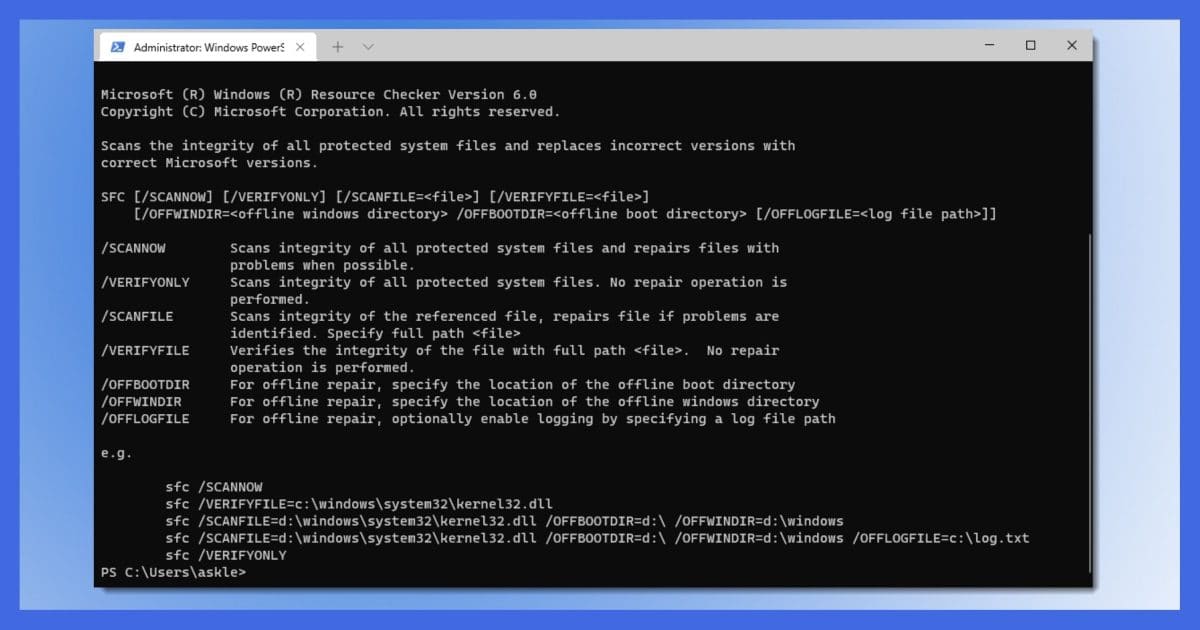
SFC is a command-line tool that checks that all of the files covered by system file protection are as they should be, and tries to repair those that are not. It’s a good utility to run when you suspect system files have been somehow corrupted, or if you just think there’s something wrong with your system.
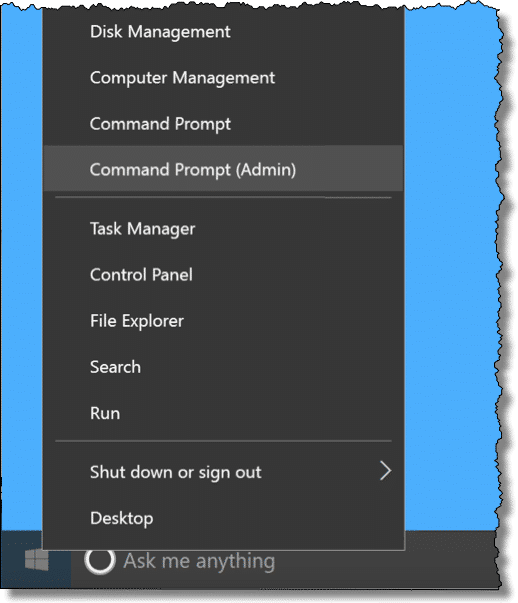
SFC requires administrative privileges. Right-click on the Start button and click on Command Prompt (Admin), Windows PowerShell (Admin), or Windows Terminal (Admin).
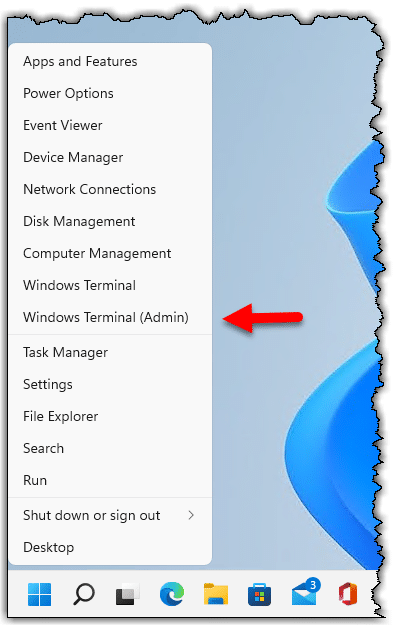
After confirming any UAC prompts, type “sfc /scannow” (that’s “sfc”, a space, “/scannow” without any quotation marks) at the prompt and press Enter.
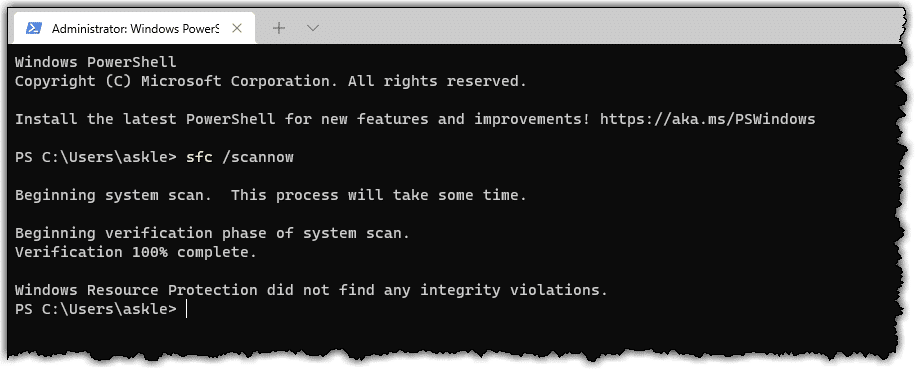
SFC scans your system immediately. It can take several minutes to run.
If you have installation media, such as a DVD, you might have it available in case SFC needs it to replace a damaged file.
While it’s not documented as being required, I’d reboot your machine if SFC replaces any system files. I like to be sure the file replacement actually takes effect.
Microsoft has more detailed SFC documentation, including more options to check at boot time, how to control the size of the system file protection cache, and so on. There is also Windows Resource Protection documentation, which covers the mechanism Windows uses to try to keep your system files (and a few other things) safe automatically.
Do this
Subscribe to Confident Computing! Less frustration and more confidence, solutions, answers, and tips in your inbox every week.
I'll see you there!
Podcast audio

Related Video


firstly thanks for being there Leo..many appreciate you and we in the Green Isle would call those who complain as above (some) begrudgers ….this what i got when i ran the check as advised by you
“windows resource protection found corrupt files but was unable to fix some of them. details are included in the CBS.log windir\logs\CBS\CBS.log for example C:windows\logs\CBS\CBS.log. note that logging is currently not supported in offline servicing scenarios ”
that was all it wrote …no solution offered thanx mr. gates.. am running 8.1 on a 2GIG MEMORY notebook only weeks old and is as slow as a tranqed tortoise lately.. i used up to date Superantispyware free and Loaris trojan remover latest version latest updates and Bitdefender antivirus plus 2015 up to date and full scan before the test and all clear
WINDOWS SEARCH CANNOT FIND THE FILE BUT SURE WINDOWS ALWAYS GAD PROBLEMS EVEN FINDING ITS OWN DERRIERE…..
ANY ADVICE LEO ?
I have Windows XP pro but when I tried to run the file checker it asked for my Windows CD but would not accept it, even though it had SP3 on it. After much trial and error here is what worked for me.
Copy the I386 folder from the Windows CD onto C:\. Next click on the Start menu than Run. In the Run box type regedit. This opens the registry.
Scroll down to a) hkey-local-machine b) Software c) Microsoft d) Windows e) Current Version f) Setup
You will see two lines that need to be changed. They are Servicepacksource and sourcepath. Double click on each one and change the value to C:\ and press OK after each item.
Get out of the registry and reboot.
In the run box type sfc /scannow.
My computer than ran the file checker. It took about a half hour.
Once completed, I rebooted and got into Microsoft update.
Because my Windows CD is a few years old and does not reflect all the updates since, I thought that there would be updates but there were none.
For those people who do not have a Windows CD, I googled “free downloads i386 for windows xp sp3”. There appeared to be a few websites that offered the download but a couple of times my virus checker wouldn’t allow it, so be careful. I didn’t actually download any files since I already have a Windows CD but if your desperate this maybe the way to go.
Leo,
Thanks for this information. I think I have discovered a method to help with SFC recover file methods:
First of all: SFC can run in it’s own window, so when it cannot find the file it needs: open up another explorer window and do a full system search for the exact file it is looking for. Many times SFC does not search “everywhere” for the file it needs. If you can find the file it needs,: switch focus back to the SFC window and tell it where the required file is located…SFC will continue in it’s search for the next file it can’t find and halt again..repeat the process until all it wants is satisfied. Sometimes one may even have to insert a CD or DVD that has the required file….no concern, SFC window will wait for you to find it! Kinda painfull, but it works to verify that all your system files are correct as far as SFC/WFP is concerned.
Thanks again,
jubal
Similar to a lot of the other apps MS provides, there are many glitches in running SFC, chief of which is that the updated versions of the system files do not relate to what one has on their installation CD. As a consequence of this, I have found that running SFC is virtually worthless.
in win 10, win logo + x, to get to command prompt admin.
I think you left out a step. If you type Windows Key + x, it brings up the same menu as right clicking the Start Button. From that menu, select “Command Prompt (Admin)”
Dear Leo
You state that we should have installation discs handy. I got windows 10 courtesy of a free download provided by by MS to update from Windows 8, can I still make fixes / repairs?
Dane Hardinge
That should work. That’s one advantage of upgrading to Windows 10 that isn’t discussed enough. For people who didn’t get installation media with their preinstalled versions of Windows 7&8, we now have installation media.
Theoretically, yes. You may have to download the ISO for Windows 10, but it should still be quite possible.
I was wondering i am not an advanced user. would I be able to Run SFC, the System File Checker.
I don’t have command propmt I have power shell in my start up, Is that the same
Open Powershell. Right-click on thee Powershell icon in th Taskbar. Select “Run as administrator” from the pull-up menu. Click on Yes in the UAC prompt. Type sfc /scannow.
I have used a paid software called Reimage which seems to automate the process of SFC and replaces any corrupt files with its own data base of good system files. In the course of doing it, it also does a few other cleanups like malware etc. It seems to work (at least not getting my system to an unbootable state) although I cannot tell exactly what files, if any, it has changed. The initial scan almost always says I have Windows damage. Can you do a review of this software or comment on it?
I also have no idea of Reimage’s current state, but if I recall correctly it wasn’t highly regarded some years ago. That may have changed. PC Magazine has a review: https://www.pcmag.com/article2/0,2817,2331883,00.asp
I ran sfc /scannow and this is what it said:
“Windows Resources Protection found currupt files but was unable to fix some of them. For online repairs, details are included in the CBS log file located at windir\Logs\CBS\CBS.log. For example C:\Windows\Logs\CBS\CBS.log. For offiline repairs, details are included in the log file provided by the /OFFLOGFILE flag.
You may need to consider a refresh of Windows: https://askleo.com/refreshing-windows-10-without-a-re-install-or-reset/
When I receive the message “Windows Resources Protection found currupt files but was unable to fix some of them. For online repairs, details are included in the CBS log file located at windir\Logs\CBS\CBS.log. For example C:\Windows\Logs\CBS\CBS.log. For offiline repairs, details are included in the log file provided by the /OFFLOGFILE flag.” I choose the appropriate action listed below
Run from elevated cmd prompt
Win 10:
DISM /Online /Cleanup-image /CheckHealth just checks files: no repairs
DISM /Online /Cleanup-image /ScanHealth The ScanHealth option performs advanced scan to check if the OS image has any problems.
DISM /Online /Cleanup-image /RestoreHealth option to scan and repair common issues automatically
Win 7:
run Windows10Upgrade9252.exe (in downloads folder)
DISM /Online /Cleanup-image /ScanHealth (to scan the image for component store corruption)
After above completes then run sfc /scannow
This method has never failed me
I have noticed over the years that the ‘sfc /scannow’ tends to show errors a fair amount of the time, more often than you would think would occur because the computers were used normally etc, so it’s not like I was doing anything to cause it to act up. so I imagine Microsoft is slipping a bit. hell, off the top of my head I have even noticed it finding errors shortly after a clean install (i.e. wipe drive and install Windows from scratch) after maybe some updates here and there and nothing is wrong with the hardware, or installation media, either.
but with that said… I can’t say I noticed any obvious problems with general usage on the computer(s) when I do see the ‘errors’ on the ‘sfc /scannow’ here and there over the years. so I suspect most of the time it’s probably not a real problem if it shows some errors since it typically says it fixed them.
but I suspect if someone is having any bigger issues with things being out of whack, a clean install is their best bet to ensure everything is in good running order as that might end up taking less time then trying a whole bunch of random troubleshooting options that may or may not help.
but at this point, and for a while now, all three of my computers (two desktops and a laptop) are all on Linux Mint. although 1 out of the 3 (it’s a ASUS A8N32-SLI Deluxe motherboard which is basically high end tech in 2005), in short, cannot run Windows 10 (i.e. Win10 32bit installs and runs but it’s unstable, Win10 64bit simply won’t install due to lack of nx-bit according to the installer). so it’s either continue to use Windows 7, which is generally not a good idea for online use, or switch to Linux. but Mint runs well on the old machine as I suspect it will continue to be a passable internet machine for years to come, especially since I maxed out the RAM it’s limit of 4GB (4x 1GB) back in I think Jan 2019 (as 4x 1GB chips were dirt cheap (maybe $10-12 or so)). because while 4GB of RAM is on the lower side nowadays, it’s still at a usable level for basic usage. but to get that board to use the full 4GB you have to ‘enable memory hole’ in the BIOS (I am using the newest BIOS to (one can easily flash to older BIOS if you want to)) as when the BIOS settings are at their defaults I think the system is limited to only 3GB of RAM even though 4GB is installed (I am using a 64bit OS).
Even though this PC is less than a year old, I decided to run SFC to see what it reported. This is what I got:
Beginning system scan. This process will take some time.
Beginning verification phase of system scan.
Verification 100% complete.
Windows Resource Protection found corrupt files and successfully repaired them.
For online repairs, details are included in the CBS log file located at
windir\Logs\CBS\CBS.log. For example C:\Windows\Logs\CBS\CBS.log. For offline
repairs, details are included in the log file provided by the /OFFLOGFILE flag.
I ran sfc a second time an it reported:
Beginning system scan. This process will take some time.
Beginning verification phase of system scan.
Verification 100% complete.
Windows Resource Protection did not find any integrity violations.
It appears that sfc was able to fix the corrupted system files. I’ll keep this tip handy, and perhaps ad it to my monthly preventative maintenance routine.
Thank You!
Ernie
The information in the article is outdated. Microsoft has revised their guidance for all currently supported systems to indicate DISM as the first step, followed by SFC:
https://support.microsoft.com/en-us/topic/use-the-system-file-checker-tool-to-repair-missing-or-corrupted-system-files-79aa86cb-ca52-166a-92a3-966e85d4094e?mc_cid=32bdb4ba87&mc_eid=33ea968f54
I run sfc from time to time using Ultimate Windows Checker from the Windows Club. If scf finds unfixable errors, DISM can be run with a single click from the same utility. Either way, you should always run sfc again to check the problem is fixed.