Digital thumb-twiddling.

This is a great example of things we geeks take for granted that aren’t always obvious to the rest of the world.
I mean, really, a process regularly taking up 99% of your CPU’s resources must be a bad thing, right?
Nope, not at all. Just the opposite, in fact.
Become a Patron of Ask Leo! and go ad-free!

System Idle
The System Idle Process runs when the computer has nothing better to do. A system whose System Idle Process is taking up 96% of the CPU resources really means that 96% of the CPU’s resources are available for anything else that might come along.
System Idle Process
Let me show you what we’re talking about.
Right-click on the clock in the taskbar, and click on Task Manager. Click on More details, if present, and then on the Details tab. Now click on the CPU column heading to sort by CPU Usage (click again to reverse the sort order if all you see are zeros in that column). Generally, you’ll see something like this:
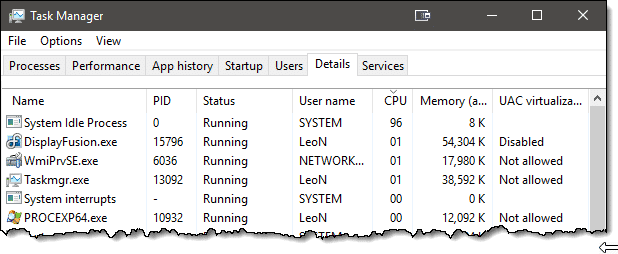
Something called “System Idle Process” is taking up a full 95% of my CPU’s resources.
No such thing as doing nothing
Most computers never really do nothing. When the computer is powered on, the CPU is running, and it must do something even if “something” is waiting for something real to do.
Think of it as your computer twiddling its virtual thumbs, waiting for something more important to do. The computer is doing something — virtual thumb twiddling — but we wouldn’t call it doing anything useful.
That’s called being idle.
“System Idle Process” is the software that runs when the computer has absolutely nothing better to do.
It has the lowest possible priority and uses as few resources as possible so that if anything at all comes along for the CPU to work on, it can. When there’s nothing left to do, back to idle it goes.
Having the System Idle Process use 95% of your CPU is a good thing. It means that 95% is readily available should there be any real work to do.
Do this
Subscribe to Confident Computing! Less frustration and more confidence, solutions, answers, and tips in your inbox every week.
I'll see you there!
Podcast audio

Related Video


The devil finds work for idle processes. :-)
And so does BOINC.
http://boinc.berkeley.edu/projects.php is a list of projects you can donate idle cycles to when you install the BOINC software. It can either run in the background as a low-priority process, eating up idle cycles, but giving up cycles when your priority programs need them, or as a screensaver, using more of your CPU when the whole system is idle.
The projects range from evaluating radio signals from space for signs of E.T. communication to helping with complex mathematical modeling. It’s a great way to take those idle cycles away from the System Idle Process and donate them to worthwhile projects, making your computer a voluntary node in a giant distributed supercomputer.
Apparently, what the System Idle Process is actully doing is continually issuing HLT commands to the CPU; HLT being a command which, according to http://download.intel.com/design/PentiumII/manuals/24319102.PDF, “stops instruction execution and places the processor in a HALT state … An enabled interrupt, NMI, or a reset will resume execution”.
Apparently doing this saves power, which raises the question of what the CPU would be doing that would use power if the OS *didn’t* continually issue these HLT commands. Any ideas?
I am using WIN Vista Home Premium. I ran Task Manager, went to Processes, sorted the list and could not find the System Idle Process. Whats up with that?
Thanks
On Vista machine you’ll also find that “SearchIndexer.exe” may be chewing up lots of CPU time from time to time. Vista will only show the current user’s processes initially – if the user is logged in as an administrator, they can click on the Show All Processes button on the bottom of the dialog box to see everything running on the system.
Hi
The Idle Process can kick in when you are engaged in when you are using Movie Making software and are downloading or writing video causing you to lose or get distorted clips or frames. To get around this you can deliberately start the Idle Process so that it effectively gets it out of the way and won’t start up in the middle of your movie making. You can also use a little program called “End It All” which also helps, but thats a different thread.
David
Simon said: “which raises the question of what the CPU would be doing that would use power if the OS *didn’t* continually issue these HLT commands.”
Adding 0 to 0. Repeatedly. :)
Actually, that’s a joke. What it would do is check over and over again if anything’s happening, like a key being pressed or the like. Read http://en.wikipedia.org/wiki/Busy_waiting (and http://en.wikipedia.org/wiki/HLT while you’re at it).
Also, thanks for pushing me to research this :)
Sometimes my machine is running idle and it cannot be interrupted. That is, the idle process is too busy to notice keystrokes and mouse clicks.
Leo, do you know why this is happening?
I once read something about WinXp automatically moving files about, a kind of optimisation. When I can’t interrupt the idle process there is certainly a lot of disk processing (I can hear the heads thrashing). I haven’t been able to find the information about automatic file positioning again and sometimes wondering if it was a figment of my imagination.
The point seems to be that users expectations are that the SIP should not take over the machine, but it does, interferring with the usefulness of the computer. There have been many times for me when a program has appeared to have crashed when in fact the computer is just busy doing the SIP. If the SIP is housekeeping processes and commands to keep the processor occupied during periods when programs are inactive then as soon as a program requires the CPU, the SIP should be suspended. So either the SIP has been badly programmed or it is more than the computer sorting itself out. Either way this is very frustrating to users and a way to control the SIP would be really welcome.
-Leo
On my computer i found the same thing, but while transferring a massive 120 gb folder from partition to partition. Needless to say it is deadly slow, should,nt the processor consider that an opportunity to maximize the cpu to decrease time? Or did i miss something here, =)
06-Feb-2009
Leo, I understand what you are saying about SIP not interfering by definition, or by design is probably better. But what Hawkins, Webb, and Milton are saying is true. In practice, I have often noticed momentary hangs in the application I’m working with when SIP kicks in (this is XP SP2). Whatever the intent, SIP does in fact interfere. What is needed, as Milton says, is user control of this feature.
21-Feb-2009
I read the above article and I understand the virtual thumb twiddling bit SIP doesn’t stop when I try to start another program. Is it that once it starts, it must finish the SIP first? Is this process only characteristic of Windows?
25-Feb-2009
This is one of the few posted answers that uses “resources” instead of “usage” or “processing” But may still leave some in the dark. The CPU column next to “Image Name” in task manager(as in posted pic) is NOT the cpu “Usage” it refers to cycles to the processor(instructions that let it know whats goin on, on the system – kinda like the dispatcher of your local taxi company) In this case the System Idle gets all the dispatcher attention when your system is doing nothing. Although it cant be seen on the edited posted pic, at the bottome of task manager is the ACTUAL cpu “USAGE” When the cpu “USAGE” goes up the Idle “CYCLES” go down and vise versa. So when the “CYCLES”(shown in pic) are in the 90’s your cpu “USAGE” should be low 0-10%. If you are seeing both #’s high there may be other issues. As far as some of the post with jerkiness I beleive that is an XP IDE problem itself. I have used 2k til 08 when forced to upgrade due to newer hardware and have had that problem as well, EVEN when my actual cpu “USAGE” has been under 10%.
In closing the high “CYCLES” are normal on SysIdle if you have constant maxed “USAGE” (bottom of task manager)then you have something goin on but the high “Cycles” arent it.
My “system idle process” has been running from 95 to 99 since Friday….5 days….and I have just been able to sign on the internet tonight (Tuesday night). Don’t understand this…..and even though I can sign onto the internet now, this “thing” still seems to control what I can and cannot do…..Richard
16-Mar-2009
Leo, don’t worry these guys will never get it.
The System Idle Process is not actually a process, it’s a representation of the CPU that is not being used.
I.E. You have firefox running at 5% cpu usage constantly and nothing else is above 0% the System Idle Process will read 95% usage because it’s the inverse of the amount being used… it’s not actually using 95% of your CPU (it does nothing and serves no purpose except to show what is not being used).
The problem most people are referring to is more than likely to be Intel SpeedStep or AMD’s Cool n Quiet technology, both of which throttle the CPU clock speed (and sometimes voltage) when the computer is inactive (idle) if enabled.
You and some programing book may say it’s doing nothing/something, but often a system gets a bug (we’ll say) that gets it rollig out of control.
Whatever the “reason” is, you guys have not had the issue some of these folks are talking about. the system idle process does NOT stop running for many people and it slows the heck out of everything. One guy said it was days b-4 he could even get on line. once it took over an hour for me to even get to the shut down window. Now mine is stuck @ a high # again and I don’t remember how to fix it.
I did a search because I was under the same idea, that the system idle process was killing my ability to work. I have a feeling that based on the new info here (from Leo) and the complaints that I was right in my first idea.
The slowdows are the result of either system restore files being written, the hard drive trying to clean up swap files and rewriting or closing files, or both depending on when they take place. I think the system backup is growing too large and maybe the way to stop it, is to make sure the computer is running right and turn off the system restore so it dumps the huge files, then restore it so it can start over.
I hate waiting 12 minutes on startup because the hd is wigging and wigging though the processor and system idle show nothing is happening.
Bill
my systeam ideal prosses sometimes just randomly comes on and when it does i cant do anything ex:im playing a game then that comes on and i start laging so bad that i can hardly move my mouse. but when its not running my computer is really fast it makes me so mad xD btw its running right now wich is why my typing is so bad -.-
Having read most of the comments above, I get what system idle is all about and have never had an issue with it, until now. I never considered it to be a problem for the reasons Leo, and others elsewhere, have mentioned, but what they don’t answer is, if while system idle is showing 95% etc and the system going mad with activity why it slows everything else to a crawl? What is it doing? Scenario:- Desktop doing nothing, everything fine, 95% ish system idle, open a web page, activity as expected and fine, I accept once the page is open for the system to then become bored and become idle but not for it to suddenly go mad with activity and thus prevent me from having a nice smooth system, go to open excel or anything else, forget it, cpu far too busy :-( So my question, which gets ignored or skirted around is, [edited] is it doing to stop me from using my pc and why doesn’t it recognise that i’m attempting to actually use the god damn thing and therefore the system should no longer be ‘idle’ and do what I want it to do???? or one day it WILL have a major argument with a hammer, and we all know who the winner will be :-)
Does it effect the temperature of the processor? i am using AMD athlon 64X2 dualcore and its temperature is rising to 42 and 36…
Should i be really bothered?
19-Nov-2009
yeah , feeling gud after reading the content !
my lappi was doing well , no prob at all , bt as ichecked 98-99 % cpu for a single process , i could not jst avoid it , so i chked for it ~!
thanks !
My computer [XP] shows 98% SIP CPU usage along with a svchost.exe application error. The svchost.exe fixs that I have tried do not seem to solve the problem.
My computer is slow to to launch any program and Internet Explorer and email is most difficult to launch.
Any help for me?
This seems to be a matter of communication. I understand, Leo, that you are saying the SIP is actually doing nothing. But I, like several others, do find that, while we are using the computer (so it is not idle), all processing slows down and becomes sporadic. When that happens, Task Manager (in XP) shows only SIP using memory. If SIP is not causing the slowdown, what is?
Leo from reading the posts i belive what the folks who are having trouble with System Idle Process are trying to say is their computer is not switching over from idle . Like say you start IE and their system does not send CPU to IE it just keeps at idle .
If i was one with that problem i would click on the Performance tab then see the real time CPU Usage even if System Idle Process is at 99% it should read very low if not zero you may see a bounce but that is other stuff running
how do I get it to stop when I want it to so I can do other things like close and open tabs and search, etc.
the system idle process takes up all my cpu and wont switch over and everything is slow what do i do!?!?!
Ken, I’m having the same problem. With nothing open, my SIP is still at 98 to 99% and EVERYTHING is slow. There has to be something to this. Can I just “end process”?
01-Apr-2010
Kathryn asked, “Can I just ‘end process’?”
Leo, if it’s listed in Task Manager, it is a process, and can be ended just like any other process. (Even you, Leo, inadvertently acknowledge this by telling us that it causes the computer to “twiddle its virtual thumbs”; well, guess what, that’s a process, which is doing something!)
What you seem to be saying, is that if you “terminate” the System Idle Process, “Something Hideous-&-Horrible” will happen. (Now, I don’t actually think you mean that, but with your instantaneous “No” leading your reply, that is the impression you give.)
(Actually, based on your description, the only thing I can imagine happening is that the computer would instantly spawn a brand-spanking-new instance of the System Idle Process!)
But, If, in fact, “Something Hideous-&-Horrible” will happen, do please let us know what it is! :o
System Idle Process is your computer DOING NOTHING. Your CPU is *idle*, hence the name.
If you’re experiencing system slowness while the System Idle Process is “running” at high percentages, System Idle Process is not the problem. More than likely some other component of your system – often the hard drive or internet connection – is experiencing difficulties that manifest as overall slowdown.
Again: System Idle Process is not the problem. A high “usage” of System Idle Process tells you that your CPU has nothing to do, and that you should look elsewhere for the problem.
01-Apr-2010