The short answer is, there’s no simple solution to this problem. There’s no single service or tool you can rely on to keep you completely safe.
I understand that can be frustrating.
There are tools and techniques, including online tools, DNS blocking, web blocking, and browser blocking, but these solutions are inconsistent and incomplete. Generally, they can be used only to gather a little additional data to inform the ultimate safety tool: yourself.
Become a Patron of Ask Leo! and go ad-free!
What is “safe”?
There’s no canonical list of what is and what is not safe.
One problem is that the word “safe” has different meanings depending on who you ask.
For some people, “safe” means no malware could be downloaded by visiting the site; for others, “safe” means there isn’t any risqué humor present; for still others, it could mean that the site represents a company with which it’s safe to do business. There are probably as many definitions of what it means to be “safe” as there are people answering the question.
I don’t believe it’s possible to get an absolutely safe/not-safe decision from any service or tool. At best, you’ll get data to help you make that determination yourself, according to your own criteria.
Online tools
Online services that rate websites’ credibility are one of my first stops when faced with an unknown or questionable link.
Web of Trust became quite controversial when it was discovered they were selling data collected by their toolbar. The solution is simple: uninstall their toolbar, or don’t install it in the first place.
Their online service remains a valuable source of data. The information is “crowdsourced”: it’s generated from internet users, not from some central authority. I’ll talk more about this concept below.
Visit mywot.com, enter the URL of the site you’re investigating into the search box at the top, and hit Return.

That will generate a report for the site in question. You can view the report for Ask Leo! (askleo.com) here. This will tell you if others have found the site to be safe and trustworthy, or not.
You do not need to register, sign in, or download the extension, even though it may be offered multiple times.1
Norton SafeWeb is a similar service from Symantec. Its web interface is perhaps a little cleaner, putting the search function front-and-center.
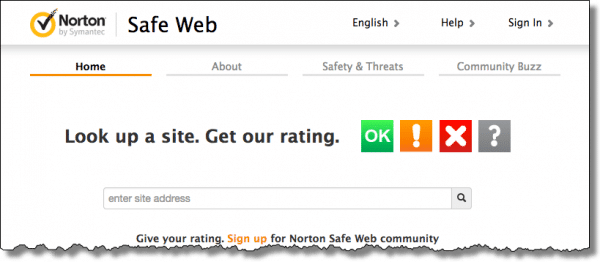
Like Web of Trust, it’s crowdsourced. Since it has somewhat less visibility than WOT, over the years its database of community-contributed ratings may not be quite as deep. Regardless, it’s a valuable additional resource.
Crowdsourcing: good and bad
I stop just shy of formally recommending either of these services.
Let me be clear: there’s value in the information that they provide. But there is a concern, and that’s the crowdsourcing aspect of this information.
Anyone can post anything. That means these services can be abused, primarily in either of two ways:
- Malicious sites can post positive reviews of themselves. They can hire people to post fake, glowing reviews to make themselves appear safe, when in fact they are not.
- An individual who feels wronged by or disagrees with a site can also post a malicious or fake review, disparaging the site when in fact the site would be considered “safe” by most.
Both services have processes in place to minimize this activity, but like any spam filter, it’s impossible to be 100% accurate.
That means you need to view all information on crowd-sourced review sites with a skeptical eye. It’s not authoritative, but it can be additional data.
DNS Blocking
Whenever you access a website, page, or download, DNS looks up the mapping from the domain name — like “askleo.com” — to the IP address of the server where that domain is physically located — like 67.227.211.203. Since every domain you access goes through this look-up, it’s an opportunity for the DNS service to block your ability to access domains known to be malicious.
Unfortunately most DNS services don’t do that.
OpenDNS, now owned by Cisco, is a replacement for the DNS service provided by your ISP. OpenDNS was originally created to be a faster, independent DNS service, but they support malicious filtering as an option as well.
Changing DNS is best done at your router, though you can do it on each individual device as well. To use OpenDNS visit their setup guide to get started.
Web blocking
Many anti-malware scanners and security suites include malicious website detection as part of the service they provide. The quality and intrusiveness of this detection varies based on many things, including not only the specific security package you run, but the browser you use, as well as other aspects of your system. I don’t have a specific recommendation.
The security package I generally do recommend — Windows’ own built-in Windows Defender — does not include such a feature. However, Microsoft’s browsers, Edge and Internet Explorer, have options to use “Windows Defender Smart Screen” to protect your system from malicious sites and downloads.
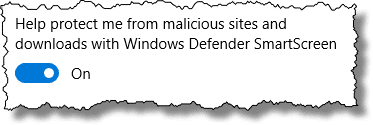
I don’t have a sense for exactly how good these filters are, or what Microsoft’s definition of “safe” or “malicious” might be. My guess would be that they’re fairly conservative, since the repercussions of a false positive — erroneously flagging a good site as malicious — could cause a backlash against Microsoft, whereas accidentally allowing a malicious site through would seem to be today’s norm.
Browser blocking
A final class of tools for assessing website safety are toolbars and add-ons to whatever browser you use.
Before Web of Trust lost my trust, I would have suggested installing their toolbar. It provided a nifty approach to accessing WOT data without having to visit their site. While there are other toolbars and browser add-ons that may perform similar functions, I don’t have enough of a track record with any to make a suggestion — with one exception.
uBlock Origin is a browser plugin most people think of as a pop-up or ad blocker. It also blocks many malicious or questionable sites. I’ve been running it for a while and consider it a fine addition to the tool set.
But how can you tell if a website is safe?
Ultimately, you can’t. Not with 100% certainty, anyway.
What I’ve listed here are several tools and techniques you can use to gather data, or perhaps at least avoid the most obviously malicious sites, but the risk remains.2
What I can say is this: give these tools and techniques a try, but take that information with a grain of salt. Use it as part of your own decision-making process. Read and understand the reviews, and see if they are fair and make sense. Know that your blocking solutions may not block every malicious site, and continue to view every link cautiously.
You are the ultimate safety net. One of the best things you can do as you surf the web is to be skeptical. Don’t believe everything you read or every promise or offer made. If it sounds too good to be true, chances are it’s not true. That goes for links people send you; it goes for the information people post on crowdsourced information sites; it even goes for what you read here on Ask Leo!
I’m guessing you already have a sense for what’s good or bad. Use common sense; listen to your gut. Use tools like WOT or SafeWeb to gather additional data if you’re not sure, or even just a plain old Google search for more information.
If it’s not worth your time to do the extra checking, it’s almost certainly not worth the risk of visiting an unfamiliar site.
I’m quite interested in additional techniques readers use to identify or avoid good or bad sites on the internet. Feel free to leave a comment about what you do to stay safe.
Notes
Previous versions of this article, as well as several of the comments below, reference McAfee Site Advisor. Similar to SafeWeb and WOT, it appears Site Advisor is no longer offered.
Do this
Subscribe to Confident Computing! Less frustration and more confidence, solutions, answers, and tips in your inbox every week.
I'll see you there!


I’ve been using WOT for a long time and highly recommend it with one warning. WOT has never missed a dangerous site, so far, but on the other hand I’ve seen a few false positives. I don’t believe these were mistakes but sometimes some websites were blacklisted on WOT for some political or religious prejudices of the WOT users. But better safe than sorry. If you’re not sure, stay away. If you know the site already, you might take a chance and go there.
UPDATE: I removed the WOT tool bars from all my browsers except one. When I see a link in an Ask Leo! comment that I’m not sure of, I paste it into that browser which I only use for things like that. I don’t log into WOT on that browser so the don’t get my email address. That way they don’t get personal information and don’t see my surfing habits. I assume that’s probably no more of a privacy breach than going to their website, but with less hassle.
On the other hand, except for the dishonesty issue, are they doing anything Facebook, Google and Microsoft don’t do?
How about AVG Link scanner in AVG Internet Security Suite. I have been using for some years with good result.
14-Oct-2009
If you are on a secure site, simply click on the padlock in the address bar (depending on your browser, this might need a double-click or right-click). You will see to whom the security certificate was given. While phishers may fake a website, the verisign security certificate is a pretty safe indication of the authenticity of a web site.
I use Site Advisor and find it to be very helpful. Another useful tool is Verification Engine, by Comodo, which does not recommend websites, but does verify that you have reached the website that you want to go to, and have not been misdirected to a fake website. This free utility is especially good for verifying that you are connected to your real banking or credit card websites. A great security enhancement, and a very small download. You can get it at http://www.comodo.com.
I use Firefox and the “InterClue” addon to preview pages. So far, it’s work extremely well to avoid such problems.
FYI – Web Of Trust reports that the covertsurfer.com site has a “Poor” rating. Check here for more info:
http://www.mywot.com/en/scorecard/covertsurfer.com
Leo, another tool for identifying “bad” web sites (but only for IE users at present) is Browser Defender, which is very visible, and does things similar to WOT and Site Advisor. Link-Extend http://www.linkextend.com/ is another one. One of the nice things about Link Extend is that it includes any detections by Site Advisor, WOT, Browser Defender, Web Security Guard, Norton Status, Complete status and Google Safe browsing all in one toolbar package. It is only available as far as i know as a Firefox addp-on and is available for FF 3.5. It also gives indicators in Google search to avoid visiting bad sites. My only problem with it is that if you are on a site and want to know the status, you have to click the safety, kidsafe or ethics buttons. There are no alerts. The kidsafe and ethics tools also include ratings from a few browser safety vendors. It also has a number of other features not security related.
If the DNS server set by the router and the one set in Windows is different, which one takes precedent?
The DNS server setting on the computer (or any particular device connected to the router) will override the router DNS if the computer has its own DNS setting.
Windows.
Thanks for your nice article!
What do you mean exactly by “uninstall theit toolbar (about WOT)?
Do you mean uninstall the extension and go directly on its site?
Thank you for thr precision
Yours
It would only be necessary to uninstall the WOT toolbar if you already have it installed. Go into extensions in your browser(s) and uninstall it, and then go to their site to check out websites.
Mcafee SiteAdvisor still exists. It’s now called McAfee WebAdvisor (it’s still free) and does even more work than the old SiteAdvisor product.
I use it with all my browsers. It detects dangerous sites and stops your browser with a warning message. It also scans downloads for malware and has mis-click and typo protection. Checks to see if your firewall and anti-virus are activated before you surf too.
It seems to work fine for me and has stopped me and the family/friends I support from too-quick clicking on malicious ads or links many times.
One thing It does that I really like is it rates your search results by displaying a green checkmark next to safe results and a red x for results to be avoided. This is especially helpful for inexperienced surfers who might click on anything in search results because they trust Google or Bing, etc.
Saved me and the fam many, many times.
You can check-out and download the free WebAdvisor by searching for “mcafee webadvisor” (just ignore the Ad results.)
Thanks for another nice article.
I have used the URL checker of the VirusTotal service to see if a link will take me to a potentially bad website, see https://www.virustotal.com/#/home/url
According to Wikipedia VirusTotal was acquired by Google in 2012 and it aggregates many antivirus products and online scan engines. A Files and URLs are checked by more than 60 “engines”.
I have two ways.
1. Going to a Web site which was previously safe and getting a virus from it! I would like to say I’ve never been fooled, but one time, I was on this site and pressed Enter on something about privacy protection. The next thing you know, I had a virus which started when my computer started, made funny sounds and wouldn’t let me open any programs! I NEVER go on this site ag. I will not link to it because I still don’t trust it.
2. The second way is not going to sites with unfamiliar endings at the end of their URL’s. Sites with endings like .ru or .cc are those from which I stay away!
Addendum to my last comment:
The “virus site” was not the Ask Leo site! I’m sorry for my lack of clarity in my previous comment.
Well, since you said you never went back — and here you are — I think it was clear, but I do appreciate the clarification.
In [whatever] site’s defense, it may have no knowledge or control over the ad. For example I don’t control the ads placed here – Google does. That means that if Google screws up and somehow allows a malicious ad, I’d have no control. Once I found out, of course, I could disable ads, but then it’s too late.