It’s probably not your problem to fix.
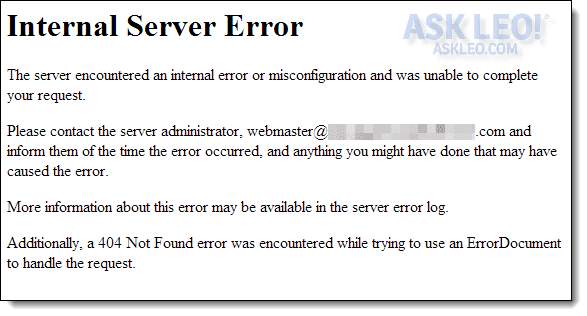
Internal Server Error
The server encountered an internal error or misconfiguration and was unable to complete your request. Please contact the server administrator webmaster@******.com and inform them of the time the error occurred and anything you might have done that may have caused the error. More information about this error may be available in the server error log.
Additionally, a 500 Internal Server Error was encountered while trying to use an ErrorDocument to handle the request.
How is this resolved?
I’m very familiar with this error. Too familiar. I see it all the time when setting up or making changes to websites.
The good news? It’s not your fault.
The bad news? There’s probably nothing you can do.
Become a Patron of Ask Leo! and go ad-free!

Internal Server Error
- Make sure the URL is exactly correct.
- Links in email are sometimes broken.
- It’s not really your problem, and there’s likely nothing else you can do.
- If you’re the webmaster, there are probably some clues on your server.
An internal server error is the server’s problem
An internal server error is an error on the web server you’re trying to access. That server is misconfigured in some way that prevents it from responding properly to what you’re asking it to do.
Think of it like the web’s version of a blue screen. :-) Something went so wrong on the server that it couldn’t even tell you what the problem was.
Aside from informing the site owner (who may or may not be at the webmaster’s email address included in the error message), there’s probably nothing you can do to resolve this problem. That’s because it’s not your problem.
The person who is responsible for the website needs to fix it.
Related

6 Steps to Fix Your Browser Problems
Browser problems can be caused by any number of things that may or may not include the browser itself. I'll review common troubleshooting techniques.It’s still the server’s fault, but…
Even though it’s the server’s fault for not handling something properly, there are scenarios where you might have inadvertently caused an internal server error. For example, errors in URLs can sometimes cause it.
One scenario: you saw a link in an email or webpage, and rather than clicking on it, you copied and pasted the link into your web browser. If you accidentally didn’t select the entire link and left off a few important characters, you might see this message.
Similarly, if you typed in a URL from a book or other source and didn’t type it in correctly, you might see this message.
The server should be able to handle whatever you did cleanly and report errors in some useful way. If it doesn’t and you get an Internal Server Error message, it’s still the server’s fault.
There are some straws to grasp at
An internal server error happens when the server encounters a situation it doesn’t know how to handle. Occasionally, your browser can be the source of these kinds of errors. Try these steps to see if they’ll help.
- Clear the browser cache
- Clear cookies
- Refresh the page (F5)
- Try a different browser
It’s likely these steps won’t work, there’s always a chance they might, and they are simple to try.
If you’re the webmaster…
What if you’re the webmaster?
Nine times out of ten, internal server errors are the result of one of two common errors:
- An error in a script caused it to fail or output an error message before it started producing valid HTML.
- A permissions issue occurred when attempting to access a script.
Check your server’s logs for diagnostic information.
Additionally…
The message “Additionally, a 500 Internal Server Error was encountered while trying to use an ErrorDocument…” indicates a second configuration error on the server.
When the web server encounters an error, the page that reports the error is just another webpage file stored on the server. This error means that trying to display the error page for the first error (the internal server error) generated a second error.
At that point, the server gave up.
Do this
Aside from confirming you’ve entered a URL properly in the address bar, there’s not much you can do about an internal server error. If you can find contact information for the server’s owner, let them know.
Subscribe to Confident Computing! Less frustration and more confidence, solutions, answers, and tips in your inbox every week. And hopefully no internal server errors. 

