Well, the last one is easy to answer: there’s no concept of free versus paid IP or MAC addresses. As you’ll see in a moment, IP addresses are assigned as part of connecting to a network, and MAC addresses are assigned at the time hardware is manufactured.
Even hiding a MAC or IP address is a concept that doesn’t quite apply, but we’ll get in to that too.
And whether MAC or IP addresses are hidden or not, they are not the kind of things you should be spending your time worrying about to stay safe from hackers.
Become a Patron of Ask Leo! and go ad-free!
MAC Address
A MAC (or Machine Access Control) address is best thought of as kind of serial number assigned to every network adapter. No two anywhere should have the same MAC address. (I’ll talk about that “should” more in a moment.)
You can see your network adapter’s MAC addresses by using the command prompt in Windows with the ipconfig /all command. It looks something like this:
Ethernet adapter Local Area Connection 2:
        .
        .
        Physical Address. . . . . . . . . : 00-1D-60-2F-4B-39
Each network adapter on your computer, including wired and wireless interfaces, has one.
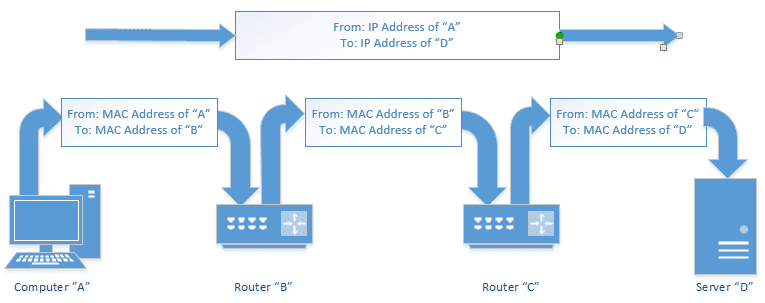
MAC addresses are typically used only to direct packets from one device to the next as data travels on a network.
That means that your computer’s network adapter’s MAC address travels the network only until the next device along the way. If you have a router, then your machine’s MAC address will go no further than that. The MAC address of your router’s internet connection will show up in packets sent further upstream, until that too is replaced by the MAC address of the next device – likely either your modem or your ISP’s router.
Bottom line: your MAC address doesn’t make it out very far.
Even if someone knows your MAC address, that knowledge certainly doesn’t help them do anything either good or bad.
IP address
An IP address is assigned to every device on a network, so that device can be located on that network.
The internet is just a network, after all – albeit a huge one – and every device connected to it has an IP address. The server that houses Ask Leo!, for example, is (currently) at 50.28.23.175. That number is used by the network routing equipment, so when you ask for a page from the site, the request is routed to the right server.
The computers or equipment you have connected to the internet are also assigned IP addresses.
If you’re directly connected, your computer will have an IP address that can be reached from anywhere on the internet. If you’re behind a router, that router will have the internet-visible IP address, but it will then set up a separate, private network to which your computer is connected, assigning IP addresses out of a private range that is not directly visible on the internet. Any internet traffic your computer generates must go through the router, and will appear on the internet to have come from that router.
The mailroom metaphor
Metaphors are always a tad difficult, but let’s try this.
An IP address is kind of like your postal address. Anyone who knows your postal address can send you a letter. That letter may travel a simple or complex route to get to you, but you don’t care, as long as it makes it.
The same is true of packets of data traveling on a network like the internet. The IP address indicates the computer to which a packet is destined, and the system takes care of getting it there. A letter may or may not also have a return address so you know who to write back to, but a TCP/IP address always has a return IP address.
A router can perhaps be thought of as a company’s mail clerk. You may send a letter to “Complaint Department, Some Big Company, Some Big Company’s Address”. The postal service will get that letter to the company. The company’s mail clerk then notes that the letter needs to go to the complaint department, and routes it there using inter-office mail. And of course, all your outgoing mail is picked up by the clerk and routed to the external postal service as needed.
When you’re behind a router, the same thing sort of happens. All of the packets destined for you are actually addressed to your router. The router then determines which of your computers that packet is meant for, and routes the packet appropriately (hence the name router).
Whether corporate mail room or networking router, neither the actual physical location of your office within your company’s building, or the actual local IP address of your computer on your local, private network is visible to the outside world.
A MAC Address is kind of like the color, size, and shape of your physical mailbox. It’s enough that the mail clerk (your network router) can identify it, but it’s unique to you. There’s no reason that anyone other than your postal carrier might care what it is, and you can change it by getting a new mailbox (network card) at any time and slapping your name (IP address) on it, without affecting your delivery.
As I said, it’s not a perfect metaphor, but perhaps it’ll help get some of the basic concepts across.
MAC addresses and staying safe
When it comes to staying safe, MAC addresses aren’t part of the discussion, because they never travel beyond your local network, and they can’t be hidden, as they’re required for networking to work. Many network adapters allow you to override the MAC address, but even so, it still identifies your computer on the local network.
IP addresses are also required for networking to work. The network has to know which computer to send data to. You can, in many cases, use things like anonymization services and the like to appear to be coming from a different IP address, but that doesn’t change the fact that your machine is still reachable by some IP address.
And, to be clear, it is quite possible for your MAC address, or your local IP address, to be read by software – that’s how the IPCONFIG command we saw earlier was able to show it to you. Other software could do the same, and even send that information on to someone else for some reason.
But it does them no good. Knowing your MAC address, or your local IP address, doesn’t help me if I’m not on the same local network as your machine.
Being connected to the internet, by whatever means, requires that you take steps to stay safe. There’s ultimately no way to completely “hide” your IP address without disconnecting from the network. What you should be doing are the classical steps to internet safety: get behind a router, keep your system up to date, run anti-malware scans, backup regularly, and so on.
A word about tracing
A MAC address cannot be traced, as it is only associated with a machine, not a location. If somehow captured, which would require additional software on the machine, it could strongly identify a specific computer. Since MAC addresses can be changed in software on many network adapters, it’s not necessarily possible for a MAC address to positively identify a machine.
Since I know it’ll come up, and as I’ve discussed over and over and over and over again, an IP address does not allow someone to find out your physical location or identity without law enforcement intervention. Similarly, you cannot find out someone else’s physical location or identity without involving the authorities.
Do this
Subscribe to Confident Computing! Less frustration and more confidence, solutions, answers, and tips in your inbox every week.
I'll see you there!


It’s funny you use a postal metaphor here. My father once asked me how his computer “knows” how to talk to a computer across the country. I used a postal metaphor to describe how Internet traffic is routed.
When you mail a letter, how does the letter “know” how to get across the country? It doesn’t have to. The postman who picks up the mail only has to know how to get it from your mailbox to the local post office. Someone at the local post office only has to know that a letter going to Florida gets sent to the White Plains post office. From there, someone only has to know that it goes to the New York City branch. From there, someone sends it on a truck to Miami. From there, it’s put on a truck to the local post office. And from there, it’s put on a truck to be delivered.
At each step, all that’s needed to be known is which direction to send it on its next step along the way.
Ken B. …An absolutely perfect metaphor…
You said it in spades here!!
Leo – one part of the original question asks about the difference between IP addresses you get ‘for free’ and those you buy. I think this is asking about the difference between a dynamic and a static IP address – most ISPs will give you a dynamic IP address as standard but will charge you for a fixed IP address; a dynamic IP address is fine if you just use email and the internet, but if, for example, you want to run your own web server, and host it yourself on your own computer, you need a static IP address.
It gives a good picture about the IP and MAC addresses.
Does the MAC address also go along with the IP address as hidden-part of the Header Details of the Email to the receiving PC / Server ?
-Leo
IP and MAC – Very nicely differentiated.
I have some doubts. Will the MAC address also go with the IP address as part of the Header details along with the Mail exchange ? Can the Mail be tracked back to the MAC no (ie., the Mail originating PC )?
What is the real purpose MAC Address ?
MAC addresses are actually at a lower ‘level’ than IP in the 7-layer OSI model of networking. (No you don’t have to understand it to use it. ) Your local area network (LAN) almost always uses “Ethernet” as the under-lying network technology; Ethernet uses MAC addresses to figure out where packets go, not IP addresses. Ethernet usually stops at your ISP router which is why the MAC addresses also stop there.
Think: Internet uses TCP/IP (Network layer 3 & 4) whereas Ethernet uses MAC (Network layer 1 & 2) to send information. See the Wikipedia article on the OSI model for more.
Chandra,
Say, for instance, you are a network admin, and somewhere in your network, there is an infected device on port 1. So you go to the office only to find that there is no longer any device plugged in to port 1. If you only used the port 1 information, you would not be able to positively identify the infected device because the device is no longer plugged into port 1. The only way to truly identify that the infected device is using the MAC address. The purpose of a MAC address (among other things) is to positively and uniquely identify a device.
Very interesting in fact I understood your metaphor. Perhaps you can answer a question.
I’m installing a new machine, I’m connected to the internet but cannot open my browser (page cannot be displayed). Checking my IP address it appears as all letters.
Any help will be greatly appreciated
-Leo
Would love to know the answer to this above post as well.
IP and MAC – Very nicely differentiated.
I have some doubts. Will the MAC address also go with the IP address as part of the Header details along with the Mail exchange ? Can the Mail be tracked back to the MAC no (ie., the Mail originating PC )?
What is the real purpose MAC Address ?
-Leo
Why would someone want the same mac address as me? I just found out through my Internet provider that some one else had the same mac address as me, which is why my internet wasn’t working. How does that happen, and should I be concerned?
Dear Sir,
This is indeed a useful site.
Please advise me the followings:
Is it mandantory to get a MAC address (OUI/IAB),
even if, I used the ethernet device on a LAN only?
Thank you.
Regards,
Octavius
why cant we replace IP system by MAC system, bcoz MAC address is going to be unique as similar to IP Address instead of sending source IP address we can transmit Source MAC address, why cann’t we do that? i am also not clear “MAC Adress travels no further than the next router or equivalent network interface” !!!!
For how long the MAC Address remains stored in the router’s memory?
23-Jul-2009
Dear sir,
The ip address at any given time in the internet is unique to a host. if so then why is mac address even required?
can’t ip address be used to recognise the host inside the network too?
I think that mac address & ip addrss is same but from this i know the difference. Nice to share this info. I usually found one site to find the ip address from http://www.ip-details.com/ to get the ip address.
Dear Leo,
this information is really very valuable.
I have a keen interest in network security methods in current times and I wanted to ask something to clarify some things for myself …
I have a system that connects to a router which further connects to my modem.
when i do ipconfig/all, i get the mac address of my ethernet port, not the router or modem, which i can check using the interface for the respective device. if my understanding is correct, my mac address does not go past the router, coz it changes there to the address of the router which further changes to the address of the modem and so on …
however, at the site “http://www.ipaddresslocation.org/find-mac-address.php” it uses java to find the mac address of my ethernet card.
this is what brings me to my question… as you said, “So your MAC address doesn’t make it out very far. Even if someone knows your MAC address, that knowledge certainly doesn’t help anyone do anything either good or bad.” just as the site used java to find my original mac address, can’t a similar process be applied to trace a person/machine’s location on the internet.
also, there are proxy service providers, both free and paid softwares, that change the external ip address of a machine. in theory, is ip address tracking the only professional way of tracing a person/machine’s original address?
my understanding is that the sender’s ip is included in the chat/email/post that is received at the other end, and these proxy servers/softwares change that header info to keep it anonymous. i know legal intervention is required, but is the packet info that contains the IP address the only way of tracing the origin or does it also have mac address info of the originating machine/person?
Please help me understand this better.
Thanks in advance.
Best Regards.
Please be clear…we are trying to trace an e mail…we have an IP…probably a public access point…now we want to try to find the mAC address of the computer that sent that mail from that public connection??? Is it possible? Does the router retain that address? This access point was used to access a hushmail account and that account send the mail we are interested in tracing.
09-Oct-2009
Hello Leo,
A question on the last question. Is it possible for anyone to find the MAC address from an email sent?
Best,
M
17-Apr-2010
Hello Leo,
i wan to know..that
Why we use Ip addresses whereas we have MAC addresses? What is the reason behind that
I think your answers may be misleading, depending on the root of the question & cause for privacy. Consider the following circumstances:
1) One wants to send an anonymous message to an email address. One wants the recipient to read the message, but one does NOT want the recipient of the message to know the ACTUAL identity of the email sender.
2) One opens up a
hi….can i know the MAC address (through the sent mail’s header information) of the system from where i am sending a mail using my gmail account.
please help me……
27-Dec-2010
Hi..Leo
i wanna know that how the webcam chat rooms sites banned us?what those sites use to identityfy us?
I usually use vagaters.com for webcam chat with friend all over country . Some day ago i did the text flooding so vagaters.com blocked me and say pls return after 3 hrs.
i came back to the vagaters.com and tried to login but it return me access denied! Now i m not able to login vagaters.com.i m trying to login each time but i cant always i found Acess Denied!
So what can i do should i need to change my IP address or MAC address?
19-May-2011
Hi..Leo
i wanna know that how the webcam chat rooms sites banned us?what those sites use to identityfy us?
I usually use vagaters.com for webcam chat with friend all over country . Some day ago i did the text flooding so vagaters.com blocked me and say pls return after 3 hrs.
i came back to the vagaters.com and tried to login but it return me access denied! Now i m not able to login vagaters.com.i m trying to login each time but i cant always i found Acess Denied!
So what can i do should i need to change my IP address or MAC address?
Note-vagaters.com do not require any login info and email address for login.Every one can login as guest using any of user name and u can also login using another username,no passward require.
A MAC (or Machine Access Control) – M is Media & not Machine I think
why is there a pair of these addresses? why does this network system need two different addresses for any entity? couldn’t it be possible for a global network system to depend on just one unique address, e.g. IP or MAC or sth else, provided that whatever it is, it will be unique.
23-Jul-2011
Thank you again, Mr Leo!
That cleared up a lot of what I was wondering about MAC.
I like your metaphor/analogy. I’ve tried to explain that concept not so much from a “How to be safe from hackers” perspective, but to answer the question “Why didn’t I get my e-mail?” or “Why did it take so long to send/receive my e-mail?” I like your explanation better than mine. They’re similar, but your description makes more sense! I usually start by trying to clarify that an address is an address – Internet or home address – & that it’s a unique, identifiable thing. Something that can be found on a map or schematic. Half the time I lose them after using the word schematic, but either way – lose them there or not – I can NEVER find the words to make it understandable! I’ll continue my explanation by saying, “It’s like having mail carrier pick up a letter from a sender’s address with the end result being that it will be delivered to the receiver’s address. The recipient will usually receive the it in the time frame expected but – depending on all the magic (good & bad) behind the scenes – it might arrive late or never at all. Then I try to define magic thustly: If the mail truck crashes for some unexplainable reason & every piece of mail becomes ash, you’ll never get your delivery & probably never know why; if the mail person gets sick there might be a delay while the post office finds a subsitute carrier; maybe there’s roadwork on your street & the mail person has to take a detour that results in a longer drive or walk so it takes longer than it should . . . Then I’ll add that sometimes a package is so big & heavy it has to be broken down into individual pieces & delivered separately – but there’s a magician type of thing that reassembles the smaller packets into the bigger package before you actually receive it . . . Of course by then they’re saying, “Uh nevermind” or “I’m not asking about SNAIL mail.” Oh boy. Sometimes when someone asks why they didn’t recieve an e-mail I tell them they’d have better luck getting an explanation if they direct their question to the Goddess of Null. I THINK they know I’m trying to be funny! I’m always being asked if I’m a computer tech because I’m crazy or if being a computer tech MADE me crazy. I tell them I don’t know for sure because I’m crazy! Never a dull moment that’s for sure! I hope it’s OK if I use YOUR explanation of data transfer in the future. Thanks Leo! 🙂
thanks for your explanation , it’s really helped me a lot.
Hi Leo,
First time visited your site and found this article very interesting. Thanks a millions for the wonderful information. Just a quick question.. Is there a way to mask or hide my machine information (like OS, browser version, other settings etc) from Java Code or ActiveX or JavaScript being run from a website? Like if a website is trying to get my Device Finger Print, how can I prevent or block or mask that?
Thanks a lot !!
Singh
I think a better way to convey the mac address is to liken it to a post office box. You have a specific box number assigned to you. It’s how the postal worker knows how to route your mail to you. And if you decide to change it later, you can.
In response to the Vagaters comment: Vagaters uses a mix of data available through the browser and http connection to try to identify banned users. Regular IP or cookie bans, which most other chats use, have proven to be inefficient.
Since the site had been abused for illegal activity in the past and is not monitored 24/7 bans do not last 3 hours, but 7 days.
The site uses the camamba.com chat technology, where a ban indeed lasts 3 hours, hence the misleading message.
Leo –
Thanks for the insightful piece. As you have noted in many other posts, the recipient of an email sent from Google, Yahoo, etc can often glean the IP address from which it was sent. How about the *sender’s* MAC address? Is this logged in an email’s header? Also, can the known IP address be used to view a log of MAC addresses that accessed the router?
Thanks,
J Levin
21-Jan-2012
Hi Leo,
Very well explained and similied. Was very helpful to me in understanding the IP and MAC address. Thank you. Thanks a lot.
Very simply and effectively u clarified my doubts
Thanx Leo….ur metaphor thing has helped me loat n getting things properly….keep working 4 us
very well explained , u really gave me a big smile . I was very much confused initially but now very much relaxed. Post office example was awesome .
Thanks
Thank you very much Leo, your explanations have been very helpful – demystifying.
as ip address has two parts n/w addr part and host address part, n/w address identify network and host address identify the host in that n/w , then proper routing is also possible , then after all what is need of mac address? plz answer i cant be keep confusion for more time. thank you
Well stated Leo. Could you further expand on the difference with a mobile device MAC address vs a standard desktop or laptop? Thanks!
Leo,
Why do I need a MAC address if the package has the destination IP? Can’t it get to the destination only with the IP?
Thank you,
Joao Victor
Thanks for explanation the information provided are great
Thanks. I really liked your explanation.
hello sir…….
thank u for ur valuable information…,,
i may say… actually a worthful class for me.
so attractiv styl of xplanation.
I logged into my wireless network and someone hacked into my network. Can that be traced to the exact location if I provide the Mac Address?
@Mac
You could only determine who hacked into your account if you know who happens to own the machine with that MAC address. There is no registry where MAC address are stored.
i have shared my ip adress and mac id with someone can that person harm me any way???
I have a doubt . why don’t we deal only with ip addresses . In data link layer we use mac address. Why can not we use ip address instead of mac address in data link layer.
If I change my MAC address do I have to notify my ISP of the new MAC address? Using your analogy, if the color of my mailbox has changed then my mail carrier should still be able to deliver the mail, correct?
When you log into your ISP, they see your MAC address of your router (or computer if you don’t connect through a router) automatically.
Recently one incident happened in our office. Someone sent emails from rediff to one girl and the IP address shown was of our office.The police found our office IP and they found some port no. 7 which was connected to one of my friends PC.
I am confused how the ISP gave port no.7 as culprit. My friend is genuine and he hasnt done aytign wrong.
can you tell me:
1) How ISP would have found the port no.
2) when email accounts are created on rediff , do they not have mac id saved of users pc ?
3) Does router also have a Mac id ?
4) they got some mac id which isnt matching any pc in office , but no one changed aything in any pc , what would have happened.
1) no idea. Varies from ISP to ISP
2) MAC addresses don’t make it to the email service. They only (typically) go as far as the first router.
3) Yes.
4) No idea.
MAC = M is Media, not Machine.
When a message comes into the router with only the router’s IP address as a destination, how does the router know what to do with it?
Using the metaphor, if all incoming mail is addressed only to the mail room how does the mail clerk know who to send it to?
In very simple terms, every packet of data that your computer sends to the router contains information about where it’s come from and where it’s going. The router then uses that information to route that packet to it’s destination – whether that’s a device on your internal network or some external network.
Packets coming into the router can only be responses to packets sent by a computer within your network. Think of the packets you send out as having a complete return address so responses know where to go. Packets which are not responses – i.e. new conversations – cannot be routed, so they’re dropped. That’s the router acting as a firewall.
Thanks Ray. I will reword my question.
When a message from an external network arrives at my company’s router, with only the destination address of my company’s router, how does my company’s router know which internal address to send it to? There are probably many internal computers, how does the router choose between them ?
In simpler term, the router knows it was your computer sending the outgoing packets, so it knows where to send the incoming packets which come in response to the request.
Assuming the simple case typical for most users, with one ‘Internet connected’ Router and multiple devices [IPADs, Desktop PCs, Notebook PCs] connected and accessing the Internet:
MAC addresses are allocated to network devices. Most devices will have a single MAC address but laptops typically have two, one for the NIC and one for the wireless. MAC addresses were originally meant to be pre-allocated and unchangeable but some devices [often home Internet routers] allow MAC addresses to be changed. They must be unique on a network; you WILL have problems on networks if you connect devices with duplicate MAC addresses. They are only seen on the network to which you’re connected; Email/http etc. requests from a device will have the Router’s MAC address on the Internet Packet when it leaves the building.
IP addresses are also allocated to network devices [that are enabled and connected]. If you connect a laptop wirelessly and with an Ethernet cable to your Router, you will have two IP addresses, one for the network cable with the cable pugged in and one for the wireless adapter. As above; email / http etc. requests from a device will have the Router’s IP address on the Internet packet when it leaves the building.
Hi Leo,
You said that your mailroom metaphor is not perfect and perhaps it isn’t, but it’s a pretty good one. I wish I had thought of it when I was teaching this subject.
Hae Leo … I admire the networking argument posted here.
Hey Leo,
Just wanted to point out that your posts are great! You make it very easy to understand for guys like me who are new to the IT world. Please keep them coming.
Ps, Your metaphors are great!
Since I know it’ll come up, and as I’ve discussed over and over and over and over again, an IP address does not allow someone to find out your physical location or identity without law enforcement intervention. Similarly, you cannot find out someone else’s physical location or identity without involving the authorities.
^ actually this has been dis-proven as there are over 40 services that can provide that information when a web user visits a site, their ip address is logged among the viewer list. that ip address can then be used at a website like {possible spam link removed} and the information discovered. Spoofing (or masking your IP Address ) can be traced only so far depending on how many changes that address makes.
That still only gives an approximate location, sometimes off by several hundred miles.
Those 40 services are all NOTORIOUSLY unreliable and inaccurate. NONE of them will give you the specific location of the IP address. (As in they cannot give you someone’s home address.)
Is it possible that via MAC address we can see history(Attached Portable Device,USBs,On Internet Browsing) of a computer(Client) from other computer(server) in a wireless network…??
Great article!
In my case, I’ve always remember the MAC address as the VIN # for the device.
So I guess, you can think of it as the car that’s parked in the driveway 🙂
Hello,
I got a pc from my friend, it was his old pc but with a new hard drive. My question is do i have his MAC address now or do i have the same one i had with my old pc?
Also if i have his MAC address can i see which websites he visited and how can i delete it?
PC was formated and cleaned with new hard drive.
Thank you
The mac address is associated with the hardware, so yes, your computer’s network card has the same mac address it had when your friend had it.
No you cannot use a MAC address to determine what’s been viewed in the past. Period.
No Leo, hackers knowing your device’s real mac address can actually do you bad. Let’s say, you downloaded some apps from Google play, and that app provider could collect your phone’s mac, imei, your mobile number and other informations under your consent, maybe doing this to improve user experience or what, and stored these data on their server, but the server were then hacked, so your personal information, alone with your devices’ mac were now open to the public. Then the other day you went to a starbuck where were another hacker who’d got a wifi sniffer, that once he sniffed your mac address (he didn’t even have to connect to that starbuck’s hotpot or connect with your device to sniff, your mobile devices broadcast their macs automatically) he could know who you were, how far you were from him, even where you actually live if he were that bored wandering around the blocks sniffing the next few days. But that really doesn’t matter since most hackers are not interested where ordinary people like you and I live. What matters is: this technique ( wifi mac sniffing) plus big data analysis can make a very accurate portrait of you so they can send you very accurate ads; they can conduct very accurate location tracking using this technique as well. And that’s why we now have windows, android and iOS allowing us use random mac addresses. In fact, I now use a wifi sniffer as a bio-detector, and it’s very easy: I sniffed the mac of my boss’s mobile phone, now when my boss is on the same floor of my office, tens of metres awy from the door and is approaching, I’ll be notified. LOL
Wow. A LOT of things have to happen for that scenario you outline to play out. While, sure, it’s possible, in my opinion it’s incredibly unlikely.
By the way, your MAC address was not the worst theft in your scenario: the IMEI and phone number were. They’re WAY more likely to clone your phone than they are to jump through all the hoops that your full scenario outlines. The important lesson? Be careful what you download.