This is one of those things that I think a lot of people take for granted, but to many it’s just so much magic.
So, a quick look at what it means when you choose between “Run” and “Save” when downloading a file.
Become a Patron of Ask Leo! and go ad-free!
Downloads
A download is nothing more than transferring a file from “up there” – typically a server on the internet – to your computer “down here”.
The file being downloaded can be anything. It could be a program that you’ve elected to get for your computer, it could be a picture that was attached to an email you’re viewing on line, or it could be a PDF document that you just purchased at a popular online source of computer books.
It could be anything.
The difference between Run and Save is two-fold:
|
Let’s look at each in turn.

Run
When you select Run on a download, it begins a two-step process:
- The file you’ve requested is downloaded to your machine and placed in a temporary location.
- The file is then run exactly as if you had used Windows Explorer to navigate to the temporary location and double-clicked the file.
The temporary location is either your browser’s cache or temporary folder, or one of your Windows temporary folders. Which it is, actually doesn’t matter, simply because it’s temporary. The file isn’t meant to be something you’d actually try to access directly. In fact, it really only needs to be preserved long enough for the “Run” that happens next, and could be deleted at any time thereafter.
What it means to “run” a file can mean several things.
- If the file is a “.exe” file, that’s a program, and running it means exactly that: the program is loaded into memory and Windows runs it.
- If the file is a “.pdf” file, that’s a document, and running it means that the PDF viewer installed on your machine is run, and told to open the document for you to view.
- If the file is a “.jpg” file, that’s a picture, and running it means that the image viewer configured on your computer is run and told to open the picture for you to view.
- And so on…
Hopefully, you get the idea. Run means either run the downloaded program, or run the program that knows how to deal with the type of file you just downloaded.
One important thing to reiterate about using Run: the file was downloaded into a temporary location, and it may eventually be deleted. In fact, it almost certainly will, if you wait long enough.
That’s why Save exists.
Save
When you select Save (sometimes only offered as Save As…) in response to a download, the browser simply downloads the file.
That’s it.
The file is copied to your computer, and it’s then up to you to do something with it.
The big difference is that it’s not downloaded into a temporary location. The file is downloaded into either:
- A default folder, such as “My Documents” or “Downloads” (often the default when you select Save).
- A folder that you specify in response to a “Save As…” dialog (the action when you specify Save As…).
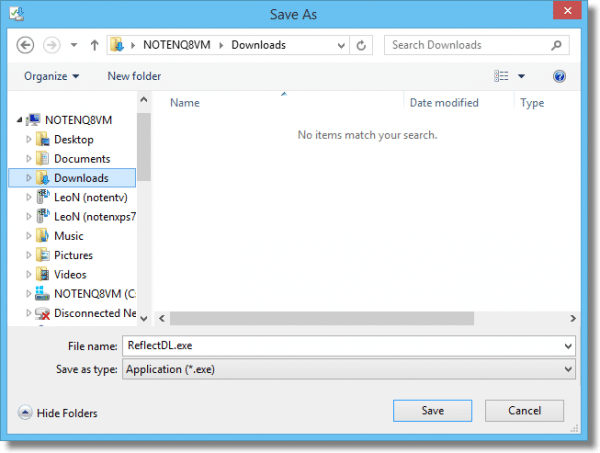
The file is placed into a folder that you specify or know how to access, and will not be automatically deleted.
Like I said, you have to decide what to do with it and when.
It could be as simple as leaving it where it is, and using Windows Explorer to locate and then double click on the file whenever you want to use it in the future. Or you could move it to a different location to backup and archive it. Or you could do something else entirely.
Save and run
Internet Explorer, at least, has a third option: Save and run.
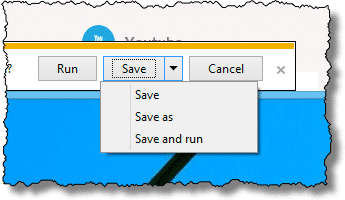
This combines what we’ve seen so far:
- The file is saved to a known, not temporary, location.
- The file is then run.
Which to choose?
When might you use one or the other?
-
-
- Run: Choose Run when you only need the download once. Perhaps it’s a song or video you only plan to listen to or watch once. Another scenario might be an installation program that, when run, installs software on your machine in other, permanent locations. Once installed, you probably don’t need the installer again.
- Save: When you want to keep whatever it is you’ve downloaded, choose Save. You can still run it, or whatever else you’d like to do with it, but you’ll need to do that yourself. You’ll also want to decide where, on your computer, to keep the file.
- Save and run: Use this option when you want to do both: save the file to a location you control, and then immediately run it.
-
Do this
Subscribe to Confident Computing! Less frustration and more confidence, solutions, answers, and tips in your inbox every week.
I'll see you there!


i don’t know what happened, but my comment was cut off. Anyway now I can “run” it now or “save” it for later.
Run lets you play or use the data you want at the moment off the disc or website you are on. Save keeps it on your hard drive so you can use it anytime you want without a disc or going to the website.
Another great value of SAVE is when you are downloading something you want to move and run on another machine.
I NEVER, use the Run. I use the “Save As” so that I can scan the file for viruses.
Run is just to damn risky in my opinion.
I agree 100% with Scott. By using “Save” you can scan for viruses before opening the file. If you just use “Run” who knows what you have downloaded besides the file. I am sooooo very surprised that “Ask Leo” didn’t bring this up in his answer.
Yes, you and Scott’s comment is very true – why Leo didn’t mention it, I have no idea!
The vast majority of antivirus programs check all installation programs for malware upon execution. So if you’re running the AV in real time scanning mode, you are equally protected using either save or run.
I would rather check before execution…. Plus I check with more than one AV. I use Spysweeper and Malwarebytes to scan it and have Hitman Pro standing by in the cloud.
Once it’s on your computer, you’re pretty much done, especially today. Note even IE11 has a ‘checking for viruses’ in the lower left part of the the pop-up. So it’s automatic and integrated. I don’t know about other browsers, but I’d guess it’s been a standard for some time.
My computer behaves (now) at “Save” almost like at “Run”. I mean… It looks like it downloads the file somewhere (I don’t know where), then, after a (long) time, the “Save to” dialog box appears and the saving takes only 1 second (regardless the file width).
See screen caps at {broken link removed}
What’s going on?
I was ttrying to help a friend reinstall a program that had been installed by our IT Department. In anticipation of his question (do I select run or save?), I submittted the question to Goggle. I tried a few sites. Your site was, without doubt, the most targeted and helpful response. Thank you so much!
I downloaded a long file to run and for some reason I was disconnected from the web. I found the file and saved it but then didn’t know what to open the file with. Nothing worked. So I gave up and deleted the saved file and went to redownload. Apparently the run file was still there and the install proceeded without another long download. I don’t know what was used to open the run file but I am glad it worked.
as scott and especially glorya im very surprised that leo didnt mention the better security of SAVE. There are things to discuss here, like how much safe is SAVE itself?
Thank you, Leo and thank you all for this great input. I knew what “Run” does (sort of) and I knew what “Save” does, I just wasn’t sure when to Run or Save. Your opinions and reasons work for me! Luv this website, I’ll be back
I purchased a microsoft office package and I am not sure if I should click on save or run. Since this is a very expensive purchase I realli need to be sure. In case I don’t get any response I will just clik on run because that is how i did it with my messenger and it works fine. I need help!!
I’VE SAVED FILES FROM MININOVA AND WINDOWS MEDIA DOES THE USUAL REJECTION.I’M ACHING TO BURN TO CD WITH SOME OF THE ALBUMS THEY HAVE LISTED!
Why capitals? Bizarre…….
I need to download a driver from dell website for another computer, but when I download it I don’t get the option to run or save. I need to save it. It gets downloaded and allows me to intall/don’t install, but I don’t need it for this computer. How do I fix this?
02-Apr-2010
I generally will “save” the file. I put it in a specific location if I want to keep the file but I will save to my desktop even when I just want to run it – in case something happens and I have to restart the loading. Then it is is to find and available to just run from my desktop without a new download. Once it has successfully installed I delete it from my desktop. The larger the download the more helpful this can be. The last step of deleting the installation files helps generally to keep a cleaner desktop.
Hi Leo, great article. I was taught that anything you download directly from the web bypass’s your anti-virus. By default I will only save a download to the desktop, right click on it and run a scan for virus’s before either saving it to a folder or running it. Is this being over protective?
I save files to my desktop instead of run most of the time. Then I check it with Spysweeper before I open it up. Just to be on the safe side.
So..if I’m downloading transcription software, I should save it, correct?
08-Nov-2010
just want to thank you for being direct and to commend you for your clarity
what if i save and at the same time i run the file?
01-Apr-2011
Hi. I have download webcall direct software from internet and save it. But when i am trying to run it I am failing. It is not running. so what may be the problem?
28-Jun-2011
Thank you for an excellent response: concise and perfectly clear.
I have been trying all day to get my answer in terms I could understand. You gave me my answer very quickly. I had no problem understanding. Thank You! I know who to contact for now on.
Yours is the best explanation of the several I read. Thank you.
Hey Leo. Great explanation of save and run. Shouldn’t you have explained about save and save as? I mean in my newsletters I publish, I use save to overwrite a file just before, and save as if I want to keep the old file but make a new one. Also, what about saving where the publisher recommends it to go, but you want it to another place? Save as seems to be the only way I can see to do that.
Thanks… JR.
For many browsers save as is the same as save (that’s why I show the whole dialog box and so on above).
The publisher does not determine where the file is downloaded – the browser does that.
Most of the time the file you download and save is only the installer for the file still left on the website you were at for the program. I noticed this a long time ago and now I try to get to the website and download the .exe file for the complete program. I do this because I have a friend who has no way to go online and I get him upgrades of programs such as firefox and others. Then he can simply run the file without any other internet connection. I do this for virus checkers and for programs which check for malware too.
Very clear as always. One further point: I thought saving a file or program meant that the anti-virus software had a chance to “check” it, while this does not happen with running. I see Brad from Australia has made the same point. Is this not a very important distiction, if true?
Actually it may not be a distinction at all. It really depends on the specific security software. Some (most?) will scan the file as it arrives, regardless of Run or Save.
Thank you for teaching me some thing that I did not know . This is a great job you are doing . God bless you.
One thing to keep in mind is that different browsers handle this differently. For example, I use Firefox, and the specifics are a little different. It offers the choice of “Open with” or “Save file”. “Save file”, of course, saves the file in your default download folder, but “Open with” in Firefox runs the default program associated with the file if there is one or asks you to choose a default program if there isn’t, but it also saves the file in your default download folder without deleting it. If it is a .exe file, it saves it in the download folder and runs it.
And probably if you are reading this in a few months, things will have changed in Firefox :(
Thanks Leo. Great website…
I have SAVED 4 VPN Download’s also 2 Firefox, I see them in my download box, by each one it offers… RUN, Does this mean they are NOT ACTIVE until I Run them ?, For I have been offered a turn ON and OFF from the VPN Company suggesting I am up and running with them with Only Having Saved them to my Downloads. Just concerned having not Run them, am I protected as it appears I am but wanted your opinion. Yes or No. Thank You.
Download is not the same as run. Download is exactly and ONLY that — it copies a file from the internet to your computer. It does not run it, it does not install it, it does not activate it.
Exactly how you’re supposed to use this VPN or whatever depends ENTIRELY on the VPN service itself. Check their site for information on how to install and set up.
If your VPN is working and you have a downloaded installation file, it might be that you’d previously run the installation for that program, or the version you have saved is an update file to be installed.