Well, one part of this is easy: IDE and PATA are two names for the same thing.
The rest – well, the easy part is that SATA and PATA are two different ways of connecting a hard drive to your computer. Your computer will have one or the other, and what you purchase must, in general, match.
When we go further, however, things start to get a little complex.
Become a Patron of Ask Leo! and go ad-free!
The Interface
SATA and PATA (aka IDE) are two different disk drive interfaces. By that I mean that the physical and electrical connection to a hard drive uses either a SATA or a PATA interface.
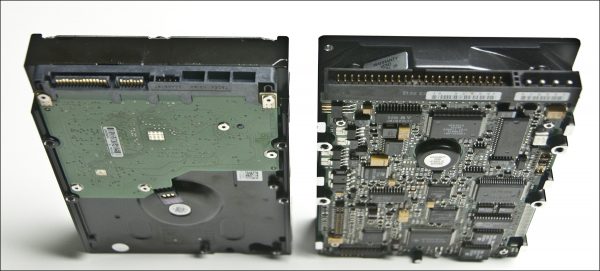 |
The picture above shows the physical differences. The SATA drive on the left is a pair of flat connectors – the larger one for power, and the smaller one for data. The PATA drive on the right uses the larger connector full of pins for data, and the four-prong connector on the right for power.
SATA is an acronym for Serial Advanced Technology Attachment, often shortened to Serial ATA. Serial refers to the fact that data is sent one bit at a time down a single connection in each direction. There’s a separate connection for data going in to and out of the device.
PATA is an acronym for Parallel Advanced Technology Attachment, often shortened to Parallel ATA. Parallel refers to the fact that data is sent 16 bits at a time through a single 16-bit connection, which is used for data traveling in both directions.
While it might seem faster to send 16 bits at a time, PATA actually transfers data more slowly, for a variety of reasons. Current PATA interfaces can transfer at up to 133 megabytes per second, whereas SATA interfaces can transmit up to 150, 300, or 600 megabytes per second, depending on the version of the interface being used.
The history of SATA and PATA
PATA is the older interface. Originally known as IDE (Integrated Drive Electronics), it was the connection of choice not only for hard disks, but for floppy and optical (CD/DVD) disk drives as well.
In recent years, the PATA interface has been slowly disappearing. Most new machines today come with SATA hard disk drives, and may use a PATA interface only for the optical drive. As expected, optical drives are now also becoming available with SATA interfaces, so we could soon see the end of the PATA interface completely.
Compatibility between SATA and PATA
As for compatibility, there is none. SATA and PATA drives are completely incompatible at the interface. They can certainly co-exist in a machine, but only if that machine has both SATA and PATA interfaces.
If a computer has only one of the two styles of interface, then only drives compatible with that interface can be used.
What it all means
In practical terms, what this really means is simply that you need to know what you have when you replace a drive or buy drive-related equipment.
When replacing the drive in your computer, you must know whether your computer uses a PATA or SATA interface, and make sure to get a replacement that uses the same. You also need to make sure you get a drive that is the same physical size. The drives pictured above are classified as 3.5-inch drives, and are common in desktop computers. Laptops typically use 2.5-inch drives.1
If you decide to take a hard drive and put it into an external disk enclosure, you’ll need to know whether it’s a PATA or SATA drive and get a compatible enclosure, again of the same physical size. It’s not the actual enclosure that’s different, but the small amount of circuitry included that physically connects to the drive to provide the USB interface.
Do this
Subscribe to Confident Computing! Less frustration and more confidence, solutions, answers, and tips in your inbox every week.
I'll see you there!


It might be good to mention here that there are IDE and SATA controller cards if one or the other is needed in a computer that has a PCI slot that is empty.
I have heard about solid state hard drives – as I understand it these are hard drives with no moving parts – but very fast – although limited in capacity…Have I heard wrong, and are these solid state drives SATA, PATA, or are they another thing altogether?…confused
29-Oct-2011
@Dave
Solid state hard drives (SSDs) can come with any of the same interfaces as hard drives, and SATA is the most common, if not the only, SSD interface.
Thanks Mark Jacobs.
We often need to take a drive out of one system and temporarily attach it to another. (For example, saving documents from a non-bootable drive and moving them to a new system.)
In that case, there are adapters that include IDE, SATA, and “mini” IDE (ie: for 2-inch laptop drives) connectors at one end, and USB on the other. They come in handy if you need to do something like this more than once or twice.
He must have been trying to replace the drive in a very old computer. I haven’t seen a new computer sold with an IDE drive in years.
You can buy an adapter to plug into a SATA drive to use it on a PATA PC and vice versa.
There may be no room for an adaptor. Isn’t there an EIDE standard? I use a hard drive enclosure that came with both types of cables.
Just to muddy the issue a bit, there are converters you can buy that attach to the back of an IDE drive to convert it to SATA. I’ve had mixed success with them but when they work they work great.
Less commonly nowadays, you can also get an expansion card that plugs into a PCI slot on the motherboard that adds IDE ports if your system doesn’t come with them by default.
Hi Leo, very important article for me. I have 3 small dell puters that need sata HDs. I have a box of PATA HD’s. A puter guy told me all i need is interface adapters to get pata HD to connect to these puters. i got them and have them connected but when i try and install windows says there is no HD there. So was this guy wrong, and there is NO WAY i will ever be able to utilize these PATA HD in these DELL puters?
SATA to IDE converters do work I have one for an older HD for some extra space… You need to connect the adapter to the IDE HD and have a power supply which has a IDE power plug or get another converter for that. Plug power into the converter and plug the SATA in from your mother board to the converter
I have an older gateway, and it had a 60GB IDE drive that went bad. I went to newegg and saw the newest best priced drive, and silly old me got it without a second thought.
Turns out my pc needed IDE, and not SATA, which is what I got. After a BIOS update and a 15$ converter, it worked fine.
If you have an external “desktop” drive unit, it is fairly easy to remove the drive itself and use the interface with a different drive, even the smaller laptop drives, in order to recover data from a partially defective drive. This can also let you treat a drive that has been corrupted by various malware.
It could be useful to expand the article to include mention of esata — a variation that complicates the situation a little further.
Richard, sounds like you need a driver for your new interface adapter. Check the adapter’s website for the version of Windows you’re trying to load. During Windows install, you’ll have the option to load the driver for your adapter.
@Richard
If they won’t work as primary drives, you can try and see if they work as secondary drives. If that doesn’t work, they should be able to be used as external HDs with either a USB PATA enclosure or adapter plug.
Can I use the internal hard drives from an old machine as an external drive on a new one.
My 6-year old Dell Dimension 9100 has two EIDE drives using RAID to get a grand total of ~30Gb. When I bought it, I figured I’d never fill them, but now I’m getting close. I’ve been thinking about replacing them with a single larger (1Tb?) drive, but most of what I see available are SATA drives. Apparently they’re faster and I think I still have an open PCI slot. Do you think switching the drive to SATA with an appropriate interface, would be a good idea? I’m also wondering if these drives are nearing the end of their lives. If one goes, all data is lost – except for the images on external USB drives.
02-Nov-2011
After proofreading and hitting “submit,” I didn’t notice until posted – I now have slightly >300Gb; not 30Gb. Sorry!
Very good description.
Thanks !
Isn’t that a SCSI drive on the right?
03-Nov-2011
Actually, they do sell adapters to change IDE to SATA and viceversa. Small PCB with IDE interface on one side and SATA on the other. Both for desktop and notebook computer drives. I carry one with me.
Hi Mr. Leo,
I am a subscriber of your tech articles and read each of them with great zeal and enthusiasm. I find your articles to very informative with tons of information on personal computing and internet. I hope your articles will continue to be a source of information to poor ordinary mortals for a long time to come.
I was going through this article of yours on SATA & PATA and thought this would be the opportune moment for asking a pressing question that I am having for some time now. I have a 10.1 inch Acer notebook – Acer AOD 270 with a 320 GB SATA HDD. Now this stuff is 3 years old and after saving a hell lot of Hollywood movies (I am a big fan of them) my 320 GB HDD has become full and there is very few space left to add anything big…..
So I searched the net and ordered a 500 GB Internal HDD (2.5″) that is compatible with my my model. It is Hitachi (HGST) HDD and I bought it on Ebay.in. Now I want to install this new 500 GB HDD in my laptop in order to replace my old and crammed 320 GB HDD.
And Oh! I forgot to mention this: My Acer AOD 270 comes with a pre-installed version of Windows 7 Starter edition (OEM edition). So I have also made a full image backup of the C Drive in Macrium Reflect (yes, by going through that wonderful article of yours on using Macrium Backup tool). I have also made the recovery DVDs from the Acer backup and recovery programme and can install a full clean reinstall of the Windows 7 OS from Scratch in case the image fails to reinstall the OS correctly.
Everything has been going well as per my plan except one big spoiler that is thwarting all my attempts to upgrade to the new HDD – I also want to install a copy of Windows XP in the new 500 GB HDD so that I could have a dual boot operating system environment – XP with Windows 7. I intend to install the XP first and then the Windows 7 OS on it. I have made full note of the techniques required for this process which includes fixing the Windows Boot manager through a program called Easy BCD. Using Easy BCD I need to specify the OS installed so that the Windows 7 boot manager files are not removed from the Windows XP OS and the latter tends to overwrite the boot files of 7.
But my biggest hurdle is in installing Windows XP. You see I have an XP SP2 CD and it has no inbuilt SATA drivers in it. Now the computer simply boots from that CD. If I change my BIOS setting to IDE, then maybe it may boot initially but later it might crash as the HDD itself is SATA and not IDE. So pls let me know if changing the BIOS setting to IDE from AHCI/SATA will work in installing XP SP2 which doesn’t have SATA drivers?
And even if it allows so, will I be able to install Windows 7 without any hiccups in the IDE mode as Windows 7 might be supporting SATA modes only?
Pls help me out on this issue. I know the article is lengthy but I think my case is worth reading and will be of interest for all stakeholders….
You must use an updated Windows XP SP3 disc with sata drivers injected (SP3 x86 – Black Edition 2015.9.12 – google it). I also have a D270. I love windows XP, but it doesn’t work at all.
First there are no display drivers, except for the generic IEMGD drivers, but they don’t support 3d gaming at all. (so no directx). Second, If you try to install xp using IDE mode(@bios settings) the default hdd read/write protocol will be pio mode, the slowest of all( 2-3mb/s max= is like being on win95=horrible performance).
Another thing to keep in mind is to disable d2d option and network boot, if these are enabled in BIOS, the windows xp installation will hang/fail when registering components(@18-19 mins left to complete installation) for some reason. So the only solution is to do a fresh install using the updated XP SP3 disc, with ahci mode enabled.
After installation, a generic sata driver will be installed(nvm10 express), so you still need to install intel chipset driver and ahci driver for proper functioning of the system. The windows 7 drivers work fine, for these two, just download them from acer website.
In the end, you can get it working by using these steps, but with no 3d acceleration available, it loses it’s purpose. Good luck.
PS. If you’re going to dual os boot using the old 320 hdd, you need to create partitions, by doing so, you may end deleting recovery partition and with it the chance to recover the current windows 7 installation using the drive, not to mention losing all your movies. So keep that in mind, before doing anything (at least u did disc based backups). if you’re using the new 500 hdd, u still need to create two partitions. D270 is good nettop device, and windows 7 home edition works excellent on a fresh install, with no tweaks. if you install an antivirus or firewall program the system performance will degrade fast, due to low memory(ram), by default a 1gb stick ram is installed, so an upgrade for a 2gb stick($12-15@ebay) is one of the first things to do, if you want better performance. The same goes for the hdd, a slow 5600rpm drive, u may want to upgrade for a 7200rpm one.
where does SCSI fit in?
It’s an older and much rarer interface. You hardly see it at all any more. (Addin confusion wasn’t worth it in the article above. :-) ).
Hi,
I am able to connect SATA HDD as secondary Drive .
I have 160 gb HDD PATA (old type HDD Yellow 50pin for data cable) and win 7 is install and
bootable.Then i will connect my SATA hdd (Red Cable for data cable) which is 500 gb.
.Enable First boot options as 160 Gn HDD.
Restart then after succefull booting its not show my SATA HDD(500 HDD )
how to back up my files on my computer system
I’ll start you here: https://askleo.com/how_do_i_backup_my_computer/
Hi Leo,
Just got hold of HP Pavilion Zv5000 laptop, in good running condition. Try to clean up the HD of old files, but the HD gave of the ghost. It a 60 GB HD and its a ATA HD. I’ve been doing some online looking for another HD, but I’m confused about if there a difference between a ATA HD and a PATA HD. Can I used a PATA HD in place of the old ATA HD? Or is a PATA same as ATA to connect to the old HD connection?
SATA is serial ATA, and PATA is parallel ATA. ATA alone refers to PATA (also called IDE), but the surest way to tell is to look at the plug connections and compare them to the photos in the article.
ATA and PATA are the same thing. (SATA is the one that’s different. You’ll know right away from the connector as shown above.)
Now that we have SATA speeds on SATA cables & interfaces wouldn’t the next logical step be to run SATA in parallel? Or, if I could just go ahead and trademark it now: SATA Over PATA or “SOP”
How i get 2 gb graphics card help me
Depends on your computer and where you’re located. The typical answer is find one online that is compatible with your computer and buy it.
Why PATA & IDE are the same?
It’s just a name change.
hello leo,
i am trying to improve an older multitrack recording device (yamaha aw4416) to an ssd
the current harddrive(s) reside on slide in/removeable trays …
i have acquired an adapter for the ssd card which is 40 pin but the tray ribbon connector has 50 pins (ultra ata)
do you know what i need to make the connection between the two ?
i realize the equipment is older but it works flawlessly and i worry that the older drives with moving parts may fail at any time
please advise
thanks
mark
You’d have to find the correct adapter.
What are the harddisk interfaces?
Those are the connectors on your computer to connect the hard drive.