PST stands for “Personal STore” – as in your personal mail storage. PST files are actually fairly complex databases that contain your mail, your calendar, your contacts, and even more when you use Microsoft Office’s Outlook mail program. (Not to be confused with Outlook.com, the online mail service from Microsoft, which is completely unrelated.)
The default location has changed a time or two over the years. Of course, there’s always a chance that your PST is stored in some other, non-default location.
Rather than telling you where the default location is, let’s use Outlook itself to tell you the exact path of your PST file and then use Windows itself to do the same.
Become a Patron of Ask Leo! and go ad-free!
Using Outlook
I’m using Outlook 2013, but the technique is similar for older versions.
The easiest and quickest way that I know of is to open the “tree view” of your folders, if you haven’t already. The default view is often something similar to this:
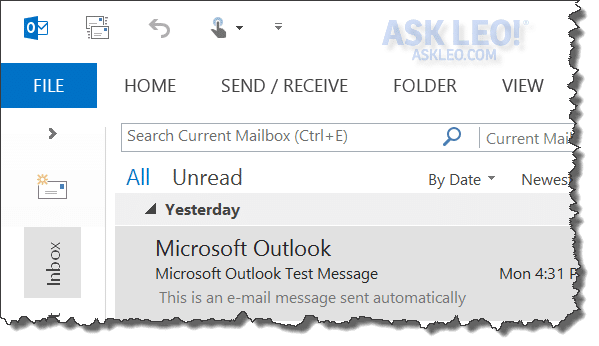
Underneath the File menu is a rightward pointing arrow (>). Click that to expose the full-folder pane:
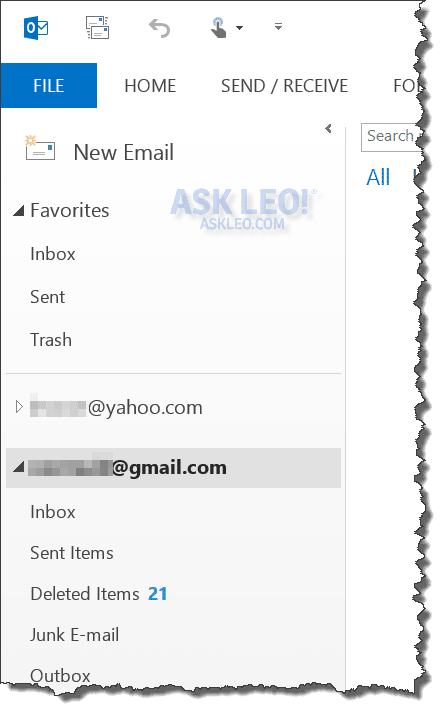
Each top level item represents a separate PST. In the example above, *****@yahoo.com is a Yahoo! email account configured in Outlook 2013, and *****@gmail.com is a Google mail account which has been given its own PST file. In other versions of Outlook, you may see things called Personal Folders or Outlook Today. You may also see additional top-level entries for other email accounts or PST files that you have opened manually.
The key is that each top-level item represents a separate PST.
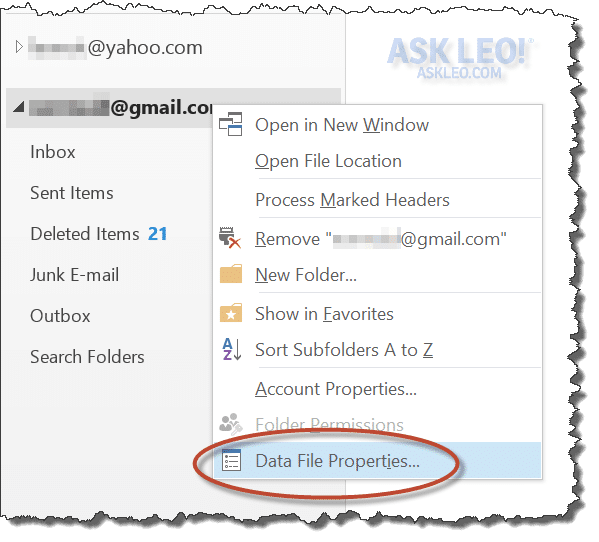
To find out about that PST, right-click on the top level item and then select Properties:
That will give you the Properties dialog for that specific PST file:
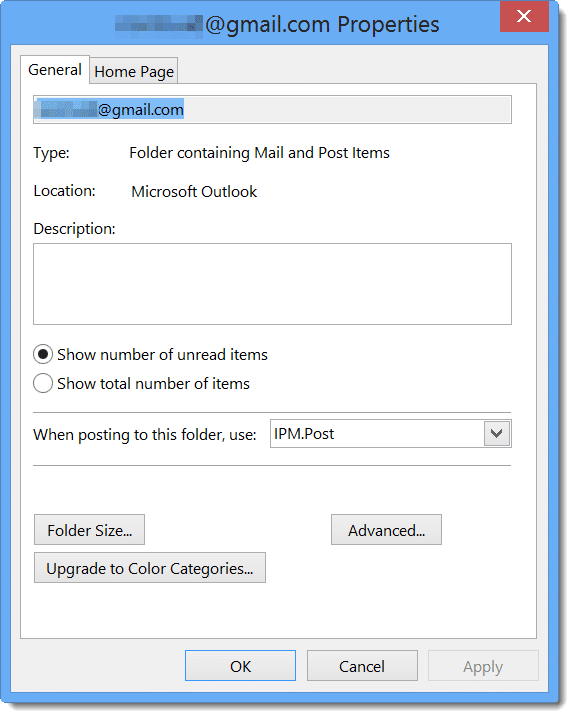
Now click the Advanced… button:
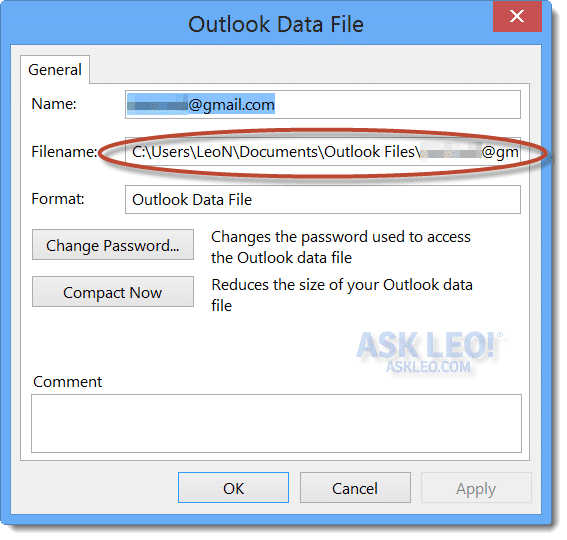
And there, right in the middle of everything, is the Filename and the full path to the PST. If it’s too long to display in the allotted space, you can click in the item and arrow back and forth to scroll the text right and left.
Using Windows
A PST is just a file, so using Windows own built-in search for files with the .pst extension is another approach to locating your PST.
In Windows 8, I simply started typing *.pst at the Start screen, which means any file that ends in .pst:
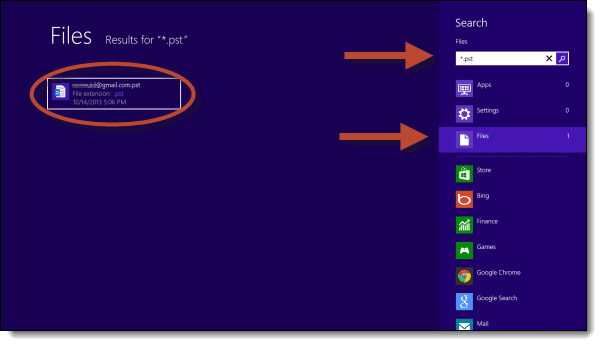
I realize that it’s a little difficult to see above, but underneath the search box that appeared as soon as I started typing, I click Files to limit the search result to files (as opposed to Apps or Settings). The result is that on the left, any PST files found are displayed.
Hover the mouse over (or tap-and-hold) on a result for more details:
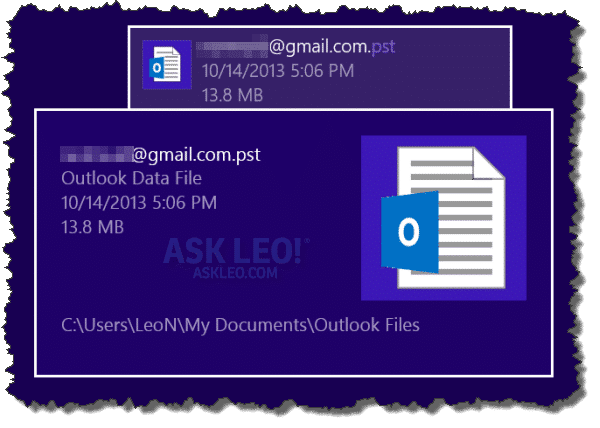
And of course, those details include the file’s location.


I use outlook 2003.Is there a way to backup one particular email message to a cd. The message has both text and pictures in the body.It was sent in HTML.
Thank you.
This was a very helpful article. Does saving your PST file on a external hard drive backup the all the following in outlook: inbox, contacts and calendar?
Thanks, Chris
Yes, it does. (If you use more than one PST, make sure you backup all.)
I tried to do this– I also use Outlook 2003– but when I go into Properties there is no “advanced” button! I’m the administrator on this machine, so it shouldn’t be that kind of a problem. WHat am I missing?
Molly- I couldn’t find my PST file either through the advanced button, NUTS!I just bought my computer two weeks ago so its not an old computer. If anyone figures out another way to locate that file please let me know. I would also be interested in knowing how you reinstall the PST file if one needs to use it.
The article is very helpful for me. Thanks Leo. Could you explain how to backup the .pst and how to read it without Outlook?
Backup the PST by simply copying the PST file somewhere. And I’m not aware of any programs other than Outlook that can read a PST.
For those who dont have the advanced tab, try this..
– click on the AutoArchive tab in the Inbox properties form
– select “Archive this folder using these setttings”
– select “Move Old Items to:”
– copy the string in the textbox to a browser and you should be taken to a pst, i think your archive settings will determine how relevant that pst file is though…
hope it helps, and i hope its not wrong
I think you can find pst files with a file search. Click on the Start menu, then click Search, then click “For Files or Folders”. In the field named “All or part of the file name” enter “*.pst”, then click on the Search button. This found the pst files on my computer.
There is a further issue in that the default location for these files is in a folder that is typically hidden by the OS, so you may have difficulty navigating to the files. The default location (Windows XP, Outlook 2002) is as follows:
C:Documents and SettingsUsernameLocal SettingsApplication DataMicrosoftOutlook
where Username is your username on this computer. If you try to navigate to this folder, typically you will not find it as it is hidden.
To alleviate this, open My Computer, click on the Tools menu and select Folder Options. In the resulting window, click on the View tab. Click on the button labeled Show hidden files and folders so that it is selected. Also, uncheck the box labeled Hide protected operating system files. Click on the Apply button at the bottom of the screen, then click on the Apply to All Folders button near the top. Now you should be able to navigate to the default path listed above.
I hope this helps someone…
I am not having any problem locating my .pst files.
However, my wife, myself and my business email all share the same Email program (Outlook 2002)using multiple profiles. This is exceptionally tricky due to the fact that I have three .pst files which I did
archive to a CD for safe keeping :-)
Now, the question is, which .pst file is which?
And do I need install them according to the individual profile?
My wife is ready to kill me or worse, From now on I am relying on GMail and Outlook express solely, I dont need all of the Bells and whistles associated with Outlook 2002. My wife on the other hand runs a business and uses her personal email for her business. Needless to say she is a little more than mad.
It’s very simple. You’ll need to copy them to the hard disk somewhere (Outlook won’t open them directly from a CD), but you can then do a “File->Open->Outlook Data File” and simply take a look a the contents of each PST.
PST’s are not tied to the profile.
Hello everyone. I am so completely upset! I will try to make it short – I had lost all my data (so I thought) – not sure how/why. A friend loaded another version of windows on my system. Then, I talked to someone that knew what they were doing, and I managed to get my data back (believe by changing permissions or something like that). Now I am in the process of backing up all of my data so I can completely wipe out this system and start over (the system is a complete mess). But, I cannot get my .pst files backed up/copied. I have tried everything, including what is already posted here. The last thing I tried was to copy the file to this iomega REV drive I just got. When I try that, I get an error message of “cyclic redundancy check”, and then it stops copying. I am so lost as to what to do. I desperately need my .pst files. When I tried to copy if over to my d drive, I got the error message of “access denied”. I know the file is o.k. because I pull it up through Outlook just fine. I would truly appreciate any help anyone can offer. Thank you!!!
I’m guessing there’s a corrupt sector on your hard disk. Even though Outlook can open the file, it may not stumble into that bad sector until it tries to actually access whatever’s in it. A copy of the entire file, of course, would.
A CRC check error should allow you the option to ignore and continue. So I’d at least backup a (possibly corrupt) copy of the PST. Better that than nothing.
The next approach I might take is to, in Outlook, create a new PST on the backup drive (File, New, Outlook Data File…) and then drag/drop items from your old PST to the new one. (Hold shift down when you drop to copy instead of move items).
I don’t understand the “access denied” message. Are you sure you have rights to write to the disk you’re copying the file to? Make sure that outlook’s not running when you copy the file too, Outlook locks it so that other applications, including the copy program, can’t read it while Outlook works on it.
Good luck!
I also can’t backup my .pst file. It tells me access denied, the file is in use by another process. It tells me this even if Outlook isn’t running and I’ve just fired my computer up.
I’m trying, simply, to copy my .pst file and paste it into a backup folder on an external hard drive.
I should know by now to strap on a helmet before I do something like this w/ microsoft. It saves the pain from banging my head into the desk.
Apparently outlook is still runing, even though it’s not visible. Check usign task manger, or process explorer, for the “outlook.exe” process. First thing to try would be to fire up outlook, and then File->Exit and see if all instances go away.
If outlook isn’t listed, you might still use process explorer to see who has the file open: http://ask-leo.com/how_can_i_find_out_who_is_using_a_file_in_use.html
PST FILE SEARCH
Hi Leo
Hope you can help.
The problem is that Office 2000 in XP is working fine but when *.pst is entered in search cannot find the file.
I have run the file
C:Documents and SettingsOwnerLocal SettingsApplication DataMicrosoftOutlookoutlook.pst
Through SCANPST four times and it has found no problems.
I have completed the following instructions and opened the Outlook file but still no sign of the allusive PST file.
1. Double-click the ‘My Computer’ icon on your Desktop.
At this point, the ‘My Computer’ explorer window opens. Click the ‘Tools’ menu and select ‘Folder Options…’. Select the ‘View’ tab and select the ‘Show hidden files and folders’ option in the ‘Hidden files and folders’ section.
Dave
If your PST file is showing an “Access Denied” message, make sure that the read-only attribute of the file is turned off by right-clicking on the file in Explorer and then selecting Properties.
This has caused me great confusion before.
Hi Leo,
One day I came home and all my emails had disappeared from my outlook. Using the route explained by Steve in his email, I have been able to locate two large files (“archive” and “outlook”) which I suspect could be the emails. The funny thing is that no file type is marked. I suspect it is .pst but “properties” does not show any file type. I have not been able to recover the emails either through outlook or scanpst.exe (which finds no errors). I am running several users on the PC and no other profile lost their emails. Any ideas??
Brg,
Jussi in Shanghai
Let me know what version of Windows (XP, Win7, etc) you are using. I can tell you what to do
Anyone have a theory why MicroSlop puts the pst files in a hidden folder by default? Logically, Outlook files are user data, and should be in something like “My Email” under “My Documents”
I wonder how many people have lost all their Outlook data when their xcopy or backup commands didn’t pick up the pst file in the hidden folder.
Leo,
I found what appears to be an easier way to locate the place where Outlook stores e-mail files. In Outlook 2003 under File, click on Data File Management. It takes you to a screen that shows the path of all connected e-mail folders. Also, the default location for Outlook to store its email is: Drive:Document and SettingsUser(your login name)Local SettingsApplication DataMicrosoftOutlook
I have a solution to my problem and it looks like the same one as Rein. I went to Microsoft online and found that Outlook 2003 saves pst files differently than earlier versions so go to http://office.microsoft.com/en-ca/outlook/HA011190371033.aspx for the long instructions.
The default path for Outlook PST data file is different for different operating system. A list of them is located at http://www.datanumen.com/aor/outlook-pst.htm
The answer was simple and straightforward and helped me import my 2.5 Gig outlook file to a new VISTA machine. DO THEY HAVE ANY “REAL” SOFTWARE ENGINEERS AT MICROSOFT?? DON’T YOU JUST LOVE THEIR PIECEMEAL APPROACH TO SOFTWARE??
I have a question about doing a full system back up. When I do this does the pst folder also get copied automatically?
Or do I have to manually save it?
Thanks
—–BEGIN PGP SIGNED MESSAGE—–
Hash: SHA1
If your backup is configured to truly be a full backup, it
then backs up all files, including the Outlook PST. If
you’re not sure, DOUBLE CHECK your backup.
Leo
—–BEGIN PGP SIGNATURE—–
Version: GnuPG v1.4.7 (MingW32)
iD8DBQFHgncVCMEe9B/8oqERAroXAJ0YOfy3P6sImuwY+095+xpYLqbGcACfdEv2
e5/+jvM9jhvp3B8cqE8J8qg=
=3K3H
—–END PGP SIGNATURE—–
I run the same backup programme on my desktop and laptop and recently noticed that for the same Outlook 2003 contact info stored on each computer the compressed backup file size varied substantially indicating that one or other of the .pst file paths was wrong or duplicated. I had just assumed that the program would backup the correct files once only but it seems that whatever backup program you buy it is best to specify the path to the required backup file category oneself. This is even more likely to be true of “My Documents” and “Desk Top Setings”. I found the pst file path the most difficult one to track down and am very grateful for Leo’s clear tutorial on the subject.
ok guys i have spent about 10 minutes after reading this to find the answer
first open windows explorer next Click on Organize -> Layout then choose menu bar, next in the new menu bar at top click view > folder options when the new window opens click show hidden files. ok now close all windows,
now the path
c:/users/what_ever_the_user_name_is/appdata/local/microsoft/outlook
enjoy ;-)
Outlook 2003 has its own method of backing up .pst files — I prefer the seek/find & copy/paste, because I like to dig around in computer files. For others who don’t or like to save time, just open Outlook and go to File then Import and Export. A wizard will guide you thru the whole process.
PST = Personal Storage Table. The PST file is a database containing your folders, messages and hierarchy info.
Learn how to import the pst file in your microsoft outlook
http://www.repair-outlook-pst.com/import-pst-file-microsoft-outlook.php
HELP!!!!! I can find my PST file without any difficulty. I had to reinstall my entire system (but had a ghost backup on an external drive) – I have all my emails, etc. but what I don’t have is the email account settings (pop3/smtp/logon/passwords) which means I have to redo all the settings for about 50 email addresses (yeh, I said 50) – where the heck does microsoft hide the file that has that information????
Rob
—–BEGIN PGP SIGNED MESSAGE—–
Hash: SHA1
I’m not aware of a single location or easy way to do this.
Every time I’ve been through this I’ve hand-entered all the
information for each of my accounts.
Leo
—–BEGIN PGP SIGNATURE—–
Version: GnuPG v1.4.7 (MingW32)
iD8DBQFH0YiQCMEe9B/8oqERAkOfAJ9Plrwix98Ghu6ZUUEFgDoxD6uHCACdEswU
GRZTdqYc2rLGwLU1855ZWgE=
=cHc9
—–END PGP SIGNATURE—–
Hi Leo,
I’m have a couple of problems with pst file. It doesn’t exist on my machine… I have a fairly good understanding of PC’s and do all my own tech work. I have restored other pst files for friends in the past after crashes etc,
My machine has not crashed and my outlook still works, I was showing someone where they are located… and my machine cannot find mine! this has me scratching my head… could this be a virus? has something changed the name of the file, but then would outlook still function?
looking forward to an answer
cheers
Franck
You can also find your PSTs by clicking on the DATAFILE MANAGEMENT link in your FILE pulldown menu. This will show Archives (if existing) as well as Personal Folders.
I desperatly need to find this file, outlook seems to have deleted my profile with my entire calender for the year & my contacts!
I can’t accecc my emails easily at the moment either. I need to find this file without being able to use outlook.
and help will be gratefully recieved.
—–BEGIN PGP SIGNED MESSAGE—–
Hash: SHA1
Use this article:
http://ask-leo.com/how_do_i_find_a_file_on_my_machine.html
and look for *.pst.
Leo
—–BEGIN PGP SIGNATURE—–
Version: GnuPG v1.4.7 (MingW32)
iD8DBQFIRKctCMEe9B/8oqERAlgBAKCM2NmJhkdSDGyKw0UZzKEh9WqP5wCdGKww
xYyMkNUMCyG6Y0YP1YBIiSc=
=WSRd
—–END PGP SIGNATURE—–
I found useful. I was also not able to see the Advance Tab the way Leo explained. But I was able to find my Outlook.pst through going File|Data File Management. Select the Personal Folders and click settings & you should be able to see the address of your pst (FileName)
My pst was in –
C:Documents and SettingsHarshaLocal SettingsApplication DataMicrosoftOutlookOutlook.pst
When I went to this address I did not see any pst file, but I was able to see an outlook file which was called Office Data file. But fortunately that is the PST file as the size was big (typically pst are big)!!! Now I can understand why didn’t I get any files when I search for *.pst file.
Thanks
Thanks for providing such nice information regarding the pst and its location.If your pst file is corrupted, damaged or lost and you are not able to repair it with the help of free Microsoft utility you can try a good pst recovery software.This software provides recovery from PST Recovery from folders, calendars, contacts, tasks, notes. It even provides recovery from password protected and encrypted pst file.It is easy to use and supports all the version of outlook. You can check its capability by downloading the free demo from the site
http://www.stellarinfo.com/outlook-pst-file-recovery.htm
Thanks for the article, but can anyone help me as I still cannot locate my .pst file? I’ve run a full search of my local drive and all network/shared drives for “*.pst” and cannot find anything. I also ran a search on my exchange server, but I don’t think it was storing them there. My “Data File Management” box is empty, and the properties window only shows: “Type: Folder containing Mail and Post Items, Location: Microsoft Office Outlook”. No useful info is available in the advanced screen. I’m using Office 2003 SP2, and any ideas for places to look or different formats that it could be in is greatly appreciated.
I don’t know if this will help anyone who still may be searching for his/her .pst file, but I spent several frustrated hours today trying to figure out where my archive.pst, mailbox.PAB (contacts) and Outlook.pst files went so I could back them up in anticipation of reinstalling Windows (don’t ask…).
Went to My Computer…Documents and Settings…Application Data…Microsoft, then Outlook, as I have done so many times before, and found several Outlook files, but not the ones I cared about. Didn’t recognize any of them, and the largest one I found was Outlook.NK2, which was all of 487 KB in size. Yet, when I’d go into Outlook, go to Personal Folders, right click on Properties and click on Advanced, it said that was indeed the path I wanted, and when I’d search the system, the cute little dog earnestly assured me I’d find the Outlook files I wanted right there.
Well, I guess I wasn’t careful enough. Turns out I have TWO “Application Data” folders in my line-up — one at the Desktop/Favorites/Local Settings level and another at the next lower level, and I was clicking on “Application Data” (followed by “Microsoft” and then “Outlook”) one level too soon. Don’t know WHY I have two different levels of App Data, Microsoft and Outlook going on, or what I should do about it (any thoughts, anyone?) but when I went back and clicked on LOCAL SETTINGS instead of APPLICATION DATA at that level, and THEN at the NEXT level clicked on Application Data followed by Microsoft followed by Outlook, THERE THEY WERE, my very chubby Outlook files, including Mr. Rotundo himself: my 1.46 GB Outlook.pst. Thanks to this terrific resource I’ve just found, I’m going to follow the advice found here on slimming him down via deletion & compression before we put one another out of business.
go to file, then open, then the popup should say “outlook data file” and click it. just click up one folder (as its default starting point is where you have it save your pst file) and it will show you were yours currently is…
I read some of the earlier comments about not finding the PST files and I had the same problem. If you go to Control Panel open Folder Options then the View tab and tick Show hidden Files and Apply, when you go thru the procedure again you should see it
We had a new server installed at my office and now Outlook will not start because it cannot find the PST files. I really don’t care if I can’t recover them, but I have not been able to get Outlook to start without them. I even uninstalled Office 2003 and re-installed, and still get the same error message about not being able to find the PST files. Is there a way to start Outlook and have NEW PST files created? When I start Outlook, it says the path is not valid and then asks for the file location. I have searched the entire hard drive and network drives and cannot find any PST files. Without them, Outlook just closes and will not let you into the program to change any settings or anything.
to Dennis Vannatta at October 31, 2008 3:20 PM
Your outlook mail box may be corrupt. go to control panel, click on mail, click show profiles, click remove. then click add. this will create a new outlook mailbox.
how do u back up pst files
02-Dec-2008
Leo, your advice above was great, I just wished I understood the very first part: how in blazes do I find the tree folder???? I am transferring over Outlook Express from my old desktop to my new laptop. I have copied two folders over, I go to open them, I get error messages. I seem to have copied over the inner folders of OE, but not my personal stuff. The only OE folder under the OE folder that I can open is not called pst, it is msimn. I know it copies to my usb device, I can open it fine until I place it on the new laptop. Then I get error msg. I would love to get my stuff to the new place, why does Bill make it so hard?? Please help, I feel so close
I have recently attempted to recover my email, contacts and address book in outlook 2003 from backed up files after a hard disc crash. I can get my emails OK but I cannot understand how to recover my address boook and calendar. I understand that calender and address book are all in the pst file with my emails. Any help would be appreciated.
Daniel Petri has a good article on repairing pst files using scanpst.exe, my pst file gets corrupted from time to time
05-Jan-2009
To change the location of the outlook.pst file you must have a password. I did not setup a password for Outlook. How can I get into this to change the location? Thanks
The trouble these folks are probably having is that default Windows setting are hiding these files, the folders and the root – my pst files can be found first under ‘Local Settings.’
In the explorer window, go to ‘Tools’ and select ‘Folder Options…’
In the box that pops up, go to the ‘View’ tab, and in the Advanced Settings area click the radio button (the little circle) next to ‘Show hidden files and folders’
If it’s already checked, check ‘hide the folders’ and then recheck ‘show hidden files…’ then exit explorer and reopen explorer and see if the local setting folder has appeared.
how do i transfer my microsoft outlook information from one computer to another?
06-Feb-2009
Hi,
I need to access a .PST file using DOS. An unusual request maybe. To explain, i have a Dell laptop which is dual booted XP Pro and Vista Ultimate 32bit. the Vista partition has been rendered useless by a recent windows Update that i simply cannot get round. The XP partition works great and so i am wondering if i can rescue my .PST file from outlook on the Vista partition from DOS in XP?
Any help would be greatly appreciated.
Many thanks Nick.
26-Feb-2009
I want to transfer my address book to my lap top. I have gone to outlook and dont see these PTS files you are talking about. How do I tranfer?
Hi, I loaded Microsoft 2003 suite onto my wife’s computer (she already had a working copy of Outlook)but I didn’t backup her outlook.pst file. It has wiped out all her folders and I can’t locate the previous file. I have retrieved her contact folder though. Is there any way I can restore the old folders ? My service provider say they haven’t got copies on their server.
I accidentaly deleted all the contact/emails, etc from my new bbry. I have the contacts saved on disc, but it saved in a .pst format. Do I have to have OUtlook to open that file? HELP!!!!
Im trying to copy my pst files from my laptop to my external hard drive 250G and it will not allow it. the fine print that came with the external hard drive said, an individual file size can’t exceed 4gigs. my pst folders are 6-8gigs. please help.
29-Mar-2009
It is only on my mail tab that I see “personal folders” or that I even have a tree view of. What about my calendar and contacts? Those are the things that I most need to back up. How do I find the files for those things?
I am using Microsoft Office Outlook 2007.
Did not work. I have saved the *pst files before reinstalling my operating system. Now I need to find out where to put it. I am using Office 2000 in Win XP
Subject: Windows-xp-Home: Finding Outlook 2003 Contacts and Mail folders
This Toshiba laptop using Windows XP was ruined with water on the keyboard. I removed the Hard Drive and I am able to see the hard drive contents on my desktop using my USB HD converter box. My friend did not back up her Outlook 2003 Contacts and Mail Folders. I would
like to be able to find the folders wherever they are in the directory. I have done many searches using Microsoft Outlook 2003, *.pst, Contacts,
Personal Folders, etc. as well as scroll through the entire directory for some reference to those folders.
I have done many backups of these folders on other systems, but have never looked for them in the Windows directory.
Any help will be appreciated.
Jack
17-Apr-2009
In Outlook 2003 in XP for me, there is no local setting file. There is the Mailbox, then the Inbox under that. The advanced option shows up for Mailbox, but does not display a file as yours does – very different.
Nice article. Another issue is the backup of this file, and with the huge size of these files one solution is bakup the PST files incrementally like EdgeSafe http://www.datamills.com mainly for organizations
I need to access a .PST file using DOS. An unusual request maybe. To explain, i have a Dell laptop which is dual booted XP Pro and Vista Ultimate 32bit. the Vista partition has been rendered useless by a recent windows Update that i simply cannot get round. The XP partition works great and so i am wondering if i can rescue my .PST file from outlook on the Vista partition from DOS in XP?
i too am having a simular problem. i also need to transfer from a dead vista home prem partion to the working xp pro. i have located the file … but how do i merge it with the current file or how can i make outlook read it
19-May-2009
I have backup all of my files under program in the external hard drive. I need to import my Outlook (.pst) into another laptop computer. I went to the steps in File>ImportExport>Wizard>Next>Next and it’s lost
Please help
Also there are parts of Outlook calender missing when i ImportExport last year, like 2005, 2002, etcc… I have all of my hard drives from many laptops (Sony) Can you help, I’m trying to copy everything back into one drive
I am in the San Francisco bay, Oakland, next to SF, is there someone wsho knows how to help???Referral??? I try to talk to Greek Square and no help, the Squares are lost, they only do what I do…. and I pay them???
22-May-2009
how can i take and restore backup of address book in MS outlook 2003. (Please Tell me in deffirent-2 Ways)
Thanks sir!!
When I open up “Inbox Properties”, I have no “Advanced” box to click on. I am running MS Office Outlook 2003/SP3. What am I missing?
I was trying to save my husband’s pst file and stupidly used “Open with” and the “ALWAYS USE” box was also checked. When I try to open the file with Outlook, it will not recognize the file. Now I am unable to open the file to save all his email addresses! Is there help?
How do i search for the .pst file in windows vista?
So…I know my path, but now how do I ACCESS the file in order to read my auto-archived emails? (Where do I enter the “path” address so that I can go there? Also, what do I use to OPEN a pst file. My PC (Windows Vista) doesn’t know.
11-Jun-2009
I did a system backup and then had to reinstall the computer to the original factory install…I have done a recovery, all my documents are there etc.. but I cannot get the archive.pst for Outlook 7 to come up. I get an error message that it is not a personal data file but it is a pst. file. Any help????
I have encountered an error and cannot open Outlook and need to reinstall. I want to copy off my pst file so I can reimport after reinstall. Have looked all over and can’t find. Is there a standard install path for such (running vista)
My computer caught a virus so I purchased a new hard drive and now use it as my Main drive, and the infected (and cleaned) original as the Slave drive. I installed MS Office 2002 (Windows XP) onto the Main Drive and it created a new Outlook file. I’m cannot locate the original .pst file on the Slave drive. Did I lose it when I reinstalled MS Office onto the Main drive?
My version of windows crashed, so i installed a new version. I can find my contacts, but i can’t find the emails from the old version. I know that they’re there, but i can’t locate them.
Where is my Outlook “PST” file located in LINUX (FEDORA,SUSE,REDHAT) AND APPLE MACINTOSH
how to find out the my not showing mails when iam reinstall the pc not showing before 2 months mails
help me
They wo do not find, try a bit harder… It’s a Personal Computer no Perseverance Competition :)
There is no advanced pushbutton on the popup box when you right click on inbox/properties
Copy and move HIDDEN “.pst” files in Outlook 2007.
Leo:
Great article and critical to save and transfer computer e-mail files. Only Microsoft would make Outlook 2007 “.pst” files HIDDEN. Please update the above article for Outlook 2007 based on the 2006 vintage RECENT COMMENTS.
An updated article would reduce my 8-hour challenge to a simple 10-minute task for future readers. Writers in the 2006 RECENT COMMENTS disclose the required procedure. Windows Explorer does NOT find hidden “.pst” files.
in our office, how can i erase the PST of my mails in the outlook so that the administrator could not read them?
messaging interface has returned an unknown error” I m getting whenever I click Reply all tab.
Any solutions…anyone
If outlook will not open because it says the .pst is corrupt, then how do you find it? I have tried EVRYTHING. I can’t see the local settings file.
16-Oct-2009
where is my outlook 2007 pst file located on windows vista?
How do I import my outlook archive to be able to read the emails I archived? The file is labeled “archive” and I know where it is. I’m not successful in importing back.
Thank you
It is not very easy to search in huge PST-Files, and few search tools can do so, actually I only know one which is able to search PST-Files, it is called lookeen… are there others?
We have a program that automatically finds your Outlook Contacts file and exports the contacts to a Microsoft Accesss database with one click. This is link to page with download of trial copy.http://www.smallbsystems.com/sbs/OutlookUtility.htm
I used to work with lookout to search thru my uncountable mails. But recently it became pretty slow. I tried Looken, which was mentioned above. For now I could say: fast and easy. I’ll see how it will behave in the long run. For those with huge pst-files and email archives I recommend this little tool http://www.lookeen.net
I have Windows 7 beta and a Verizon smart phone that used to sync with two computers. Could you give directions for that as I cannot find the Outlook files as given in this email.
I do not use it for email. I want to find the files for contacts, tasks and calendar.
Are they all on PST files?
Thanks!
I tried to load outlook 2007 in a pc that already had outlook 2003 and without any explanation I suddely lost outlook 2003 and didnt get outlook 2007. Now I have no email records at all. Are they gone forever?
If Outlook can’t find the .pst that was created yesterday, and it won’t open, none of these suggestions work.
Made the mistake of using Windows Live Mail and had a hell of a time getting my messages over to a new PC. Ended up converting them to MS Exchange format, but WLM wasn’t kind enough to tell me exactly where they planned to export to. So your site was the end of my little hunt. Found it at c:/documents and settings/etc.
I love you. I would even be willing to bear your children. Thanks for this advice.
Using Windows XP Pro I erroneously uninstalled Microsoft Office 2003 and consequently lost Outlook which contained my contacts book. I am now using Outlook Express for my mail which is OK, but can I retrieve the Outlook PST file and find the lost contacts, and if it’s possible how do I do it?
Actually something I can understand. Clear concise and usable. Why is everything so hidden…. Anyway, many, many, thanks.
Using Microsoft 2007 Office Pro. Outlook just started showing a new blank calendar and all my contacts are gone. Email works but it to is formated different. I’m using Windows 7. Where do I find my pst files and how do I get them back to Outlook? Thanks for your help.
Dependiing on the version of Windows and Outlook that you use, the default location varies so this makes it hard to track down. I have seen a few answers to this question on the Internet but they rely on you being able to open your Outlook program. This is not always possible. The following method will work even when Outlook doesn’t!!
Well, here’s where they are and how to find them:
1. Go to Control Panel
2. In XP open ‘Mail’; In Vista/W7 Open User Accounts first and then choose Mail
3. Click on “Show Profiles”
4. Choose your username and click on Properties
5. Click Data files
6. Click on the requred data file (probably only one to choose from)
7. Click on “Open Folder”
8. Copy and paste to your backup folder
My vista hard drive crashed, so I replaced it with a window 7 HD. How can I trabsfer my outlook data from the old HD?
I already purchased a sleeve and installed the hd in it and connected it to my lap top. I did not know which outlook folder to look for. there were so many
thanks
Hi there,
Thanks for this article. I recently exported .pst folder structure using this link http://office.microsoft.com/en-us/outlook/HA011166031033.aspx
But the problem is when I close and open the outlook evertime the newly created pst folder structure disappears from with in outlook. I have to do File -> Open –> outlook data file to open the folder structure in outlook. Is it possible to force outlook to open it everytime it restarts.
Thanks for your help in advance,
Rooban
I needed to reinstall Vista, so, using the export file (.pst) wizard, I backed a copy of my Outlook 2007 file.
When I’ve reinstalled Outlook, the only folders I can access are the Inbox and all sub folders. I have no contacts/calendar – which I’m not too concerned at.
However, all the content form sent mail is missing – does a .pst backup not include the sent mail?
If the backup should include the sent mail, how do I access them? I’ve ran the repair tool but it’s made no difference?
Regards
Chris
Thanks for the tip on where to find your outlook data files – as I am not able to access it through Outlook. I followed the instructions specifically – and there was NOTHING listed under data files. The whole problem started when my tried to repair my Word – I was only able to use it in safe mode so I hit detect and repair – and it appears that it wiped out Outlook …meaning when I attempt to open it keeps asking for a user profile and start the wizard all over again. I have all morning trying to locate the Outlook file locations in order to save them so I could re-load them once I configure Outlook -but it appears they are gone too. Do you know what happened and if there is anything else that I can do to retrieve them. I of course – had not backed them up. Thanks in advance. Denise
C drive >> document & setting >> user profile >> Microsoft>> outlook >> .pst
It is the location of the pst file.
Fix Outlook
I need to transfer all my email documents to my EXTERNAL hard drive. Advise how can I do it easily, without opening and coping each email to a folder. Thanks.
Here’s how I backup (copy) my email files.
My ComputerC driveDocuments and SettingsUser NameLocal settingsApplication DataIdentities here you will have 3 or 4 numbered files – just click one at a time until “Microsoft” appears then click Microsoft Outlook Express folder appears. You can open this folder and see all your individual mail files.
I then right click the Outlook Express folder and send it to……. my external harddrive as a new backup file.
I also import OE into Thurnderbird, and then copy the Thunderbird file to the external hard drive.
The thunderbird path is very simple- CUsersUser NameApplication DataRoamingThunderbird.
Good Luck!
I started a new job and have a new laptop computer. While I’m allowed to access personal e-mail, I was told not to set-up a personal account on the laptop. I’m wondering if I can set-up an Outlook account that stores and accesses the PST files on an external hard drive? Is that possible? If so, at what point during set-up would I choose the file location? Thanks!
Thanks steve the following helped
“I think you can find pst files with a file search. Click on the Start menu, then click Search, then click “For Files or Folders”. In the field named “All or part of the file name” enter “*.pst”, then click on the Search button. This found the pst files on my computer.
There is a further issue in that the default location for these files is in a folder that is typically hidden by the OS, so you may have difficulty navigating to the files. The default location (Windows XP, Outlook 2002) is as follows:
C:Documents and SettingsUsernameLocal SettingsApplication DataMicrosoftOutlook
where Username is your username on this computer. If you try to navigate to this folder, typically you will not find it as it is hidden.
To alleviate this, open My Computer, click on the Tools menu and select Folder Options. In the resulting window, click on the View tab. Click on the button labeled Show hidden files and folders so that it is selected. Also, uncheck the box labeled Hide protected operating system files. Click on the Apply button at the bottom of the screen, then click on the Apply to All Folders button near the top. Now you should be able to navigate to the default path listed above.
I hope this helps someone…”
When you have moved your email files to an external hard drive, they are in .pst or .dbx format. I can’t find a format to open them. How do you do it?
20-Jun-2010
Helpppp!!
I took my desktop into Best Buy, and they replaced the defective hard drive. They did a ‘Geek Squad Backup’. I reinstalled Outlook and of course my Personal Folders/sub folders from my previous Hard Drive are ‘gone’. Two years of important archived information. I don’t know what the Geeks did, but: i) how can I find the Inbox/Sent etc. folders/files from my previous drive (where would it be likely to have been copied?) ii) how can make the freshly installed outlook, which is completely bare, call up the previous folders from the previous copy (if you see what I mean). I run Vista, and have tried a search for .pst files but no luck.
Thanks.
21-Jun-2010
Hi Leo,
In Outlook 2007, the Advanced button in the Properties dialog gives a different dialog from the one shown on http://ask-leo.com/where_is_my_outlook_pst_file_located.html
In fact, the top level folder is called Mailbox – and what appears in the location is .
Your how-to needs updating.
Mike
i see where the pst file is by following the instruction above, but when i go to that location i can’t see it. i have already told the computer to show me the hidden files. What else am i missing??
A freind of mine moved his Outlook PST file to his external hard drive and now cannot open the file is there anyway of moving it back to outlook, I have tried drag and drop that does not work and I have tried import, Hlep Please
Hi Leo,
I cannot open outlook all of a sudden because of a pst warning that comes up, it has gone awol and neither myself nor my computer consultant can find it on this computer, how do we “get a new one” or find/repair the old one so I can get back into outlook?
thx!
I have problem of first email is stuck so cannot open or delete the file and thus cannot open outlook. I want to use scandisk to repair but cannot find the pst file. Tried all combination
My HP laptop died. I salvaged my 2 SATA HD and mounted them in an external HD enclosure. I would like to be able to locate my .PST files in the old HP, but have no idea where they are. I had Office 2007 on a Vista OS on my HP. Any idea where to look for them?
Ed
Your answer presumes that Outlook is currently functioning, and/or even still on the same computer that it was once installed. In my case, I’m seeking the “default” location of the outlook.pst file, so that I can locate it from the back up disk and import to a new computer. Seems the locations are different on Win 7, vs. XP
SUCCESS… FINALLY.
I tried every method to find my PST files. Nothing worked until I followed the steps posted by PC Resolver on February 18, 2010 7:29 AM, re-pasted below.
The only thing I would add is to CLOSE Outlook any open emails, calendar, address book, etc. before doing these steps. It won’t allow you to paste the file unless everything is closed.
Thank you SO MUCH! Now I can easily copy and paste into my backup hard drive.
1. Go to Control Panel
2. In XP open ‘Mail’; In Vista/W7 Open User Accounts first and then choose Mail
3. Click on “Show Profiles”
4. Choose your username and click on Properties
5. Click Data files
6. Click on the requred data file (probably only one to choose from)
7. Click on “Open Folder”
8. Copy and paste to your backup folder
I do not have an ADVANCED button to fine the .PST location and I’m not finding anything in docs and settings, “username” that says .pst either. Help, please!
Any chance anyone could answer above question re how to get pst file from hard drive removed from computer
Hi to answer the above question – you can get the same thing by clicking on the “Mailbox – name” or “Personal Folders” (the node above the Inbox in hierarchy) and click properties. There you should be able to see the ‘Advanced’ button and then the location.
You can use this Freeware to find your pst file.
Bought new computer and transferred all data from old to new computer. Found the pst file in the backup folder, but cannot open it? Says the file must b opened with in outlook? Help please. Thanks. Old computer had outlook 2003 and new is outlook 2010.
04-Feb-2011
Hello, After doing a restore and then an undo restore my 2003 outlook contacts are all gone as well as my address settings. The settings where easy to redo but I’m still without my address book. I can see two data file folders one is outlook and the other is call outlook 1. Both show something in them but will not open. How can I get my contacts (address book) back. All my other Personal folders are there, although outlook setup new Personal folders which held nothing. All my sent and out box with all my emails are in the old personal folders under the new Personal folders. All my emails out and in now go into the new personal folders. I hope this is enough info to help find a way to get my contacts back. Thanks Much
.PST does not stand for Personal STore. It stands for Personal Storage Table. Wow.
Yes Adam, you are technically correct. PST stands for Personal Storage Table…..thanks for clearing that inconsequential tidbit up 5 years after this article was published.
I have archieved my mails and the archieve .pst file contains no mails at all and it is also not available in my mailbox. Let me know how to get my mails back.HELP!!!!
The method given in the article is correct. However, the location of PST files differ as per the different MS Outlook versions or the Windows operating system versions. Also, one more method of finding the PST file is with the use of Search file option in Windows. Using this option you can scan the entire C drive to locate the PST file easily.
I hv installed ms outlook 2003 on vista OS. But now I’m facing the prob showing ” Unable to open your default e-mail folders”. Kindly give me a solution
What about on an unusual situation like this:
User profile with outlook configuration has gone with the AD domain change. I can only access the files. Unfortunately PST file is missing in an old user profile. Perhapos it was located somewhere else, but where? Since I have no access to Outlook configuration by Outlook I am looking for the following for where does Outlook remembers such configuration info as shown above in Personal Folders window field Filename?
Is there a any trace in registry about that?
Other options?
Thanks
Hi Leo,
Thannks very much. I kept getting an error reading while opening my Microsoft Outlook ‘Inbox’ and I needed to used ‘Scanpst.exe’ to fix it. I couldn’t locate the file and your advice helped a lot.. Regards
John
Hi:
I am using Vista OS and am having difficulty getting Outlook 2007 to work. Help please!
21-Aug-2011
Hi leo, i am trying to locate and install my personl pst files from windows xp outlook express to windows 7 ms office outlook. In windows 7, it’s been telling me that c:/windows/outlook.pst is missing
30-Aug-2011
@Charles
Have you copied the PST file to the c:windows folder?
This article explains the steps involved in moving the Outlook PST file from one machine to another.
http://ask-leo.com/how_do_i_move_my_microsoft_outlook_mail_and_address_book_from_one_computer_to_another.html
Hi Lacy,
Leo is saying correct in Outlook express there is file format is .dbx used.
Please note that Outlook and Outlook express are two different products. So procedure to backup is different.
Outlook .pst data file location
Open Windows explorer and goto following folder
C:Documents and Settingslogin_nameLocal SettingsApplication DataMicrosoftOutlook
Outlook express .dbx data file location
Outlook express stores settings in windows registry and emails in .dbx file.
a) Open Outlook Express
b) Select Tools > Options > Maintenance > Store Folder
c) Now you will see a dialog that explains the location of the .dbx files.
d) Open files browser and location .dbx location and backup all files to another computer or zip drive or your backup media.
e) Run regedit in the run box (Star > Run) and pressing Enter: Regedit
f) Now navigate as follows:
Navigate HKEY_CURRENT_USERSoftwareMicrosoftInternet Account Manager
g) Select the above key > Click File > Export and save the file.
In case you still face problem then you can try Stellar Phoenix Outlook Express Recovery Software to Restores individual emails into EML or DBX formats.
Need help. I use Outlook (Not express) with vista. Sometime Friday evening 3 days ago my email stopped sending out. I have checked 3 servers I use with email addresses and all 3 send and receive fine from the server. In outlook, I can compose an email, hit send, it shows up in outbox, says sending, sent, and then shows up in the sent items folder. But it just goes out into cyberspace or somewhere. No one has received my emails in 3 days but it looks all normal!!! I am self employed and cannot afford to loose my outlook contents. Its my lifeline. I was told I might be in mail jail, so I emptied my deleted items, and deleted a bunch of old emails. Still doesn’t work. Someone said do a *.pst search. Can’t find it. Another person said to turn off system restore before I scan. Don’t know how to do that either.
14-Sep-2011
I am running Windows 7 and my Outlook has stopped working and stating the folder that has the .pst is damaged and I was hoping you could provide me with a fix please and thanks. Error Message: Cannot start MS Outlook. Cannot open the Outlook window. The set of Folders cannot be opened. Errors have been detected in the file C:UsersAveryApptDataLocalMicrosoftOutlookOutlook.pst
Hello Leo and can you please assist me with issue in Office 2007 running on Windows 7?
I am running Windows 7 and my Outlook has stopped working and stating the folder that has the .pst is damaged and I was hoping you could provide me with a fix please and thanks. Error Message: Cannot start MS Outlook. Cannot open the Outlook window. The set of Folders cannot be opened. Errors have been detected in the file C:UsersAveryApptDataLocalMicrosoftOutlookOutlook.pst
Posted by: Avery Johnson at September 25, 2011 11:06 PM
Thanks
Windows XP=C:Documents and Settings(xxxuser namexxx)Local SettingsApplication DataMicrosoftOutlook
Thank you Leo!
5 days ago, I updated from winows xp to windows 7. I backed up everything before hand but after installing W7 I could no longer read my backup file. I also used ‘easy transfer’ which was lucky – it restored most of my files but did not copy across Outlook. I had to re-install outlook and that started me fresh – no contacts, no emails, nothing! I have been trying for 5 days to figure out how to read the back up or at least get my outlook info back. I watched your video on locating .pst files and found it straight away. Thanks again.
Hello Leo and can you please assist me with issue my outlook 2003 running on Microsoft Windows XP, Home Edition Version 2002 Service Pack 3?
My personal settings are gone follow a restart and I had to re-install outlook and that started me fresh – no contacts, no emails, nothing! I have been trying for 3 days to figure out how to read the back up or at least get my outlook info back.
Thanks
Toan Nguyen
Hi leo, running scanpst.exe to repair my broken pst file but everytime scanpst.exe fails giving fatal error: 80040818, please assist me in my outlook pst repair.
I am using Windows XP service pack 2…..
30-Nov-2011
Good advice except when you are trying to recover data from a pc that wont start windows (let alone outlook)!
26-Dec-2011
Hi Leo, I am using Windows XP outlook ex 7. I had a flag came up on my desktop says Compact your emails. Once this was done I have lost all my “sent” emails as from 1 Aug 2011 up to yesterday. Can you assist me please can I retrieve those sent emails again
Thank you
@Fanie
You might need to restore the archive. This other article on Ask Leo! has some info on that:
The contents of my inbox disappeared, can I recover?
I get a message the file C:usersWandadocumentsoutlook filesoutlook.pst cannot be found. What do I do? I have tried to find answers, but have not been able to figure it out. Thanks
I am importing .pst files to Outlook. What is the average time for the import to finish for a 1.98 GB file size? It seems like FOREVER! Is it normal or do I need to abort and re-start the import process?
24-Feb-2012
@Susan
It shouldn’t take FOREVER (assuming that’s over the amount of time to go get a cup of tea). But don’t just abort and try again. Do a few steps first like checking for malware, etc.
I did exactly what your directions said and found that my Outlook files are in C:UsersndcAppDataLocalMicrosoftOutlookOutlook.pst. Only one problem. When I open Explorer to find that file, AppData is not listed anywhere ???? I need to backup my calendar, contacts, and e-mails. I even downloaded a program (Microsoft Outlook Personal Folders Backup) but it doesn’t work. It said that there would be a ‘Backup’ option on the File menu but there isn’t.
error : “outlook1.pst is missing”
the above said error is showing while open the outlook 2007 after upgrade from outlook 2003 to 2007
Hi Leo, I have similar situation as Nadia. I could not find the pst file. My windows7 OS crashed and upon re-installation, a search found the old .pst file in C:Windows.oldUsersPFS02Local SettingsApplication Data……MicrosoftOutlook
But Windows Explorer could not locate C:……Local Settings….
i.e. there is no Local Settings folder after …PFS02…
So, where can the file be?
I have the following issue. I’m using Outlook Express with Win XP. My Store Folder is on drive D: but I see that my outlook.pst file is on drive c: and is 4 gb. I want to move this file on drive D: too but without harm and change anything on my e-mails. Could you help me about that?
28-Mar-2012
Now I just saw that I have also installed Microsoft Office Outlook 2003. So if you say that pst file is not used from Outlook Express can I deleted it? The strange thing is that this file was last modified on 26.03 but I never ever use Outlook 2003
30-Mar-2012
When I export my .pst file from my computer at work, and import if into my laptop at home, my outlook calendar in my laptop still includes all entries that were deleted that day off my work outlook calendar.
Is there a way that I can synchronize the outlook calendars on my laptop with my work computer?
Thank you.
My original outlook express has been deleted during a virus clean-up along with all files etc. A new outlook express has been installed, how can I retrieve my files and import all to the new outlook express? Is this possible? Thnx.
26-Aug-2012
Leo your video basically just saved my life! I can’t thank you enough!!!
My outlook was migrated to the cloud and I lost my archive.pst. I tried searching with windows explorer for *.pst and i tried searching for all files > 100 MB. These searches revealed nothing. But using the first method in your video, I immediately found my archive in a hidden folder that windows apparently doesn’t include in it’s searches. THANK YOU! (again) :-)
Thank-you soooo much for posting this. I couldn’t find the file using normal methods, Outlook itself wouldn’t open . . . . and of course Command didn’t even enter my head. Thanks for taking the time to make that video, to make other people’s lives easier.
Now – finger crossed that it can be fixed!!
my problem with outlook is keeps holding back files another problem i just recently got that on my puter,,,,i never downloaded outlook or requested it…..in fact i don’t even want it how do i delete this beast….. tks
23-Jan-2013
My outlook pst file reached about 5gig and crashed! Ran scanpst. It did all the steps ok but when it reached repair part my windows explorer acted up and nothing happened. Can I split the pst into 2 smaller sizes and then load in outlook? Then delete unwanted emails/folders (about 27,000(+))? Any other suggestions? Thanks.
I am a tech and whenever I set up someones Outlook I always create a folder on the root of C called ’email’ or something like that. I then move the PST file from Outlooks default location to that folder and make the necessary change in the Data folder settings in Outlook to point to the new folder. That way if I need to do anything with the data folder in the future it is easy to find. It is also less work when backing it up or restoring it.
I disagree with your choice of location. Outlook’s PST file and Mozilla’s profiles should always be stored in the user’s folder. Some people don’t back up at all. Some people back up everything. Some people only care about their own data because they’ve got all the install media to get up and running again.
The first people you can never help. The second people don’t need our help. The third group of people are at risk of losing their email if it’s not in their user folder because all they ever backup is the user folder and don’t expect data to be stored outside of their user folder.
Excellent article, Leo, and many useful comments to which I’d like to add my two penn’orth…
First, you must close Outlook to backup. If Outlook is running most backup programs will simply skip the .pst file because it will be in use.
Second, if you use Microsoft Exchange or Office 365, your .pst file is stored remotely and so although there may be an instance of a .pst file on your computer, it will likely be an old file and no longer being used.
Thanks for the article Leo.
I now have W8.1, and tried the *.pst search in “Files” (not the default setting, Everywhere).
Got the message “No file results found for your search”. I have put all my document files including pictures on a separate hard drive, and I also put the Outlook .pst files there. (The address is “outlook.pst in H:\Email V32” – it was set up when I had three operating systems and I wanted to be able to get into Email from each of them.)
I can get all .docx and .jpg files when I search.
All my files are in Outlook 2007, and of course have full access to them when this program is opened.
Can you suggest why I can’t successfully find all pst files by using W8.1 search?
I am still using my Office 2000 and it works well for my needs EXCEPT the allusive “PST file
what has disappeared. Hasn’t anyone figures a work around ? It’s too bad that Microsoft does something like this for those of us who don’t have big buck$. Do you or any of the readers have a work around ? This cost is was beyong my budget and I don’t need all these new add=on. Just
Outlook for my emails…….Thanks !
Don’t know what you mean by “the allusive PST file what has disappeared.”
He’s probably alluding to the word elusive ;)
http://public.wsu.edu/~brians/errors/elusive.html
Still not sure what he’s referring to – something about it disappearing?
I have Windows 7, and Office 2010. I want to move my outlook emails from my PC Outlook 2010 to my Outlook for mac 2011. My outlook program on my PC keeps freezing with spinning circle, so I need to get the .PST file off so i can use a program like pst converter pro to convert them into a format for the outlook 2011 mac program.
Do you think those 3rd party programs will convert a pst file that I copied from the location you say in this article? “Where is my pst file located”
The reason why i need to use the 3rd party program is I cannot use outlook 2010 to export anything because it will freeze up quickly.
I’m running Vista and recently upgraded from Outlook 2003. The install program for Outlook 2010 kept the old location for the PST file. The file could not be located using the search function of the Start menu. Using Leo’s method I found it in the username/appdata/local/microsoft/outlook folder.
The post mentioned above, shows a graphical representation for PST’s location and how to find it. In fact, it is a sensitive data that should be backed up at equal interval of time with advanced stellar mail backup. This practice helps to prevent data from unknown damage or loss.
Regards:
Russell Smith
I know where my archive .pst file is, but when I try to restore it, I keep getting a message that this .pst file is already in use with Outlook, even though I don’t see/can’t find where it has been restored to. This is the whole purpose to archiving rather than deleting– we have to be able to see our old emails. Can you help?
Leo,
I created a .pst file for backing up my 2010 Outlook files. Now that it has been created is there a way that it will automatically back itself up or do I need to recreate another back up periodically?
Nothing will happen automatically simply by creating a PST. You’ll need to periodically copy what you want backed up into it, assuming that’s your intent.
Hi Leo, I have just ‘discovered’ your site and I can understand it – which I would love to be able to say about more technical sites. Thanks!
I have a question re pst files. I have backed up my pst file onto a flash drive. And, I am about to be travelling for the next month without my laptop. Can I access the pst file (mail, contacts) from another PC? How? Many thanks. Tim
This article should help with that.
http://ask-leo.com/how_do_i_move_my_microsoft_outlook_mail_and_address_book_from_one_computer_to_another.html
You would open it in a copy of Outlook on that other computer. I hope you trust that other computer completely, because any malware could then have complete access to what’s in your PST and to your email account credentials.
I have Windows 7 and Outlook 2007. When I start outlook, it tells me that errors have been detected, won’t open and to run scanpst.exe. I have found scanpst.exe and when I try to run it, asks for the name of file to scan. I’m not sure of the file name nor its location and have only found suggestions on Using Outlook to find it which I cannot open. Can you help me out?
As outlined in the article you just commented on, use Windows own search function to look for PST files.
For Windows 7 –
:\users\\My Documents\Outlook Files
For Windows Vista –
:\users\\AppData\Local\Microsoft\Outlook
For Windows XP and 2000 –
:\Documents and Settings\\Local Settings\Application Data\Microsoft\Outlook
For more information on Outlook .pst file, visit: http://www.outlookxperts.com/pst.html#pst-location
Leo, I have seemingly either lost or deleted my fathers pst. file accidentally on his laptop. I am worried that I may not get this issue resolved before he learns of the situation, which will NIT be good.
MS Outlook is telling me in the dialogue box that the file can not be found so therefore I have been unable to sign back into his Outlook email.
Any pointers? PLEASE HELP???
Thank you, Eric
If the instructions in the article you just commented on didn’t work, then hopefully you or he have a backup you can restore.
hi leo, i upgraded my windows from xp to 7…had ms outlook which i backed up my emails both inbox and sent to my local disk d partition and were saved as .dbx.file. so how can i restore them back??? plz help
Hello Leo,
I was in the properties/general tab of the outlook file, i checked Read-only and Hidden. Now the outlook file is missing… How can I recover and find this again.
Thank you!!!
Switch Windows File Explorer to show hidden files. (It’s in the Options list in File Explorer.)
Using “Outlook PST Recovery by SysTools” you can easily recover all the missing Outlook files. Just follow the steps and recover missing and even deleted files.
Leo,
Accidentally I “deleted” two PST-files from my Outlook screen.
These files have been transferred in the past from my previous notebook to my new one and all my ca. 9,500 relations Outlook “business cards” where in there as well as two agenda’s.
Through your “Where is my Outlook “PST” file located?” I found the location of these two PST-files among those with/from my three email addresses.
These three email addresses are still visible in my Outlook screen on the left side.
Can you tell me how I get these two “missing” PST-files now back in the Outlook screen on the left side so that I have access again to those ca. 9,500 Outlook “business cards”?
Thank you.
Ronald
File -> Open -> Data File (varies slightly with the version of Outlook) can be used to open PST files.
Tried to do this but get the message “Outlook data files have to be opened from outlook”
You can use Long Path Tool to solve the problem of long path error and also it solve the problem of long filename. It is very useful to solve such type of problem.
problem w/email; Outlook 2010, Windows 10. Mail is missing. error tail, “New1.pst cannot be opened.” Went to folder pane, right clicked an email address top level. Menu dropped down, clicked on Data File Properties, received error box “Cannot Display Folder Properties”. Tried going thru Windows, tells me .pst must be accessed thru Outlook. at a dead end
I’m using Outlook 2016 with IMAP connections to Gmail, icloud and comcast.net connections. These are all .OST files, not .PST (except for one “Internet Calendar Subscriptions.pst”)
Leo,
I just installed Windows 10 and Office 2016 and cannot locate the Oulook.pst as I used to do in earlier versions to ensure I make backups
Can you assist me with this?
I used the search box for my computer (this PC) and got no results
Your help will be very much appreciated :-)
Look for *.pst to begin with (the name may have changed). I’m also assuming that you HAVE created your email accounts. If you used IMAP then the file will be an “.ost” file instead of a pst.
Leo,
Found it!
Turns out that Outlook creates a folder inside the Documents with the selected e-mail address as opposed to “Outlook”
Cheers!
Hi Leo
I found my past fiules,,, app data,, users ,, local etc,,, but access is denied,,,, SO HOW DO WE GET ROUND THAT PLEASE
Eric
I’ll point you at this article:
https://askleo.com/how_do_i_gain_access_to_files_that_windows_says_i_dont_have_permission_to_access/
If the pst files get lost, how to recover the lost files back?
Depends entirely on how and why it got lost. (THe correct answer would be: get a copy from your most recent backup. If you’re not making backups, start.)
In Windows 16 you can find the location of scanpst.exe by the following syntax:
C:\Program Files\Microsoft Office\Office16.
As Moonyhill asked about the recovery of lost PST file, then you can recover the data from already taken backup.
In case you do not have a backup then the automated solution will be required. Check out this link for more info: {link removed}
Thanks for this perfect information regarding the the location of PST files. If you anyone wants to convert other file extensions like ost files into pst files, then you have to try the good ost converter solution. With this, you can get the complete email data into PST file format along with all elements of email files. Also, it is safe for all email properties.
Read More: https://www.cubexsoft.com/ost/pst.html