Yes and no.
I don’t know where on disk the files are stored. Fortunately, that doesn’t matter, since you can use Windows Defender itself to manage the contents of the vault. Even better, you probably don’t need to do a thing.
Become a Patron of Ask Leo! and go ad-free!
Vault and quarantines
The “vault” is the location where anti-malware programs like Windows Defender place files identified as malicious or suspicious. It’s also frequently referred to as “quarantine”.
Depending on the specific threat, the anti-malware program moves malicious files to this safe, quarantined location in case you need to recover them later. Not all discovered threats may be moved, however; some may be deleted immediately.
There is no standard vault location. Each program sets up and uses its own strategy for managing its vault.
Managing Defender’s results
Double-click on the Windows Defender icon —  — in the taskbar to open the Windows Defender Security Center. Click on Virus & threat protection.
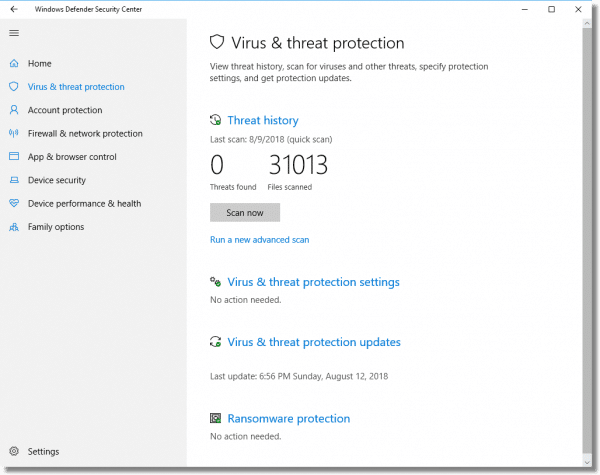
Click on Threat history. This will list current issues and quarantined items if any are present.
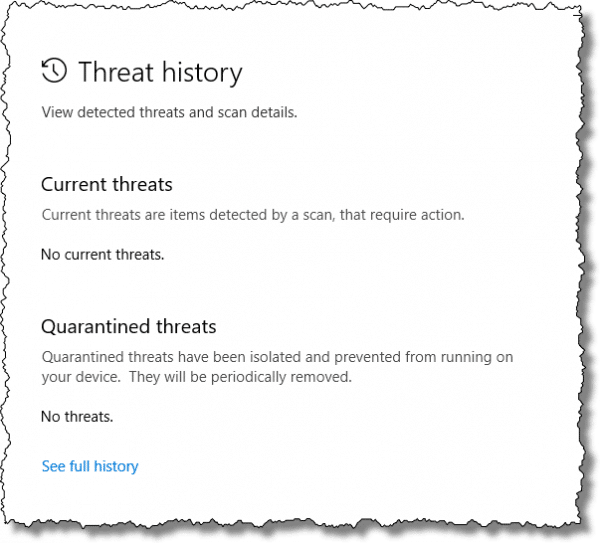
Click on See full history.
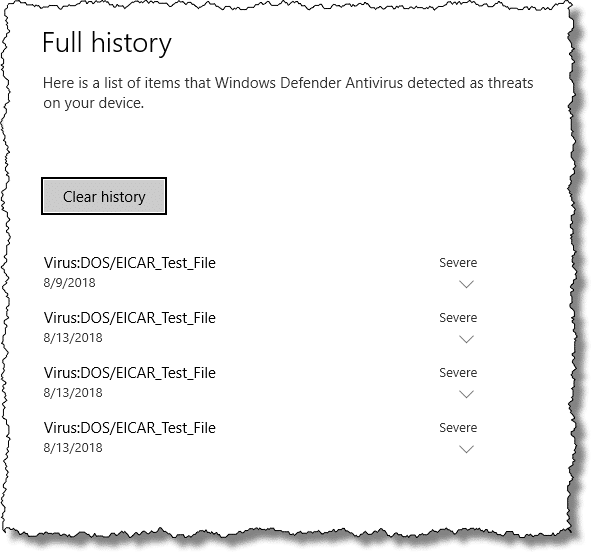
This will list recently discovered issues that have been dealt with. If you’re experiencing false positives, you can also indicate that specific threats are to be allowed (by clicking the down-arrow to the right of an item listed, and then the “Allow” button, not shown).
Manual action not required
One of the phrases to note in the dialog above is “They will be periodically removed” in the quarantine section.
The implication is that you do not need to empty the quarantine yourself; it’ll be handled for you. They only time you really need to visit these settings and history is if you’re curious, or if you’re trying to address a specific problem such as a false positive.
Windows Defender is, for the most part, completely self-sufficient and self-maintaining.
Do this
Subscribe to Confident Computing! Less frustration and more confidence, solutions, answers, and tips in your inbox every week.
I'll see you there!


I subscribed to Windows Live OneCare.I found I had to uninstall it to download Defender and then reinstall it.Later was told Defender included with WLO.I found both are excellent programs.I wondered ’bout the vault deal..Leo you are amazing!!
I run Defender every week, and it has NEVER “caught” anything – I often wonder if it even works, when Spybot and AdAware seem to trap things?
This is a good question.
I also have Windows Defender running real time, and run a full scan once a week. As far as I know Windows Defender has never blocked anything and on scanning it has never found anything. Is Windows Defender really working?
Is there any way to verify/test Windows Defender to see if it is really doing anything?
Leo, do you trust Windows Defender (I mean, obviously you do, you run it, but still..)
I have a hard time trusting Microsoft to detect the crud it let through in the first place.
-Leo
C:\ProgramData\Microsoft\Windows Defender\LocalCopy
Regards
I think you mean c:\ProgramData\Microsoft\Windows Defender\Quarantine\
That’s what i meant to say …. silly me.