Name <myemail@hotmail.com>
or even
myemail@hotmail.com <myemail@hotmail.com>
What’s it all mean, especially that last one?
Well, the last one is someone just not filling in some information in their email program like they’re supposed to.
But in general, that format is just the email protocol recognizing that most people don’t think in terms of email addresses; they think in terms of names.
Become a Patron of Ask Leo! and go ad-free!
Email addresses
By now, you probably realize that an email address looks like this –
emailname@somerandomservice.com
“emailname” defines the person or account that is to receive the email, and “somerandomservice.com” usually indicates the email service (like “outlook.com”), or the domain on which the person has their email delivered (like “askleo.com”).
The problem is that you and I don’t think in terms of email names. (OK, you don’t. Computer geeks are often another story. :-) ).
So they came up with another format.
Display name
In almost all email programs, you can actually enter email addresses like this:
descriptive name <emailname@somerandomservice.com>
The real “email address” part is enclosed in angle brackets and is preceded by something more human-readable, like a name. So you might see:
Leo Notenboom <leo@somerandomservice.com>
As far as the mail system is concerned, the “Leo Notenboom” part – the descriptive name – is actually ignored. It can be pretty much anything. It’s the email address that matters.
Defining display names
Most of the time, all this is entirely transparent to you.
For example, when you configure Microsoft Office Outlook, you’ll see two fields, one for Your name, and one for Email address.
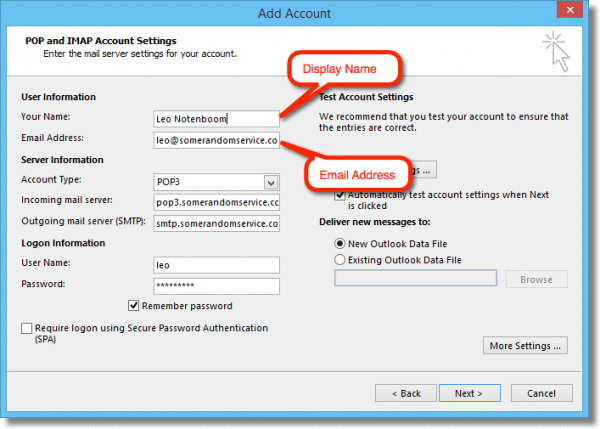
Those are the display name and email address, respectively. When you send an email, Outlook automatically puts those two together into the “From:” field of the email you send, in the form “Your name <Email address>”.
Similarly, when you create an address book entry for someone that includes both a name and an email address, your email program will frequently use both in the “To:” line in the same fashion. Leave the name blank, and it’ll only use the email address.
If you add someone to your address book or contacts from email you receive, typically your email program will add both name and email address, if both are present.
Confusion in name only
It can definitely get confusing at times.
Some email programs will actually hide the email address, displaying only the name. You might need to double click on the name (or perhaps right click on it and choose some option) to see the actual email address associated with the name.
Now, as to why you’re seeing addresses with this format –
emailname@somedomain <emailname@somedomain>
– one of three things happened:
- When configuring their email program, the sender entered their email address in both the “Name” and “Email” fields.
- The sender didn’t enter a “Name” at all, and the email program is using their email address as their name.
- The email program ignored the “Name” field, and substituted the email address instead.
Most often, it’s the first.
Intentional misdirection
It’s very common to see a “Name” that is obviously totally unrelated to the email address that goes with it. Something like:
Chester <leo@somerandomservice.com>
Or, even worse, you’ll see email addresses with the format
someotheremail@randomisp.com <emailname@somerandomservice.com>
In other words, the “Display Name” looks like an email address, and the “Email Address” looks like an email address, but the email addresses bear no relationship to each other whatsoever. Some email programs will display only one, some only the other, and some will display both.
These are almost always the result of spam. The whole point is to confuse you or bypass spam filters.
Remember: the display name is ignored by the email system. It’s only the email address that’s meaningful – and even then, when it comes to spam, it can be faked.


Aha. We get those weird looking because of some glitch from Microsoft. What I’d like to know is why does some email come with strange marks like Harry^s or +/when he ^lacked the sense…?
Frequently the “wrong” characters are due to someone using characters in their text that are not recognized by the email display software.
You see it a lot when someone pastes text done with word processing software into the email. In order to make the word processed documents look better, some use special characters such as open and close quotes instead of the generic quotes. The generic version is standards ASCII text that everything handles. The open/close versions are special characters that not all email programs can show and they come up with a place holder for them. There is a fancy version of the apostrophe that some programs use.
Does anyone know if it is possible to format the From field to have: name instead of just the name@domain, when you send email via programmatic means (eg PHP)?
Thanks
Does anyone know why > > > appears in the body of the email when i send emails? How do you get ride of that!
@Kate
That is a mark being added by your email program to denote which part of the text is not yours in the reply. Every time a new reply occurs, another character is added.
“The problem is that you and I don’t think in terms of email names. (OK, you don’t. Computer geeks are often another story. :-) ).” I’m glad you included that. I hate when an email program includes only the name and not the email address. I want to know which email address I’m sending to or receiving email from. It’s been 4 years this month since I started working at Ask Leo! and I’ve learned to empathize with the frustrations of people who simply want their computer to “work”.
Hi I read your article about the carrot sign…i’m using a msn browser and sometimes it saves my address with the carrot on both sides and I can’t email the sender? Is there a setting to just have it saved without the carrots signs? When I remove the carrots, then I can send the email ok? This doesn’t happen in my outlook app or internet browser just the msn browser?..
thanks,
Juan
Those probably aren’t carats (not carrots) – if they’re at either end they’re probably square brackets? [like this] – or do you mean angle brackets <like this>? If the later, that’s normal, as described in the article.
Nope Leo, I have the same problem. The addresses start off with these brackets “( )” when I put mine in contacts (Outlook). I will try an email to 6 of my friends and Outlook will not complete the send. I look at the email and several addresses have randomly changed the brackets to “”. The email will not send until I erase the offending bracketed addresses and re type them (being careful to not let auto fill put the old address in). The puzzling thing is why do some change and others don’t (even though I just created the group in outlook)?
“When configuring their email program,
The sender entered their email address in both the “Name” and “Email” fields.
The sender didn’t enter a “Name” at all, and the email program is using their email address as their name.
The email program ignored the “Name” field and substituted the email address instead.
Most often, it’s the first.”
From my experience, that vast majority are as a result of #2: the sender not entering their name in the account name field.
Team Leo,
At work I have to use outlook. I also get to use an iPhone with Mail.app. Most of my coworkers also use iphones (various models & various iOS versions).
I’m running into the following issue:
1 – I compose an email to addresses in the SMTP Format “Lastnane, Firstname” (An approved SMTP Standard Format)
2 – M$ Outlook displays the email address in the format “Lastname, Firstname”
3 – iPhone users receive the email in Mail.app on their individual iphones.
4 – Mail.app divides each address into two & displays them in some variation of “\”Lastname and Firstname
How can I get apple & Mickeysoft to play nice together?
-Some ludite who likes his white space.
PS: I don’t want to have to reformat every entry in my M$ Outlook address book.
While it might be AN approved SMTP format, it’s certainly not the ONLY format. I’m not aware of any guidance at the SMTP level of exactly what’s preferred.
Email programs try to interpret the “display name” portion of an email address as best they can. I know of no way to force them to agree, and indeed, would be surprised if they did.
When I send an email to a list of people, and I copy the whole list (from Excel) into the send to, the email addresses are formatted in my Excel list as first-name.last-name@company.com. But Outlook automatically converts all of these email addresses to a different format, last-name, first-name@company. Then Outlook refuses to recognize these as legitimate email addresses to send my email message to.
If I copy each name one at a time from Excel into the send to, it works, but not when I copy and paste the whole list. Copying and pasting 800 email addresses one at a time is way too time-consuming.
Is there some setting in Outlook where I can FORCE Outlook to use all of email addresses from the list, exactly the way I actually typed them, first-name.last-name@company.com, and NOT convert them to last-name, first-name@company? Where is this setting, and how do I set it?
Thank you.
Ed Hass – regarding excel spreadsheet list:
use another column and enter a formula to prepend a character at the beginning and append a character at the end of the email address – for example quotation marks or the less than and greater than symbol. I believe this will work – it’s been many years since I did it in Outlook.
for example joe.smith@somewhere.com becomes “joe.smith@somewhere.com” or in another column
when this column is pasted into email TO-recipients field it may take them literally and not try to change them for any reason including they are in address book.
cell formula:
=”” where A1 cell has the email address
If you don’t put a comma or semicolon at the end of each recipient then the email program thinks the recipient is one really long one and will fail or will only recognize the first one. A semicolon I believe is the protocol standard but with Outlook pretty sure commas are needed.
So before cutting and pasting into Outlook append the comma (and probably a space for looks/good measure).
cell formula:
=”, ” where A1 cell has the email address
copy this formula down to all the addresses in your Excel list of course.
If that doesn’t work possibly pasting into a text file first and then copying from there and pasting it to Outlook may work.
Good Luck
above was supposed to be a reply – not a new comment – my mistake.
… so not sure why the formulas I wrote didn’t flow through. Ampersand and less than and greater than signs are not displayed.
try to enclose the email address in quotation marks or Less Than (left angle bracket) and Greater Than (right angle bracket) symbols.
where A1 is the Excel cell (column A row 1) containing the email address and
GT is greater than symbol > and
LT is Less than symbol < and
Ampersand is the & "And" symbol (shift F7 – most keyboards) then
the first formula in the above comment (to enclose in less than and greater than symbols) in words is
equals, quotation mark, LT symbol, quotation mark, ampersand, A, 1, ampersand, quotation mark, GT symbol, quotation mark
the second formula in above comment also appends a comma and space i.e.
equals, quotation mark, LT symbol, quotation mark, ampersand, A, 1, ampersand, quotation mark, GT symbol, comma, space, quotation mark
I’ve been inundated with spam emails from various senders (ex Home Depot). All the reply addresses goes to cybusa.com but nothing opens. There is no raw address available and no reply email address. How can I found out who it is so I can block them?
Blocking won’t work. Spammers constantly change that. Instead, just mark them as spam in your email program or interface.
Is there a way of telling whether a purported copy of an e-mail on a printed page is genuine or not?
For instance, is the presence of angular brackets suggestive of a genuine e-mail that has been sent and received? Do angular brackets only get created upon the sending of an e-mail?
If status “opened” definitive that an e-mail has been received and opened?
Is the only certain test to look at an in-box in an e-mail account on a device(eg phone or computer)?
Thanks.
Tony
The information used to determine the legitimacy of a message isn’t generally printed, sorry. Besides, printed info is trivial to fake.