And why, when you look, it’s full of errors.
In an ideal world, you’d never care about Event Viewer.
In an ideal world, software and hardware would always work. In a slightly less ideal world, we’d be able to rely on Event Viewer for clear and consistent information about our system.
Sadly, we do not live in an ideal or even slightly less than ideal world. While Event Viewer can be a source of excellent clues into system failures and behavior, it can also be a frustrating, incomprehensible mess.
And scammers leverage that confusing mess to their advantage.
Become a Patron of Ask Leo! and go ad-free!

Windows Event Viewer
The Windows Event Viewer allows you to view the contents of the event logs maintained by Windows. Event logs contain information about how your system is functioning. Event logs are a mess and are intended only for the very technically aware. Event logs are full of errors and warnings even on a properly functioning machine. Don’t let a scammer tell you otherwise.
What Event Viewer Does
Windows has an “event log”. Intended for software engineers and technicians, it’s a repository of information about how your system is running and what’s been happening.
The implementation is complex, but at the highest level, a log entry includes information like:
- The name of the application or Windows component.
- Whether the entry is informational, a warning, or an error.
- The time of the entry.
- Additional information about the entry.
Event Viewer is the application used to display the contents of the event log.
Running Event Viewer
There are several ways to run Event Viewer.
In Windows 10 and 11, click the Start button and start typing “event viewer”, and one of the results will, not surprisingly, be Event Viewer (as shown at the top of the page). Just click on that.
In all versions of Windows, you can also click on Start and then Run, or type the Windows Key + R, and then type eventvwr and click OK.
Event logs
Depending on your version of Windows and additional software you have installed, there may be several logs visible.

If you click on the “>” in front of Windows Logs, you’ll find five Windows logs:
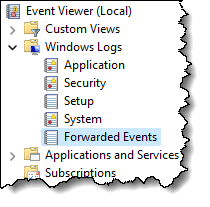
- Application: Applications running under Windows are supposed to log their events here, unless they’ve created their own Event Viewer log.
- Security: Windows logs a host of security-related events here.
- Setup: Presumably events logged by Windows (and perhaps other) setup programs.
- System: The operating system logs its events here.
- Forwarded Events: Events forwarded from other computers. (Typically empty on home and small-business installations.)
If you click on one of those five logs, you’ll see a window that includes several lines of logged information.
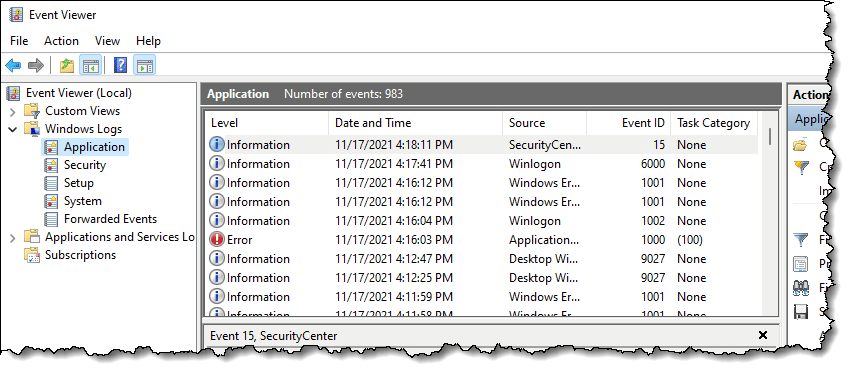
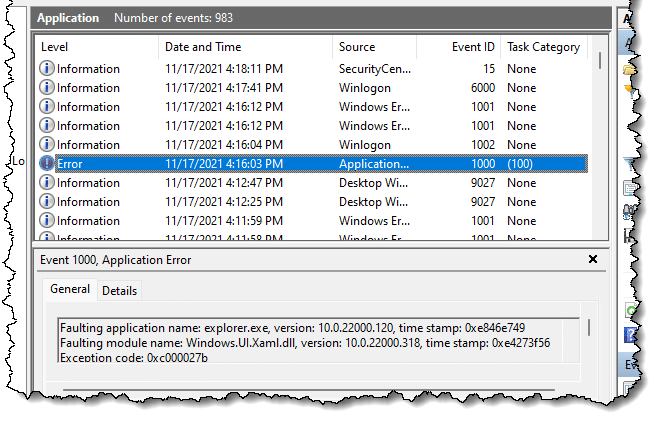
Each line corresponds to one event logged by the system. If you click on one of the lines, the information contained in that event will be displayed in the pane below.
Useful information
Looking at the pane containing information about a specific error can sometimes garner useful information.
As one example, Windows Defender logs successful virus definition updates. Normally, you would never need to see it, so burying it in the event log is somewhat reasonable. However, if there’s ever a question, you can come here to see if that’s been happening as it should.
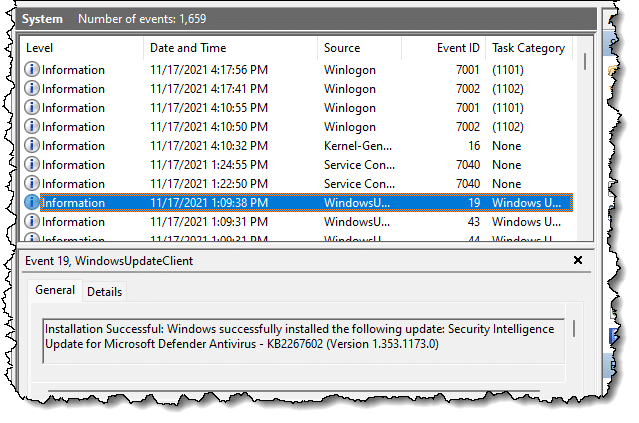
Event log confusion
As you look through individual entries, things quickly get disorganized and confusing.
- There are no real rules for what constitutes an error, warning, or informational event.
- There’s no consistency about the meaning of many of the fields associated with each event.
- Many entries are just numbers, meaningless to the casual observer.
- There are no enforced requirements that a component or application use the event log or how much information it should log if it does.
That’s really just the tip of the iceberg. The important take-away so far is this: there’s no consistency in what gets logged.
Chaos in the data
Unfortunately, less-than-helpful log entries are common. Frequently, entries are completely indecipherable to normal people, and often even to technical folks who aren’t familiar with the component logging the information.
What’s worse, it’s completely normal for the Event Log to contain errors.
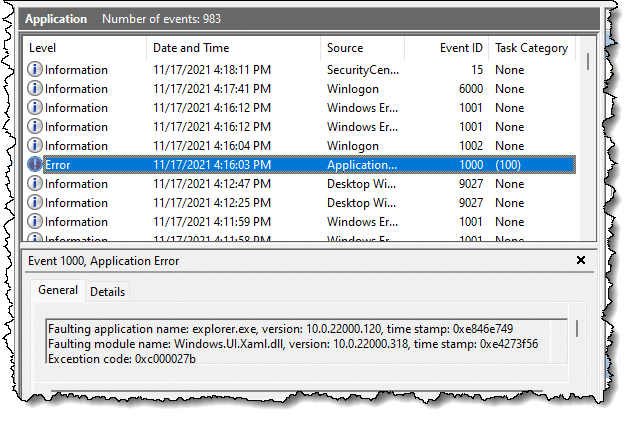
I’ll say that again: it’s completely normal for the Event Viewer to show entries that are marked as “Error”, even on a completely healthy, normal system.
I’ll even go so far as to say that an event log without errors just doesn’t happen.
The bottom line is applications — including Windows itself — commonly log inconsistently, log things that are meaningless or misleading, or fail to log things correctly or at all.
As I said, it’s a mess . . . which is why scammers love it.
Scammers leverage confusion
Event Viewer has become a key component of the so-called “tech support scam”.
You get a phone call from someone telling you they’re from some important-sounding company or service you use, and that your computer is causing problems. Then they direct you to Event Viewer. They have you look at an event log and show you it has errors in it.
Because it does.
I said it earlier and I’ll say it again:
On a machine that’s working well, Event Viewer will still be full of errors and warnings.
The scammer knows this. The scammer also knows you don’t know this, and will instead believe that Event Viewer is confirming their claim that you need their help to “fix” your machine.
It’s a scam. Your machine is fine. The event log always has errors in it. Hang up on the scammer.
Is Event Viewer any good at all?
First, remember that the event log is meant for software engineers writing and debugging their software and technicians trying to diagnose what’s going on with your machine when it really does have a problem. For people who know what to look for (and more importantly, what to ignore), it contains valuable data.
Curious? Go ahead and browse around in Event Viewer; it doesn’t hurt to look.
Just don’t jump to conclusions, and don’t panic when you see lots of warnings or errors. Every properly functioning Windows computer will have them.
Do this
Subscribe to Confident Computing! Less frustration and more confidence, solutions, answers, and tips in your inbox every week.
I'll see you there!
Podcast audio

Related Video


It’s not just Windows; other operating systems generate error logs that can give angina to a regular user looking at them. I was surprised by how many errors were reported on the error log of a Linux Mint system I was experimenting with a few years ago. It was a system that in all appearances was working quite well.
The Windows Reliability History is more practical. The Event logs are detailed but the Windows “Reliability history” provides a useful overview. The Reliability history lists critical events, warnings, and successful software updates and installations, including Definition Updates for Windows Defender and updates to Windows 10 apps. It can be viewed by Days or Weeks. It also seems to include information from the useful Custom Views > Administrative Events log.
To start the Reliability history:
[1] Click the Windows 7 or 10 Start button and type Reliability, then click on View Reliability history
[2a] Right click the Windows 10 Start button > Control Panel > Security and Maintenance > Maintenance > View Reliability history
[2b] Right click the Windows 7 Start button > Control Panel > Action Centre > Maintenance > View Reliability history
Unfortunately it’s kind of useless also. If you click on an error, just like in the Event Viewer, it will 9/10 say no solution found.
Thank you for this article. I’m really glad to have this information about the Event Viewer. I’ve long assumed these were all pretty serious issues, so have worked with mine over the years, researching every warning and error, and have managed to eliminate most of them over time. This is one type of reason I’m holding onto XP, my system is now stable, I’ve read all of the numerous books and manuals, and things are finally predictable. I did however purchase a Chromebook laptop and it is such a total and complete breeze that I use it for everyday now. Thank you again for these informative articles.
So after reading the above article I have a understanding of event viewer. How is a snap-in event viewer different and what is the purpose of this if computers already have one? Thank-you
It’s the same thing.
I use the Event Viewer to see the elapsed time of the last Microsoft Security Essentials (MSE) scan. I view “Windows Logs – System” and do a Find (Ctl-F) for 1001. That is the ID of the event created when a Microsoft Antimalware (MSE) scan finishes. It tells when the scan finished and the elapsed time. btw – Find for 1001 also finds entries for other events not related to Antimalware, e.g., 10016, 7036 and 6005, which you can ignore.
This works for me on Vista but it could be different on other releases.
Slightly off topic, I had a “Tech Scam” call yesterday. Previous calls like this have asked me view Event Viewer. Yesterday I was asked to open the Command prompt and enter the following (without the quotation marks) “assoc”. This brought up a long text list of what looked like file extensions. By this time the caller had worked out that I wasn’t falling for anything and asked why I was wasting his time!!! and hung up.
So I never got what he was going to claim what this list demonstrated.
Interesting. In the help menu for “assoc”, it says if you type just that command and an extension, it will “delete the association for the file extension”. So, I’m guessing, if you were to put “jpg” after it, then any icon of a Jpeg image file that you are used to seeing will now have a generic icon. Furthermore, double-clicking it would show a message that no program is associated to that file type. For most computer users, this would be very confusing and they might think something is indeed wrong with their computer. It appears the scammer is trying to get the user to break an extension (and they wouldn’t even know they did that) and then, for a small fee, help them to fix it. Just a guess.
One thing I’ve always done with a new computer is change the logging level of the Application and System logs. By default the size limit and time limits are very small, usually old files are deleted after a mere 7 days in some installations! I change it to only delete after the log size exceeds 150 MB. This way, many, many months and sometimes years of logs are available because as Leo points out, you don’t know if the error you’re seeing from today is bad or normal. With years of logs, you can quickly determine if it has always been present.
Oh what fun. I didn’t have anything planned this evening, just Linda and I watching a Hallmark Christmas move. “And up on the roof top, there rose such a clatter, some dude from India called and began such a chatter.”
They told me I had a virus in my computer. Oh, what fun. I tried to keep them on line for longer than 20 minutes. NEW RECORD! I kept him on the line for 30 minutes! Poor guy! He thought I couldn’t type. But meanwhile I Pinged the URL that he was wanting me to go to and I told him that I will contact the IT manager of the server in Houston, TX and have them put a denial of service on them.
He first had me open eventvwr which is a standard test to see what events have happended. You will always find errors in this display. Ignore it. That is just to make you think you have a problem. They want you to type in an address like But instead I typed something else. DONT EVER DOWNLOAD THIS! They will set it up to have access to your PC and then YOU are STUPID. They then have your computer.
Let me know if you can play dumb and keep them on the line for more than 30 minutes! Don’t mess with tech. USA tech that is.
I was contacted by a scammer usinf the event viewer as bait. trying to sell me Norton Security at three times the price and also trying to persuade me to let them delete the logs on Event viewer. Do these logs have to be deleted???
No, there’s no need for the average user to be at all concerned with the EventViewer or to remove the logs. Windows takes care of that. And under no circumstances ever let anyone who has contacted you by phone, email, pop-up or any other means of communication get access to your computer. Just hang up or ignore the pop-up and emails.
Read this article, that you commented on, carefully – and I would also point you at the following: https://askleo.com/i_got_a_call_from_microsoft_and_allowed_them_access_to_my_computer_what_do_i_do_now/
Nope. They clean themselves up.
Thank you for the information on event viewer. I received a phone call today from a scammer who got me to open event viewer which showed about 17,000 errors. The spammer descibed himself as head of security at my ISP and offered to fix the errors. I asked him for his name and he side-stepped the question. I had to hang up on him 3 times before I got rid of him. I have never opened event viewer before and am suprised that I did not see any prior warnings of this particular scam.
This is so weird, I ran Windows XP for over 8 years, guess what, If I had errors in the event viewer it was very few.
Now it seems that I have at least 30 red error codes per day, all I have to do is start the computer and wait 5 minutes.
The yellow I have always had.
I went to the store and looked at 14 computers, Brand New, they had errors already and they have not even been sold yet.
I understand the fact that between all the third party programs and the internet things will happen but why so many per day.
In my old system I got maybe 3 errors a week, now 30 a day, what’s up with that.
Can anybody give a real reason, I have run dozens of programs that claim they can fix them but the bottom-line, they can’t
I even paid for a full cleanup, performance, integrity check that was $189.00 out the window.
I am tempted to try the Microsoft azure program that is $139.00, they claim they will check integrity of third party programs.
Can anybody help.
The computer itself, seems to be running good, Norton’s reports no issues, the SFC in windows claim no integrity issues.
the hard drive according to the report is 16% above average in speed and of course my processor is a 3.5gig with 8000 mb. of memory
Please read the article you commented on. The data you are seeing in the event viewer is not really useful unless you are having a problem with your computer. And then it really needs a trained tech to sort it out. It’s completely normal for the Event Viewer to show entries that are marked as “Error”, even on a completely healthy, normal system. Your best bet is to just leave it alone. Don’t look at the Event Viewer every day. It’s not giving you any useful information.
The fact that you found errors in new computers in a shop prove Leo was right. The listings in event viewer are so often wrong in what they show, and that those error are no indication of a problem. I doubt if the Azure program would reduce the number of errors in the Event Log. In fact, I wouldn’t be surprised if it produced error log entries itself :-)
One example of something which might (purely hypothetical) produce an error entry. A program tries to run but is blocked by another process. A log entry of that is written. A few milliseconds later, it’s no longer blocked. As for why so many a day now when before there were so few error entries: later versions of Windows are that many time more complex than earlier versions.
In light of all the phone calls, you’d think that by now Microsoft would get the idea to start the Event Viewer up with a pop-up which warned people of the scam and that Event Viewer errors are nothing to worry about. It would prevent a lot of people from being ripped off.
ASk,Leo.
Thank You So Much-for giving time and sharing your knowledge technically on computer.more power and god bless.
P)s,thanks free tutiorial-from the philippines.
My Event Viewer > Windows Logs > System list is full or MEIx64 warnings that are issued every 15 seconds. So far I haven’t been able to isolate and correct whatever is causing these warnings. However, my main question is whether frequent warning (or error) messages such as these consume a significant amount of system resources. Of course, at the very least, they do fill the list with a lot of repetitive garbage that might make it hard to find a real problem should one exist.
As the article says,
As for consuming resources, the Event Log is an relatively small text file. Mine is only about 154 MB.
I got the scam phone call yesterday.Luckily, before I gave him access I put him on hold and took a look to see if it was a scam. He called back 3 times to get me back on the hook. After reading this I understand the errors, I have a ridiculous number of them just since I signed up for internet in Feb this year . None recorded before that ?
He did point out when he had me open the systems file that many of my systems have stopped running and told me that was a result of the errors. Can I fix this with a download or should I have my laptop cleaned and updated by a professional? Happy to spend the money if necessary, not if I can do it on my own.
thanks for writing this article !!
If your computer is running without any obvious problems, I wouldn’t pay any attention to Event Viewer errors or errors opening files you wouldn’t otherwise open. And I especially wouldn’t listen to anything a scammer who phones me says, and everyone who calls to tell you about your computer having problems is a scammer and a thief. Read the article you are commenting on.
There’s nothing to be fixed. As the article states: the caller was lying.
Thank you fothis information …. i just got a call from unknown person and he telling me to fix my system. he was saying your machine is in serious problem after i followed him till opening the custom logs in event viewer. then i though it loks limek scam becasue he is not from telstra and how he know there is viruses in my machine … then I HANG UP THE SCAMMER. he called me three times after i hang up his call.
Then i read this article and i got … it was fake call.
Thanks again
Singh
DCOM error ID 10016 noted in ‘event viewer:
CLSID {9BA05972-F6A8-11CF-A442-00A0C90A8F39}
APPID {9BA05972-F6A8-11CF-A442-00A0C90A8F39}
Because this is noted in EVENT VIEWER as an WARNING – I felt compelled to chase it for an solution – to discover it was a waste of time BECAUSE:
The word WARNING should have been programmed to an computers user choice as an INFORMATION notice
in that since I CHOSE to use Internet Explorer 11 64bit WITHOUT addons – the system, I guess, saw this as an error or problem therefore generated the event 10016. In other words YOU/I did not give PERMISSION for IE to activate WITH addons.
If I chose to use IE11 WITH addons – event id 10016 – NEVER appears.
Sadly many are being given routines – to change permissions in the registry to prevent the choice of running IE11 without addons – BECAUSE the problem is NOT UNDERSTOOD !!! Or how the computer works.
NEVER waste time tracing down issues in Event Viewer. As the article states it’s chock-full of false positives and meaningless (to the layman) information.
Leo, you wrote:
“NEVER waste time tracing down issues in Event Viewer…”
Now, that, Leo, I disagree with! Because…
1. Users can learn this way. They’re hard lessons, perhaps, but they’re learning just the same. :)
2. Who says it’s “wasting time”? You? And who are you? One person’s “wasted time” is another person’s “hey, let’s learn what this is.” (See Item #1).
3. Whether or not to “waste time” is always entirely at the discretion of the (alleged) time-waster. And not only that, but it’s always the (alleged) time-waster who supplies the definition of “time-wasting”!
4. Items 1, 2, and 3 are all really the same thing. :)
Hey, if you want to waste time in the Event Viewer, be my guest. I stand by my statement: for the average consumer the Event Viewer is a distracting, confusing, waste of their time. If they’re chasing down an issue their time us much better spend in other pursuits.
Lately when booting up my laptop with Windows 7, it pops up a message that Windows could not connect to the System Event Notification Service, preventing standard users from logging on, but as an Administrative user I can look at the System Event Log to see why the service didn’t respond. The Taskbar and Start Menu look like an older version (NT? Win 95/98?). If I log out and log back in, the Taskbar and Start Menu look like the regular Windows 7 version.
I’ve been in the Event Viewer looking for this log and see what the problem may be. Indeed there are many Errors and Warnings. I just don’t know how to narrow it down. One of the errors that shows up frequently has to do something with the power, which doesn’t surprise me since the battery is on its last life and needs replacing. But I’m not sure that would be the cause of the error.
In a lot of ways, I could care less, except the old look, look very odd and I hate having to log out and log in again. Should I keep trying to figure this out, or just abandon the Event Viewer.
Really depends on what you want, but I have to say that the system seems … “damaged” for lack of a better word.
In your shoes I’d start with a run of SFC – https://askleo.com/what_is_the_system_file_checker_and_how_do_i_run_it/
and if that doesn’t do it, probably a repair/reinstall of Windows – http://ask-leo.com/how_do_i_repair_windows_7_with_a_reinstall.html
Hello, I had a call today (16 Oct 19) just 30 mins ago using the Event viewer as a way of convincing me he knew what he was talking about. After I agreed with him that there were errors, he then wanted me to type into the “Run” box:- {url removed}, which I did. I was then on what appeared to be the Microsoft Tech Support site. He then told me to click on the “Quick Support” button which I did and an exe file box appeared in the bottom left of the screen. It looked like it was a way to take control of my computer so I hung up the phone and deleted the box. Looking at the {url removed} window again makes me think that the window is a false one and NOT an official Microsoft site. What do you think?
Completely fake. Run away.
I never let the scammers get that far. As soon as they tell me they are from [company or service name here], I call them liars, tell them I take care of my stuff, and hang up. If I start to get more of these calls, I may have to start trying to take up more of their time, just for grins . . .
Ernie
I fell asleep next to my laptop which was on the bed next to me and it was powered on and online. When I woke, I saw Chrome browser had crashed during my sleep (like it has been doing lately) and for some reason Event Viewer was up on the screen. I had never seen nor used Event Viewer before so I came here to find out what it is. Why would it be up if I didn’t call it up? Has somebody hacked my computer? Nobody has physical access to the laptop except for myself. Could my pillow or blanket accidentally have pushed some keyboard combination that would of brought it up? I run Windows 10, but not with the last update as I didn’t have enough room on the harddrive to download it and Kaspersky free. Thanks Leo for your input on this matter.
No way to know, really. I think it unlikely to be a sign of a hack, though.
This week I had an unsolicited phone call from a woman who said she was a Microsoft Engineer.
I knew, of course that she was not and I was ready for the fun that followed.
I have an old PC that only has a system disk, with nothing on it except the system files.
I also have a clone of that disk, which I keep as a backup.
I have a land line telephone near the old PC
She told me there are lots of errors on my PC, caused by viruses and hackers !
And she got me to display the Event Viewer (EventVwr) to prove it.
I pretended to be shocked and she told me to go to http://www.[removed].com
A warning popped up that this site is commonly used by hackers.
After upsetting her with this news, she then asked me to download ALPEMIX
After getting a UserID and Password from me, she then had control of my PC.
The cursor was moving about as she desperately tried to find something useful.
She then asked for my email address, but I told her I don’t use email anymore.
She insisted that I must have an email address, but I told her I couldn’t remember it.
At this point a man started talking who claimed to be the chief engineer.
He raised his voice and shouted “DO NOT TOUCH YOUR COMPUTER”
But that only prompted to click a Restart shortcut that I have on the desktop.
He soon worked out that I was just wasting their time.
He told me that my grandfather was sitting next to him !
Then after some more nonsense he accused me of trying to be clever.
Then the line went dead.
Later I formatted the drive and restored the system from the clone.
I wonder how these people manage to sleep at night.
Later that week I had three more calls from “Microsoft”, all trying to “help”.
I made one silly mistake at the start of the last call.
I told the woman that I’d already had a call from “Microsoft” the same day.
She immediately dropped the call and they haven’t tried again.
Meanwhile, I’ve set up an email address, which I can give to the hackers.
I hope this will keep them on the line longer. I’m ready !
Thanks very much for your great article Leo.