Perhaps because it’s impossible to type the name.

It’s rare, but you can create files in Windows that are almost impossible to delete using normal methods.
Typically, it’s because there’s a hidden or invalid character in the filename — a character you can’t see, or a character that’s difficult to type and got there by accident.
How did that character get there, and more importantly, how can we delete the file?
The answer to the first part is pure speculation. I have some ideas on the second that have worked for me in the past.
Become a Patron of Ask Leo! and go ad-free!

Deleting files with invalid or confusing filenames
Windows File Explorer will often work, but if not, Windows Command Prompt’s auto-complete will often let you specify the file name in a way that allows you to use the DEL command. If not, deleting the containing folder may delete the file. Finally, renaming that containing folder and walking away is a pragmatic solution.
Creating invalid or misleading filenames
It’s usually a software problem. Some programs fail to filter out invalid characters from filenames before they pass them on to the system. The system should also filter them out, but I’ve seen that fail as well.
Let’s say you accidentally hit the spacebar after the filename when you went to save a file. If the application you’re using is not smart enough to strip trailing spaces, it may well create the file with a trailing space. You may think you’ve named the file
FOO.DOC
but Windows sees:
FOO.DOC
I’ve underlined the space following the filename. It’s a subtle but important difference, since these are two different filenames.
Another unexpected scenario might be:
FOO.DΘC
That’s not a speck of dust inside the “O” in DOC, that’s the letter Theta. But it would be simple to mistake it (and many other look-alikes) for an “O” and not know how to type them.
Windows File Explorer
In many cases, Windows File Explorer is enough. Locate the file, right-click on it, and click Delete or the Delete icon.
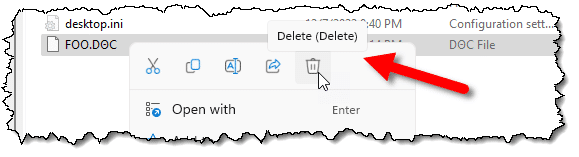
You can also rename the file. Presumably you’d rename it something straightforward without any hidden or odd characters, and deleting it with the method above would work.
Sometimes, however, Windows File Explorer is not enough. For whatever reason, the characters in the filename confuse it.
That’s when I turn to the Windows Command Prompt.
Windows Command Prompt
One of the most reliable ways to get Windows Command Prompt to “do the right thing” is to type the beginning of a filename (like “FOO” in our example) and then press the TAB key for auto-complete.
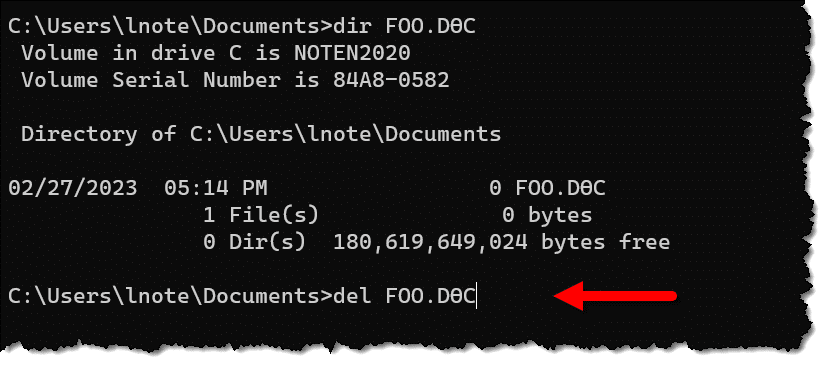
Auto complete will not only fill out the filename for you, it’ll include quotes if they’re needed. In the example above, I typed “del foo” followed by TAB, and Windows Command Prompt filled out the rest.
Once again, this technique should also allow you to rename the file as well and delete from there.
REN FOO.DΘC FOO.DOC
More stubborn problems
I’ve run into cases where the techniques above don’t work for reasons that escape me. Here’s what I try next, all in Windows Command Prompt.
Use wildcards
For example,
DEL FOO.*
will delete all files named “FOO” with any extension (FOO.DOC, FOO.JPG, FOO.XLS, etc.). Make sure there are no other “FOO” files you want to keep in this folder before you do this.
Delete the folder
After emptying the folder of all other files (typically by moving them elsewhere), I might try to delete the folder containing the problematic file. For example, if the file were in a folder called “2023-Records”, then in that folder’s parent folder (the folder in which 2023-Records is listed), I would try:
DEL /S 2023-Records
If that’s successful, I would re-create the folder and move the other files that used to be in it back.
Rename the folder (AKA give up)
If deleting the folder containing the problematic file failed, I typically cut my losses and give up. In Command Prompt or Windows Explorer, I rename the folder to something obvious, like “Records files-i-cant-delete.”
The new folder name, “files-i-cant-delete”, tells me what’s going on. I can then create a new copy of the original folder (“2023-Records”) and move the other files there.
Third-party tools
Delinvfile, short for Delete Invalid File, is a tool that deals with this scenario. It used to be free and may still allow you to delete one or two files before requiring purchase.
This is not about a file in use
If you get a message about a file not being able to be deleted because it’s in use, that’s a different scenario. Chances are the filename is just fine; it’s the fact that a program has the file open that is preventing you from deleting it.
Close that program (or close the file within that program) and you should be able to delete the file without a problem. If you’re having difficulty determining which program has the file open, here’s one technique to find out.
Fortunately, the error message displayed by Windows File Explorer should include the name of the program blocking your access. (If you’re having this problem in Windows Command Prompt and are getting a generic “permission denied” type of error, retry the delete in Windows File Explorer to get more information.)
Do this
There are many odd scenarios that can result in files that are difficult to delete. Now you have a few tools to try when that happens.
Want more tools and techniques to get around sticky situations? Subscribe to Confident Computing! Less frustration and more confidence, solutions, answers, and tips in your inbox every week.
Podcast audio

Related Video


I’ve had that problem a couple of times. Moving the files I wanted to keep into another folder and deleting the folder worked for me.