
Spammers do everything they can to get their garbage in front of you, and that means using and abusing every tool at their disposal.
One of those tools is also available to you and me when we send email.
Become a Patron of Ask Leo! and go ad-free!

You were BCC’ed. The “BCC”, or “blind carbon copy” feature of email, allows email to be sent without displaying the recipient’s email address at all. Spammers often use this to hide some or all the actual recipients of a spam email message. A a result, you may receive spam email where your email address does not appear. Since it is spam, mark it as such and move on.
The BCC field
“BCC” stands for Blind Carbon Copy1, a technique to send an email without the recipient’s email address appearing in the message. You might use the BCC field when emailing a group of people so as not to share their email addresses without permission.
In addition to the To: and Cc: fields, email programs typically include a Bcc: field. Here’s an example in the Windows 10 Mail program.2
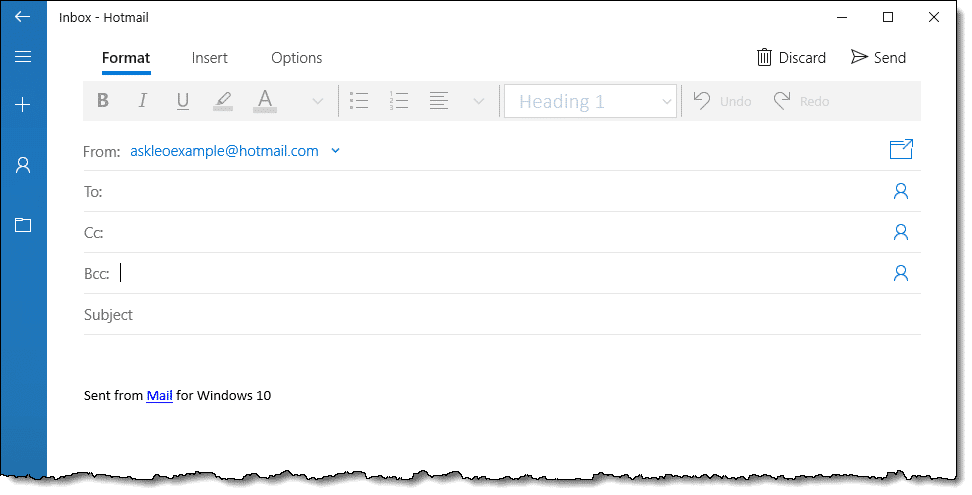
You can add email addresses to any of these fields.
- To: is used for one or more direct recipients for the message.
- Cc: is used for one or more recipients who also get the message. While the message is not directed at them, they also receive it. Often, people use this as an FYI to others to see the message. Any Cc: recipients are displayed in the message on the Cc: line.
- Bcc: is used for one or more recipients who also get the message. This is exactly like Cc:, except that the list of people receiving the message via Bcc is not included in the message when it is sent.
Who was BCC’ed?
There is no way for a recipient to tell who was BCC’ed, how many were BCC’ed, or even if any Bcc: addresses were used when a message was sent. (There are sometimes ways you can see the BCC’ed recipients on a message you’ve sent.)
Spammers use this technique to send one message to perhaps hundreds of people at once, because listing all of those addresses as Cc: or To: makes the message more likely to be flagged as spam. Since there’s no way to tell when you get the message that Bcc: was used, you have no idea that hundreds of others might be getting the same message.
As just one example, those hundreds of messages might be what’s called a dictionary attack, meaning they try variations on email names in the hope that one or more will reach a real person. For example, they might3 try “leo@”, “leoa@”, “leob@”, and so on, on any of my domains. Some might work, some might not, but there’s no added cost to the spammer to try ’em all. Most will be hidden in the Bcc: you can’t see.
What you can or cannot do
Ultimately, there’s nothing you can really do about this specific situation.
Mark the message as spam if it’s landed in your inbox. Your spam filter will use other factors and characteristics of the message to update its database of what you (and perhaps others) consider spam. Mark these messages as spam enough times, and they should get routed to your spam folder automatically.
Do this
Subscribe to Confident Computing! Less frustration and more confidence, solutions, answers, and tips in your inbox every week.
I'll see you there!
Podcast audio

Related Video


Footnotes & References
1: Some apparently know it as “Courtesy Copy”. “Carbon Copy” harkens back to the days of using carbon paper to automatically make copies as documents were typed in a typewriter. Look it up, kids. 
2: Not all email programs or interfaces show the Bcc line by default. You may need to click on an option or other user interface control to display it.
3: There is no “try”. They definitely “do”.


Although everything that was discussed is very interesting, I don’t believe that the question was answered.
I don’t claim to know the exact answer to the question but, for example, I do know that gmail has this feature that if your email address is:
myEmail@gmail.com
you might type my.Email@gmail.com and for gmail both addresses are the same one. It can even go as far as being myEmail+someSite@gmail.com and gmail will still consider it to be the same address which is usefull since if one day you receive an email from an unknown source with this email address, you’ll know that “someSite” sold its emails database.
I have to agree with the above; I’m not sure the question was answered. I know of a couple of reasons that might produce the situation described, for instance, if the e-mail recipient happens to own the domain and their e-mail address is the “catch all” address for the domain.
Also, spammers can fake most of the header information in their e-mails. I’d advise the questioner to check the “Envelope-to:” and “To:” lines in the e-mail’s header.
Not exactly the question raised here but perhaps a related issue….
Not so much recently but in the past I received numerous crap emails seemingly addressed *from* me. (If my email address is, for example, abc@xyz.com the email would not only be addressed *to* that address but *from* that same address.)
Concerned at first thinking someone was sending spam from my hijacked email address after some time I ceased being worried and simply figured the spam-sender’s program somehow simply did this by design — perhaps further enticing the recipient to open the email (after all, it was sent from me!).
BTW – Either HTML tags on these boards don’t work for me or the effects of using them don’t show in the “Preview” window. I’m not sure which.
When I first used hotmail, I got hundreds of spam,phishing, and plain con e-mails [ including money scams ] then I loaded the ACMA submission page in my favorites.Every time I got crap – I passed the whole page to ACMA [ located in Canberra ] Their job is to track these scum, arrest them and prosecute. It’s been over a year now and I don’t get any spam EVER!!!. And I don’t even run any anti-spam programs; I guess when the federal police start knocking on doors, some people get the message :)
I’m confused. The answer does not match my experience. When I get one of these spam messages…there is nothing in the headers to indicate that the message is meant for my account. However, when people BCC me…there are headers in the message to indicate that the message is meant for my account. So I still do not understand how I keep getting spam email in my account when no header in the message indicates that it is for my account?
I read this article and also followed the link to “Why shouldn’t I use the “Report Spam” or “Junk” button?” I have been getting emails every day from a source that I KNOW I have not subscribed to. Perhaps I could open these and look for an unsubscribe option, or perhaps I could open these and find I am now infected with a virus. I choose to not open these and add to my Blocked Sender List and Bounce Back To Sender. It does not appear to do any good, but makes me feel better. What say you?
My span list has grown massively since I started using Facebook and I find my posts being reposted on other site pages. Can I sue FB??
14-Dec-2011
Not particularly related to this question – Why is there a tab “Free Newsletter” sticking out and obscuring part of your news letter? (I have increased the web page to make it easier for me to read it!) I already receive your news letter!
17-Dec-2011
Tom,
I had the same problem until I learned this trick.
When you add an address to the Blocked Senders list, do not include anything before the @ symbol. Frequently that stuff keeps changing, but what follows remains fairly constant.
As an example, Me@mysite.com would be blocked simply as @mysite.com. That will block everything from mysite.com even if they change the “Me” portion.
alpha omega,
I frequently BCC myself on business e-mail I send out so I’ll see exactly what the recipient(s) see. Also, it will be in my Inbox where it is easier to find.
I just checked the source code for some I received from myself, and there was no BCC listed; only the From, To and CC. This was true of two e-mail clients.
Perhaps those you see as being sent to you are CC instead of BCC.
Leo,
When I get a doubtful email, I view the full header to know its origin and if from like serbia, vietnam etc I just delete it. In Gmail unless I open the mail I cannot see the full header, unlike in Yahoo mail. Suppose if I forward it to my Yahoo mail and check the full header, will the sender know I have opened his mail/spam ? I get very minimal spam and doubtful ones are extremely rare.
As long as images are not displayed opening the email does not inform the spammer at all. You’re safe to do what you’re doing in Gmail.
I received an email from an alleged Russian woman writing from a gmail account, but directed to an unfamiliar hotmail address. Even though the email was directed to an unfamiliar email address “unfamiliarname@hotmail.com”, I received it in my junk mail box. Maybe I was bcc’d in that email and it is a spam, but is it possible that my email account has been hacked?
That sounds like typical spam as described in the article. It is not an indication of malware.
Unlikely. Sounds like typical spam.
I don’t understand how the spammers got my email address since it is not yahoo or gmail. My account comes from a local company common in my country but not in Europe or the US.
Leo, you wrote:
“Carbon Copy” harkens back to the days of using carbon paper to automatically make copies as documents were typed in a typewriter. Look it up, kids.”
I’ve actually used carbon paper, back in the day. And, who you callin’ a “kid” ??? :)
“Kids” wouldn’t have know what it is, much less used it. (As did I, by the way.)
I used to teach my students how to write emails and had to explain what carbon paper was. I few had actually seen carbon paper as some receipt books still cam with carbon paper inserts.
To: and CC: are functionally identical. The only difference is that the person receiving the email gets a notification line in the email that they’ve been CC’ed.
In the text book there was a warning about CC’s.
An American company sent an email to a client, in a country I won’t mention here, and CC’ed their supervisor. The supervisor was offended because it’s poor form to relegate the boss to CC status in that culture.
To which I’d say… suck it up. Really, in this day and age the planet has gotten much, much smaller. My wife comes from a country that “would have” had that sort of attitude. But they’ve had to adapt to the internationalisation of communications, including information going from the top of the organisation to those at the bottom.
I agree, but when you are dealing with a client, it’s usually best not to offend them even if they are wrong.
I occasionally use BCC when I do not want the original “TO” or “CC” recipients to know the email was sent to a particular person. I know BCC recipients do not see the addresses of other BCC recipients, but will BCC recipients see any of the “TO” or “CC” addresses?
YES. ALL recipients see the To: and Cc: lines.
Why do I receive spam mail address to me but not the email provider I use example my email is
Emailaddress @ Gmail.com but the mail the spam was sent to says Emailaddress @ aol.com
That’s just how spammers work. It’s an attempt to fool you into opening the mail to examine its contents.
This is good information. Thanks!
Is there a way to block emails entering your inbox by blocking the email in the “sent to” box and not the “from box”? I all of a sudden started receiving multiple spam emails . See below
For example my email is
Emailaddress @ Gmail.com but the mail the spam was sent to says that the receiver (myself)
was a version of these emails below…
E.mailaddress @ Gmail.com
Em.ailaddress @ Gmail.com
Ema.iladdress @ Gmail.com
Email.address @ Gmail.com
Emailaddress @ aol.com
Is there a way I can block the incoming email so that I only receive emails that are sent to
Emailaddress @ Gmail.com
and block all of the other email addresses?
Not that I’m aware of. You could play with Gmail filters, but the problem is that to Gmail those are all the same email address (it ignores the periods).
Leo, that’s the same problem I have. I get 10 emails a day that are spam. When I block one, they just change the email address and I get another, some multiple emails addressed to me at different addresses. For example, if my real address is {email address removed}, I get email delivered that read {email address removed}. When I block it, the next one comes to {email address removed}. These are just examples, but I can’t find a way to stop it. I wish there was a way to block all email that does not come to my real address.
Your “real” address IS getting the email, it’s just being BCCed. Anything that accomplished what you want would also break the ability for legitimate uses of BCC.