Usually because you need to take one more step that’s not obvious.


Why do the changes I’ve made to a document that was emailed to me disappear?
There are a lot of ways things can disappear, but documents emailed to you as an attachment add another layer of complexity.
You can edit the document to your heart’s content. It’s when you hit “Save” that things get confusing.
Become a Patron of Ask Leo! and go ad-free!

Editing an emailed attachment
Rather than editing an email attachment by opening it directly, save it to disk first in a location of your choosing. Then edit that saved copy. That way you know what file you’re editing and where it’s kept.
Failure: step by step
This discussion applies mostly to email programs like Outlook or Thunderbird, but the principals apply to other email programs, including online email services like Gmail and Outlook.com. Similarly, I’ll be using a word processing document as my example attachment, but the concepts apply regardless of the type of document attached.
You receive an email with an document attached. Here are the steps likely to happen when you edit it:
- You open the attachment, usually by clicking or double-clicking it in the email.
- The attachment opens in the program configured to handle it; Word in our example.
- You edit the document and save it.
- You exit Word.
- You open the document from the email again, and the changes are nowhere to be found. It’s as if you did nothing.
What happened?
Under the hood
Let’s walk through the scenario again, this time including the steps your email program probably took.
- You open the attachment. Your email program saves the file to disk in a temporary location or perhaps your Downloads folder.
- The attachment opens in the program configured to handle it; Word, in our example.
- You edit the document and save it. It saves to the temporary location.
- You exit Word.
- You open the document again. The email program opens the unmodified, original attachment to the temporary location again, possibly overwriting the copy you just edited.
- Your changes aren’t there because you’re looking at the original, unmodified document.
There are two keys here:
- Your email program doesn’t update the original attachment in email after your edits.
- Your edits were in a copy of the document placed in a temporary location. (Your Downloads folder should also be considered temporary, as it isn’t intended for long-term storage.)
The solution is to do something other than #2.
Save to the rescue
If you want to make edits to a document you’ve received via email, rather than just opening it from the email, save it to disk in a location you specify first.
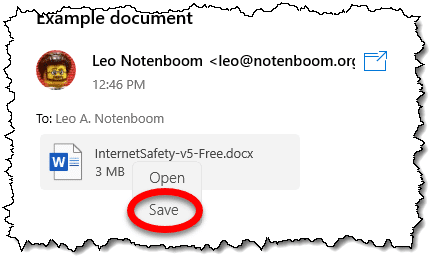
Saving it to your “Documents” folder would suffice. Then edit that document. (Another approach is to open the document as you have been, but them immediately use your editing program’s “Save As…” command to save a copy of the document, once again perhaps in your Documents folder.)
By saving the document to disk yourself, you now have a copy of the document under your control. You can edit as much as you like, and those edits will still be there when you return.
If you want to email your edited document, perhaps replying to the original sender, compose your message and attach your edited copy from your Documents or other folder.
What’s the deal?
Why can’t you just edit the attachment by opening it from the email?
- When you use “Open” on an email attachment, most of the time that implies you only want to view the item, not edit it.
- Email attachments are part of the message they accompany. Editing the attachment is tantamount to editing the message, which is not something most email programs allow. (Can you imagine sending an email that says “no” and having your recipient edit your message to say “yes”?)
- Some email programs do allow you to edit the attachment. If it notices an attachment was opened and changed, it might ask to update the original message. However, if the email program is closed prior to you saving the edits, all edits to the temporary file are once again lost.
Do this
Don’t try to edit attachments directly from email. Save them to disk first. That puts everything under your complete control and will save you some frustration.
Here’s something else that’ll help: Subscribe to Confident Computing! Less frustration and more confidence, solutions, answers, and tips in your inbox every week.
Podcast audio

Related Video


Hi Leo,
Thanks for your thorough explanation. I just had a row with our IT guys over this issue. Your email explains in a lot more detail why the changed attachment doesn’t get saved, but I was wondering if there is anything that can be done in the meantime. Is there any little programme that can be run to disable the “save” option on excel attachments so that you are forced to use “save as” or can you some how set Outlook up so that it auto saves documents into a designated non-temporary folder. It drives me nuts that everyone passively explains why the problem exists and no one knows of a way to fix it… everyone i know in every company i’ve worked in has lost large ammounts of data in this way, more than once. It’s just so counter-intuitive the way it works now.
Yes, I understand it. But where the document is temporarily stored? When I open the file agian it has the (1) attached at end. If I open it third time it has (2) attached. It means the document exists somewhere, but where? I made changes, saved, closed, returned to Outlook, pressed Reply, the message close without asking a thing, and I discovered I have not given an option to save the document at any point. Word recent documents does not list it, Search does not discover any document with similar name on whole drive C:. And Outlook Aplication data folder also does not contain any usable file.
browse to:
C:Documents and Settings%username%Local Settings
Search the ‘temporary internet files’ folder for the extention of your file.
EG: you have been working on a powerpoint file: search for: *.ppt
It’s easy to go into this trap if you edit the attachement in the reading pane (without opening the message). This way Outlook won’t notice the changes in the attachement and you lost them. Worst is if the attachement is another e-mail message. I could not find the corresponding temporary file, or it was blocked by Outlook and deleted when I exited Outlook.
I had the same problem with a word attachment
this was what I did
FROM DOS
1)cd C:Documents and Settings%username%Local Settings
2)dir /A /S *.doc
3)copy “filename.doc” c:
4)enjoy!!!
Francesco, you are a lifesaver! This worked – except that I had to change the directory to Temporary Internet Files and then the Outlook folder (OLKxx). I never knew you could recover modified Outlook attachments. Strange that they don’t show up in Windows Explorer but appear in the DOS file list. Thank you so much!
I never though it would ever happened to me. i opened word document from my e-mail to finish the paper I was working on and closed it without saving in on my hard drive. I was devasted, 6 hours of work went waste! I was trying to locate it by all means possible, searched tepm files, word recovery files and couldn’t find it. I downloaded couple of free document recovery programs but it didn’t help.I followed the instructions posted by Francesco, found the file in DOS list, but it didn’t copy. Then i decided to purchase EASEUS Data Recovery and it found and restored my lost data! So happy!
Does anyone know Microsofts “Official” stance on this…is this a feature or a bug? I’ve got users who seem to operate this way on a regular basis and this behavior causes them difficulty. I understand there’s a “don’t do it that way” work around but was wondering what the official response was.
13-May-2009
This is great!
I made changes in the attachement of the e-mail, forgetting that I did not save it to computer, but at least I clicked save several times during work. When I realised that, after I just closed the document, I felt so bad because I’ve been working on it a few hours.
Downloading the Handy Recovery 4.0 solved all my problems so easy that I still can not believe. Just read the tips at the beginning and you will need a few minutes to get the file you need. And the best thing is filter which helps you to find it even by name.
I spent half a day editing a brochure under very tight deadlines when I discovered all of my edits disappeared because I had edited the document that was attached to email. In an absolute, utter panic, I searched online for a solution and ended up on this (Ask-Leo) page. You are my saviour, Leo! Thank you, thank you, thank you. I found the doc in my temp directory. Phew!
This feature quit working for a couple of users in our company. they are no longer able to save the attachment with edits. It opens as Read Only. I can’t duplicate it on my PC. Any idea how to turn it back on?
01-Oct-2009
When a document opens as Read Only, there is usually a button to click which says something to the effect of “Allow editing”. Then, you can save the document with the “Save as” or “Save a copy” menu option. If it doesn’t show an “Allow editing” button, you can usually save the document with the “Save as” or “Save a copy” from the File menu.
In my case for a Windows XP PC, I needed to goto ….Local SettingsTemporary Internet FilesContent.Outlook folder to find the lost updated spreadsheet attachment
ROAR!!!! all hail to Francesco the greatest exponent of document recovery ever to visit the internet. Two days of painstaking work I ploughed into a word document not realizing I had originally opened it from an email attachment. When it vanished this evening I was ready to turn my back on the IT game and move into a monastery. I don’t understand the recovery method you outlined but when it worked for me just now I literally burst my guts open with relief
This essay doesn’t quite jibe with how it works for me. If I open a word attachment it always opens as a read only document and warns me that I need to save a copy of it when I try to close it. If I close the email before closing the document it warns me that I have an attachment open and will lose all changes unless I save it. I would have a hard time losing my changes. I’m using Office 2013, but if I remember correctly this is how it worked in Office 2010 as well. I’m using the enterprise editions of Windows 8.1 and Office. I don’t know if that makes a difference or not.
I usually save the attachment before editing, but if I sometimes open the attachment from the email, instead of clicking Save, I click Save as. The default location it shows will be the Temp folder. I navigate to the appropriate sub-folder in my Documents folder and save it there.
This behavior is not just from Microsoft for its email programs (Office Outlook, etc.). Every email program I’ve ever used works this way including Thunderbird. The email program has to save the attachment somewhere when you open it. It doesn’t know where you want it, so it copies the file to a temporary location folder in Windows. The name of the file is usually very esoteric since the email program may only know the attached file type. That temporary location may vary based on what version of Windows you’re using.
After you edit the file & hit save, the app your using saves it back to the same temporary location, usually overwriting the file already there. Your edits aren’t gone; they’re in that temporary location file. But that’s why Leo said to use “Save As” instead of “Save.” Then you get to choose where you want to save the file with your edits. As Mark mentioned, using “Save As” usually brings up the location of where the file is located in the temporary location. So even if you hit save, you’ll know where to look for the file.
BTW, I forgot to mention that in MS Office Outlook email program, you can right-click on the attachment in the email & a drop-down menu appears. From that menu you can select “Save As” for that attachment or “Save All Attachments” for all the attachments in the email. Either choice allows you to select where you want to save the attachment(s). You should then open the file to edit it from where you saved it. Then you can just hit “Save” in the app when done.
I suggest starting looking at the document in the app again and clicking on save or save as and see the folder where the program is trying to save the document. Then look into that folder using File Explorer to find your original edited document or cancel and click on Open to get the edited doc and save it some place more to your liking.
Forgot to mention that I suspect Thunderbird & most other email programs have a similar capability.
I’m familiar with how incoming email attachments work, but I had a similar situation although in reverse. I wrote an email (I use Thunderbird) and attached a document from my files. I was actively working on several OTHER files at the time and minimized the email I was GOING to send. I happened to move a few files to different folders. I didn’t notice but one of those files I moved was the file I previously attached to the email. I later clicked on “send”. Luckily the email I sent went to a close friend. He called me on the phone and asked why I sent him an “R” rated photo instead of a text document? I told him, “No, I sent a text document”. He forwarded the email back to me so I could see the attachment. I called and said something weird happened and I offered him a very humble apology. Later, I recalled I had moved the original document before I clicked on “send”. I did an experiment. I sent myself an email with an attachment. Before clicking on “send”, I moved the original file. After I received the email I sent to myself, I opened it and the attachment. The attachment was not the file I had intended on sending to myself. OUCH. Lesson learned.