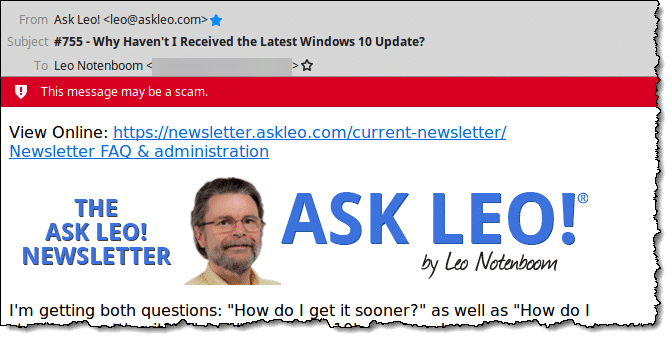
Unfortunately, this happens to a lot of newsletters and other email.
Needless to say, my newsletter isn’t scam, but seeing as how I do occasionally get this report, I thought it worthwhile to explain exactly what Thunderbird is doing. Other email programs may do something similar.
It’s also a good education on how some scams try to fool you.
The scam warning has always thrown too many false positives for my taste, so I’ll also show you how to turn it off in Thunderbird.
Become a Patron of Ask Leo! and go ad-free!
Link destinations
The fundamental issue is very, very simple. Hover over this link (or click, if you like; it’s safe):
The URL it links to is not the URL that is displayed. It could be trying to deceive you into clicking on what you see to get you to go somewhere else.
In other words, it could be a scam.
This is very easy to do in HTML. More traditionally, the link would be:
Which a) does not display a URL at all, but text, and b) is very clear about what to expect when you click.
Now let’s look at something a little more sinister:
You may think you’re clicking on a link to PayPal, but you’re not. If the page you land on looks like PayPal, you may not even notice.
You might get scammed.
Not all scams are easily detected, and not everything that’s detected is a scam. However, Thunderbird’s scam detection includes something like this simple rule:
- If the display text of a link “looks like” a URL that begins with http:// or https://
- and if the target of a link is also a URL that begins with http:// or https://
- then if the rest of the URL doesn’t match, it might be a scam.
The upshot is that:
would generate the warning (display text and destination are both URLs, but they are different), while
would not, because both display and destination are the same. Neither would:
because even though the display and destination are different, the displayed text is not a URL.
Click tracking
So why does the alert happen for a non-scam publication like my newsletter?
It’s due to a common tool used in legitimate newsletters and other mass email: click tracking.
I’ll continue to use my newsletter as an example. At the top, it includes the text:
View Online: https://newsletter.askleo.com/current-newsletter/
When the newsletter is sent, the destination of the link is automatically replaced with a different URL — a variation of “https://clicks.aweber.com/…”. Aweber is my newsletter mailing service, and “clicks.aweber.com” is the domain they use to count clicks.
When you click on the link that displays “https://newsletter.askleo.com/current-newsletter/” your browser is taken first to “http://clicks.aweber.com/…” where it simply counts the fact that you’ve clicked on that link, and then automatically forwards you to the intended destination — often faster than you’d ever notice.
But the display text and the destination encoded into the email a) are both URLs, and b) are different, so Thunderbird says, “This might be a scam.”
Even though it’s not.
Click tracking is an extremely common technique to see how popular things are. Understanding what people are clicking on is one of many ways I get a better understanding of what interests people, and how to make what we do more interesting and useful to you.
Disabling scam checking
Since it’s such a common technique, I find little value in having Thunderbird throw the warning for newsletters I’ve signed up for and know are not scams.
So I turn the feature off.
In Thunderbird, click the Edit menu,then the Preferences menu item, and in the resulting dialog, click the Security tab and then the E-mail Scams sub-tab.
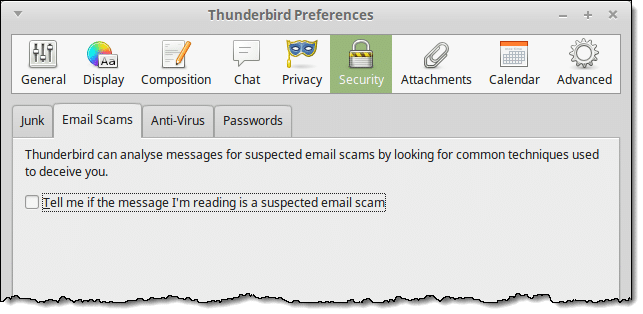
Make sure “Tell me if the message I’m reading is a suspected email scam” is unchecked.
Other email programs may have similar settings to use if you’re seeing this warning too often.
Remember, too, that it is just a warning, not an absolute determination. It’s just an alert that you need to tread carefully — nothing more.
Do this
Subscribe to Confident Computing! Less frustration and more confidence, solutions, answers, and tips in your inbox every week.
I'll see you there!


I learned a lot from this post but I disagree with turning off the Phishing warning. For example, if you get a warning about an email from your bank or PayPal most likely it really is a phishing attack. I So, I suggest keeping the filter on and be aware that some newsletters might get flagged. Instead of signing up for newsletters, I put a bookmark on the bookmarks toolbar of the sites I check out regularly.
Ironically, I get this warning EVERY week, but ONLY with Leo’s newsletter lol.
Ironically I get it with “some” email newsletters that I’ve signed up to… but other newsletters from the same address get flagged as possible spam, or worse, in Gmail.
I’d rather use Microsoft Outlook 2010 to handle my emails like I used to, but can’t figure out a way to use it coming from Gmail. All the information I read online about it becomes gobbledegook to my increasingly ageing mind. Previously my ISP was email provider but they shut it down as they couldn’t handle all the spams etc.
Hey Leo, good post. I guess I am just hoping that all my opt-ins won’t be using Thunderbird. I’d like to add that, putting a “Warning: If You Are Using Thunderbird” note on your Aweber Confirmation (right after signup) might be a good idea. Some people see “scam” and instantly freak, and I guarantee this will cause some lost sales. For those of us that have to cloak our affiliate links, or use tracking, there is no choice. Fortunately, I do not see any other email programs being so “tight” if you’ll pardon my French.
Hi everyone.
Thunderbird’s scam filter engine is quite good, i think so. I have found that Thunderbird will filter the below case as “may be scam”
– HTML email
– There is at least a link with the link text begin with “http://…”
– The link about has its URL different from the link text.
For example:
http://click.link.com
If the link text doesn’t begin with http, or the link is an image, is will pass the scam test.
I use T/Bird, and attempted to do as suggested, but found no privacy tab, after Tools>Options>???
I think it’s more important for people to learn to recognize such scams than having to rely upon any program (s) to protect you.
The answer to Larry’s question: In Thunderbird 3.1.5 (ie the current one – you have upgraded, haven’t you?), the button you want after ‘Options’ is ‘Security’, not ‘Privacy’. HTH
I think it’s better not to disable the feature. It certainly catches my eye every time I see it. While I know how to verify whether a link is safe or not, it doesn’t hurt to have a second set of “eyes” to warn me to take care. It is all too easy to quickly click and make a mistake.
The path is now Tools > Options > Security.
I like a warning, but I’d like to be able to whitelist sites. I’ve sent several e-mails to Mozilla, but I guess they like TB the way it is.
Yes, whitelisting sites, or perhaps more appropriately senders, would be awesome.
I do that with Gmail and it still randomly flags as suspicious emails even though I have marked it as a valid email. Total PITA quite frankly.
I’ve gotten warnings like this in other email apps and was able to add Ask Leo to my “safe” list to eliminate them. I do not use TB but think it should offer the same option.
Oddly enough, it doesn’t.
It should but in the years I’ve been tracking this issue, it still does not.
Thanks for this explanation. Always wondered why Thunderbird would flag an email newsletter from a reputable source as a possible scam. Is this the only reason why Thunderbird will flag an email as possible spam? If not, and you turn the warning feature off, aren’t you open to the potential of a different email actually being a scam but not receiving a warning about it from the Thunderbird program?
If you look at all emails with links carefully, you’ll do better than relying on the scam warning feature in Thunderbird. Seriously, verify all links in emails and better yet, never click on links. Go directly to the website by typing in the URL or clicking a bookmark you may have for that site.
for the most recent version of TBird, (67.7.0) the filter is found Using the Tools/Options/Security menu path…
In Thunderbird, version 60.7.0, I had to clickon Tool, then on Options, and then on Security to get to the “turn off” selection.