Changes you didn’t make.

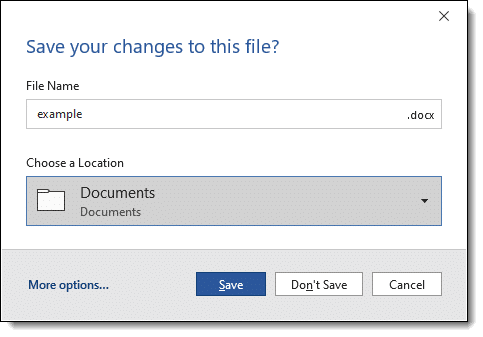
Hey Leo, what can I do, when I close out of an existing saved Word document, to stop the “Do you want to save changes to your document?” window from coming up every time, even when I haven’t made changes or touched a thing?
Word thinks your document changed.
Chances are it’s correct, even if all you did was look.
Become a Patron of Ask Leo! and go ad-free!

Different printers can cause Word to repaginate or otherwise consider a document to have been laid out differently, and thus changed. Features such as fields can be used to include document information that changes automatically, even when only viewed. Macros and add-ins can make unexpected changes as well.
Printers and printing
Some versions of Microsoft Word include a feature called “background repagination”, meaning that when you open a document, Word goes through it and calculates all the appropriate page breaks for whatever printer you currently have set as default.
Even without that feature, the fact that you might have a different printer than the one originally present when the document was last edited might be enough for Word to consider the document has changed. It’s also one reason documents can look different on different machines.
Fields
Another common cause is something called “fields”, which are, in essence, calculated results.
For example, you can insert a field into your document including the date the document was last saved or printed. The problem arises when some fields are recalculated just by opening the file. Fields including date and time are often culprits, though in complex documents there are several approaches that could result in Word thinking the document has changed.
It’s difficult to say exactly which because it will vary based on the document in question.
Add-ins
Macros and add-ins can also cause Word to think something has changed. Macros can be set to trigger when a document is opened or at other seemingly random times. Add-ins similarly can make subtle changes that may not visibly affect the document, but can cause Word to think it’s changed.
Document changed
The bottom line is that it can be hard to tell why Word might consider a document to have changed even though you haven’t done anything since opening or last saving it.
Hopefully, knowing that it happens and some of the reasons helps.
Do this
Subscribe to Confident Computing! Less frustration and more confidence, solutions, answers, and tips in your inbox every week.
I'll see you there!
Podcast audio

Related Video


I have got a different problem, word files appear with dates of “last time this document was opened”, that are impossible. For example, the computer will tell that such a word document was opened at such hour when nobody was home, and the computer was disconnected.
Have any clues?, Virus? Bug? Bios batery?
Strange stuff.
Thanks,
Jcm
Well, perhaps it’s too obvious, but … is the clock on your computer keeping time properly?
I had the same problem and created a new file line by line until I got the “do you want to save” etc. The lines forcing the save for me were dates that were assigned smart tags. When you put the cursor over the date you get an I icon with a drop down that gives you the clue.
So if this is what is getting you then you can go to Tools then autocorrect options and select smart tags. At this point I just disabled the “label text with smart tags” then clicked on Remove smart tags and I no longer am having the problem. You might want to check out this possibility.
i just have a microsoft word question. how do i add page numbers to my document?
-urgent
This article from my friend Allen Wyatt should help: http://wordtips.vitalnews.com/W224_Page_Numbers.html
I had the same problem and I knew that it had to be a setting in Word because I could open and close the same document on one computer without any prompting, but on the other it would ALWAYS prompt me to save. The solution was to uncheck the “embed smart tags” in the tools -> options -> save tab. I am glad I found that. What a pain.
My income tax software updates every time I open the app. I wish it wouldn’t do that. It always make me wonder if the filing matches the changes to tax law after the filing.
When I change time zones with my laptop all of my text files which have been kept in NoteTabPro suggest they have been changed. It’s only relative time.
Perhaps that happens to Word docs also?
Word is usually complaining about the contents of the file in some way.
My guess is the disk is formatted FAT32. Older versions of FAT didn’t handle timezones properly. I’d bet that if you formatted NTFS the files would no longer seem to have changed. (Or it’s a bug in NoteTabPro).