On some websites, “back” will hold you back.

I feel your pain.
You hit the back button. The browser churns for a bit, perhaps displays a thing or two… and then returns you to the page you started on.
It’s a function of the website’s design. Sometimes, it can’t be avoided.
Become a Patron of Ask Leo! and go ad-free!

Back not working?
If the back button appears not to work, try right-clicking on it to expose your history of recently visited pages. You can then click on the specific page you want to return to.
A to B and back again
Normally, when you click a link on page A that takes you to page B, you rightfully expect that when you hit “back”, you’ll return to page A.
And most of the time, you do.
Unfortunately, sometimes sites are designed such that when you click a link on page A, it actually takes you to page Z, which quickly and automatically takes you to page B. Now when you click “back” it takes you to page Z… which quickly and automatically takes you back to page B.
It might seem silly to go to an intermediary page, and sometimes it is. However, there are legitimate scenarios where it’s the right thing to do. Regardless of whether it’s silly or correct, it simply is, and as a web surfer, you’re stuck dealing with it.
Fortunately, it’s not that difficult to deal with.
The button is a list
The back button in most browsers includes a dropdown list of pages you’ve visited recently. It’s the list of sites that you would be “backing” through if you kept hitting the back button.
Sometimes there’s a small down-arrow indicator that the list exists, but sometimes you just have to know. If there’s no little down-arrow to click on, right-click on the button to display the list.
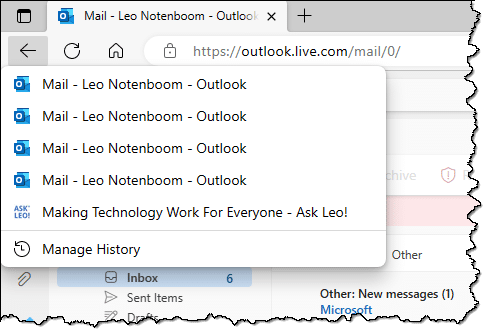
If there’s one of these automatic redirection pages in the middle of everything, you can skip over it by clicking on the real page you want to go back to.
Do this
Just because it’s relatively easy to deal with doesn’t mean it isn’t annoying, especially considering that you probably won’t realize that you need to take this step until after that first “back” fails.
It’s doubly annoying for me, since I see it happen often where it’s not necessary or where there are other, friendlier solutions.
Want something that’s not annoying? Subscribe to Confident Computing! Less frustration and more confidence, solutions, answers, and tips in your inbox every week.
Podcast audio

Related Video


When I know I’ll need to go back on a website and don’t trust the back button to work. When I click on the link I want to visit I have it open in a new tab so I can just return to the tab I started with.
I do that often, especially when I want to switch back between web pages. That also gives me the option to “tear off” the tab and move it to another screen.
To tear off a tab, click and hold on one tab and drag it off the browser window. and release the mouse button.
Namaste
I too many times right click link and open article in new tab. But this as a step to safeguard against failure of back button is very good to know KNOWLEDGE. Thank You very much.
Pranams
Leo, I see not just one, but two problems with this advice.
FIRST problem:
1. It (almost certainly) varies by browser. I have at least ONE browser on my Amazon Fire tablet (I don’t know about my two alternative browsers, as I rately need to use either of them) which doesn’t have this feature.
Mention of my Amazon Fire brings me to the SECOND problem:
2. It doesn’t work at all on tablets! Not just because the OS (it’s usually Android) and browsers are different — although, of course, that complicates things too — but because a tablet typically uses a touchscreen rather than a mouse. There simply ain’t no way to “right-click” on anything!
Experimentally, I tried a long-touch to see if that might be a “right-click equivalent”; all I accomplished was to exit my browser completely. Phoong! :(
The real way to do what you suggest is simply to invoke your browser’s “History” function — by whatever method that requires –because this is, after all, exactly what right-clicking on the back-button is really trying to accomplish in the first place.
I wouldn’t say that’s the real way. It’s the way to go back if the much simpler dropdown doesn’t work. So, try the dropdown method first.