
They were never there.
Believe it or not, there’s no real, agreed-on definition of what a gigabyte is.
Let me clarify: there are definitions, plural. And which one gets used depends on how you think.
Become a Patron of Ask Leo! and go ad-free!
Thinking like a computer
The problem stems from the fact that computers think in powers of two (1, 2, 4, 8, 16, and so on), while people think in terms of powers of 10 (1, 10, 100, 1000, and so on).
So to a computer, a kilobyte is 1024 bytes (two to the 10th power). A megabyte is 1,048,576 (1024 times 1024, or two to the 20th). And a gigabyte is 1,073,741,824 (1024 times 1024 times 1024, or two to the 30th).
To a computer, a terabyte would be 1,099,511,627,776 bytes (1024 * 1024 * 1024 * 1024, or two to the 40th).
Thinking like a human
People don’t think that way.
We think of a kilobyte as “around” 1,000 bytes. That’s close enough for most casual conversations. But when we think of a megabyte as “around” 1,000,000 bytes, and a gigabyte as “around” 1,000,000,000 bytes, or a terabyte as “around” 1,000,000,000,000 bytes, we’re getting less and less accurate at each step.
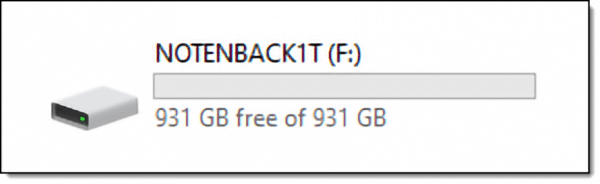
To a computer, 1,000,000,000,000 bytes is really … 931 gigabytes.
And sure enough, my own one terabyte drive shows exactly that:
Thinking like a salesman
If you’re going to sell a hard drive that holds 1,000,000,000,000 bytes, and you have the opportunity to call it one terabyte (in human terms) or 931 gigabytes (in computer terms), which would you choose?
“1TB” sure sounds like you’re getting a bunch more for your money than “931GB”, doesn’t it?
So, you’re getting a terabyte drive, alright — unless you’re thinking like a computer.
Thinking like a linguist
The problem is that the terms kilobyte, megabyte, and so on are all ambiguous1. The same term can mean different things depending on context, or even just depending on a whim.
Because of this confusion, new terms have been created: “kibibyte” (and the mebibyte, gibibyte, tebibyte and so on). (Note the spelling with a “b”.)
These terms are defined to only the “think like a computer” value. A kibibyte is exactly 1024 bytes, always. A mebibyte is 1,048,576, always. A gibibyte is 1,073,741,824 bytes, always.
And a tebibyte is exactly 1,099,511,627,776 bytes. Always.
These terms even have a slightly different abbreviation: while KB refers to a kilobyte, KiB refers to a kibibyte.
And in contexts where these terms are used, “kilo”, “mega” and so on are all assumed to take on their correct “human” values, based on powers of 10.
This means that the salespeople weren’t lying when they sold you a terabyte drive that has only 931GiB on it. If anything, it’s the manufacturers’ failure to use the new, more accurate terms that leads to the confusion.
Because 931GB is not the same as 931GiB.
And, to be fair, I can’t blame the OS designers for not wanting to throw even more generally unheard-of geeky terms at us.
Thinking like an operating system
Even though what I just described is the major reason for the discrepancy in total disk capacity, other factors also contribute to less space being available than you expect.
On a completely empty hard disk, the operating system reserves some amount of space for its own use. For example, the top level directory structure, even if empty, takes some space. Security information, the Recycle Bin, and other information is placed on the hard disk before you ever create your first file. Exactly how much space depends on how the disk is formatted.
And of course, if this is your system drive, the operating system may also have large hidden files, including your swap and hibernation files. In recent years, many hard disks include hidden partitions that eat up even more space.
Do this
Subscribe to Confident Computing! Less frustration and more confidence, solutions, answers, and tips in your inbox every week.
I'll see you there!
Podcast audio

Footnotes & References
1: Technically, they are not at all ambiguous. The prefixes kilo, mega, and so on specifically mean factors based on powers of 10, not powers of two. In other words, they are specifically human-based numbers. A kilometer is unambiguously exactly 1,000 meters, for example. It’s the computer industry that’s caused the confusion by using the terms inaccurately for numbers based on powers of two. For years.


I would also like to point out that the File system or File allocation table (NTFS / FAT /FAT32 etc) also taked up a large amount of disk space. Different file systems take up different amounts of space, file systems vary according to their purpose. The bigger the hard drive, the move space is required for these file systems.
Very nice explanation of a concept my hardware students have difficulty with.
Hi Leo, a great explanation thank you!
I am installing a new ‘160’GiG harddrive (system drive) and prior to formatting the drive it only has an indicated capacity of 130 GiG….
Does that sound about right for a drive rated at 160 GiG?
Is this a predicted “after formatting” capacity?
It seems like a large a discrepancy!
NB/ figures gained from windows XP setup disc.
130 seems a big short. I’d be suspicious that there was another partition on the drive eating up some space. Does XP’s disk manager show only a single partition?
i put some gb size files in all of my drives but when i remove them there is no change in the space.instead of having 18.5 gb free i have only 1.8 gb free.please help.
How did you “remove” them? Try emptying the recycle bin.
The 130gb limitation is due to lba limitations. Go here for help: http://www.48bitlba.com/
We have just bought an 80Gb Dell Inspiron laptop. The disk properties states total 69Gb, which it says is 74,***,***. I could understand if it said 80,***,*** was 74Gb, but how can 80Gb capacity be claimed for our drive which is 11Gb short?
as i know… we define giga as 1000M, mega as 1000k and kilo as 1000
but pc define giga as 1024M, mega as 1024k and kilo as 1024
why there is no free space for me??i need extra space for my mail boxwhich is only 2MB. i need fast. do kindly give me free space or help me. thankyou for your co-operation
Thank you for the explanation Leo. I was also stumped to where my extra GB’s had disappeared to.
what i would like to know is why would windows xp say theres 1 mb or so of free space when i defragged the crap out of it and transferred all the big programs and files to my other drive?
it don’t make sense
Alan
http://www.helio.com
Well, for one thing, defragging does not free up disk space. That’s not what it’s for.
My computer has been messing up lately. Sometimes the internet would work and sometimes it won’t. What is wrong with my computer? Also, my new computer (less then 6 months)started with 232 GB free space on my hard drive and some things have been downloaded but not much. These things that have been download have taken about 30 GB of free space on my hard drive. One day after i was finished using my computer i checked the free space and it had 202 GB of free space on my hard drive left. When i logged back on my computer the next day the free space on my hard drive was 70.5 Gb. How is this possible? Also what does System restore do? (Start, all programs, accessories, system tools then system restore) I have done this before and it loaded my info and all but the programs that i installed before the date selected. Does this take a large amount free space off my hard drive because when my computer shut down again i tried to restore it to an earlier date and it took hours to restore it, sometimes it just stops trying to restore my previous works, it says “needs more virtual memory”. Please help. My computer is being stupid.
System Restore is a program that restores the registry and other system files. I had to use it when I installed a virus on my computer that totally messed up the whole thing and the registry. When you buy a new computer, System Restore is automatically set up to make a restore point that copies all the files in the registry. It does NOT take up that much disk space. And in reply to your internet question, do you have any devices that cause interference? That might be what is messing everything up. It is most likely a toy that some of your siblings/friends have, and your friends are playing with it and turn it off and on. I know nothing about the other stuff.
could you pls tell that when i delete any file and even remove it from recycle bin…..then using system restore ..i am able to bring it back…how does it work…are the files not deleted in reality?
“We have just bought an 80Gb Dell Inspiron laptop. The disk properties states total 69Gb, which it says is 74,***,***. I could understand if it said 80,***,*** was 74Gb, but how can 80Gb capacity be claimed for our drive which is 11Gb short?”
Most Dell computer systems have a portion of the disk sectioned off..called a partition. They do this because they usually put system restore files in it, which include drivers and sometimes the OS as a cd/dvd image. So part of that space is likely that. The rest is likely taken up by Windows and windows related files … and possibly by any pre-installed software/drivers.
I’m Very formilier with windows, However I recently performed a complete reformat of my hard drive because of a shell error that I was unable to fix. I have not connected to the internet or added any files, apps. folders and so on. And I had the same problem befor the reformat. my hard disc is(74G) with a system allocation of 10G and 2G allocated as virtual space. Why do the drive propertys report about 2G less every time I boot up? Now there is less than 10G without adding a single bit. I tried compressing the drive and it freed up a few gigs but it soon began to slowley dwindle. I have a Hunch there is just an error in how the OS calculates free space and reports it. Strangly the free space will get down to 500mb or so and then jump back up to 2.5 or so gigs. What the crap?
it all started way back in the “DOS Days”
I have 2 Quantum 80MB disks, yes I did Say MB from 1988 and both of them have 83.8MB of usable space after formatting with DOS, I also have 2 Samsung 250MB disks and both of them have 262MB of usable space after formatting with DOS, you always got more space up until after the 8GB disks, then everything after that was calculated the other way and sold by the other number
ie if those 80MB disks were being sold today then they would be sold as 83MB disks not 80MB’s,
what happened is greed took over, instead of selling you a 74GB disk and getting 80GB of usable space they sell it to you as an 80GB and windows reports it as 74GB and you get almost exactly 80,000,000,000 bytes.
just like the “320GB” disks which are actually 298GB with almost 320,000,000,000 usable bytes
Cheers, Leo Thanks for keeping us all informed with PC info
I recently bought a 160 GB notebook. Lately, device manager shows total hard disk size to be 149 GB (adding free space and used space) Where did 11 gb go because at first, it was reporting a total of 160 gb? I would appreciate any info.
My recovery C Drive say It only has 45KB left. Is there any way I can add more memory to it? I have a Dell with window Vista.
Someone said – “We think of a kilobyte as “around” 1,000 bytes. Close. Close enough for most conversations. But when we think of a megabyte as “around” 1,000,000 bytes, and a gigabyte as “around” 1,000,000,000 bytes, we’re getting less and less accurate at each step along the way”
Umm
Kilo means exactly 1 thousand (not around)
MEGA means exactly 1 million (not around)
Giga means exactly 1 billion (not around)
Your math is spot on old bean, but how YOU think is wrong. and yes the companies sell you an 80 gb hard drive with only 7.6 gb usable ( by you) because the rest is used my your operating system.
When i had my old 486 Dx 33 ( loooong time ago) I had a 260 mb hard drive ( that was huge back then) Dos and windows 3.1)reported exactly 260 mb. it wasn’t until the advent of Windows 95+ did the operating system hog space for it self.
So yes you ARE getting an 80gb hard drive, but your Operating system gets dibs on the other gigs. so windows is correct in telling you that you have 7.6gb of space. thats the space left over AFTER windows hogs what it wants.
@Steve: Leo’s math is correct, and so is his logic.
You’re right, ‘kilo’ means 1000, etc.
But in computer terms, (and if you read his post carefully you’ll find out), ‘kilobyte’ doesn’t mean 1000 bytes, it means 1024, even though they use the prefix ‘kilo’.
So when he says we humans says ‘kilobyte’ to mean ‘around 1000 bytes’, he’s right – because 1024 bytes is very close to 1000, so in layman’s language, we round it off to 1000 to make it easier for us to understand. But to a computer, a kilobyte is 1024 bytes. And a gigabyte is 1,073,741,824 bytes.
So if you have a computer that says ’80GB’ on the box, realize that this is ‘human talk’, so that companies can make it appear that they’re giving away more memory than they actually are. In ‘human talk’, that’s 80,000,000,000 bytes they’re giving away. Which is correct. Want to find our how much you’ll ACTUALLY get when the computer uses the disk?
Simply divide 80,000,000,000 by 1,073,741,824, and you’ll get the result = 74,5 GB, which is exactly how much the computer reports.
The reason you see less memory is NOT due to the operating system, as you stated. The above happens even if the disk is completely clean and has no operating system on it whatsoever (I know because I have one hard disk with no OS on it.)
The reason your old computers reported the exact amount of memory that was available to the computer, was because in THOSE DAYS (80’s), the manufacturers used 1024 bytes to mean a kilobyte. Later when they started selling 8GB drives upward, they started using the ‘layman’s’ definition of KB, GB etc.
Geddit?
08-Nov-2010
You’ve touched on one of my pet peeves.
Sure, back in the “old’ days, my $5000 386 included upgrades. All the way up to 80mb and 2mb of RAM. Back then there were a couple of things going on. Many vendors sold drives unformatted, so when you formatted the drive a lot of space evaporated. Other vendors would sell formatted drives that actually had a little more space than advertised because they expected sectors to go bad. And in those days, losing a sector was a significant bite out of the total drive size. So they hedged to keep customers happy.
The binary reporting in the OS was based on optimizing performance when CP speeds were measured in Khz and memory in 100’s of bytes. The CPU and the RAM was binary, so it was “easier” for the computer to report in powers of 2. Conversion to decimal was “cpu expensive”. But now when even “granny” has GHZ sitting idle on her desk I think it is time for the industry to convert to measure that is “normal” for “average” user. That is counting in decimal rather than binary. Powerful computers are now commodity items that are being marketed to “average people”. Computing has grown way beyond geeks who count in binary and hex and who could read core dumps. Mom, Pop and grannies now use them on a daily basis.
My concern about the binary / decimal divide is the scale it is reaching. Sure 24 bytes isn’t much in 1000 bytes, but since you are dealing with powers of 2 the gap keeps on getting bigger. That 1 TB (decimal) drive only has 931 GB reported in the OS. That “lost” 70 GB is a significant difference. It won’t be all that many years when the home theatre server will be measured in petabytes.
It’s certainly one of the things that puzzles new computer users. A 500 GB Seagate drive I recently installed reported 465 GB of space. It’s perfectly normal.
After reading all the comments. ONE very basic point is missing. I was a computer tech when a 300mb Hard disk was a stack of 19inch disks. ( removable spindel) The “empty ” disk was decreased by “sector Markers”. Think of it as a 20×20 ft. garden “before” setting out the the plots, rows. etc. When done you lost a lot of roon to space between rows. pathways, etc. So by the time your done you only have apx. 20×15 of planted aria. Sector marks, partitions all use up disk space. THEN the other discussed factors add to the mess.
At 78, I’ve seen Tube computers # took a large roon just for the “Main frame” My first desk top used a audio tape drive for storage. My first “hard drive” was a 20 Meg. ( Wow, I realy thought I was “Hitech”.# I ran Dos1.3 Now I’m running Win7 and have 1.5 T bts. All on my desk.
Whatever ya say Leo this should have been changed a long time ago. Reminds me of all prices being up by .99 cent at the end.
@Ernie S. You are five years older than me, I was trained by the Air Force in 1959, first worked on a 100% vacuum tube machine (dual diodes, of course) to encrypt teletype signals. Went to work for Litton Systems in ’62, NCR in ’63. Been generally along the same trail. If progress continues at the same rate as the 20th century, “Beam me up, Scotty” will be a reality by the end of the 21st. Too bad progress in human relations can’t be accelerated a little. — “73s + CUL” Charlie
@Digital Artist
Charlie, I am three years older than you! Also served in the RAF. Your comment “Beam me up, Scotty” is something I have been predicting for a long time. And I really believe it will be possible sooner than we think. 73’s o.m.
A fair amount of folks are familiar with kilometers and 100 meter dashes and other metrics like .75 liters (approximating a fifth). Or .5l, the size of a lot of plastic bottles these days, approximately a pint of liquid, but a little bit more (around 16.9oz.). I wonder how NYC’s Mayor and the bottling industry are dealing with that.
The metric system is familiar to most in the venues where it is used. In the computer world we deal with bytes, 8 bit bytes when measuring capacity. When talking about bytes we know we are talking about computers and computers measure capacity in powers of two. So a Kbyte in the computer world, 1KB, equals 1024 bytes. To invent a commercialized meaning of 1KB as meaning something otherwise is at the very least, disingenuous, more likely deceptive marketing practice. KiB wasn’t established until 1999, long after the horses had left the barn, and hasn’t had much acceptance. How much code do you think would have to be touched for a computer to report capacities in KiB? Ain’t gonna happen this generation. And how many man-hours would be lost this generation with everyone scratching their head, asking the question “what the Sam Hill is a kibibyte?” With extended discussion to follow. One solution may be for Standards Orgs. to define Byte as a special metric-metric in recognition of its unique status and further quantify a unique value (1024) for 1KB and all subsequent orders of magnitude. The marketing world defined 1KB as something, in practice, it wasn’t. Seems to me, just off the top of my head, it’s a lot of trouble for just under 2.5% but that’s a pretty big number when it comes to profit margins. I think the Standards World fell down on this one, even though they tried to fix it in 1999.
Don’t get your hopes up though. Physical Bytes does not equal effective Bytes. There’s byte level parity just to start with and all sorts of derivatives and schema to insure the full integrity and reliability of your number crunching powerhouse. Byte level parity adds 1 bit to that 8 bits of actual information. Of a true MByte (1024KB) of storage that equals 1Mb (Megabit) or 125KB of added (lost) storage just to start.
Got a headache? When you’re trying to exert some control over your computing environment, load up on information, buy what you think will satisfy your need, and hope that at least you’re getting a fair price for what you bought. Be happy with your success if it does and forget the rest.
This comment, originally composed in MS Word 2010 is a total of 477 words or 2,747 characters including spaces. The stored document size is reported as 14.6 KB (15,036 bytes). The stored area on Disk is reported as or 16.0 KB (16,384 bytes). Oops! Formatting loss.
Hi Leo
Slept on this as I know it annoys the hell out of a lot of people.
Only answer I can think of is to totally Zap the Bit.
This would rule out the 8 factor and would allow the system to become fully decimal as it is supposed to be !
There are many precedences for this in currency, at least in Europe.
But WOULD this interfere with the command prompt which I still regard as DOS ???
Would highly regard your opinion.
Why just not zap the Bit, and get back to true decimal ???
Because computers do not think in base 10. A computer’s CPU is, at its most fundamental level, just a collection of a few thousand to a few billion transistors. (An Intel Core i7 has about 1.75 to 1.9 billion transistors.)
A transistor has only two possible states. It can either be “on” (1) or “off” (0). In order for a computer to “think” in decimal, you’d have to invent a new transistor that has TEN states instead of just two. So this imaginary transistor would have to have “totally off”, “mostly off”, “moderately off”, “slightly off”, “barely off”, “barely on”, “slightly on”, “moderately on”, “mostly on”, and “totally on”. Then, and ONLY then, each “bit” could hold a number from 0 to 9.
Yeah… not going to happen. Not in our lifetime, anyway.
Leo gives a nice explanation, but does it really matter anyway? Unless you are going to write one file that is exactly 500 Mb, you are never going to use all 500 Mb of a 500 Mb drive, even if you had all 524,288,000 bytes.
Have you ever noticed the file sizes when you click on the properties of a file? This 12,130 byte file on my computer is actually using 12,288 bytes (Leo’s got another article about why this is, so I won’t go into it here).
There is always some lost space. There always will be. It’s a fact we have to live with. I once bought a 512 Mb hard drive for more than the cost of the external 3 Tb drive I just bought. Hard drive prices have come down a lot, so I just don’t see the point of quibbling over where the extra bytes are.
That however, does not excuse the manufacturers from being less than ethical (in my books). They’re not driving down the highway; they’re not selling me apples. They’re selling computer equipment and should use the computer terminology, not the metric terminology.
Now I wish the
I thought that all hard drives have the technology to swap bad sectors in and out of operation, therefore reducing read/write errors. Could that not exploain the “missing bytes”?
Someone sued the monitor manufactures, resulting in 15 inch monitor(13.9 viewable). So Lets sue the hard drive manufactures. The worst offenders are the flash drives. My first drive 2GB(IBM) was actually bigger than what I paid for. I believe the lost capacity is due to the format sectors taking up space in addition . My 320 GB drive is showing up as 292GB. I am missing 21 GB. Also NTFS may eat up more space than FAT, but that is another question here.
I was to go for 500 GB portable Hard Disk till the time I could generate fund for a Tablet or at least for a Laptop. After reading this Leo’s letter, enligtened to go for 1TB unit to have the required capacity. Thanks for the timely guidance.
By z way did you put in mind that the operating system uses some of the hard drives space? Like 20-40gb.
Ive recently bought a Sata 3.0 3terrabyte hd and after plugging it in and formating it i can only use 2 terrabyte because 1 tb is locked to the system. In the case you explained its missing 3%, In my case im missing 33%.. And nobody can tell me why. I have a 990 FXA-UD3 Motherboard and a additional 500gb harddrive plugged in.
I’d have to know what you mean by “locked to the system”.
A terabyte is 1,099,511,627,776 bytes. So why would they use 1,000,000,000,000 instead. You said they used 1TB because it’s bigger than 931GB. But 1,099,511,627,776 bytes is even bigger so why don’t they use that.
Marketing is all I can answer.