It’s full of unmet promises and will probably let you down.

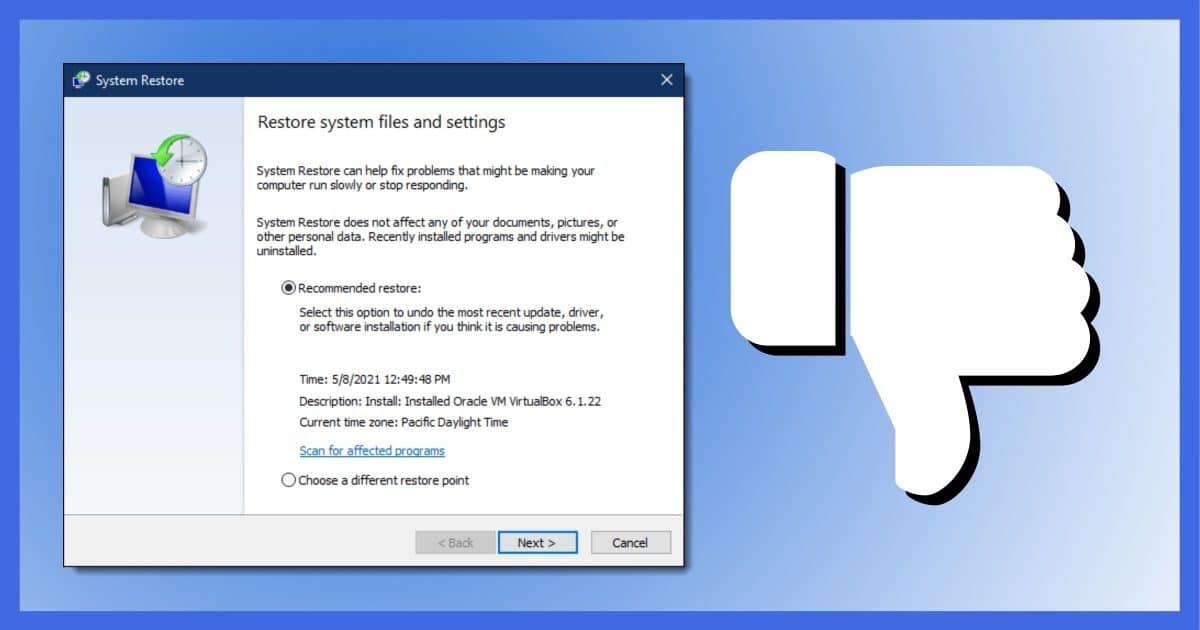
I’ll be honest: I have no answer to your question. There are many possibilities, the most likely being that there is not enough disk space allocated for restore points. In my experience, increasing that may or may not resolve the issue.
System Restore is so difficult to diagnose, and I hear of so many problems and misunderstandings with it, that I now avoid it completely.
I turn it off. It’s just not worth it.I’ll tell you what I do instead.
Become a Patron of Ask Leo! and go ad-free!

System Restore considered harmful
System Restore does not restore your system. Its name implies it does, but at best it backs up and restores only the registry and a few other items. In addition, experience shows it’s untrustworthy. While System Restore can be a quick solution when it works, there’s simply no assurance it will. Rely on system image backups instead.
What System Restore is
System Restore is best thought of as a registry backup and nothing more.
In reality, it backs up more than the registry, but exactly what else is complex and incomplete.
As a registry backup, it’s reasonable. When it works, it’s a fine way to take a snapshot of the registry you can restore later, should something go wrong.
But only the registry — and only when it works.
What System Restore is not
Ironically, “System Restore” does not restore your system.
It does not restore everything to the state at which it was created. It restores some things — like the registry — but not all things — like your files or whatever else you were hoping it would.
System Restore is not a substitute for backing up your system.
System Restore in the wild
Much of my opinion on System Restore is not based on its definition or even its intent.
In theory, it’s a great concept, though poorly named. I’m not a fan of its user interface, but that seems to be improving and doesn’t really factor much into my opinion.
What does factor into my opinion is that in the real world, System Restore continues to have problems.
Your inability to manually create a restore point is just one example among many. Other common examples include failures when restoring and missing or non-existent restore points.
Sometimes, these are configuration issues. Sometimes, these are issues of mismatched expectations.
But too often, even understanding what we should and should not expect, System Restore just lets people down.
To be fair, I do hear of successes. It’s not uncommon to hear of problems caused by installing some application or another to be completely repaired by reverting to a recent restore point.
Like I said, it’s a great concept.
But in my experience, you just can’t count on it.
Don’t rely on System Restore
Given that it might work but might not, what should you do?
Simple: don’t rely on System Restore.
Leave it enabled if you like, but don’t count on it being there when you need it. Don’t set things up such that a System Restore failure would cause you grief.
Be happy when it works; be prepared when it doesn’t.
Do this
Rely on backups instead of System Restore. I advise turning off System Restore completely (to free up the disk space allocated to it) and relying instead on a good system backup strategy.
By “good system backup strategy,” I mean that you regularly take full system backups of your machine, augmented with more frequent incremental backups — typically monthly full and daily incremental.
If something goes wrong, restore from the most recent backup. Done. Everything — everything — is restored to the state it was in when the backup was taken.
This can take more time than restoring to a System Restore restore point. Restoring from an image backup restores your entire system. But it’s worth it because it works.
It’s what I do.
Choosing to leave System Restore enabled is fine, but only in addition to having those backups. That way, when System Restore works for you, it’s a shortcut — a time saver.
And when it fails, it’s not a disaster.
Podcast audio

Related Video


There’s yet another reason not to like System Restore. A friend once asked me to free up space on her hard drive which was full. I found 70 GB of System Restore Points. I cleared all but the last one and limited the amount of System Restore Point to a maximum of 2GB. If you’re running out of disk space, try reducing the space allocated for System Restore Points.
How do I get System Restore to take up less space?
I still use system restore and have allocated 1 GB for restore points. Running the Restore is so fast, to me, it’s worth a try.
I’d advise to leave it on IF you know how to use it, or ask your friend who is going to fix your computer when it totally dies after a rogue exe decides to do some major damage.
I use UBCD to access the system even if it won’t run, and use the restore tool on there to reset it with success in most cases.
I find it only works for cases where the damage is one rogue installation or similar and you get to it straight afterwards.
I have, in the past, used System Restore to undo some catastrophic screw-up, or to ‘get around’ a virus infection in order for me to do something about it.
Things I don’t like:
If a specific file has changed, it stays changed. SR doesn’t do anything about that.
If a program ~updated~ itself, it forgets – and has to be updated again, regardless if you have the new files or not.
The System Restore file system seems to be the hiding place for a lot of viruses – more often than not, if I get a virus alert, it’s in one of the system restore files or directories.
I used system restore when I got a virus. I restored it back to as far as I could took two times but I think I got rid of it. Did I do wright?
06-Jan-2012
@Larry
System restore probably didn’t get rid of the virus. Read here for more:
How to recover from a virus infection
Actually, one thing I like about System Restore is that it *doesn’t* affect data. It has saved me from some disasters, especially programs which messed things up totally and the damage could be undone. And I was glad that work since the restore point (data files) were not affected by System Restore.
How can a backup get the same functionality? For instance, I use Macrium to take a frequent (weekly) image backup, but if I were to use it to restore my system it would revert data files as well. Is there any way to restore the system from a backup without affecting data?
06-Jan-2012
Difficulties with running System Restore can be caused by malware. If your System Restore isn’t working, I would strongly advise running a good free anti-malware program like Malwarebytes Anti-Malware – http://www.malwarebytes.org/mbam-download.php
The problem with backups restoring old data can be avoided if you have one disk for programs (system & the rest) and one for your data. I’ve been doing it for several years, and it lets me restore only what I want to.
BTW, system restore has saved my butt a couple of times. I give it plenty of room on all my disks (1.5Tb disks going for $79 on sale these days) and I make sure to do a random one now & then.
It’s very easy to create a manual restore point in Windows 7. Click the Start button, type Create and the first item on the list is “Create a restore point”. Click that and Click the Create button. The restore point create is also available on the System Protection tab of the System Properties dialog.
I do see what you’re getting at, but equally I think you’re response is a bit harsh. I tend to think of it in the following way: you’re computer is you and you’ve just been involved in a small car crash. A first aider (System Restore) tries to bring you back whilst a medical professional (proper back up) is called. If the first aider gets you running again that’s great, but you’ve always got the medical professional there if needed. If you bare in mind that System Restore doesn’t affect files you shouldn’t be disappointed! In fact, it often plays to my advantage. Using System Restore, I could try to restore to any stable state so that I can access/backup any files before safely fixing the system if necessary. Leo is mostly right, especially when he says that it should not be thought of as a “backup” – I still believe that a full back up of your system should be made at least once a week.
In regards to the original question asked, it’s hard to say with out more information – it could be down to malicious software, insufficient storage or permissions or anything else. Your best bet is to Google it and even ask on a site such as SuperUser.com!
I don’t use or recommend System Restore either because it is half-baked, like many other Microsoft features. It is not finished and fails more than half the time with no explanation as to why. Sometimes it even screws Windows up. I advise my customers to back up if they need to, but to leave System Restore completely alone.
First of all after trying to “bare” in mind (Jimmy Swann), I now bear in mind what is going on with System Restore. But, why oh why, Leo did you not recommend what you use to back up your system, and where to back up to?
06-Jan-2012
I turned system restore off 5 years ago after it did nothing to help in my last system crash. I’ve been crash free since and I’ll never turn it back on. I’m using XP Pro
System Restore, like or dislike.
Been there, tried that, didn’t like that, me too could not create restore points, and all a bit messy too, particularly where my old enemy, “Windows ambiguity”, is concerned, likewise, such ambiguity was around after the local geek advised System Repair for a blue screen error, I wiped my hard drive completely clean, fortunately not so
when I had dabbled in Restore, but heh, I am a relative newbee, to sharper users the ambiguity would not be a problem.
Cheers
DurbsDave
I have had success with System Restore in that if I won’t restore automatically, it will then give backup dates to choose to restore back to. it’s been working for me. I have Vista.
I have only been able to System Restore using safe mode. I agree with Leo that System Restore is unreliable.
When System Restore fails, like Leo, I first rely on an image restoration. If that fails, I reinstall Windows.
Don’t forget to backup your drivers with Double Driver; don’t forget to backup your internet bookmarks.
Seriously folks….Leo is providing a “learning” environment for me and many others I am sure. He would be negligent if he did not give us the pros and cons.
System Restore is an intimate friend to me. I have seen my life disappear before my eyes, having to depend on my last bit of energy to hit the System Restore tab….like magic, my life is returned to normal.
All of my friends are accessible to me again that were not….my pictures come back…my poetry.
Microsoft would not offer us or enable us to access a program that is faulty.
If used properly, the program or lifesaver, whatever, is truly a lifesaver to some of us.
I need to learn more about ‘backing up” stuff.
My vote is “keep it on”.
peace,
Ruby
I agree that using System Restore in safe mode is more reliable. I’ve also had instances where the restore failed message appeared, but it actually did work. Go figure.
Wow ! I’m amazed that anyone would not praise SYSTEM RESTORE.
As an ardent surfer I often try out a program or app and then unistall it if it isn’t what I expected.
In many cases, uninstalling those programs also uninstalls an important app that I need. Recently my IE EXPLORER and RECYCLE BIN were missing when I booted up next day.
Nobody in our computer club knew how to bring those back but I just clicked on SYSTEM RESTORE, clicked on the previous day and voila,
both important apps were recovered.
I just can’t imagine a better device that SR and maybe that is why millions of PC’ers still prefer XP to Win 7 and are waiting patiently for Win 8.
04-Feb-2012
System Restore has worked for me in both XP and Win 7. I’ve also restored friends PC’s when an update or their Anti-V programs have deleted files that proved to be needed and were false-positives. But yes, I do incrimental back-ups to an external HD.
I’m with Leo. As a system builder/repairer I’ve seen far too many times when system restore was useless or disabled completely by malware. When it works, it’s great. However, those who have never had system restore fail are in the minority.
The system backup (we prefer images via Acronis True Image) is our preferred method of backing up our own systems and what we’ve recommended to customers for years.
Another thing to consider is, that backing up to the same hard drive as the operating system is on – is really no backup at all if that hard drive fails. So there’s no such thing as “my computer is too full to permit me to backup everything”. I’ve got 4x 1 TB hard drives running in RAID 0, with 3 partitions on it. Windows can’t currently see more than 2TB partitions, so any partition backup will fit on an external 2TB drive. 1 and 2 TB hard drives are cheap now, so no excuse not to have several if you have that much to backup.
Just food for thought. :-)
You are right, sometimes system restore does not function, It goes through the process and then at the end it tells you system could not be restored to rstore date.
My question is, Is there a good recovery software that you can use as a recovery partition that will actually clone your drive, mainly the newer computers come with a recovery partition which is good but not completely safe and true. software to backup the drive (clone) and be also bootable? Can you recommend.
I have been a repair technician for several years and I do like system restore but it is not perfect. you should never put all your eggs in one basket, use system restore along with back up’s.
As a tech I get many calls to fix problems that were easily fixed with system restore, and many that are not. Sometimes system restore is blocked from opening from a virus sometimes the date has been moved ahead a thousand years and locked out from going back to get a proper restore point and sometimes it just fails. fixing other computers almost never involves using a backup to restore stuff since they did not use a back up that leaves you with the hope of system restore or finding the problem manually or a re install.
in short system restore is great but not perfect
@Walter
The safest solution would be an image backup. Leo recommends Macrium Reflect The paid version has the incremental backups feature which would allow you to restore to any backup you choose.
Since this article was written, we’ve added a recommendation for EaseUS Todo Free which performs incremental backups.
I have HP DV 8000 series with XP SP3
Restore has always worked for me. But I do notice that it does not remove malware.
I use security software for that.
I have successfully used Acronis True Image to clone my drive about once per week. Until the recent flooding in Thailand hard drives were so cheap I would just buy two identical drives. One for the system and one for backup. Even a catastrophic failure was easily remedied by swapping in the backup and I was ready to go. I used to use Ghost but floppy drives became less available and the floppy discs is/was clearly not as reliable as data on a hard drive.
I’ve never had much success with system restore. Seems very unreliable. Almost invariably comes up with “Your computer cannot be restored to ………… No changes have been made”, the give-away normally being the sudden jump by the progress bar to the end whilst allegedly “restoring settings”. Seemed to be a bit better running from safe mode but even that fails quite often. Doesn’t seem very robust to me.
Is Norton GoBack similar to System Restore? System Restore on my XP system has NEVER worked correctly from day one. I still have and use Norton GoBack with much success – it has saved my a$$ from bad and incompatible software installations, malware, and who knows what else dozens of times over the past seven years or so.
Does anyone make a program similar since Norton does not carry this product any longer?
My comment would be in favor of SR.
I found a weird thing happening to a MS Street and Trips App. If I installed Sony Vegas Movie Studio, it would cripple the registry of the MS app, suggesting I reinstall the app. Of course, I would get the same warning no matter if I uninstalled it and started again, or just did a corrective install. It seemed the ONLY way to recover was to run the SR mode and forget my
Vegas software. I think there must be some way I can have both apps without this conflict.
I have Norton Go Back on my system and have used it for years. I has multiple choices for going back. it has saved my but many times. I like it.
“…I hear of so many problems and misunderstandings with it that I avoid it completely.”
Re: Why I don’t like System Restore
Not surprising, Leo–I and, no doubt , hosts of others have successfully used SR time and again. Successes in using SR would not trigger off a celebratory email to you.
Just saying…
09-Apr-2013
System Restore has come in handy numerous times for fixing client systems. (At a minimum, to get to the point of having a non-booting system booting again, so the rest of the problems can be fixed.) It’s come in handy numerous times to repair a corrupted registry.
On the other hand, I’ve also seen a perfectly good, newly-fixed system brought to its knees by someone else carelessly using System Restore. (Basically, they restored it to a bad state. We’re considering implementing a policy where we create a restore point after fixing such a system, and deleting all old restore points, to prevent something like that from happening again.)
In short: I see no problem letting the system make restore points. Just don’t restore to one unless someone who knows what he’s doing says to do so. (And don’t rely on them to magically fix any problem you may have.)
09-Apr-2013
If I wanted to restore the registry, I would use the “Last Known good configuration” option during “Advanced startup options” (which many of us know as F8).
In addition to the registry, I have noticed that System Restore also backs up internet explorer. One time, I hated Internet Explorer 9 beta so much that I used system restore to uninstall it. I know that I probably should not have done it that way, but it worked completely flawlessly and seamlessly. (but later on, I loved the real IE 9, and now I love the real IE 10.)
Another example:
On Microsoft Answers, someone had a problem with “unwanted (asterisks made by website) running at startup of IE” and basically said that after installing freeware, IE didn’t work like he wanted. So I gave him four options with detailed instructions. 1. turn off/remove add-ons 2. add/remove programs in control panel 3. System Restore 4. Malwarebytes’ anti-malware. The next day he replied “I just went with the checkpoint restore and everything I did wrong just vaporized.” So that goes to prove how powerful a tool system restore is if it does what we want it to.
I forgot to add in my original comment:
I don’t get why people think that it will get their files back. The help files in Windows clearly state that “System Restore isn’t intended for backing up personal files, so it cannot help you recover a personal file that has been deleted or damaged. You should regularly back up your personal files and important data using a backup program.” In fact, when rstrui.exe is executed, it produces a differently-worded similar message, yet people complain about it.
People don’t read help files, and in fact rarely read the messages that are popped up like that. The name is System Restore, so some folks expect it to restore their system – all of it.
I would compare System Restore to a car with a faulty airbag. It’s great when it works, but I’d rather have something more dependable in addition like a safety belt or in the case of a computer, a backup. I know the analogy isn’t perfect, but it’s the best I could come up with.
I absolutely love the concept. When it works it’s great. But in my experience it simply cannot be relied upon to always be there when you need it.
SR has been all GOlD for me over the years but I agree, it should NOT be called system restore, especially when software exists that can create images and restore systems in every sense of the meaning; maybe registry restore; at least for XP. Microsoft muddied the waters in later versions with shadow copies and the ability to restore SOME files. I’ve backed out of a service pack 3 for XP update using system restore and rather than grind for days on some error or resort to a full system image restore for some trivial registry corruption, system restore can make things right again in 5 minutes.
Like any tool in the wrong hands with improper expectations it skews perceptions badly (exceptions are taken as gospel instead of proving the point that it works most of the time)…one doesn’t hunt elephants with a six shooter and one doesn’t break peanut shells open with a sledgehammer.
I look at System Restore as being like a lost and found at a train station. If you leave something on a train, you go to the lost and found even though you don’t expect to find what you lost. A couple of times I actually was pleasantly surprised to get lost things back. That’s similar to my experiences with System Restore.
Sorry, but “I typically advise people to … turn off System Restore completely” is bad advice. Would you say “turn off your firewall because you have an Anti-virus program running?” (or vice versa?) Or “you don’t need file backups because you have weekly image backups?” (or vice versa?) System Restore is *part* of the Windows reliability system and throwing it away just doesn’t make sense. Another example, this advice is equivalent to saying “Since I have a RAID array I don’t have to do backups.”
Definitely, as you say, “Don’t rely on System Restore” because there are things that it can’t fix. I typically create a restore point before installing unknown and possibly buggy software. Relying only on one thing to save oneself from disaster is always subject to Murphy.
And Leo, there another aspect of System Restore you didn’t address, the “Restore Previous Versions” or files or folders function that is part of System Restore. In Windows 7, right-clicking on a file or folder gives an option to recover Previous Versions of that file or folder. (Unfortunately, this feature appears to be cut out of Windows 8.) Again, Previous Versions is not a substitute for good backup practices, but a supplement and added layer of redundancy. Since I’ve got lots of extra disk space, I’ve even increased the maximum disk space that System Restore can use – allows it to “backup” even older versions of files and folders in older system restore points.
I usually completely agree with your teachings, but this one feels contrary to your normal, “Backup, Backup, Backup” philosophy. Why throw away something that doesn’t hinder and can help?
-bb
My problems with System Restore are not about the functionality that it does or does not provide. It’s about its reliability. By that I mean all too often it simply doesn’t work when it should.
I advise people to turn it off for two reasons: one, to free up the disk space that this unreliable feature takes up, and two, to drive home the point that they shouldn’t be relying on it.
Other than that, there’s no great harm from leaving it on. There is great potential harm in expecting it to work and not taking additional measures to protect yourself in other ways.
I have used ERUNt (Emergency Recovery Utility NT) and it has saved me a couple of times. I often run it before installing a program, then if I don’t like it. i uninstall it, but roll the registry back to prior the installation. That way no remnants of the program remain at all.
Jim
Leo,
Here’s another reason not to like System Restore.
I recently had occasion to do some file recovery from an external USB drive that a friend had accidentally formatted.
I grabbed an older desktop machine that had Vista loaded on it, booted it, and plugged in the the USB drive to start doing some forensics.
Vista proceeded to write to the USB drive, creating a System Volume Information folder and a Recycle Bin folder.
Writing to an accidentally formatted disk is exactly what you *don’t* want.
Is there a way to *completely stop* the System Restore and Recycle Bin services so that they don’t do this?
This article is about making System Restore take up less space, but the screenshot also shows a box to disable System Restore.
How do I Get System restore to take up less space?
You can disable the Recycle Bin by right clicking on the Recycle Bin and selecting Properties and from there selecting “Don’t move files to the Recycle Bin…” I believe that can only be done globally and not an option for one particular drive.
You wrote this article 7 years ago and System Restore has been around since about the beginning of the Millennium. You’d think after almost 20 years, Microsoft would have figured out how to make it work.
One would think. Actually my take is that it’s doing exactly what it’s designed to do. It’s just poorly named (it doesn’t restore your system), and it’s interaction with available space is not made sufficiently visible.
And Microsoft is doing what it always does, confusing the hell out of people with their naming system. It would be a great program if it were renamed Registry Backup and Restore. It does a little more than back up the Registry, but it’s little more than a Registry backup.
After reading this article, I tried to access System Restore but “Set a Restore Point” was grayed out. I then switched users and logged in to the Administrator Account. (My regular account is an administrator account but it didn’t work there.) I then went in to System Restore and was able to make a tweak. I then logged out of the Administrator account and went into my regular account and I was then able to go in and set a restore point. I don’t know what happened or why but if you can’t create a System Restore Point, you might try logging in as Administrator and it just might fix the problem.
I have used System Restore for a long time and I do a complete backup to another drive.
Never had a problem. Works just fine. Like Leo said, check your remaining disk space.
As Leo says, it’s not a replacement for a back-up.
Although Restore Points have their uses.
I create an RP prior to installing any new program, so in the event of that program being rogue then I can easily roll the computer back to where it was immediately before the install.
Some software installers (especially installers of software from reputable programmers) are kind enough to create a restore point automatically, just before the actual install. :)
I don’t know how old the original question is, but in Windows XP both the Restore and Create functions were on the same utility (same window), easily accessible via the Start menu (Accessories >System Tools). Since Vista, Microsoft split the Restore and Create functionalities. Restore was still accessible via the Start menu, but the Create function was well hidden. This, I believe, was due to Microsoft’s continuing effort to obscure, obfuscate, and hide everything. I wasn’t going to put up with this, so I created a Visual Basic script to create a restore point on demand. I also put this script in the Scheduler to create restore point upon every reboot. One area this has come in handy is being able to quickly create a restore point just before installing a new application – just in case the application messes up something in the Registry. That has proven to be useful over the years.
The original question is, indeed, XP-era, however my concerns remain to this day. That they remain after all this time is frustrating.
I have Windows 7 Home Premium. I have System Restore turned on but I think I have used it maybe 3 times since I bought my PC 8 or 9 years ago.
About 7 years ago I was being nosey and I found that System Restore was not creating restore points even though I had reserved enough space for them. I could not create restore points manually either. After several days of searching the internet and cross-checking everything (to see if I was being led astray), I discovered my “Shadow Copy” was to blame. When I bought the PC I had turned off “Shadow Copy” because I did not want it. I use other means to get my files back. System Restore on Windows 7 apparently needs “Shadow Copy” in order to work. After a week of more internet searching (and more cross-checking) I figured how to make “Shadow Copy” work ONLY for my System Restore. Caveat emptor – don’t trust everything you read when searching for answers on the internet. Some answers might work for one person, but not for someone else.
If you want to create a restore point yourself go to control panel>system>advanced system settings>system properties will open, go to system protection and at the bottom create. Fill a name on the box and it will create a restore point for you.
I agree with Leo, Windows system restore is not reliable. Sometimes it works but sometimes it don’t.
In my experience that goes for all backup solutions built in to Windows except for Robocopy, which can be used as a good file backup solution.
To backup Windows I use Macrium Reflect, a solid backup application. It has never failed me.
I don’t save files on the C partition.
I save files on other partitions.
I backup Windows with Macrium.. All my changed files on the other partitions is copied with a Robocopy command saved in a bat-file several times every day to two sets of external hard drives formatted as ReFS (the newest file system from Microsoft which actually protects files from becoming corrupt).
Off-site backups is running continuously to Onedrive (the most important files only) and idrive (all files). I am suggesting this a very solid backup strategy and I am interested to know if anyone would like to object!
You say you back up on other partitions. If you are backing them up on different partitions on your system drive, you are not doing it correctly. You should back up to an external drive or network drive so your backup doesn’t get destroyed when your system drive gets fried.
Can I backup files to another partition on the same hard disk?
Thank you for caring Mark!
All my files are saved on internal drives different from the system drive.
Robocopy copies all files to dual sets of external ReFS drives.
Onedrive takes care of backup of the most important files to Microsoft cloud and Idrive backs up all files to Idrive cloud.
So all files are backed up on 3 places and the most important files are backed up on 4 places.
Windows system backups are only backed up to the external drives {I dont want to waste cloud space on system backups)
Copying your backup to an external drive would be a safe backup since you have your backups backed up outside your machine. In a way, OneDrive is my main backup as I occasionally restore files from it. I’ve only had to use my image backups twice in the last 10 years. Once to upgrade to an SSD from a failing hard drive and once to get rid of malware.
If you are serious about backing up you should definitly use some kind of off-site backup. I wish to alter my first posting and now say OneDrive is a cloud (off-site) backup solution built into Windows that works fine most of the time and when it doesn’t the Onedrive icon shown in taskbar will indicate something is wrong (or disappear) and it can be fixed. That’s my own experience anyway. Onedrive works fast and also replicates files between devices if you wish. Idrive is cheaper than OneDrive, a bit slower in my opinion but also reliable and easy to check if it works or not. Any problems with Idrive is easily fixed and the support is excellent. Idrive also has file replication between devices.
If you subscribe to MS Office 365, you get up to 5 TB OneDrive storage for free. I look at it in reverse. I subscribe to Office for the storage and look at MS Office as a bonus for subscribing to OneDrive.
A sore subject with me. I used to use it and it worked several times over the years. Over the last couple years however, it just didn’t work correctly. In my quest to understand why, I came up with 3 things .
1) If you any kind of 3rd party program that allows you to do a system restore, you have to question how it might have affected the SR program that came on your PC by stealing focus with Microsoft/Windows.
2) It’s important to go into SERVICES>VOLUME SHADOW COPY, be sure it’s set to “Automatic” and is “Started” before doing a back up.
3) Go to support.microsoft.com/en-us/help/947821. Read and install DISM- All 3 steps. After I did this mine started working again.
I too discovered that at times, System Restore just didn’t work and I didn’t know why. In the last 2 weeks I found an article “Fixing Restore Point not working in Windows 10 on auslogics.com. I found in section 6 what looks very much like the “fix” IF you did everything to set it up to work properly. To cut to the chase, if you go to “Services” access > 1) Volume Shadow Copy andheck to see that Startup type is set to Automatic and Service status is set to Running. Do the same 2 steps with “Task Scheduler”, “Microsoft Software Shadow Copy Provider Service” and “System Restore Service” from the Services list. These 4 items need to be set to Running AND Automatic. Needless to say these 4 items are necessary for System Restore to work correctly. Unfortunately I think what is happening is that 3rd party apps that incorporate a System Restore as one of their options, is stealing that focus from Microsoft and these 4 settings are being modified in Microsoft Services. This is speculation, but I highly suspect it. I haven’t taken it further to double check that yet. None the less it’s Microsoft’s responsibility to put in a fix so those settings in “Services” can’t be changed by a 3rd party app, making one of Microsofts’ tools unreliable and useless. If this is the case, beware, another reason to use 3rd party app at your own risk. I think Leo has said this over and over, as we never know what they are doing to the MS OS!
I stopped relying on System Restore ages ago. If it works yeah! But if not it sucks. From my experience like with leo’s its very hit or miss. Since I have fixed friends and families PCs I have decided it’s likely not worth it. Instead I use a less well known freeware tool called Regbak (https://www.acelogix.com/freeware/) and unlike System Restore it’s an excelled registry backup and restore tool. Now many of you might ask what’s the point of a third party registry backup tool when Windows has it own in the form of Regedit? the reality is that the registry backups made with regedit don’t work the way you think they do. When restoring with a registry backup made with regedit it performs a merge not a full restore, this can lead to all sorts of issues. Regbak on the otherhand does a complete registry restore and it’s very easy to use, quite similar in design to System restore, with the main UI showing all previous registry backups. Also it supports commandline options as well so what I tend to do with certain user’s pcs is to make a special task schedule task to backup the registry every month (or so) and that should be enough for an average user. Also it works with XP right up to windows 10!
Also I would like to give an honorable mention to ERUNT, this was my first go to registry backup tool for windows XP, but it was for XP only. And so it just made sense to have one tool for most of the OSs I will come into contact with.
I don’t rely on System Restore either, but I’m a belt-and-suspenders kind of guy, so the little bit of disk space used by leaving it on isn’t a big deal in case it does become useful as a first line of repair. That said, there is a “Create restore point” option now which does enable creation of manual restore points. Now whether or not that actually works is another story… :)
I don’t use it because it’s unreliable, and extremely slow, both to open and to process. Macrium Reflect is more reliable and quick. I have the paid version, it restores the entire image in less than 5 minutes.
5 minutes? That sounds like you have an SSD system drive and an SSD external backup drive with a tiny amount of data on your drive. It took me between an hour and two to restore from a system image backup.
funny how things change but dont change (orig article from 2012!) :^)
Leo wrote early on to do “full system backups of your machine”.
okay, that make sense.
but, using what kind of utility? file copy, proprietary backup utility, image backup, ???
what are some easy to use low-cost (if not free) “backup” utilities that you all use and/or recommend??
I have several mentioned in many, many articles throughout the site. Windows Backup can work, but I prefer EaseUS Todo or Macrium Reflect. “file copy” is not a full system backup, you really want an image of some sort.
If you had looked at the Related Links in this article you would have had your question answered.
Has PC Matic ever done any security checks and/or heard of /Sandworm? This Russian invasion of computers has been around aprrox. 10onths, now?
You’d have to ask them.
I have a NAS drive that I backup all my Pics and documents. Those are the only things worth saving. Everything else can be reloaded. I also have an app on my phone that backups all my pics to it as well. Nothing like a fresh Windows install. Formatting the drive will insure all viruses are gone. Microsoft has made it easy to create a USB media boot with most of the latest updates.
My NAS is Microsoft OneDrive. All of my personal files are in my OnDrive folder, encrypted by Cryptomator. I also use EaseUS Todo for ssystem image backups. Before system image backups, file backups worked well for me, but I’ve used my system image backup a few times saving me hours of work each time. Yes, I can install Windows and myprograms from scratch, but now that Windows no longer has to be periodically reinstalled, a system image backup is the way to go.
I’m not saying you should switch from a NAS to OneDrive. I’m mentioning it for those who don’t have a NAS. Another advantage of OneDrive is that it’s off-site and a NAS is subject to loss by fire, theft, or severe electrical surge if it’s in the same physical location as your computer. Of cours some people have a NAS in a more remote location. Of course, a NAS plus cloud storage is even better.
I use to rely on System Restore. Occasionally I still do but that is ONLY right after I’ve installed software or an update I decide is not what I want. My System Restore is only useful for about 30 minutes before my PC removes the restore points. That is not long enough to tell if new software or an update raises havoc with other software, library files, etc.
.
I also use EaseUS Todo for both file changes and system files. I used it once to restore my PC after I discovered newly installed software from a few days earlier interfered with other software. It took almost 30 minutes to restore my PC with EaseUS Todo. I was not happy. A few months ago I learned EaseUS Todo was the culprit behind why my Restore Points were being deleted. I removed EaseUS Todo and had no problem with Restore Points for several days. Not wanting to take a chance, I reinstalled EaseUS Todo.
I love using System Restore on my Windows 7 PC. It is fast and reliable; it seldom failed me. For a little peace of mind, I almost always create a restore point before I install a new software or update an existing software.
However, System Restore on my Windows 10 PC has been another story. It has taken over an hour for the restoration process to complete the few times I have used it with Windows 10. The last time I used it, the restoration process took so long, it made me think the process was frozen. So I did what Leo told us NOT to do, which was to interrupt the restore process. I ended up “breaking” the PC. Fortunately, I had a recent image backup with Macrium, which saved my day. I no longer use System Restore with Windows 10. Too bad; it’s a real useful feature to have…when it works.
The key phrase I completely agree with: “when it works”.