It might be the only setting Windows knows about.
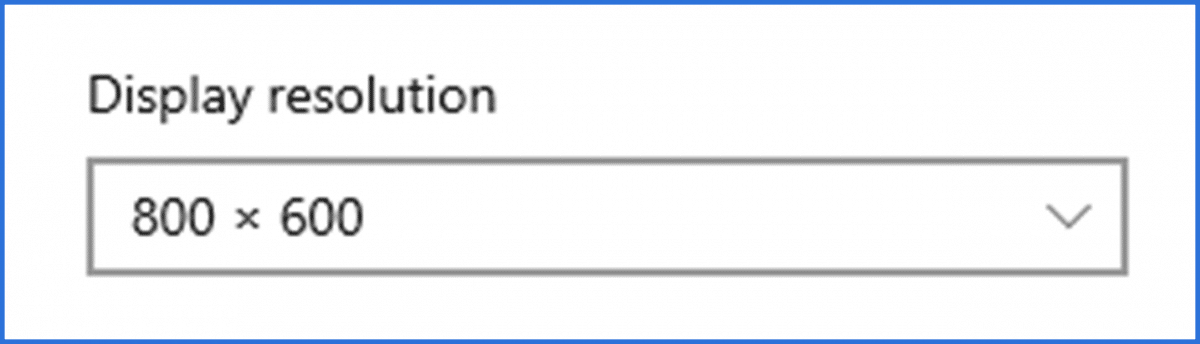
800×600. There was a day when we were excited to have it. Now it feels so “small” as to be unusable in most cases. Even the most basic new computer supports at least 1024×768 or much higher.
But what if it appears that 800×600 is your only option?
Become a Patron of Ask Leo! and go ad-free!

800x600 Only?
If 800×600 is your only resolution option, it’s typically because your system does not have the proper drivers for your video card. Contact your computer manufacturer or look for the drivers that came with or can be downloaded for your specific hardware.
When all else fails
800×600 is the lowest-common-denominator resolution. By definition, all PCs, graphic adapters, and monitors must support at least 800×600.
It’s the one resolution that can be counted on to work and always work regardless of your hardware selection. It’s often used as a fallback when troubleshooting or the default if your computer doesn’t know it can do any better. You’ll also see it used during the Windows setup process before Windows has determined your system’s capabilities.
To change your resolution, right-click on an empty space on the desktop and click on Display Settings. Under Display resolution, you should see a drop-down list of available resolutions.
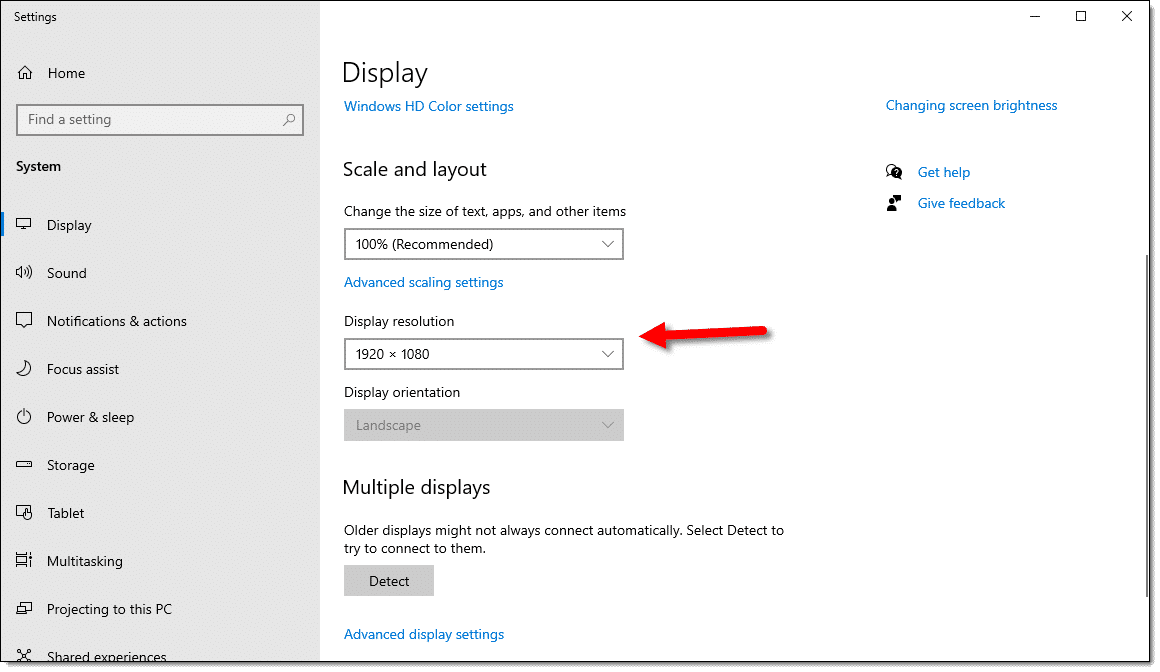
The list shown (when you click on the downward-pointing arrow to the right of the current resolution) may vary based on the hardware and drivers you have installed.
And there’s the rub: if you have the wrong drivers or the default drivers installed, the list under Display Resolution may not give you any option other than 800×600.
So what to do in that case?
It’s a driver thing
Not having the correct video drivers installed for your machine causes this issue 99% of the time. Normally, and especially in a case where your computer has come pre-configured from the manufacturer, this will already have been done. And, unfortunately, exactly where you go to make sure you have the proper drivers varies based on where you got your computer and whether or not you installed a new graphics card yourself.
To see what your computer “thinks” you have, right-click the Start button and then click on Device Manager. Expand the node labeled Display adapters by clicking on the “>” in front of it:
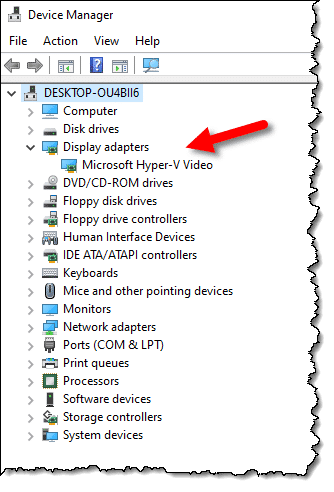
If it says something like “default” display adapter, then Windows does not know what kind of adapter you have or what its capabilities are. When that happens, it has to assume the lowest common denominator: 800×600.
Do this
If 800×600 is your only option, you have a couple of options.
- If this was a pre-packaged machine, get in touch with the manufacturer’s technical support. You need to locate and install the correct driver for whatever video card you have.
- If you installed a new video card yourself, you need to locate the drivers for it (they should have come with the card) and install them.
While you’re at it, subscribe to Confident Computing, my weekly newsletter. Less frustration and more confidence, solutions, answers, and tips in your inbox every week.
Podcast audio

Related Video


Hi all. I had this problem and this is how I solved it. I went to my computer-properties & device manager. There was a little YELLOW question mark that said “other devices” I opened that up and there was a something that said video drivers I think. I added the drivers and it works now. Check it out.
I need help too, When ever i start such programs as Windows messenger live or Itunes, My computer the last few days seems to throw itself int 640×480 mode with low 16 bit colour, Does anyone know why its doing this, i thought it was a virus so i brought Zone alarm, but nothing… its just getting really frustrating with all my Studies and just finishing highschool please help ASAP
If you’re saying that the resolution changes when you run those programs then this article might be appropriate: http://ask-leo.com/why_does_my_screen_resolution_change_when_i_run_this_program.html
Here’s a solution I found:
98 default loads a basic VGA graphics driver.
Open System>Device Managers>Display Adapters and open the one listed. Then click the Driver tab> Update Driver>Display a list of all drivers.
Now here is the important part that stumps some people: Click the radio dot for Show _all_ hardware and then highlight [Standard Display Types]. Usually you’ll see a Standard PCI Graphics Adapter has been nominally chosen by Windows. Change to Super VGA and OK close everything and let it reboot. You should now be able to change to 800×600 and High Color _IF_ your card will support it. This only works if the maximum capabilities of your system are being twarted by Windows stupid default choice. If not, get a better vid card is all you can do.
Hope this helps, that’s how I solved it.
Nice one Leo! as we say over here in the UK.
I reinstalled windows on my dell dimension yesterday but had the same problem with the poor display. I read your excellent article and immediately understood my problem. I went to Dell support and downloaded the graphics driver and EUREKA!
You’re doing a great job!
best wishes, Barry
Seeing as the Dell name pops up a bit in hardware descriptions, I’d like to point out a great service Dell offers in the area of drivers – a “Service Tag”. This ‘Service Tag’ is a sticker on the box of the computer, usuall on the top or back and is a unique number to identify that computer with Dell. If you go to Dell’s support site and enter that number, you will be shown the computers purchase and warranty history and all the relevant drivers to ‘that’ computer as it left the factory – That is why I like to work on Dell computers (albeit they are super basic, too).
Hi I have an Acer Inspire, My screen resolution won’t go any higher then 1024*600, why won’t it go any higher?
04-Jan-2011
HI everyone!!! I Was having the same problem that all of you were having. I used nivida to get a nicer picture for a game. Little did i know I dont even have a nivida graphics card. Now your resolution is stuck on “8-Bit” and the picture is terrible , right? Well Like everyone says, go to device manager. There is no pulldown that says display, right? Well keep looking down the list untill you see a big yellow question mark. It should say graphics controller. Right click that and install updates. It should install the updates, then go back to desktop properties and your 16-bit and 32-bit options should now be there. HOPE THIS SOLVES YOUR PROBLEM!!!!
I have the same problem with my resolution. I took it back to the store. At first they said my monitor was bad. So they replaced it. When I got it home and set it up again, I still couldn’t change the resolution. It was stuck on the 640×480. I took it back again. Everything was checked and all systems and drivers were correct. They told me it has to do with my outlet and that there is nothing they can do.
02-Nov-2011
A loosely related issue. When my kids played older games on my computer, the resolution of my computer would change to 800X600. I had to use a process similar to the one described in this article to return to the proper resolution. This was many years ago and might not be an issue anymore, but in case that happens to you, following the instructions in this article should fix it.
Because the question this article uses as its base is about a ‘new Dell PC with a 19″ screen’, if you have already completed the new PC setup function(s) that come with most new PCs, my next suggestion would be to run the system updater to make sure the latest software is installed. In Windows, run Windows Update. In GNU/Linux, run the distribution’s update utility. I don’t know the updater utilities name for Apple/Mac computers (I have never and will never use one), but run it. Many new computers come with some sort of a support utility. When all else fails, you can run the manufacturer’s support utility to make sure you have the latest versions of all the drivers for your system. These steps will usually resolve most hardware issues on new computers, and will often resolve similar issues in cases where a newer driver has become available on a not-so-new device.
I hope this helps others,
Ernie (Oldster)