And why you might not want to.

It’s easy to fix, but it’s also an important aspect of security.
I’ll show you how and then make an argument for not changing it.
Become a Patron of Ask Leo! and go ad-free!

Screensaver Password
Search Windows for “screensaver”, and in the resulting Control Panel dialog, make sure that “On resume, display logon screen” is unchecked. Be sure to do this only when you know that unfettered access to the computer when you’re not around will not be a security or privacy risk.
Setting or removing the screensaver password
Click on the Start button and start a search by typing “screensaver”.
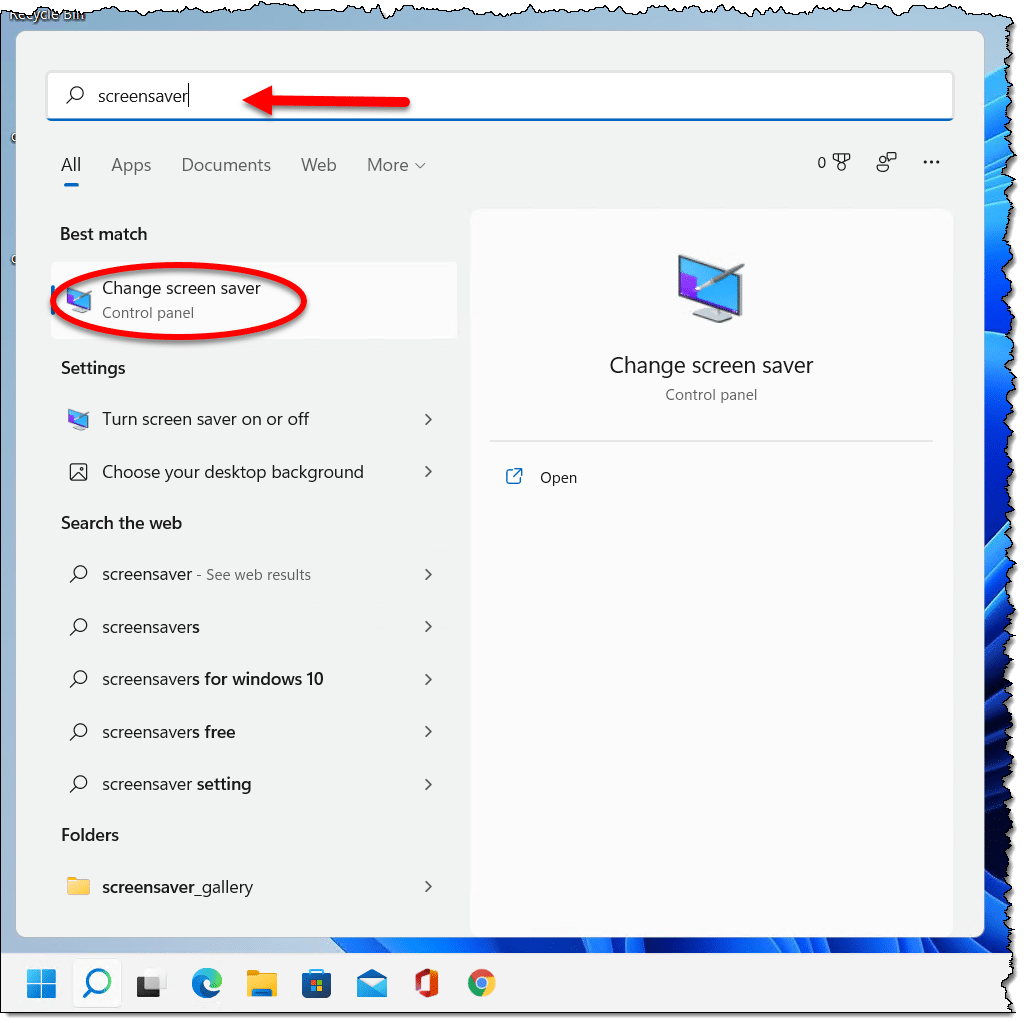
Click on Change screen saver when it appears.
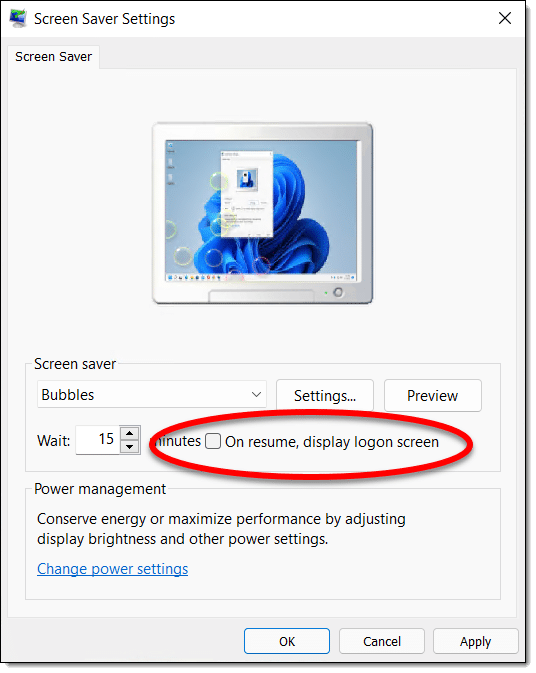
Make sure that “On resume, display logon screen” is unchecked, and click OK.
When you dismiss the screensaver in the future, it should return immediately to Windows without requiring a password.
Why you might want a screensaver password
Many years ago, my manager was working on our performance evaluations, including salaries and raises. He was called away from his office while working on the evaluation spreadsheet.
Not only did he leave the information on his screen — a bad move by itself — but even after the screensaver kicked in, anyone walking past his desk and (even accidentally) moving the mouse just a little would restore the screen of sensitive information.
The solution was to enable password protection on his screensaver and give it a short wait time. Once it kicked in, the display would not show the screen of sensitive information until he entered his password.
It’s about much more than accidental access, however. While you’re logged in, anyone can walk up to your machine and do anything as if they were you. They can copy data, delete things, send email on your behalf, or change passwords. Unfettered access to your computer means there’s really no limit to the havoc someone with malicious intent could cause.
Do this
Before you remove your screensaver password requirement, consider whether you really want to do it. Do you really want your computer to be accessible to anyone walking by if you step away? If the answer is that it’s not a problem, go for it!
Go for Confident Computing, too! My weekly newsletter to help you deal with technology with less frustration and more confidence, solutions, answers, and tips, in your inbox every week.
Podcast audio

Related Video


You convinced me, I just followed the opposite of your instructions and enabled the screen saver password. Since I log in with a PIN, it takes about a second or less to type it in.
In addition to what the article says, every time you step away from your computer, you should type Windows Icon Key+L to lock your screen and force a login next time you need to use it.
This is also important if you have kids, especially teens. A few times I’ve seen on people’s Facebook posts things like, “Joe* is my favorite kid. The others are a disappointment.” etc. :-)
*Name is changed to protect the guilty.
That was a beaitiful way of handling this question, Leo! Well done!
“Now, what exactly, are you complimentin me on?” you want to know.
Well, as an example of one columnist who certainly didn’t follow your procedure, there was once a doctor’s advice column. His reader asked what the Hippocratic Oath said; the Good Doc responded with a lengthy diatribe on medical ethics, but never one quotation from the Oath did he quote! Although I can’t prove it, I’m reasonably convinced from the tone of the query that the correspondent was simp!y curious to know what the text of the Hippocratic Oath was. If so, the Good Doc was guilty of “projection,” and he was most certainly unhelpful!
Based on my reading of various advice columnists, the one piece of advice I’d give to anyone contemplating entering into that thankless profession is simply this: “FIRST, answer the damn question! Any commentary or counterarguments can (and ordinarily should) be given afterwards.”
The only time I’d deviate from that advice is if the matter at issue is illegal, deeply immoral, or physically dangerous (i.e., a threat to life or limb).
As always, Thank You for answering our questions, Leo. :)
Thanks. This is something I struggle with, though. Sometimes, especially in tech, the answer people want isn’t really helpful or isn’t what will really solve their underlying problem.
An example: one of the articles that republished recently is “How Do I Access Gmail Without Phone Verification?” The answer is “You may not be able to”. If I start my response with “you don’t”, many people leave then and there and completely miss the fact that there are a number of things they should be looking at, and if nothing else, an important lesson to be learned to prepare for the next time. So some folks DO accuse me of not answering the question, either because it’s unanswerable, they don’t like the answer, or they’re asking the wrong question. The challenge is to balance all three in a way that people who need help will actually read.
¯\_(ツ)_/¯