Https, which stands for secure http, is used instead of http to do two things: confirm the identity of the site you’re connecting to, and keep your communications with that site secure by encrypting it all.
If something is wrong, the browser will often display a warning, but in some cases it will do nothing more than turn the https indicator red, or put a line through it.
Unfortunately, “something is wrong” can mean many things, ranging from a serious security issue to a benign oversight by the website’s owner.
Become a Patron of Ask Leo! and go ad-free!
Your browser should warn you
In most cases, when you first connect to a website that has an https problem, your browser should warn you.
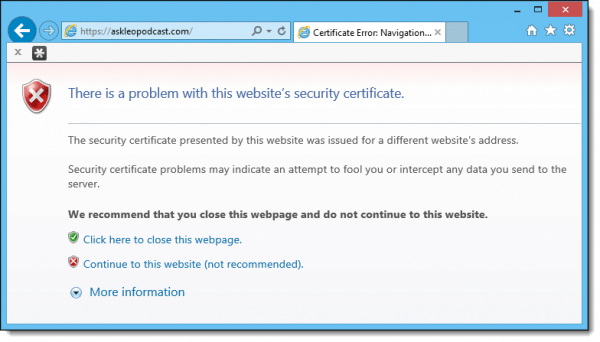
For example, if you visit https://askleopodcast.com (a demonstration site I have), Internet Explorer will notify you of an error1:
The security certificate presented by this website was issued for a different website’s address.
The security certificate includes the name of the site you’re going to. For example, if you’re attempting to visit https://paypal.com, the certificate there will confirm that it is, indeed, the real paypal.com. This error indicates that the certificate does not match the domain. You may not be visiting the actual site you think you are.
IE’s error message actually sums it up quite nicely:
Security certificate problems may indicate an attempt to fool you or intercept any data you send to the server.
The address bar continues to warn…
Continuing through to the site regardless of the warning, IE’s address bar continues to indicate that there’s a problem.

The address bar is given a red background and the red security icon is present, along with the words “certificate error”.
Similarly, Google Chrome turns the https red and draws a line through it.
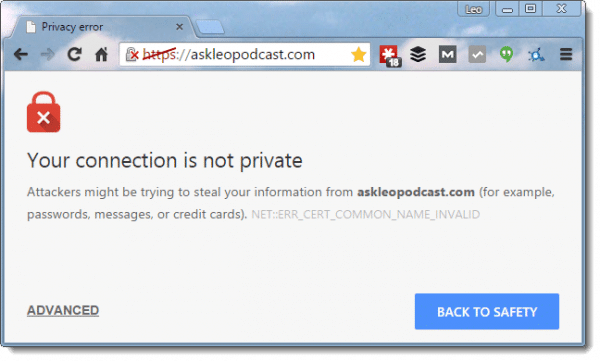
Clicking on the broken padlock in Chrome displays information about the secure connection and its problems.
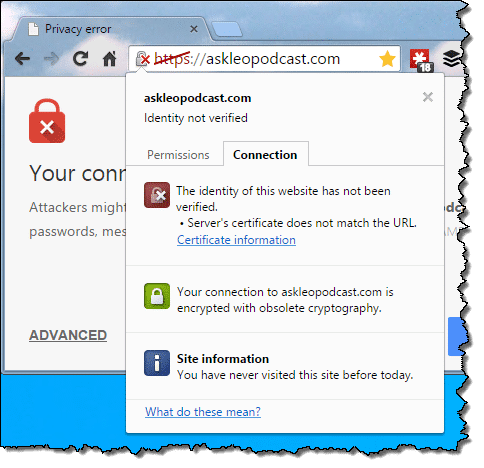
Clicking on IE’s red security shield in the address bar, or the highlighted domain name in FireFox’s address bar, will also display additional information.
What should you do?
Unless you know for a fact that the error is benign, cancel the operation and do not visit the site, especially if it’s a financial institution or a site that deals with your personal and private information.
It could be a trap.
Contact the institution some other way to clarify the error, and make sure your system is free of malware and otherwise secure.
Often, it’s benign
I do want to be clear: unless you’re a system administrator of some sort, you should never see a certificate error. That’s why I said above that if you’re the least bit unsure, stop.
However…
The most common causes for certificate errors are actually quite benign.
First, check your computer’s clock and timezone setting, particularly if you see this error on multiple https sites. The certificate-validation system relies on your computer’s concept of time being relatively correct. If it’s not – say you have the wrong timezone selected, the wrong year, or just the wrong time – then certificate errors are one possible side effect.
Second, if you feel so inclined, look at the more detailed information for the certificate, and check the expiration date. Certificates expire, and sometimes the websites forget to update their certificates in time. I know, because I’ve done it … or rather, forgotten to do it.
Thus, if you can examine the message associated with a certificate error, and you can determine that the only problem is that the certificate has expired, and expired recently (typically, these cases are fixed within 24 hours), then it may be OK to proceed: encryption may still be operative.
On the other hand, it’s also safe to simply wait a day.
Do this
Subscribe to Confident Computing! Less frustration and more confidence, solutions, answers, and tips in your inbox every week.
I'll see you there!


could there be other reasons? I know for a fact that our certificate on a site is good and will not expire for at least 2 more years. and when I am on the site (in Chrome) certain pages have the red line going through the https. Could placing links to outside websites cause this problem? I have been trying to diagnose the problem for a few days. Glad I received this article in my e-mail today! :-)
06-Apr-2012
Follow-up to first comment… since IE often asks whether a user wants to display only secure contnot, how can a user who responds that they are willing to allow both secure and nonsecure content tell which is secure and which is not?
08-Apr-2012
Leo’s discussion shows a sample “bad” website. But he blurred the URL. Is there a “valid bad” website that one can visit just to see what other browsers do or do not do when they encounter an invalid certificate?
I have had that Certificate error page on a new Windows install. Had it for several pages including Google’s home page, Yahoo, Yahoo mail. Could not solve for awhile. Tried the clock, updating the certificate, restarting, EXing out of Chrome and IE and still could not figure it out. I then decided to do a Windows Update. When I went to to the update Microsoft’s update told be to update the Update program first before I get any suggested updates. So I did the update of the Windows Update program and restarted. I then went to Google and the certificate error page was not there any more. Yahoo and Yahoo mail was working now as well. So I don’t know why just updating the Windows Update program fixed this problem. Can you figure this out?
My guess is the root certificates – which are kept up to date with Windows Update – were out of date. Root Certificates, you ask? Right here: http://ask-leo.com/what_are_root_certificates_and_why_do_i_need_to_update_them.html
this is the first example of what a website with trouble in content exists that I have seen. I have read many a article that
*talks* about potential threats but Leo, you defined it in a well done piece! thanks!
I guess this also reveals that I don’t read enough about the hazards of the Internet.
I belong to a professional listserve which has been in existence for more than 10 years, and Chrome insists that it is a dangerous, unverified website which is going to attack my bank accounts and sell my information to hackers and steal my identity. Totally ridiculous.
I can understand it saying unverified. That’s often due to an oversight on the part of the web designers, but does it really say it’s going to attack your bank accounts and sell your information to hackers and steal you identity? I find it hard to believe they’d use that language.
Um, hyperbole…….
Um, sarcasm……….
Indeed. A professional listserv should be running the latest and most secure technology to avoid these issues.
Howdy! Leo,
I’m using Firefox ESR 52.6.0 (32-bit) on a XP SP3 pc to read this page.
https://askleo.com/why_is_there_a_slash_through_the_https_in_my_browsers_address_bar/
I’m writing because in the Comment Section on May 21, 2015 at 9:02 am, You said to George Jensen – Quite often it’s because of “mixed content” .
And also because I noticed the Security Padlock to the Left of the Link for this page has a Yellow Triangle with it.
So I Clicked on the Padlock and it shows this:
askleo.com
Connection is Not Secure
Parts of this page are not secure (such as images).
I don’t see this Yellow Triangle on other pages on askleo.com – I just noticed it on this page today.
I know as hard as You try for perfection there is always one more (or less) keystroke a page needs to be perfect.
Hey!, I’m not perfect either, long ways from that…..
Thanks for Helping us understand BITS of what our computer is doing by answering our Questions and including IMAGES to Help us understand what You wrote to us.
73 dit dit
Its usually because back in the day I would often “sign” my comments by linking to an image of my signature. That signature is remote content displayed on the page. It was linked using “http”, not “https”, hence it’s the mixed content warning.
On this Windows 7 desktop I have no problems. With my XP laptop right beside me I have the “This connection is not secure” problem! I know the site is secure and my is my modem/wi/fi is password protected! I think it is the windows needs updating but that is no longer possible for XPs!
Quite often it’s because of “mixed content” – the connection to page might be secure, but a connection to, say, fetch an image for that page might still be http – or not secure.
For a short while I was getting a red slash through https when I would start going to my email (aol). However, I also noticed that there was an ad for a program in case my computer was “in danger” (an aol ad). Once I continued on to my email, the https would go green again, so I just thought it was some ad ploy. Maybe I was wrong, but the ad isn’t showing anymore, and my https is green.
Thanks for this article, Leo. Very timely as I’ve seen several of these red slashes this week on Chrome. However, I’m sorry to say that I never got any warning message on Chrome, just the red slash and I didn’t know what it was. My anti virus programme didn’t react at all, so I went ahead with my transactions. What should I do now?! Thanks for any suggestions or advice.
I would click on the red slashed icon and determine what item on the page it’s complaining about, if you can. Check the certificate involved and see if you can tell why it’s complaining.
Recently had the red slash on my laptop while trying to pay for something (university dues)… red slash for two months. Tried a pc and no red slash. Could that indicate a problem with my laptop (virus, malware, ?) or does it just mean my laptop might need a windows update or otherwise be looking at the site differently?
If you click on the icon it will give you more details on the security problem. More than likely it is a problem with the website you are going to. Or it might be that your browser needs to update its security lists. Either way, this does not indicate a problem with your computer.
I have the same issue (https with red slash) appearing when I try to sign on to the same banking site I have used for the last 6 years. The certificate is good until March 2016, so I have no idea what is wrong, and I am not computer-savvy enough to know what my next move should be. Any simple suggestions? I am sorry to say I am very computer-illiterate . I use Kaspersky as my Internet Security and have never had a problem until this week.
Did you check your system clock? If that’s not the problem, I’d phone the bank to see if they know what might be happening.
The answers provided by this site was extremely helpful… Thanks
What about an IRS.gov website? I got this after asking for a reminder of my User ID. At the IP address sa.www4.irs.gov — it never sent me the reminder email. I checked my spam box — it’s been over an hour.
I took your advice and clicked on the lock icon and it said that the site uses a weak security configuration (SHA-1 signatures), so my connection may not be private. And the icon of the lock with the yellow triangle tells me that identity of the website has been verified by Entrust Certification Authority – L1C. … And “the certificate chain for this website contains at least one cert that was signed using a deprecated signature algorithm based on SHA -1.
The green-background lock icon says that the connection is encrypted using an obsolete cipher suite. The connection uses TLS 1.2. The connection is encrypted using AES_256_CBC with HMAC-SHA1 for message authentication and RSA as the key exchange mechanism.
Any help would be appreciated.
I try to log into a UK server called “thepostoffice” using http://www.pobroadband.co.uk. Every time I log in using Google Chrome I get the Red https and a line through it. When I attemtp to go to the same address using either Internet Explorer or Mozilla Firefox the address is ok – no red text and line through. Can anyone tell me how to get rid of the red text https and line through as I wish to use Ge Chrome for access to this site and not the other two browsers. It is most annoying as I wish to enter sensitive data into the site (My Account) and I dare not do this with the HTTPS slashed through.
Most Urgent if you please.
I clicked on that thePostOffice link and had the same results as you. I’d say the problem resides with the website. Until it’s worked out, to be on the safe side, you should probably use IE or Firefox to access that site. As the song goes, “You can’t always get what you want. But… you get what you need”
Chrome is being overly cautious. “The certificate chain for this website contains at least one certificate that was signed using a deprecated signature algorithm based on SHA-1.” They’re attempting to force websites to update their encryption technology (as they should), but I don’t see it as a crisis. For now, as Mark said, if you feel better use Firefox or Chrome, but I personally wouldn’t be concerned.
Leo, I am use both Google Chrome and Safari on my MAC. I get the red https when using Chrome on both my credit card page and my personal bank page. I don’t get the red https on either site for Safari. As far as I can tell, my Chrome is up-to-date. I have Kaspersky on my computer and I use it to get to my credit card and bank pages, but Kaspersky is setup to always open Chrome. So, now if I want to use Kaspersky as my frontal protection, I am going to webpages with a red https.
Thoughts?
Thanks, Anne
Example: Netflix… all devices going thru my wifi connect perfectrly except my laptop that uses XP. It gets the HTTPS Slashed –not safe–blah blah… and there is no support for the XP. OR IS THERE??!!! The military still gets support for windows XP! I read about a guy who created a txt file and saved it with a diffeerent extension, added some info to his XP registry, and made his PC appear to be of the Military persuasion! PLEASE does ANYBODY know of a more reasonable way to jump this hurdle? The updates ARE there. Why won’t Microsoft open a pathway to XP users? THEY LOVED US WHEN WE BOUGHT THE XPs……
Unfortunately, that’s one of the prices for using unsupported software. Problems like this will continue to grow as time goes on.
Please excuse my crassness, Leo. This is YOUR website. I acknowledge you; I meant no disrespect. My quest is true and honorable. You have my Email. Any insight you might provide me on this matter would be most graciously received. (And anyone else… for that matter)!
Donald Spicer
P.S. Thanks for this site; I appreciate the opportunity.
Thank you. My issue was the date and time were wrong on my laptop.
A slash line comes on https(red color) when i open the web page,when i right click it a message comes
in.yahoo.com
this site uses a weak security configuration(SHA-1 signatures),so your connection may not be private.
Details
when i click on details
a massage comes
security overview
this page is insecure(broken HTTPS) (n some more information like expires on 2017) ,my date n time r ok ,is it safe to use web,How can i solve this problem
You can’t. This is a server issue.
Hello.
Great help here. Thanks.
I am an e-commerce website owner and had an SSL certificate that has expired and I don’t wish to renew it. The problem is that the https appears crossed out to everyone. Plus, when I try accessing my WP-Admin, I get this warning: ‘Your connection is not private. Attackers might be trying to steal your information from http://somerandomservice.com (for example, passwords, messages, or credit cards). NET::ERR_CERT_COMMON_NAME_INVALID’
What should I do to fix this?
Is there a possibility that I’ve been hacked?
Thanks.
You need to renew the certificate. Very unlikely that you’ve been hacked.
Hi. Thanks for your reply.
I don’t intend to renew the SSL. As a matter of fact, I have revoked it and 24 hours have passed since I received the confirmation for revocation but the error persists.
The error will persist until you get a current certificate in place.
funny as I read this info I see red line through the web page/man to many overkills these days, and just use logic
Hello, am having a problem with the buy now button, every time I try to copy and paste the plain link into my web page it has a red line drawn thru it. Could it be that my warranty has expired on my PC and can I buy the product from any electronic store.
This would be unrelated to any warrantee. This is all about the website from which you are attempting to purchase, and the specific link you’re using.
It sounds like it might be a problem with your browser.
https://askleo.com/dealing-with-browser-problems/
Clearing the browser cache would be the first thing to try as a corrupt cache is the cause of most browser problems.
Oddly, despite the text of this article, https://askleopodcast.com shows no certificate error (yes I know this is an old article) but this very page, https://askleo.com/why_is_there_a_slash_through_the_https_in_my_browsers_address_bar/ *does* show a certificate error. The warning messages are:
Firefox: “Connection is not secure – parts of the page are not secure, such a images” – Yellow triangle mark with ! over the lock.
Chrome is less obvious, but if one clicks the (!) mark in the address bar it gives much the same comment, including 16 cookies associated with the page.
I understand why, and I’m sure you do too, but maybe the text needs to be updated.
Help leo! Out of the blue I cannot access Google Chrome or Samsung Internet or any website whatsoever (this connection is not secure…someone may be trying to hack, etc.,) also cannot access PlayStore (no internet connection), cannot access any links within my gmails, cannot update security software and cannot access or change google password. I am stuck. I have android 8.0. I can’t download, upload, or anything. Every site crosses out the “https”. I am going to cry. Is there nothing I can do?
Sounds kind of like your security software may be interfering, OR, indeed, that someone has hacked your connection. A crossed out “https” by itself is nothing to cry over — it’s sadly quite normal. But I’m afraid without A LOT more specifics I can’t really advise you as to what to do next. Perhaps have a techie friend look at it?