I am running a VERY LONG Excel’03 Spreadsheet (can be configured to loop calculating alternatives for hours using an embedded Basic Program/Macro). I am running this on a Quad Core Intel Q6600 with 4 GB.
When I check in Task Manager, the System Idle Process will not drop LOWER than 75% and the Excel Process will max out at 25%. I’ve tried upping the priority of the process and have checked the “affinity” to ensure it’s using all 4 processor cores. The Performance tab does show activity / load on all 4 processor windows.
What’s up? Why can’t I utilize more than 25% of my system when I want to use it for a high priority and very lengthy task?
It’s one of the most frustrating things to experience. Here you go and spend extra money to get that super fast quad- (or more) core processor, throw a huge task at it expecting it to go two or four times faster…
And it just pokes along.
The good news, if you want to call it that, is that there’s nothing wrong. The bad news is that … there’s nothing to be fixed. This is completely expected, and depends entirely on the software you’re running.
Become a Patron of Ask Leo! and go ad-free!
Definition: core
A “core” is, in essence, a single CPU. Thus, a “quad-core” machine has the equivalent of four separate CPUs on a single chip. Each CPU can execute tasks independently of the others (I’m oversimplifying, of course) without being affected by the others.
It’s kind of like having four computers instead of just one. (I’ll be using quad core as my example throughout this article, but the comments apply to all multi-core processor chips, though the math might change a little).
Unfortunately this also leads to some confusion in terminology, as the acronym CPU (Central Processing Unit) isn’t always used consistently:
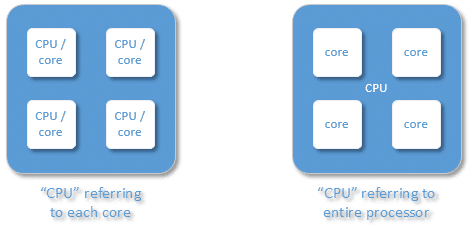
The term “CPU” is sometimes used to refer to each individual core in a processor, as I’ve used it above left. More often, and perhaps more correctly, it’s also used to refer to the entire processor, no matter how many cores it contains.1 Unless you’re specifically interested in some aspect of having multiple cores, the distinction isn’t important.
There are at least two times that multiple-core processors can be beneficial:
- When you do several different processor-intensive things at once.
- When you use software that can do one processor-intensive thing and spread it across multiple processors.
What it means to be processor intensive
 Note the phrase “processor intensive”. Reading email, browsing the web, typing up a document – these are not processor-intensive tasks. As you do any of those things, the computer’s processor is spending most of its time idle, waiting for something else.
It might be waiting for the next byte of data to come down your internet connection or the next block of data to arrive from your hard disk; or, it might be waiting for you to type the next character. The bottom line is that your computer’s processor is spending most of its time just waiting, doing almost nothing.
Processor-intensive tasks, on the other hand, usually involve calculations of some sort. Excel is a good example, but there are others, like image, audio, and video compression and manipulation. Anything that does a lot of math or calculation, or manipulates a lot of data in your computers’ RAM memory, could end up being processor intensive. When a such a task is in progress, it’s typically using as much of the processor’s capabilities as it can in order to complete its work.
Multiple cores
Now, if you’re doing just one processor-intensive thing, then a multiple-core machine can be quite nice. One core can be dedicated to that task, and the other is left free to handle whatever you might be doing, like surfing the web or reading your email. Even though those activities don’t use much CPU, they do use some.
In a single-core computer, you’ll immediately notice when the CPU is being used completely by some other process, because the system bogs down. On a multiple-core machine, it’s not uncommon to have a processor-intensive task take up one core and it not impact your other usage at all.
The true benefit of a multiple-core machine becomes apparent when you use software that knows how to use multiple processors. In fact, that’s why I’m now on a 12-core machine; the video processing software I have is multi-core aware, and will make use of all CPUs when encoding video. The result is that it does it much faster than it would if I were on a single-core machine.
And there’s the issue: software must be multi-processor aware (typically “multi-threaded”, in computer-ese) in order to make use of more than one CPU or core at a time.
I’m guessing that your version of Excel is not.
Multi-core software
Now, part of me is surprised; if any consumer or small-business application could benefit from multiple processor support, it would be Excel.
On the other hand, having actually done multi-threaded programming, I also understand how incredibly difficult it is to do properly.
On top of that, there is no practical way to take a random computer program or algorithm and “automatically” split it up so that the work can be divided among multiple processors. Software must be designed to use them.
Since Excel essentially allows you to write a computer program (in the form of cell relationships and its macro programming language), it has no way to know how to split up your work in a way that will succeed when spread across multiple processors.
There are certainly efforts to figure out how to do this kind of thing, but it’s still the stuff of computer science researchers.
Yes, it’s that difficult.
Using only 25% of the CPU
The bottom line is that when you see a single program consistently take up 25% of the CPU on a quad-core processor, you can almost bet that it’s software that only knows how to use a single processor at a time.
In fact, without even knowing how many cores may be present, seeing a computer “pegged” at 25% usage is a good indication that it’s a quad-core machine, and that it’s running single-core processor-intensive software.
And no, there’s no magic setting that can make it do otherwise.
Did you waste money on your quad core machine? It really depends on how you use your machine, but I’d say it’s unlikely.
It’s absolutely fantastic to have multiple cores of some sort, simply because it can help prevent your machine from bogging down due to the actions of only one single-core program. It’s also handy when you’re doing multiple things at once, be it multiple browser windows or other programs on your machine. Dual core, at a minimum, and even quad, can help keep your system responsive as you, and it, juggle all those activities.
If most machines weren’t already at least dual-core these days, I’d strongly advise that you never get a single-core processor again.
But I’ll be the first to admit that my 12-core machine is pretty much wasted most of the time. It’s only when I run multiple virtual machines, or fire up that video encoding software, that all the cores really come into play. Then, for me, it’s well worth the expense.
Do this
Subscribe to Confident Computing! Less frustration and more confidence, solutions, answers, and tips in your inbox every week.
I'll see you there!


I never tried this myself, but would setting the affinity of a “multi-threaded” application to use only 3 out of the 4 cores actually listen to you and leave a single core free for other things?
It would be nice too, to see some kind of logo or something on the software that tells you how many cores it’s programmed to work for… Like movie ratings you see on DVDs…. wishful thinking.. lol
Right on the money, as always, Leo. When I built my own quad-core at home and was doing processor cooling fan tests, I had to run four separate instances of Prime95 (a single-thread prime number searching program commonly used for “loading” a processor for testing) to get my CPU utilization up to 100%. Each instance grabbed exactly 25% of my quad-core chip, maxing out just the processor it was running on.
One of the confusing things about Windows use of multiple cores is that it ‘spreads the work out’ [i.e. it uses all the cores], even when it doesn’t need to. WIth only one task running, it only needs to use one of the cores.
Chris; of course your suggestion about affinity will work [and leave one processor free] but that’s not what a multi-core application wants! It would want to run on all four CPUs but you would have limited it to three. [You don’t need to leave one ‘free’, as the System will run things ‘in the right order’ anyway; i.e. the dispatcher will prioritise as appropriate].
P.S. I find the best value CPU speeed per Pound spent [sorry, Dollar spent :-)] comes from the cheaper dual core processors [not Hyperthreaded ones though!]. 2 x 3GHz is more useful and cheaper than 4 x 2.5, for example. The Excel sample quoted would run at 3GHZ with one CPU unused rather than at 2.5GHz with three CPUs unused.
I’ve found the same thing, Julian. Unless I’m running some serious encoding/compression software on a fairly routine basis (or math intensive stuff on Excel, again, regularly), quad core would be overkill.
Excel 2007 has a setting where you can specify how many of the available processors it can use. Excel 2003 doesn’t.
Rob, perhaps you could tell us where the setting is? Thanks in advance.
Excel 2007 to use all available cores:
Click Office Button, goto excel options, advanced and look for the section formulas. Enable multi threaded calculation
Thanks Dimitri.
I have the same trouble running Excel VBA code. The “Enable multi-threaded” option does not seem to solve the problem, still 25% the cpu being used. I made a sample VBA program and timed how long it took to run. Here are some comparative results on some of my machines and my colleagues machines(in seconds):
Single core Results
MyDeskTop (2.79GHz, 1GB, XP) 71
MyWorkLaptop (2.2 GHz, 1GB, W2000) 84
JasonComp (P4 3.0 GHz, 1GB, XP) 61
Dual Core Results:
John (1.83 GHz duo, 2GB ram, XP) 59
Akio (2.16 Duo celeron,3.4GB, XP) 49
Kevin (2.4 Core 2 Duo, 3 GB ram, XP) 42
Quad Core results:
Tom (3.0 GHz Quad Xeon, XP, 64 bit, 3 GB ram) 36 Kevin (2.83 Quad Core, 3 GB ram, XP 32) 37 Note that the quad core only seems to run at dual core speed?? Why?
Also for all results for the single core, the task manager shows CPU at 100%, for dual core, it shows the CPU at 50%, and for the quad, CPU @ 25%. Bizarre results. The dual core calculates almost twice as fast as the single of the same GHz, but the quad core shows no improvement in calculation speed over the dual core. Why????? I am desperate because I write alot of VBA code and feel I wasted my money with the quad core. Maybe should have gone with a dual and overclocked. How can I speed up Excel VBA so that it runs at a suitable speed on my quad core?
Also, has anyone tried running Excel VBA on vista? any difference in speed? I am grateful for any replies. Thanks, Kevin
13-Feb-2009
My guess is that Excel itself is only using 1 processor, and the extra speed of the multiprocessor machines is because background tasks (such as writing to the disk) can be done by the other processor(s). These tasks can be handled comfortably by 1 extra processor, so having 2 more processors doesn’t produce an improvement.
Kevin, I just realized the same thing as you did: while Excel 2007 can use multiple cores for spreadsheet calculations, it can not when it comes to VBA programs. 2 thoughts on this: 1) maybe it’s faster in some VBA applications to convert them to pure spreadsheet calculations 2) I do a lot of Monte Carlo simulation in my VBA programs and here the rule for Multi-processor use would be quite simple: calculate half of the scenarios with 1 processor and the other half with the other – of course there is no way to tell this to Excel – but I am trying now to run 2 instances of Excel in parallel and then combine the results “manually”.
My issue is a little more intreaging as my work PC locks at 25% CPU useage when running certain large Excel files, but when I interogate Task Manager I find that it seems to be usnig 50% of core 3 and 50% of core 4. I assume this si a little harder to explain, as it is obviously splitting the process across two cores of my quad core, but using all of neither of them. any ideas???
Hi Leo. I often get the “not responding” problem (using XP) that you have written about elsewhere. Especially when I’m on a slow internet connection. Everything grinds to a halt.
The IT guy who supports our business says “your laptop is rubbish – too old – get one with a dual core processor”. But I want to be sure this will fix the problem. How can I tell? Does it depend on the “multi-threaded programming” you mention above, or will two processors allow my PC to ignore the not-responding programme and get on with my other work meanwhile?
Any hints welcome, and thanks for the useful info on your site.
10-Apr-2010
Everyone talked about the problem but not the solution regarding excel talking 50% of core2 and 25% of Quad…i check n it is muti threaded, there is a option to turn it off or on in excel, yet it doesnt take more then 50% i have a lot of formula in my workbooks mostly referenced to other workbook, it would be very helpful if excel took 100% of my processor…anyone have any ideas??
I have a multithreaded software that does a lot of math calculation. It starts with 70-80% cpu usage. After some time (5 – 10 min) the cpu usage drops to 20% and you can tell that the software does much less work per min. Does any one know what is going on and how to fix it such that it will run with 70% usage all the time?
My computer is a dual core windows 7 laptop.
Thanks.
Hi,
Just to add here, in .net 4 framework, a Task Parallel library TPL is introduced using which you can run as many excel.exe in parallel as many cores your system has. I just did that in recent project. Let me know if anyone needs help on it.
I can’t speak for earlier versions, but Excel 2007 certainly uses as many cores as are available and the benefit of the additional cores in my quad core pc is very noticeable compared to colleagues’ dual core ones.
On the other hand Access running ‘action queries’ – typically a series of those in a macro – seems only to use 1 core. Always seems odd to me.
I use Excel 2013 64-bit. It seems to do much better at multi-core use and actually tells you when it is using the cores. It seems to use all cores for all formula calculations (I have done this on 1 GB-sized files, with millions of formulas). However, when loading and saving files, it uses only one core. I would consider upgrading to the 64-bit version of Excel, since it handles memory and processor use much better than previous versions.
One topic that has not been mentioned is Real Cores vs. Virtual Cores. Dual Core with Hyperthreading means you have 2 real cores running 2 virtual cores on each core. This will show up as 4 cores on Windows Task Manager performance tab. It is like 4 workers sharing 2 desks.
I recently purchased 2 off lease Thinkpads to run a professional 3D CAD program. I found the i3, i5 and i7 designations to be useless for comparison. The only way to understand all the choices and to make a logical comparison was to make a spreadsheet and use the cpubenchmark dot net website. (Scroll down to “Search for Your CPU”). Only then was I able to understand what I was buying. Even then I had to keep in mind that the 3D CAD program was only a single core program so I had to look at the single core benchmark (only found using the comparison tool on the search page).
During my research, I found an article written by one of the graphics card manufactures. The article listed the big heavy hitting CAD programs that were still running on only single core , which was most of them. They did mention the rendering engine modules were generally multicore.
Selecting a Computer based on CPU performance used to be easy. Most computers in the general consumer market are just media devices and they are in reality migrating to tablets. If you need a computer to actually compute stuff, you need to do a lot of tedious homework.
cpubenchmark.net
I recently bought a quad core Dell computer, hoping to ease the very high cpu % problems running multiple tabs in Firefox/Palemoon. Alas it didn’t help one twitch. Are there any multiple tab browsers that are set up to take advantage of multiple cores? And since this has been a problem for years, I wonder why there haven’t been any design changes to enable multiple core usage.
I imagine Chrome would do better at spreading the load, as it launches a process per tab (plus a few others for handling things like Flash separately), and thus allow the operating system to scatter the processes across multiple cores.
Mind, I say this as someone currently sitting at ~3% CPU usage with 15 tabs across two windows (and I’ve gone up as high as 50-ish tabs without major changes). For reference, my CPU on this machine claims to be “Intel(R) Core(TM)2 Quad CPU Q8300 @ 2.50GHz” — old and not high-end by any means. I expect NoScript helps more here, just preventing most websites from running whatever random junk they feel like running in my browser (until I explicitly allow them because the sites are broken without it, at least).
I’m curious to know if you’ve tried many open tabs using Firefox, as a comparison to Chrome. Firefox, and Palemoon, are basically unusable with my usual load of 5 windows (aprox 100 tabs). This is on a Quad core just a little newer than yours (9400 series). Firefox will be using about 1500-1700k with that many tabs and after a short while it will just lock up(25% cpu), and can only be rescued by ending firefox.exe. Palemoon is a bit better as long as I’m not running news sites (NYTimes.com CNN.com, etc…). Eight news sites will kill Firefox/Palemoon quicker than anything. I don’t run NoScript (too many problems using it) but AdblockPlus and Ghostery seem to take it’s place pretty well. But I had the same problem when I used NoScript.
I’ll be looking at Chrome to see if I can duplicate your results.
Firefox is a bottleneck even in my new system. I have turned Shockwave Flash to ALWAYS ASK on the PLUG IN page option. This helps a great deal. I never minded the ads before but now they are such resource hogs that caused problems as my computers grew older.
Considering that half my software is still 32 bit, I am not going to hold my breath and wait for multi-core support of software.
I tried 2 Chromium based browsers which did spread the Flash load around but those did not have the option to turn off Flash which is the real problem. They did operate only a little bit better than Firefox on my 8 year old Dual Core Celeron. I will stay with Firefox because I can turn off Flash. ….. But their new search implementation is too annoying and may even take a look at Internet Explorer again.
“The bad news is that … there’s nothing to be fixed. ” – not true :). There are multiple was of leveraging the extra cores in Excel. I compared at least 3 – they all differ in performance etc read here: http://blog.tkacprow.pl/excel-multithreading-vba-vs-vbscript-vs-c-net/
For those that think VBA multithreaded performance is enough there is always a simple library I made in VBA:
http://blog.tkacprow.pl/excel-vba-multithreading-tool/
You will definitely see a 100% core utilization using either method – although all three approaches vary in efficiency.
I wrote a small routine to time the count to 1billion (For…Next loop) using MS Access 2010 VBA, called from the click event of a Form Button. The CPU maxes out at 28% on my Asus laptop Intel I3 4030U CPU. I cant see how you could allocate this simple algorithm to more than 1 CPU given the sequential nature of the loop. If you duplicate the code and paste into another Private sub named ‘Sub2’ and ‘Call Sub2’ in the first line then somehow allocate it to a specific CPU before proceeding with the next line in the first Sub, that could share the work in theory. The actual count takes 6.6seconds under the I3 4030U Cpu, 5.8seconds under an I5 3317U Cpu..
Question is: Is there an API function under Windows 8.1 that allows a call to a specific CPU? I guess you would need to check for a Parked Cpu first and reserve it..
Sub …
Dim lngx As Long, sngx As Single, vrnx As Variant
sngx = Timer()
For lngx = 1 To 10 ^ 9
Next
sngx = Timer() – sngx
vrnx = MsgBox(“count= ” & sngx, vbDefaultButton1)
End Sub
It’s WAY WAY WAY more complicated than just allocating to a specific CPU. Windows already spreads its work across all available CPUS, along with all the running applications and more. There’s never really a specific processor that’s any more or less available than any other, until you have a single threaded application hogging one.
I have since read the link above and I get it now with the Parallel class call which does the splitting..
This article helped me! Greetings from Germany:)
The box on the floor/desk is not as you said the CPU. Everyone knows that’s the hard disk. Well at according to my other half and my mum it is. I am so ashamed of them :-)
Very nicely explained! Thanks!!
Just use the parallel.for method.
Explanations and examples here:
https://msdn.microsoft.com/en-us/library/dd460713(v=vs.110).aspx
Thank you very much for nice and important explination.
LOVE you, becoz you cleare my idea, which was totaly wrong before.
I was thinking that sigle thread process also used multiple CPU at the same time.
Majority of users tasks for CPU are too small – thats why things are not turning into GPU processors, which are the future in my newbie opinion. Even economical GPU’s provide at least order of magnitude more computing capabilities.
I really like what you mentioned about how multiple core optimization will result in increased speed of our memory channels. That means more blocks of data can be stored and analyzed. My manager is looking for a way to speed up our system so that we can answer all the tickets in an efficient manner. I will recommend to her about using multiple cores in our computers CPU to boost our data storage capacity and speed up the system. Thanks for the tip! https://silexica.com/products/#FPGA
Okay, now I totally get something someone told me back in ’07, when quad-core was still relatively new, and I wanted to get a new computer. He said that I would be much better off getting a top-end dual-core than a middle-of-the-road quad — and it only took 11 years to fully get why. :)
What about when HWMonitor, CoreTemp and Rainmeter (a desktop CPU/RAM & other desktop data gadget) are reporting 100% CPU usage, as well as the app running it in CPU Eater Demo by Bitsum? On my other computers, no problem, everything is at 100% when running.
Yet this is strange & am including two snapshots. Intel’s Turbo Boost gadget may as well not exist, Task Manager is showing an exact 50%, and worse, the CPU frequency is reported at 50% of the base. I7-3635OM CPU, 2.4GHz with up to 3.4GHz boost is what it’s supposed to be running. Am also including a Speccy link below that of the pictures. EDIT, also included a Prime95 test & still Task Manager shows 50% usage, while the others, what I could include, showed 100% usage, and temps reflected the latter. Like the RAM, CPU is soldered to the MB, can’t be swapped.
https://i.imgur.com/H8AtVxT.png
https://i.imgur.com/MLp3k8I.png
Another pic with Prime95 26.6 (using top option, small FFT like Haswell):
https://i.imgur.com/paL1SJW.png
Speccy Snapshot:
http://speccy.piriform.com/results/FV6VNXXaeFUCeF6B732dfaN
What I’ve done to address the issue is first, reset the UEFI to defaults. No dice. Then removed back cover, disconnected the battery, then the CMOS, pressed power button for a timed 90 seconds and allowed to stand an entire weekend (had other things going on). Initially was going to be 24 hours. Still no dice & that’s where I’m at today.
All of this stated, the system is otherwise running fine, just one issue, the only available place to install a RAM module doesn’t work, is running off the soldered on 4GB stick by Samsung. I purchased a Crucial 8GB module of the same type, speeds & timings, their tool identified the one needed. When that one didn’t work, tried a known working 4GB stick that I was going to initially use, I wanted to have the full 12GB to host virtual machines. Is it possible that the RAM slot not working is hindering the CPU?
That stated, I’ve had desktop MB’s where one or two slots were (or went) bad, yet the CPU was still fine. Therefore, while not ruling out the possibility of that RAM slot reducing the CPU by 50%, it’ll be a first for me. For the record, while am no expert (& don’t claim to be), I’ve built many computers & rebuilt many hundreds more from scrap or donated computers at a charity to distribute to the needy. In that time to the present, have never once seen a bad RAM slot reduce a CPU’s output by 50%.
BTW, before anyone considers the PSU, I upgraded the OEM power brick to one with more wattage, due to the 90W included one shouldn’t had shipped with the unit, it was an optional upgrade at purchase for the first owner (my relative). Assuming both the CPU & discrete GPU were running at 100%, the only thing that could power the rest of the system would be the internal battery, as both tops out at 45W each. It’s still a Samsung brand, same jack, voltage, just more wattage & amps (juice). Which doesn’t matter, as the notebook draws only what’s needed & no more. The OEM one, why I swapped, was so hot that I felt to be a fire hazard, the 120W model is warm to the touch, although will get warmer under heavy load, although I can still hold it (couldn’t the OEM supplied model). Plus I did test the purchased PSU in an AIO unit that it was designed for, no power issues. although naturally it got warmer on that PC, having to power a large touch screen.
Kind of makes me think the notebook had been starved for power for the 18 months before I got it, had ran it for less than two days before that upgrade, then a couple weeks later, the RAM. So honestly, I don’t know if this CPU issue was there before I purchased the computer for $100 ($950 less than she) in that span of time. The one thing I do know & I advised her to purchase a SquareTrade warranty at time of purchase, which fell on deaf ears, was that the notebook had to be sent back to Samsung (as was many of this series) for BIOS rescue. When Windows 8 upgraded to 8.1, would go into a boot loop that couldn’t be stopped unless the battery died & disconnected (internal under the cover). She actually plugged it in out of fear the battery would die. She brought it over, I found the tutorial to insert a safety pin to disconnect the power & the boot loop stopped. After that repair, had to be returned again, this time to fix another MB issue.
So no wonder she was willing to eat a $950 loss, had she listened to me, would had purchased a better model (not a Samsung) from Newegg, for less money, which would had paid for that warranty. Plus it was a floor sample, initially Windows 7 was installed on it, when Windows 8 was released, Best Buy & many other retailers installed prepared Windows 8 drive images onto the computer. I know this because RW Everything revealed a Samsung Windows 7 COA (there was leftover residue from a sticker), as well as Windows 8, plus the model had been available for 2-3 months before the Windows 8 release. Installed Windows 7 with what I found & activated perfectly, no call to MS needed, however have discovered that Windows 8.1 is an underappreciated OS. Has the best power management of any Windows OS I’ve ran to this date, including all of the W10 releases. Little bloat with Windows 8.1 & with a properly running machine, very responsive. I knew this before acquiring this notebook, as I purchased two Windows 8 Pro keys with the promo WMC key for $40 each, both are in use & running like sewing machines.
It wouldn’t be long after this that Samsung would exit the Windows computer market & go with Chromebooks. They tried to compete with Apple and was a disaster. However, if not for the issues, is an attractive notebook and may had sold in higher numbers. Anyway, most of the end was for it’s history, the issue at hand is in the pics & Speccy link.
If anyone has an idea what’s going on, please post an answer, I’ll return to this article in a few days to check for answers. This was sold as a performance notebook & with a strong quad core, Passmark scores are that of a FX-6300 (again, not bad for Ivy Bridge mobile), Remember, this is a over 6.5 year old notebook, released 2-3 months before Windows 8. So the CPU being on par with the desktop FX-6300, as well as mainstream desktop i5’s (both Ivy & Haswell), should be a performer. I want to save this notebook w/out the expense of a $200 (used) MB purchase on eBay. Am not going that route anyway, yet that’s what the market is charging.
Have been a follower of Leo for nearly a decade & receive subscriptions at my email address on file, before the release of Windows 7, have learned a lot here. Leo is a great teacher & made me a believer in backup as soon as I began reading his articles (using Macrium Reflect free). My only regret is that I didn’t discover him a couple years sooner (2006 or so). Leo is one of the truly good people on the Internet, giving only trusted, proven advice.
Regards,
Cat