Some of the spyware scanners will report cookies as possible spyware because they could potentially be used by a site to track who you are.
In this case, those cookies are actually quite useful.
Become a Patron of Ask Leo! and go ad-free!
Sign-ins and cookies
Many of the websites that you visit will have some kind of “Auto Sign-in” or “Remember Me” check box. These cause the computer to remember who you are so you don’t need to re-sign-in every time you visit the site – even after closing your browser or rebooting your computer.
They do this by leaving a cookie on your machine.
The next time that you visit that same service, the cookie is sent along with your request for a page from that site. The cookie contains information unique to whatever service you’re using that includes information about who you are, the fact that you were signed in before, and the fact that if everything’s in order you should be automatically signed in again without being prompted.
The cookie may contain personally identifiable information – perhaps your actual account name and encrypted password – but more commonly, some other unique identifier that allows the site to securely know it’s you and not ask you to sign in again.
Deleting cookies
As you can imagine, that information is gone when you delete the cookies.
Any websites that you visit will not have that information about you having been signed in before, so it will ask you to sign in.
This is such a frequent issue that it’s not uncommon for cookie-cleaning tools to offer to be smart about exactly what cookies they clean:
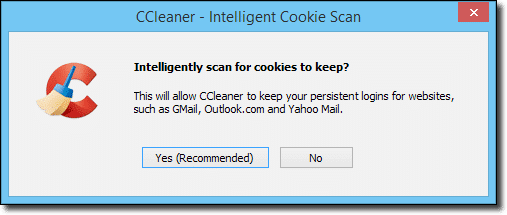
Tools like CCleaner have the option to preserve cookies from a pre-defined list of sites – typically email services, as you can see in the example dialog above – that use this behavior.
The solution
The solution is actually very simple:
- Return to the site
- Sign in again
- Make sure that the “Remember Me” option is checked when you do.
This will cause the site to leave a new cookie that indicates that you are in fact signed in and don’t need to sign in again.
This happens to me from time to time. In a fit of cleanliness, I’ll delete all of my cookies and for the next few days, I’ll have to sign in to a number of sites that normally I wouldn’t have.
Caveats with “Remember Me”
Exactly how “Remember Me” works will vary sometimes dramatically from site to site. For some, it’s truly an infinite sign-in. For others, it really just means remember me for a day, until I close my browser, or any of a number of other conditions.
Also, particularly when it comes to services that require a higher level of security, you may be asked to sign in again anyway to prove that you are who you say you are.
And therein lies the biggest caveat of all.
When you have “Remember Me” selected, anyone can walk up to your computer and start using that website or service as if they were you without needing to sign in and without needing to know your password.
Use it appropriately.


how do you stop automatic sign in on your computor?
Use IntelliLogin to automatic login any website for you!
Never forget any password again!
http://www.jjsoft-studio.com
I did do a complete clean up of my machine due to some corrupted files. How do I reactivate my automatio signin for my internet connection? Thanks.
Yes I deleted cookies but what is the answer? You have not provided the answer. Again Please provide the answer , HOW DO I GET THE AUTO SIGN IN BACK?
—–BEGIN PGP SIGNED MESSAGE—–
Hash: SHA1
Sorry, thought that was kinda obvious: do what you did originally to enable the
feature. When you sign in check the box that says ‘remember me’ or something
similar. (The exact text varies from service to service.)
Leo
—–BEGIN PGP SIGNATURE—–
Version: GnuPG v1.4.7 (MingW32)
iD8DBQFHL5GRCMEe9B/8oqERAjQhAJ9vPaDQnjNwYTE8YgkjQxnB//3oDQCfWf3l
caV7OK4TQyi1+LevXVI1nko=
=nSqh
—–END PGP SIGNATURE—–
MY AUTO LOG IN STOPED WORKING
My auto sign-in stopped working and no matter how many times I sign in to a site I check the remember info and it does not work . I have to keep signing every time
I am having a Major problem! I am not able to log into my account at all even though the password and username are correct. It brings me back to the log in page and clears myt username and password. It keeps doing the sam thing over and over even though the account is valid…what could be stopping me from logging in ??
on my sign in,it says “administrator”.i have to type in my name to get signed on.i am the administrator.I want to get signed on auto as soon as i hit the start button. i am on windowsXPSP2. how do i do this??
sign in pops up in the middle of my work how can i stop this?