Closeness doesn’t count.
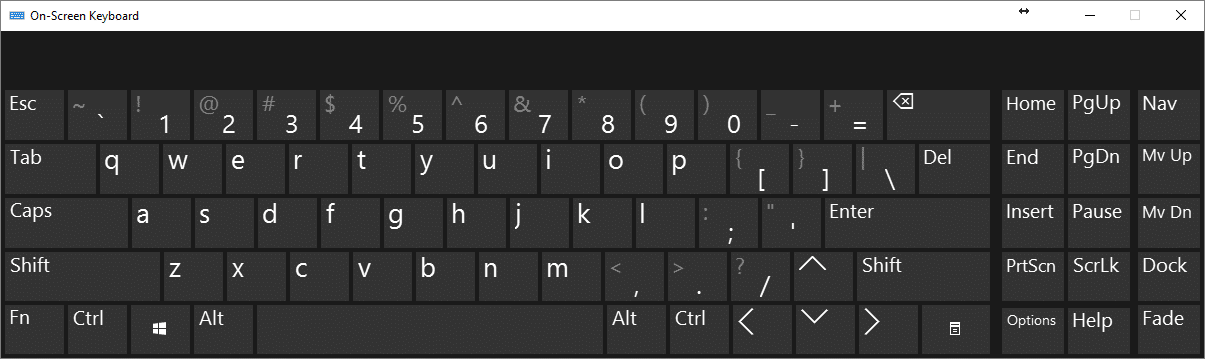

The short answer is simple: no.
I get a surprising amount of pushback on this, but the truth remains: while it might stop some, it’s nothing you can count on to be 100% effective.
Keyloggers are a form of malware that record your keystrokes to capture things like your login usernames and passwords so hackers can get into your accounts. Let’s look at the path of keystrokes from your finger to your computer to see the various ways your keystrokes can be intercepted and logged.
Become a Patron of Ask Leo! and go ad-free!

On-screen keyboards versus key-loggers
An on-screen keyboard can protect you from hardware-based keyloggers. It may even prevent some classes of software keyloggers from intercepting your keystrokes. Unfortunately, since an on-screen keyboard is indistinguishable from a real keyboard to the program into which you are typing, there remain keylogging techniques an on-screen keyboard will not protect you from. Remember, a keylogger is just one specific type of malware, and malware can do anything once it’s on your machine.
The keyboard connection
Typically, when you type a key, a microprocessor within the keyboard sends signals via the cable connecting it to your computer.
Here, we encounter the first point of vulnerability. No, not the microprocessor in the keyboard (technically possible, but exceptionally unlikely) — but the cable, or rather, the socket the cable plugs into.
Public computers are particularly lucrative targets. Someone comes along and installs a physical device between the computer and keyboard: a device that intercepts and logs every keystroke entered. Sometime later, they come back, remove the device, and take with it all the information users of that computer entered.
Wireless keyboards can be worse. Wireless keyboards actually broadcast the keystrokes you’re typing. Any receiver within range can listen in. Wireless keyboards encrypt their data, so in theory, the information should be safe, but the quality of the encryption varies based on the age and vendor of the keyboard. In addition, the concept of “in range” turns out to be much further than most people think, particularly for a thief with equipment dedicated and tuned to this purpose.
The good news is that an on-screen keyboard protects you against these specific types of keyboard-related threats. By using an on-screen keyboard, you’re bypassing those components of keyboard hardware that could be compromised.
The bad news is that hardware-based keyloggers are rare. Much more common are software-based threats.
The keyboard software
Once your keystrokes arrive at the computer from the keyboard, they are processed by a keyboard device driver which (to oversimplify) handles the translation of the keyboard “scan codes”, as they’re called, to the letters, numbers, and symbols Windows applications expect.
Keyloggers typically insert themselves into the receiving end of this process: they get the keystrokes from the keyboard as they are passed on to Windows.
This is where the on-screen keyboard scenario gets interesting.
The on-screen keyboard application is a virtual keyboard. It has its own device driver, which looks like a real keyboard to Windows.
As a result, the keystrokes it sends to Windows can easily be captured by the same keylogging software that captures keystrokes from the real keyboard, if that keylogger has been installed in the proper place.
A keylogger is just malware
Perhaps the most important concept to remember here is that keyloggers are just another form of malware.
And malware can do anything. Keyloggers can capture much more than just keystrokes.
You use the on-screen keyboard by using your mouse to point and click at the image of a key on the keyboard. A keylogger could, then, for every mouse click:
- Capture the location of the mouse on the screen.
- Capture a screenshot image of the screen, or just the area “around” the mouse pointer.
The keylogger has captured a series of images showing exactly where you clicked and in what order. In other words, it’s captured your virtual keystrokes: your mouse clicks and what you clicked on.
Note that this approach to keylogging also bypasses one of the more common so-called security techniques of randomizing the keyboard layout on the screen. You still have to see where to click, and the logger simply logs what you see and where you click, regardless of how the keyboard is laid out.
Keyloggers as threats
How big a threat is all this?
It depends on whom you ask. In my opinion, “normal” keyloggers — those that record only keystrokes — are a fairly common threat, and are one reason why security software, general internet safety, and the use of common sense is so important. So yes, they’re out there.
The real question is, how pervasive are the more sophisticated keyloggers that capture more than keyboard keystrokes, using other techniques to effectively achieve the same result?
It’s hard to say. But again, keyloggers are “just” malware. If they’re on your machine at all, you have a problem, and that problem may not be limited to logging what you type. Like any malware, you might not even realize it’s there until it’s too late. As a result, focusing on solutions targeted only at thwarting keyloggers is not only misguided; it diverts your attention from a much bigger problem. If you have a keylogger, you have malware.
Do this
Focus on preventing or removing malware of all sorts, and you’ll be avoiding or removing keyloggers as a side effect.
Do not rely on a virtual keyboard of any sort as a security measure.
Something you can rely on? My weekly newsletter! Subscribe to Confident Computing! Less frustration and more confidence, solutions, answers, and tips in your inbox every week.
Podcast audio

Related Video


I had never heard of a keyboard or keystroke encryption until two days ago. Today, I found a report that AI had now been successful at logging keystrokes. I have found nothing yet that will remove a rootkit or keylogger. Is there any hope? What about the handheld devices (OCR?) that can scan written or typed (not from keyboard!) images and transfer the copied text into a password manager or login form?
As mentioned in the article above, keyloggers are just malware. Treat them as such by having good security software and practicing safe computing. I don’t see how AI has anything to do with it, other than a scare tactic.