Passwords have always been a hot topic here on Ask Leo! and particularly among Hotmail – now Outlook.com – users. Apparently, people lose passwords frequently because I get a lot of questions relating to password loss and theft.
If you’ve simply forgotten your password, Outlook.com does provide a couple of approaches to regaining access to your account. Nothing is guaranteed, but if you’ve taken the time to set up recovery information, or you can remember various details of your account without being logged into it, then there’s a relatively good chance that you can get it back.
Here’s the approach to take when you’ve lost your password.
Become a Patron of Ask Leo! and go ad-free!
Can’t sign in
If your sign in to Outlook.com fails, notice that there’s a link – “Can’t access your account?” – below the sign in form:
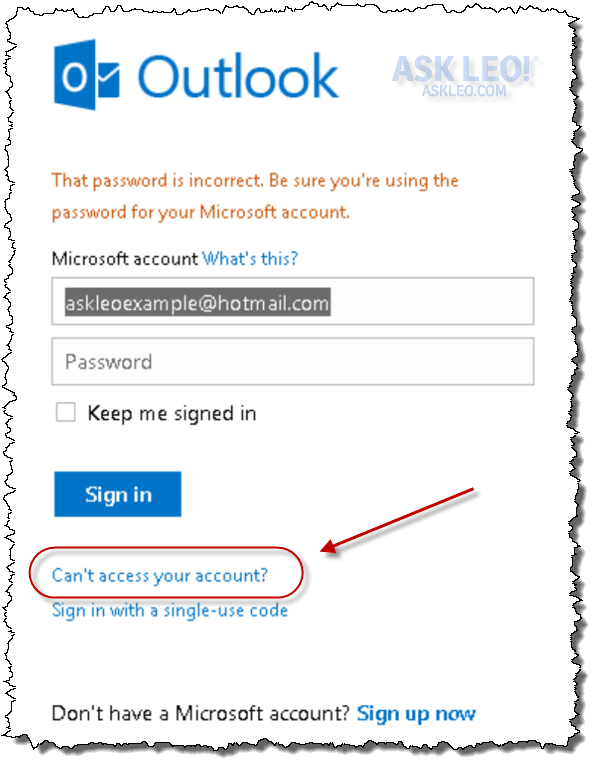
Click that and you’ll be taken to the first step of the password reset process:
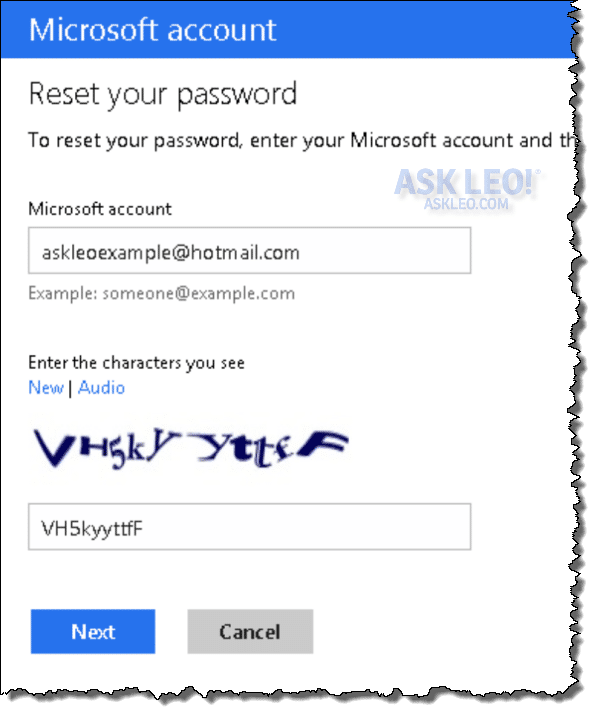
The CAPTCHA exists solely to prove that you are human … current technology makes it extremely difficult for computers to examine that picture and understand the letters that are displayed within it. It’s not always that easy for humans either! But the point is to prevent computer programs from being written, which can try to guess passwords in some high-speed automated fashion … you have to prove you’re human first.
Password reset options
Assuming you are human, you’re then given options:
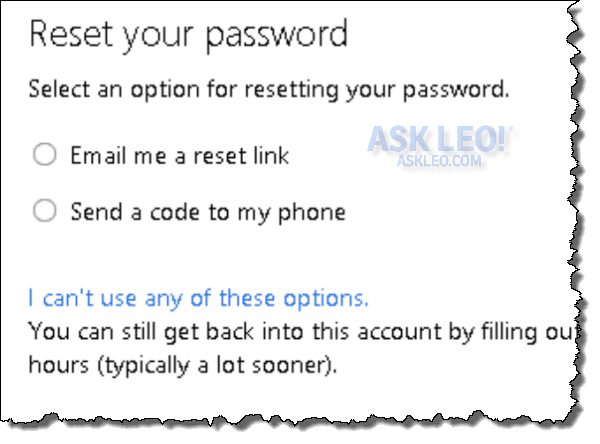
Your options may vary depending on what security, alternate contact, and additional recovery information that you’ve provided when you configured the account. In all cases, these steps are necessary to prove that you are the legitimate account holder and not someone just trying to hack into the account.
In the example above, you can have a password reset link sent. This may seem odd as it assumes that while you can’t actually login to the account, you’re able to receive messages sent to it. Typically, this works when you have some other device – another computer or mobile device – that is already logged in. If you cannot access email sent to this account, then this option is not going to help.
If you’ve configured the account to include a mobile telephone number, you can have Outlook.com send a code to that phone. Assuming you still have that phone number, this would prove you are the original account holder.
I strongly recommend that you configure your account to include account recovery information including a mobile telephone number (if you have one) and an alternate email address at another provider. Setting those kinds of options are what will allow you to recover your account should you ever lose your password.
When none of the options work
If none of the options listed work for you, then the item that appears below them applies: “I can’t use any of these options.” Click on that.
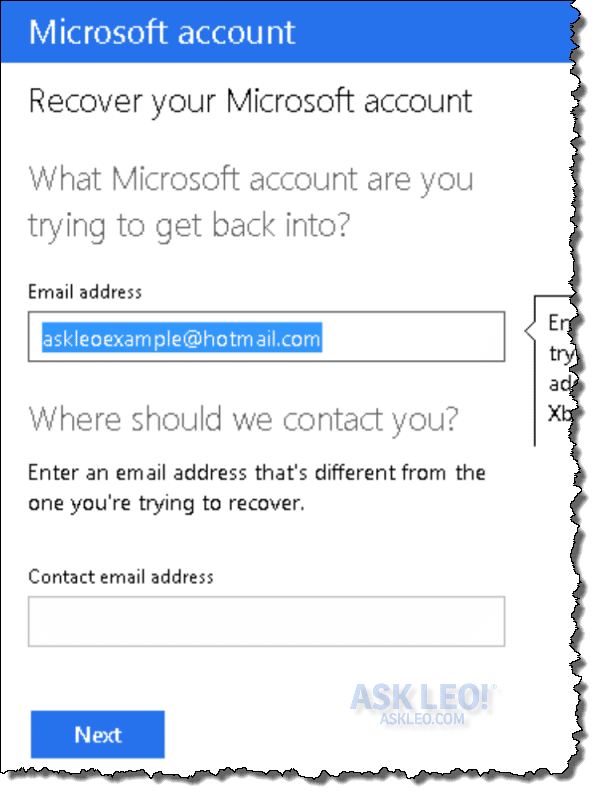
You’ll first be asked to once again identify the account that you’re attempting to recover, as well as a different email address at which you can be contacted. It’s important that the “Contact email address” be an email address that you can access. You might even need to set up a new account for this, just so the folks at Microsoft can contact you when they’ve processed your request.
You’ll then be presented with a fairly lengthy form to fill in:
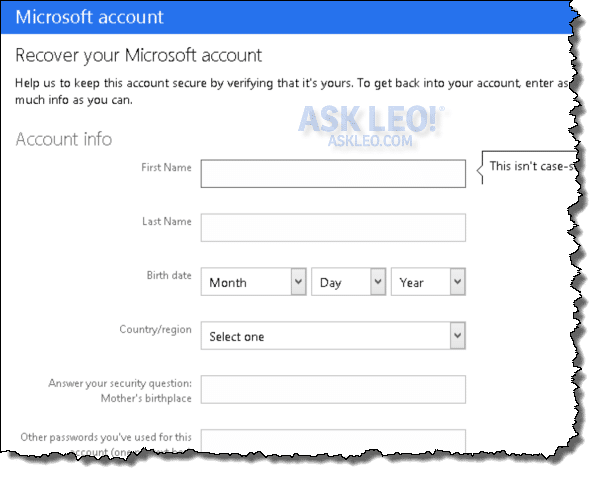
Fill in as much as you can
This is important because account recovery is not guaranteed.
The more information that you can provide, the better your chances of recovering your account. If you’ve set up secret questions (like “Mother’s maiden name” in the example above), answer that. Old password, any billing information that’s been associated with the account, information about emails that you’ve sent recently, even the folders that you may have created in your account are all items that help prove to Microsoft that you are the legitimate account holder.
It’s important to realize that all of the hoops that you have to jump through are all about preventing hackers from accessing your account. You must prove that you are the rightful account holder. Providing as much information as you can helps do exactly that.
Once you’ve submitted the form, Microsoft will examine the information that you’ve provided and compare it to the account information. If you’ve proven sufficiently that you are the rightful account holder, they’ll send you instructions on what to do next.
If nothing works
If you fail to provide enough information to regain access – be it through the recovery options provided to begin with, or by submitting the questionnaire to Microsoft – there’s little else to be done.
You have lost your account.
Prevention
Whether you recover your account or not, perhaps the most important thing to take away from this exercise is making sure it doesn’t happen again.
- Don’t share your password with others.
- Choose strong passwords that aren’t going to be easily guessed.
- Keep your computer and your internet access safe.
- Make sure you set up appropriate account recovery information.
- Log out when finished, especially on shared computers.
- Don’t fall for phishing scams (the only time Microsoft will as for your password is when you log in – never in email).
- Backup your account regularly.
Above all, use common sense when managing your account and your internet activities. Staying safe in the first place is much easier than ever having to recover your account.


i forgot my email adress also the question that i chosed with his answer
If you’ve forgotten the answer to your secret question, and you have no alternate email address, and you have no billing information on record with MSN … you are out of luck. You should create a new account and learn from this lesson.
Hi Everybody!!!
Please contact me if you have forgotton the Hotmail/MSN paswords…….I can help you getting back your password.
WARNING: I’ve said it elsewhere, and I’ll say it here too: anyone who’s offering to help you change your password should be looked at VERY skeptically. Most that I’ve seen are simply trying to hack your accounts, take your money, and otherwise cause you problems. I’m not saying the previous commentor is doing so, but I AM saying that you must be EXTREMELY careful before dealing with such.
my account is hacked, and hacker also change my secret question and alternate account how i can retrive it,
lost my password and i don’t remeber the secret question. can i get it back?
Raheel and Rebecca: probably not. THis article for more: http://ask-leo.com/ive_forgotten_the_answer_to_my_msn_hotmail_secret_question_and_my_password_what_do_i_do.html
i forgot my password for my account, but i can still sign into it, because i have set it on auto sign in, is there a way i could get my hotmail information sent to my hotmail?
Not that I’m aware of. I’d simply change your password to something you know.
Send the password of {email address removed} to this email {email address removed}
Nope. Can’t. Sorry.
hello everybody, i would like to set up a secret question of my creation . if its possible i’d like to know how to do it.
my best regards, john.
This article may help: http://ask-leo.com/how_do_i_change_my_msn_hotmail_secret_question.html
For my account information, is there any other way for me to get access to my account information, since i had no access to my hotmail account.
Thanz
You must be able to log in. Otherwise anyone could get at it.
I’m closing comments here because people are asking the same questions over and over.
1) PLEASE READ THE ARTICLE – it answers many questions that people keep asking.
2) PLEASE READ THE RELATED ARTICLES – they answer many more questions that people keep asking.
3) I CANNOT GET YOUR ACCOUNT OR PASSWORD BACK FOR YOU.
cant get my password because i forget it. I can stil get on because my computer saved it .But I cant get on anywere else apart from my computer.
In that case, you should be able to get into your account and change your password . Click on the face icon next to your name. Select “account settings” from the popup menu. On the resulting page, click “Change password”. Next click “Forgot password” and follow the instructions. If you have an alternate email address, or your phone is registered with you account, you can have a password reset code sent. If you don’t have any of these options, Microsoft will have you fill out a questionnaire which hopefully you can use to change your password.