Chances are that page was set up using a “mailto:” link that instructs your web browser to send an email using your PC. The most common approach assumes you have a desktop email program like Microsoft Office’s Outlook, Thunderbird, or other installed, or that you’re using the Mail program that comes as part of Windows.
If you’re using web-based email like Gmail, Outlook.com, or Yahoo! Mail, things get more complex.
Become a Patron of Ask Leo! and go ad-free!

- Windows has a notion of a “default” email program used to send mail, most commonly in response to a webpage’s “mailto:” link.
- You can easily tell Windows 10 what installed email program to use as the default for sending mail. (The process is slightly different for Windows 7.)
- Web-based email can typically not easily be set as the default for sending, with the exception of Gmail if you use Chrome.
- An installed email program can be set as the default to access your web-based email service.
Choosing a program in Windows 10
Windows has a notion of what your “default” email client is. This is the email program installed on your PC that is used when your PC encounters a request to deal with email.
Common programs include the default Mail program that comes with Windows, Microsoft Office’s Outlook, Thunderbird, and any of perhaps hundreds of other mail programs you can install. In your case, your system’s default email client is obviously Outlook.
To change it in Windows 10, run the settings app, search for “mail”, and click on “Choose a default mail app” when the option appears. (If that doesn’t appear search for “choose default apps”). Click on the currently-listed application (Chrome, in my example above, which I’ll explain in a moment), and you’ll be presented with a drop-down list of possible choices.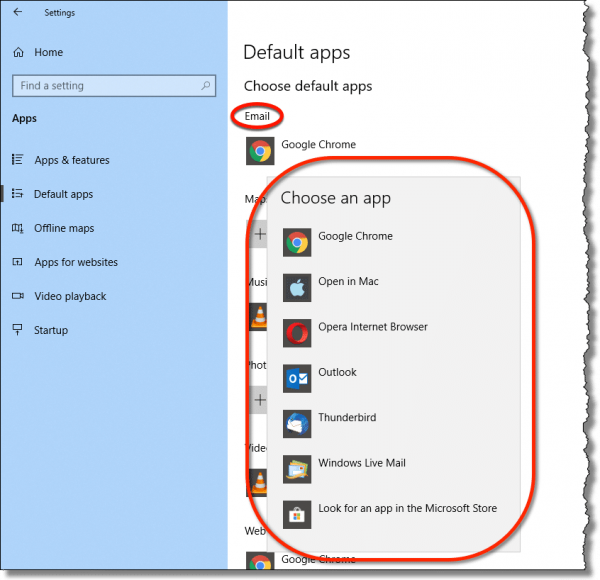
If you see the application you want to use to send mail — perhaps you use Thunderbird to manage your email, but for some reason it’s not the default — just click on the one you want.
If you don’t see the application you want, then you don’t have this option. The list is generated from several sources, including:
- Windows’ own defaults.
- The email programs you install on your PC (like Thunderbird, Outlook, and even Windows Live Mail, all of which I installed at one time or another and so are present in the example above).
- Other email-related programs installed on your PC (like Google Chrome, Opera, or in my case, “Open in Mac”, a side effect of running Windows 10 in a virtual machine on my Mac.)
You might notice that Windows Mail, the default Mail program in Windows 10, does not appear on the list. That’s because at one point I uninstalled it. You can click on “Look for an app in the Microsoft Store” to download and install it once again if that’s happened to you as well.
Choosing a program in Windows 7
Windows 7 looks at things a little differently than Windows 10. In Windows 7’s Control Panel, go to “Default Programs”, and then “Set Default Programs”. On the left will be a list of programs installed. Click on the program you want to use as your email program, and its details are presented in the right.
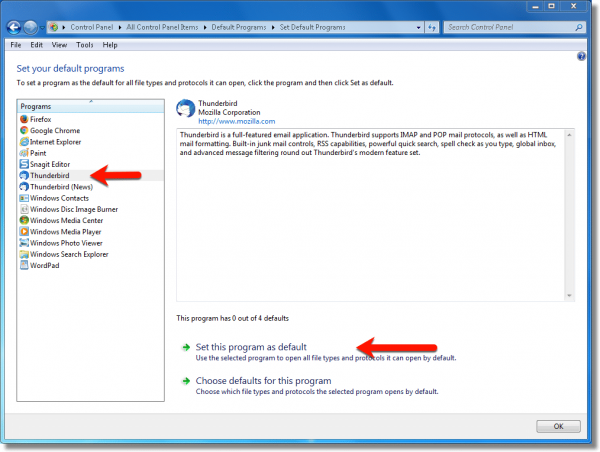
Click on Set this program as default to make it the default mail program. Note that this will only set the program as the default for things it knows how to do. You can’t, for example, set your word processor to be your default mail program — you must select a program capable of being a mail program in order to have it take that role. To see what a program is capable of, click on Choose defaults for this program.
Choosing a web browser as your email “program”
This gets … weird.
Email services like Outlook.com, Gmail, and others are not programs. They are pages on the web that you view using your web browser. Windows wants to set a default mail program. A web browser is not a mail program — it’s a web browser.
If you follow that frustrating circle, the only apparent answer is “You can’t.” You can’t set a web browser or webpage or web-based email service to be the default email program in Windows.
Except, of course, when you can. Kind of. There is at least one specific situation where you can make it work, but it has to meet the following criteria:
- The email service you use is Gmail.
- The web browser you use is Google Chrome.
When you visit Gmail using Google Chrome, you may1 find a double-diamond icon in the right-hand side of the address bar. Hover your mouse pointer over it, and you’ll get a message: “This page wants to install a service handler.”
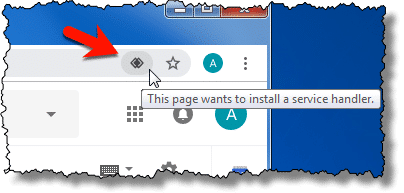
Click on it, and you’ll be given the option to allow Gmail to be used to open mail links.
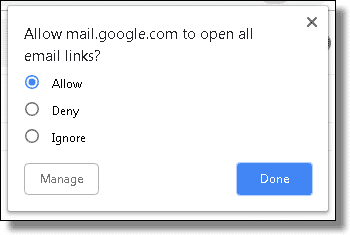
But what about other browsers and web-based email services?
You may be out of luck. At least directly.
Using an installed email program for web mail
The “right” workaround is somewhat cumbersome, but boils down to this:
- Continue using your web-based email as you normally do.
- Configure an installed email program — typically the default email program in Windows — to access your web-based email account.
For example, if your email is hosted at Outlook.com, and you’re running Windows 10, then you might configure the default Windows Mail program to access your Outlook.com account.
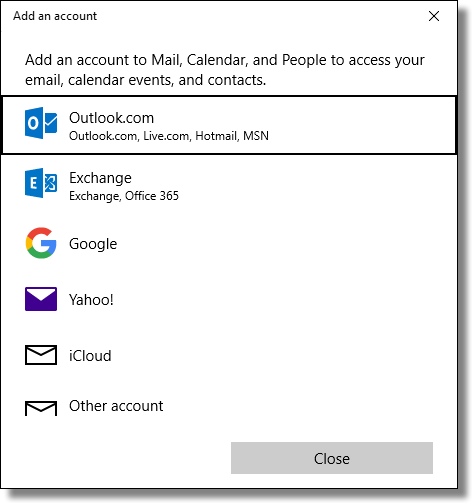
Once the program has been configured to access your email, it will also be able to send email. You would only use the Mail program when something on your PC needs to send mail, like clicking a “mailto:” link in a browser or other mail-sending activity on your PC.
This technique works for just about any email account, and can be used with any desktop email program, not just the one that comes with Windows.
If this technique sounds familiar, it’s exactly the same setup that we use to back up your web-based email: install an email program on your PC and allow it to periodically download a copy of all your email. As a side effect, it can be set as the default email program for when you need to send.
Do this
Subscribe to Confident Computing! Less frustration and more confidence, solutions, answers, and tips in your inbox every week.
I'll see you there!


how can you do this for mozilla firefox?
Hi Leo,
What a wonderful surprise to get an explication/answer to a question I’ve been wanting to ask for ages, but never quite managed to find the words to explain the problem!
Thanks to the “questioner” and for your easily understandable solution.
Have a nice day.
Jean
Great article! Somebody asked how to do this for Firefox, and my question is related. I am using Firefox for my Internet browser. When I use a mailto: in an Internet site, it actually fires up Explorer instead of using the Firefox browser. How can I change that?
Hi leo,
I have followed the above instructions wrt installing Gmail as the default email handler but the system still insists on using Thunderbird. I have restarted the system several times but there is no change. Any suggestions ??
Thanks
Nice explanation, but what about two different users on the same computer with seperate desktops and accounts?
Example:
When I’m logged on, I would like to have Outlook Express as the default email program, while my wife would like to have Yahoo email as the default email, when she’s logged on the same computer
When the default is selected in IE ,Tools, Internet Options, Programs , Email ….the default email is changed for ALL users.
I hope someone knows if it’s possible to have each user have their own default email.
Thanks
Larry
I did use outlook but now like to use comcast is there a way to make this my default mail? I read your post and do not know if comcast has something I can download. Would it be ok to remove outlook from my computer I have XP.
Thanks,
M.
i have changed the default to outlook express and uninstalled outlook, but the outlook option only appears, this happens when clicking on a mail address in a word doc or access database link. Any help fully appreciated.
I have the same question as “Anne at October 17, 2006 07:35 AM”. I want my default email client to be Hotmail in Firefox, instead of the Hotmail in IE that windows insists I use.
Hi Leo,
Similar to the question from John MacKenzie query on October 21, 2006 06:05 PM I have followed the above instructions on installing Gmail Notifier to make Gmail the default email handler but the system still insists on using Hotmail. I have restarted the system several times but there is no change. I have Windows XP. Any suggestions?
Thanks
Andy
Hi Leo,
When I insert a DVD disc containing data files into the disc drive on my laptop I can only view the files (Word & Excel files) in either MS Word or MS Excel, I can’t view the files or even the drive itself in Windows Explorer. When I open Windows Explorer the C: drive and F: drive (external hard drive) are visible but not the D: drive (CD/DVD drive). How can I view the CD/DVD drive in Windows Explorer?
Thanks,
Andy.
i want aol mail as my default, i downloaded aim but it still wont show up. what should i do?
Re: Posted by: Larry at October 25, 2006 02:02 PM
http://windowsxp.mvps.org/defaultmail.htm
how can i change the defaults in programs in internet properties, like e-mail, news group etc…
I’ve followed the above instructions..but when I highlight a file eg photo and use the file and folders tasks to email this file , nothing happens…on my old PC it automatically attached file to a message on my yahoomail…How can I fix it so this happens?
hi leo – i’ve got firefox 2.0 and the send link command doesn’t work at all- and send page command only gives a choice of gmail or blogger =but i want to use hotmail for both functions!!!cheers – marco
I followed your instructions and installed gmail notifier. I’m still unable to change the default email and really need to be able to change it. Please help.
THIS IS THE GREATEST. It was really bugging me to have outlook as my default, since I don’t use it, and in fact it won’t start properly, so clicking on an email link caused annoying things to happen. THIS IS REALLY APPRECIATED.
thanks!
How do I change my default email to Hotmail if I’m using Firefox instead of Internet Explorer?
I use Outlook for email but it won’t open Outlook when I click the mailto button on a website. It will open Outlook Express/Thunderbird or even Hotmail, but even though I have selected Outlook as the program to use, it will not launch Outlook.. otherwise Outlook works just fine.. Any clues ?
I find it convenient to type “mailto:” into my Start>Run field, when I want to write a quick email. On this computer, it opens a blank Outlook email form.
I installed google-talk last night, and suddenly, when I do “mailto:”, it opens a stupid Google web-email page.
I followed Leo’s advice, and checked Internet Options. [Microsoft] Outlook was still selected as the default. (!) I changed it to something else, and then changed it back to Outlook. (There is no “Apply” button to become active to acknowledge I’ve changed the configuration.) Clicked all the OK buttons.
Now, Outlook opens again when I hit mailto:, the way I like it.
Used to love Google…
It’s WinXP pro. First, I went into Control Panel > Folder Options > File Types, and looked around for mailto:. I think that worked for me in Win98, but no joy with WinXP. Maybe it’s in the list, but I couldn’t find it, but Leo’s method was sufficient, thanks.
-Neil-
I’ve tried all of the things mentioned above and nothing works. My computer had Lotus Notes installed before Outlook. In now use Outlook exclusively and it is my default e-mail program (for example if I click on “send-us a message” on a web page Outlook pops up), but for “e-mail this file” Notes would still pop-up. I unistalled Notes and now nothing happens when I click e-mail this file. Help!
Hotmail is not in my drop down list within tools. How do I put it in?. Can I insert it with regedit or something or rather?
Thanks buddy…
Same as many of the others. i only use hotmail, and i only use firefox. dont want a mailto link in firefox to open up IE as it does now. pleeease, its so annoying
Leo, I tried to make Yahoo Mail my e-mail account as you directed us to do…the comp I have XP on everythig worked successfully …my comp I have ME on I could not get Yahoo mail to be one of my choices to select..even after installing Yahoo Messenger..What do you suggest?
when i click a mailto: internet explorer opens like 100 blank windows. i have vista and i want microsoft mail to be my default mail, but everything i try doesn’t seem to work… help! i have gone into set programs and defaults, and i think i got microsoft mail set up as my default. so when i click a mailto: it doesn’t do anything now… at least it doesn’t open a slew of windows. any suggestions?
Thanks!!!!
That was the very best “how to” I’ve finally found.Even totalamente Computer Moron like me got the Idea from these Answers.If I may just ask,-how I can manage the default Mail with Vista?My Question probably should be,how I can manage the Vista,and IE-7 beta?Playing with an Internet is no more Pleasure,I cannot get Access even to my own Yahoo! Adult Groups,don’t mansion whatever slightly close to Erotica’s Web Sites…Please,enlighten me with some bright Idea what can be done?
Sorry the answer you gave for Yahoo does not work under Vista… even confirmed in emails to me from Yahoo… and in other newsletters. I have emailed you a couple of things on this subject, knowing you were writing this article.
For Vista, to change the mailto (I use thunderbird, not outlook) go to Internet Explorer – Tools – Internet Options – Programs tab – Internet Programs – click ‘set programs’ – click ‘associate a file type or protocal…’ – find ‘mailto’ under name, change to whatever email client you are using.
Cheers,
Manon
I am using comcast and would like that to be my default email. is there a way for me to do this without using outlook.
—–BEGIN PGP SIGNED MESSAGE—–
Hash: SHA1
Sure, just configure the email program of your choice to use comcast, and then
follow the instructions in this article to configure that email program to be
the default.
Leo
—–BEGIN PGP SIGNATURE—–
Version: GnuPG v1.4.7 (MingW32)
iD8DBQFHLKpcCMEe9B/8oqERAqFwAJ43pls6+AwkaqTrtAZVlQ9HVt2B8ACeJi9o
VRQHMpgUumJaiFbMxvw4CJE=
=lz6B
—–END PGP SIGNATURE—–
Comcast does not show up in internet email providers . how can i enable default email
Can I install Lycos as my default program?
This may be a stupid question, but I havent gotten into all the computer facts yet, if I decide to change my default mail to Outlook will this effect my comcast acct in anyway? Also will it affect anyone else’s account in my family. I am not the main person on the account?? I am trying to find a job and it is very annoying to have to go back to my e-mail address to respond to these jobs when they have outlook. I would rather just be able to do it as I see it on there website. I have tried to get my family to answer my question, but they are very impatient with me and dont know why I dont get it!!
Thanks,
Mary Maday
mom2nice@comcast.net
Anyway to get hotmail into the list?
I don’t know if this has really been cleared up or not for people but if you don’t see your email program in the drop down list for IE just re-install that program again. After re-installing you should now notice that program in the list to choose from in IE. I can’t say this is the fix for Vista or not but I do know this will work for XP.
I did what you said for gmail notifier and also did the same thing for g-mail talk – checked the box on both of these programs and g-mail still is not my default e-mial program for mailto:
Greeings: I’m still operating under Win98SE. When I try to send POP3 mail I get following error message that says “Cannot send mail. No mail program is set up to send mail using internet shortcuts.” Problem began when I foolishly tried to install Office 97 Outlook Exchange software which I think hosed my registry for Outlook Express as well. When I tried to fix it by opening “Internet Options > Programs > Email” there’s no more email client programs even listed there any more to even select from. It’s all blank. How do I fix OE6 when no default programs are even listed anymore? I tried following the OE6 regedits for XP but they do not correspond to the layout of my Win98SE registry anymore either. Do you have a regedit fixes for OE6 under Win98SE? Or better yet a fix other than a regedit? I used to be able to click on email links to open and send POP3 mail flawlessly without actually opening the rest of OE6. Now everything just stalls, sits there, launches countless windows, exhausts memory and freezes. SURPRIZE! I hope this isn’t a sign of virus. I sort of doubt it. HELLLLLP. On top of it all, I can hardly find any more forums that support Win98SE and OE6 applications anymore either! PS: Do you think the registry repair software packages that abound actually fix this sort of problem? I know they clean up the registry but repairs are something else. I know Win98SE is ancient, useless and buggy but until the whole thing crashes and burns, I’m sticking with it. PS: I also just added an ancient bridge type DSL modem that requires a seperate PPPoP software adapter, which I hope doesn’t have a history of hosing Win98SE and Outlook Express either. Thank you.
-Buster-
Leo: thank you so much. I did the intenet tools and program options like you said, and found my email program there (Incredimail) and that fixed the problem Still wondering why this all happened to begin with. Anyway, I am glad you that you are taking the time to help out.
Kim
Nothing like this in Vista, Leo. I still don’t how to make Windows Mail show as the default mail handler, when on a website, while wanting to send the site or something in it. Only Gmail and Blogger show when I click on SEND TO.
Mike
—–BEGIN PGP SIGNED MESSAGE—–
Hash: SHA1
I’ll write a full article on it sometime, but in short for
Vista go to:
– – Control Panel
– – Default Programs
– – Set your default programs
– – Click on the program you want for email on the left
– – Click on “Set this program as default” or,
– – Click on “Choose defaults for this program” if you want
more granular control.
Leo
—–BEGIN PGP SIGNATURE—–
Version: GnuPG v1.4.7 (MingW32)
iD8DBQFIC5iuCMEe9B/8oqERAsWqAJ9oOrFou+8K1FyNxW0DQP/ONc00IACeM8o+
asFHRLndF1BkAurL/JmpSrs=
=I/WO
—–END PGP SIGNATURE—–
What about in XP when you click on an image and select “Send to -> Mail recipient”? GMail Notifier doesn’t help here. Windows still wants to use Outlook.
Ive done everything that Im supposed to and whenever I click on something to send an email I get an error. Its a RUNDLL error. it says: Error loading C:PROGRA~1YAHOO!COMMONYMMAPI.DLL A device attached to the system is not functioning.
Leo, I think what everyone here is asking you is, where on the computer (registry, dll’s, etc;) do you go (C:windowsthatfilethatplacetofix.it_)to to edit the email section in your example at the top of this page. When you find out, send me that information, If I find it, I’ll send it to you. Thanks. Mr. A Collins. (i.e. DaddyWarbucks)
I did the above, changed the default mail client to Outlook Express, but when I apply and click an e-mail link in Internet Explorer, I find my default mail client has changed BACK to hotmail. This is driving me nuts, can anyone help please?
I had problems in getting gmail to be my default mail client. I had gmail notifier already installed and when I went into the options, there was already a check mark on “Use Gmail for Internet Mailto.” After trial and error, I finally reistalled the notifier, checked the appropriat boxes as listed above, and then Gmail was my default email client.
To make a long story short, I had to reinstall the notifier to get Gmail as my default.
Leo,
Have a laptop, had to install new hard drive and reload everything. Since installing XP updates, I’ve installed and uninstalled Yahoo IM and tool bar 4 times and still no Yahoo mail as an option in default mail programs. Did have it, this all happened 7/20/08. Can you please help? Thank you.
I am currently running Gmail Notifier, so I am all set with mailto: in my browser (Firefox). Now the question is how I can accomplish the same thing in Microsoft Word. In Word, I often use File – Send As (Attachment). No matter what I try, this still fires up Outlook. To make things worse, it also seems to make mailto: in Firefox revert back to Outlook.
Anyone have an idea how to fix this?
Thanks.
The page does not sow a drop down on e-mails. I go to programs and it only shows default as internet explorer. can you assist as the tools does not show what you are showing.
hey Leo I’m trying to do every step u tell me but when I get to the program tab all it sows me is msn exploer outlook mail and windows live mail, I do have install windows messenger, please help me what can I do?
I use Mozilla and Yahoo email. I am trying to get my mail to default to Yahoo. I have uninstalled/installed messenger several times and still do not get the option for Yahoo Mail as default. Please advise.Thanks
Yahoo has made a few changes with there default mail. To us this feature go to http://toolbar.yahoo.com/ie and download their tool bar. Upon downloading it you need to be sure to check that option before finishing the process.
I would like to know how to setup “mailto” using googlemail (not gmail)
Cheers
mike
Leo,
Your article describes how to change the “mailto:” in IE 6. How about IE7? In IE7, the only default is Windows Mail. I would like to change it to hotmail. This worked quite nicely for me in IE6.
Thanks!
you gave info on how to changr the default e-mail but that doesnt work with windows vista please help as i want my google e-mail to be my default back please
I just got a new computer – Windows Vista and downloaded Yahoo Messenger and toolbar after uninstalling Windows MSN toolbar. But I cannot get Yahoo mail to pick up when I click on a link on the web like I used to when I had Windows XP.
Any ideas on how to do this?
Thanks,
Ro
Hi Leo,
I installed yahoo IM recently but still Yahoo mail is not an option that I can choose as my default email program in internet options > programs?
Can you help?
If you guys install the Yahoo toolbar, you will be shown an option to have Yahoo mail as your default Internet E-mail and then if you don’t like the toolbar you can remove that form add or remove programs,but you will not lose Yahoo mail as your default Internet E-mail because it will be there as a separate program.
I must have gmail notifier. I get notified. I must have gmail chat. I chat and I reinstalled it. I still get Outlook when I click Craig’s List email links. What gives?
read most of the comments but they kind of bounce around from different isp/email providers, different ie versions and different queries.
I want my ISP’s (comcast) compose email window to open when I click a “send us email” hyperlink on a web page like it did prior to me switching from msn to comcast. I’m running windows xp and ie 7.
Has this been put to rest?
Everytime I Right Click On A Web Page To Bring Up The ” Email A Friend ” Feature On Windows XP It Goes To Gmail/Google’s Login Page. Is There Any Way To Change The Settings To Incredimail ? I Already Have Incredimail As My Default Email Client But It Still Doesn’t Work. Help Would Be Very Appreciated Thanks ,Merry Christmas And Happy New Year !!!
VISTA default mail 7% solution.RECIPE: 1)select programs 2)access control panel 3)choose programs
4)select set default programs 5)choose Windows Mail 6)then set 7)disclaimer pop-up with user account control appears-CONTINUE {at own risk}
Now I’m just a beginner, but the frustration drove me to this point.If I have assisted you in any way so you may help another then this was entirely worth it. Thanks!
I have read your blog on changing your email default with some of the other franchise companies, but what if I have my own server? How do I change my default to support my company’s email?.
25-Feb-2009
in order to get yahoo mail in the drop down box in ie7 you must down load latest ver.of yahoo tool bar. when down load starts check make yahoo my default e-mail..this WORKS!! i just done this my self
I tried loading yahoo instant messenger on 2 different computers to fix the above problem with getting my computer to default to Yahoo mail and it hasn’t worked, doesn’t show up in the menu. IE 7 is loaded and still can’t figure out how to change it from Outlook.
This did not work for me, even after installing Yahoo Messenger 9. I still don’t have a menu item in that Mail options list. It only includes the three Microsoft products, Outlook, Outlook Express and Windows Live Hotmail. Isn’t there a Registry change that can be performed to fix this?
The drop down list on Internet Options only contains three options on my IE 8 ( I followed your instructions ) Therefore I have no alternative but to go round the houses and send ( forward ) the whole e-mail aritcle . Is this because this is a version of IE ? Or is there something else that a non-computer expert needs to do or know ?
I have yahoo already I even deleted it and yet STILL yahoo will not aooear in the e-mail options of programs in my PROPERTIES of Internet Options. So Now What ? I WANT YAHOO IN THAT OPTION. What u have suggested was absolutelu useless.
I tried what u said on making yahoo mail my server, did not work.. even on the options on my yahoo mail page does not show where I can make it my web mail default!! I reloaded messanger and nothing..internet options does not have it in there!!!! can u help???? thx. Dave
I had a different experience altogether after the PROGRAMS step. I didn’t get any email option. By some fluke I ended up in a section calling for defaults to be set. No email there either, but I recalled your mentioning ‘mail to’ so I put hotmail in that area and saved it. This is a new computer to me, and I am not good at transitions, I see. I had OUTLOOK and lost it in the change; I lost all my contacts. I also note that there are two or three Explorers installed, apparently.
When I installed Gmail Notifier setup it doesn’t completly install. It doesn’t install the Gmail default. It giveS the message (ordinal 345 could not be located.in the dynamentic link lib. COMCTLCTL 32.DLL hOW DO i FIX IT?
Leo,
You made may day. After talking to Dell, searching the web and then agreeing to pay $38 dollars to Microsoft Just Answer I thought I was dead. Then I made one more try passed on deductions I had made from all of the above. Leo, you nailed it, NO PROFILE HAS BEEN CREATED. TO CREATE A NEW PROFILE, USE THE MAIL ICON IN THE CONTROL PANEL. That’s what I put in my search. It found you and
How do I change the “mailto:” or default mail program?
That did it. You may want to rewrite it for Windows 7, but it was close enough for me to find in Windows 7. My search was the exact message I was getting on the Windows 7 screen when I was trying to send and email directly from a pdf document. By the way, when I went to the Mail Icon I got another crazy pop up that was looking for a profile. However the information they asked for meant nothing to me, so it was worthless.
Thanks for being there.
Rod C
I have Win 7 and IE 8. The only option is Outlook as default mail. I d/l Windows Live but then it used a newer version of Hotmail. I would like to keep the version I have. I recently reformatted my computer to factory settings, but before I did that I had been able to change the default email to Hotmail. I remember doing it through the registry editor, I just can’t remember how. Any ideas?
10-Apr-2011
I have downloaded Yahoo tool bar and Yahoo Messenger and still do not get Yahoo mail in the list under Internet Options. My internet service is Verizon wireless. My email address is myname@verizon.net, but I use the Yahoo mail client to send my emails with the verizon.net email address. Could this have something to do with why I don’t get Yahoo mail on my list? Thanks
Leo, Leo, Leo! I need help. I downloaded the browser tools with my yahoo messenger, but still do not show an option of yahoo mail being brought up as my default should I wish to click on a link on a website. Windows Live wants me to share my email addy password. HAHAHAHA. That is not an option I wish to choose. I simply want to click on a website mailto link and have my yahoo email pop up. This was so simple to fix in my XP many years ago. Why is it not working in WIN7 and IE9?
WOW really well written, THANK YOU Ive been searchin the net for an hour trying to find my answer-turns out I just had to ask the right question.
I use IE9 and don’t have a window that displays the neat Internet Options as you picture. Where do I go from here?
24-Nov-2011
@Toni
Unfortunately, Microsoft is being arrogant in this case. Whenever you run Outlook, it automatically sets itself as the default mailto: address. They assume that if you are using it, you want it to be your main email client. I went into the Outlook options to try changing this. but the changes always reverted back to Outlook. Maybe someone else out there has a solution.
Just get poppy:
http://www.softpedia.com/get/Internet/E-mail/Mail-Utilities/Poppy-Date.shtml
Poppy will configure to let you know when any email hits your server for just about any pop account or IMAP account (IMAP which will download all folders from your web based account)
You can also set up poppy to bring up any email client you have installed on your machine.
After much messing around with Gmail Notifier and Google Talk, neither of which made Gmail the default over Outlook, and turning off Outlook as my default email I was mighty frustrated.
EVENTUALLY the cure for FIREFOX (v12) was to go into Tools then Options then applications, scroll down to Mailto: and change it to Gmail. Phew!
I’m trying to change my default email to yahoo. I’ve gone into the control panel and hit the programs tab. There is no “email” drop down box on this tab. Suggestions?
@Nancy
You may have Windows 7, and it looks different in there. Go to the Programs tab, and click the bottom “Set Programs” button under “Internet Programs.” Then click “Set program access and computer defaults” and select the “Custom” checkbox.
I haven’t tried your fix for setting Gmail as the default email when browsing. Hope this works. My co-worker is very frustrated now that she is using gmail and can’t use any email hyperlinks to email people.
I have tried all these fixes and nothing works as advertised. I simply wish to have IE10 use Hotmail, NOT my Outlook 2007. I am running win 7 pro (logged on as an admin) and IE 10. The IE options>Programs>Set Programs starts the control panel Default Programs applet and Set Program Access and Defaults there, using ‘Custom’ does not work as the ‘Choose a default email program’ only allows ‘Use my current email program’ (which is WHAT? ) – I have ms Office Outlook 2007 – BUT with no email accounts set up in it) and Microsoft Office Outlook . ‘Use my current email program IS checked, NOT Microsoft Office Outlook. There is NO way here to select Hotmail. I attempted to use the Outlook 2007 Options>Other>Default Programs, and when that window opens, sure enough there is a MAILTO Protocol checkbox (which IS checked), but it is greyed out and no way to uncheck it! For that matter all the associations in that window are greyed out (and Select All checking/Unchecking has no effect). I DO want my Outlook 2007 to still be associated with my calendaring, appointments, etc.. And I would think there would be a way to use BOTH Outlook 2007 AND IE 10 to have each use it’s own method for email. That is, a IE mailto web link would use Hotmail and Outlook 2007 would go along merrily using pop3 type email. Any help please? This seems like it should be such a simple thing. I have years in IT with Microsoft software and I cant seem to fix this one on my own. These posts seem to be pretty old, so I hope someone is still listening. Thanks.
update ! – I tried IE Internet Options>Programs>Set Programs then in the Default Programs window ‘Associate a file type or Protocol with a program’ and went to the Protocols section at the bottom. The Mailto protocol is there, but when I click on it the Open With dialog box only shows Google Chrome and Microsoft Office Outlook, and NOT Internet Explorer. Why on earth would IE NOT be listed there? The ‘always use the selected program’ checkbox is greyed out and neither Chrome OR Outlook has any check that would lead me to believe they are the ‘selected’ program. Ok, that was my last hope, now I am really stumped. Help please. Thanks.
Because Internet Explorer is not an email program – it’s a web browser. Now, so is Chrome, but they built into chrome the ability to recognize when it’s being used as an email program WITH GMAIL. You can’t do that with IE.
Thank you. I am confused tho, the whole point of your article was using Hotmail within internet explorer, complete with and as in your first example.
Ah, yes. I need to update this article. IE used to “know about” Hotmail, in the same way that Chrome “knows about” Gmail. That appears to no longer be the case. You can’t do it that way any more. You can only associate a “real” email program like Windows Live Mail, Microsoft Office Outlook, Thunderbird and the like with the “mailto:” option, and then configure that program to access Hotmail, if you want this to work with Hotmail.
Here’s something I’ve tried twice, without success. I right click over the mailto: link, and click the option “Copy Email address” (in Firefox). When I paste, it looks like an email address, but when I try to use it in gmail, in the first case I never got a reply, and in the second I got notifications ending with “Delivery to the following recipient failed permanently”. Is the method worth trying on other “mailto:”s, or is it doomed to fail every time? I’d rather just use normal gmail than have yet another program starting up.
That should work. There may be something wrong with the email address referenced by the mailto:
It normally should work. If you are having problems, it’s probably some thing else causing it to copy incorrectly. When you paste it, check the address which is pasted to see what actually is there. My guess is that you’ll find some extraneous (or missing) characters which can be deleted (or added) as appropriate.
Leo,
I have run across your answers before! And you are a genius! I have been looking and looking for an answer to a little issue for a while now, and then I found you have dealt with this previously! HOWEVER, I need this resolved for the new Windows 10 Operating System, one which I am still in the learning curve of.
Here is the situation: I cannot find the correct method for removing the expired trial version of Outlook which was included with Windows 10 and Microsoft Office Home and Business Office 2010.
I have Word and also Excel which I use in my business. What I want to do is be able to use the “send email” tab in the Excel file drop down menu. But when I click on the send as email tab, Outlook Tries to open, but I get this message window: “Thank you for installing Microsoft Office Home and Business 2010. This trial has expired. You may purchase a full version at any time by clicking upgrade now (below)”
I do not use Outlook at all. I prefer to use gmail as the default email. I want to be able to click on any link to reply or send an email and have gmail pop open (like Outlook tries to do).
I have read several link articles on how to do this, but none have worked. ANYONE ??
Thanks
Please let me know if this works:
Go to the Settings app. Then in System, Default apps, scroll down to where it says “choose default apps by protocol” and click that. Scroll down until you see MAILTO. Click the icon to the left. That SHOULD give you a list of eligible mail-handling programs. Click on the one you want.
Don’t know if you can help- but don’t know where to turn.
I’m copying emails out of excel-
Posting into AOL using Chrome (also tried Safari) in my Mac computer.
When it pastes into the BCC column, all the email addresses come up, with a space between each one… but no comma or anything between the emails.
When I send the email- it sends and then tells me the email didn’t go through because the many different emails, look like one LONG email.
I then have to start over, paste all emails, then go through and put a comma in between each individual email. SO FRUSTRATING!
Any ideas how I can just copy and paste and send?
It would probably work if you placed a comma at the end of each email address in your spread sheet. That way, each email address you paste will have a comma after it. You may have to remove the last comma, but that would be quite simple. You could probably even automate the process of adding the comma by doing an automatic replace, For example replace all .com with .com, all .net with .net comma and so on for all the different top level domains you have in your email list.
Thank you so much Leo!!!!
I run 2 identical Toshiba Note Books on the old Vista Home Premium Windows Operation System.
If one Note book goes down with a virus or what ever, I am able to fire up my 2nd Toshiba and all
is good. I recently had an issue where I had to wipe and re-install Vista on one of my Toshiba’s and
I had this issue where I could not email photos from Windows Photo Viewer. I took your advice and
everything worked out great. The interesting thing is, I only had Fire Fox up and running, in fact I had
not even launched Windows Explorer. After reading your piece on how to correct this issue, I opened
Window Explorer, made the change and everything worked fine. Thanks again!!!!
Best Regards from Canada
Tony
Firefox users can go to Preferences → General, and look for the Applications section. Under here you can set default applications for a variety of things, including mailto: links. Gmail and Yahoo! web services are supported out of the box, and there is a way to register most other services, though you have to be willing to briefly muck around in the JavaScript console to do so, and it might be tricky to find the proper URL; see the MDN documentation here: https://developer.mozilla.org/en-US/docs/Web/API/Navigator/registerProtocolHandler
I did a quick web search for Firefox and gmail. It is there under pancake/options/applications. Several email services are supported including gmail.
Alternately in firefox-you can use web base program (I use aol).
in firefox Open options, under general go to applications, scroll to mailto: click on the ‘action’ drop down. (mine listed windows mail) whatever is listed.
(Typically program you want to use inst listed, cant type, must be selected) Once drop down open select ‘use other…’ In that window select ‘browse’.
Opens an explorer window, browse to your ‘favorites’ folder (typically “C:\Users\yourusername\Favorites”)
Highlight/select link (CLICK once) that opens your web email program then click ‘open”.
url will be added to the drop down in firefox and selected to use.
This is on windows 7 machine using firefox 56.