The Not-so-obvious Location Revealed
The location of the time zone setting seems to move with every update of Outlook.com — or more correctly, the interface to manage your Microsoft Account online.
Currently, it’s pretty simple. I’ll walk you through resetting it.
Become a Patron of Ask Leo! and go ad-free!

Outlook.com Timezone Correction
Correcting your Microsoft account timezone: if the time is off on your emails by exactly some number of hours, it may be your timezone setting.
- Log into Outlook.com using your Microsoft account.
- Visit your Profile.
- The setting is currently in the “Country/Region” section.
Microsoft Account
While we’ll start in Outlook.com, it’s worth pointing out that this is a Microsoft account, so it may also be the same account you use to log in to your computer or access other Microsoft-related services online.
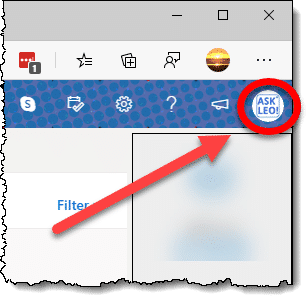
Start by signing in to Outlook.com. In the upper left, click on the small icon displaying either your profile image, if you set one, or your initials.
In the resulting drop-down menu, click on My profile.
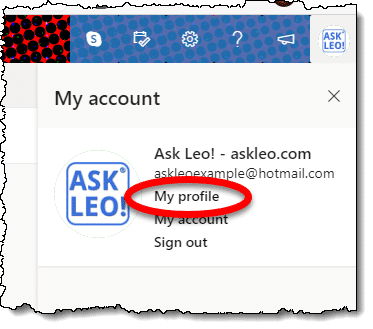
You can also visit account.microsoft.com/profile directly.
On the resulting page, click on Edit country/region.

You may be asked to confirm your password or PIN so as to avoid someone else making unauthorized changes to your account.
On the resulting page, you’ll find the Time zone setting.
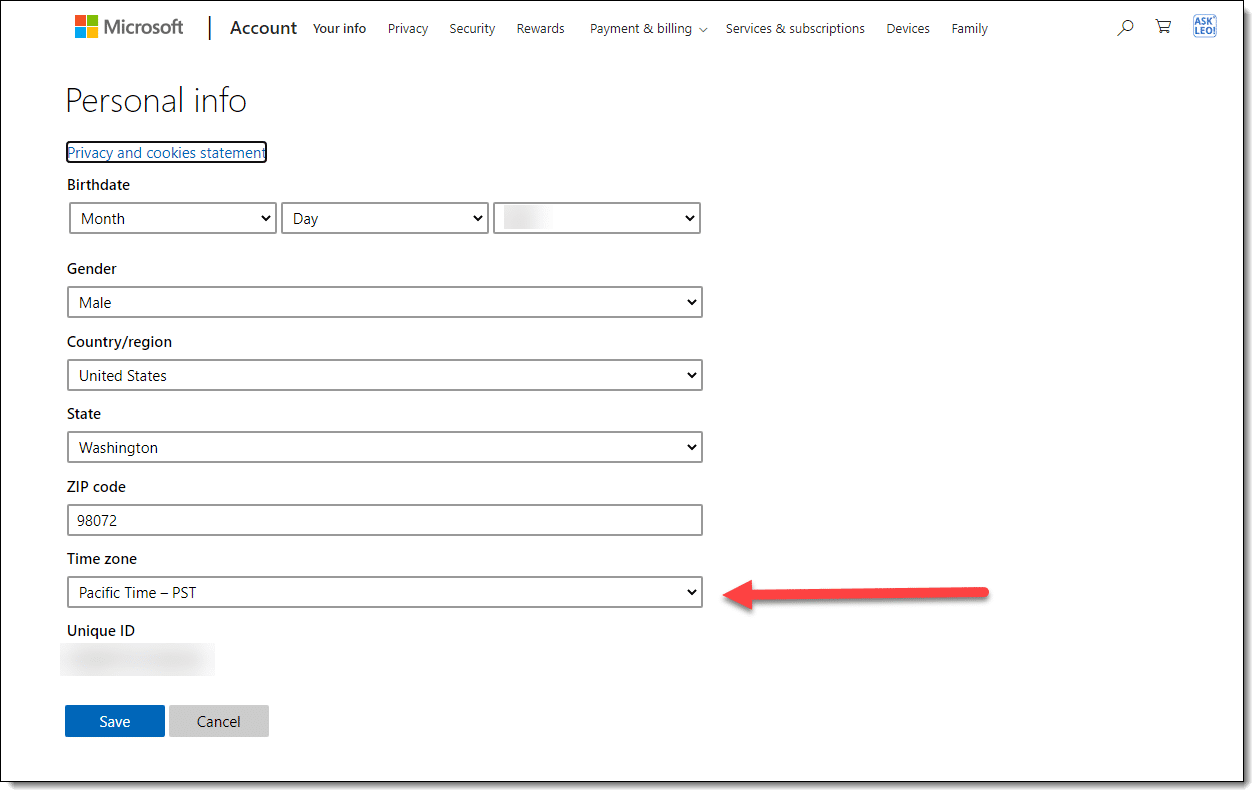
Make sure it’s set correctly, and Outlook.com will use the correct time on your outgoing mails. Presumably this will also affect the time associated with other Microsoft services you may use, such as OneDrive.
Click Save.
If you found this article helpful you’ll love Confident Computing! My weekly email newsletter is full of articles that help you solve problems (often with Outlook.com), stay safe, and increase your confidence with technology.
Subscribe now, and I’ll see you there soon,

Related Video


This fix may work in the USA, in regions outside of the USA no such luck.
Currently the time real difference between the country where I currently live, Suriname and (US0 ET is one hour. When I feed the actual information in the home location fields and save the information, I am only offered two time zone options, GMT and SRT. Neither works.The actual time zone is GMT minus 3.
For people who still having problems make sure that the change has been made to your home as well as your work location. I’ve done it and it works great. Thanks for help.
Thanks for the good and clear advice. I followed it and it worked like a charm. Bizarrely, though I had told Hotmail I live in NSW in Australia, it put me in the most obscure of only two time zones in the state – Lord Howe Island, a tiny speck of land 370 miles east of Sydney where I live, in the largest city in Australia. Go figure!
Anyway, thanks again.
David
Hi there,
I don’t study at my home country. I this case how can i select the required time zone.
I study in China, does it mean that i have to change my home address to China?
Cheers
Thanks a whole lot. Mine has been wrong for years as well. I’m in the music business, I missed meetings with very important people. I would get an email about 8:30 p.m., my time stamp was ahead five hours! It would say the meeting is tomorrow, but hotmail was already in the next day. so guess what? I was the dummy waiting for a meeting the day after the meeting. They had to think I was the dumbest [edited] alive! lol Thanks again? Why don’t they have this in the so called HELP options? lmao, you gotta leave their site to get info?
Thank you very very much for putting up this information so much in detail and specific. This helps alot and made it easier to change in less then 1 minute. I was trying to change this zone for past 8 months. thanks alot
I followed the directions which I have done previously and yet it keeps coming up Temporary Problem with service – try again later and if it happens again – try again later – Have been trying for 6 months – any other suggestions? Thanks
Wow! Done at last! Thank you so much. I’ve been breaking my head over this problem for ages. And their `Help’ is totally useless.
Must tell you though, that once I pressed SAVE or whatever that was, it went into some sort of a trance. I closed it, without signing out, then opened it again, no change, then signed out, then opened it again and VOILA, twas done.
Thanks again.
By the way, WHAT ARTICLE ARE YOU TALKING ABOUT? I’ve spent 5 minutes trying to look for what you want me to read. If you mean the instructions on how to change the time zone, then please don’t call it an article.
P.
Thank you!!!!!
Just a comment to others: Once you follow the instructions and hit “save”, give it about 5 minutes to work its’ way thru the system.
Sorry didn’t work for me. I’m in Cayman Islands and probably 2 years showing wrong time. Tried 2 years ago and had loads of emails from the team, nothing worked and still doesn’t. Tried putting Jamaica, Panama same time zone still no good. Soooo frustrating . . . Any new suggestions please? May be try Florida for now but it changes later on anyway.
I am from Trinidad and I tried using this but it didn’t work because they have Trinidad listed as AST when we are on the same timeline as New York EST
In my Hotmail there is no “registered information” link. Instead, I select Change (the one just to the right of Country/region) to get to the Time Zone screen.
There is no registered information link but as David Reichard posted, click the change link just to the right of country/region and then from there the directions are spot on!
Thanks for your assistance!! I am applying for jobs using my hotmail account and alot of my submissions are time sensitve. I don’t want to send out the incorrect time/date and possibly have my application rejected because the date and time stamp are incorrect. Thanks again and please keep up the good work. God Bless You.
My timezone has been wrong for years. Signed up in UK and then moved to China.
I tried these instructions myself before, but what helped me actually get this working was in the comments. For those that this method doesn’t work for, here’s my run through… you have to,
1. follow the instructions
2. sign out, wait 5 minutes then sign in again
3. click on Profile at the top, click details, and change the work AND home timezones
4. sign out, wait 5 minutes then sign in again
5. options – more options – personal info – change country region. Yes I know you have done this already, but it takes about 10 minutes to filter through microshafts system and refresh. Hence doing the other options too. Then you’ll see new options appear for work and home in new timezones. You must set this to the correct area. This second time, you can ONLY select country. Sign out then wait for 10 minutes or so.
6. Sign in. Repeat the steps in 5. and new settings for the timezone in your country will appear for work and home. Correctly set these.
7. Sign out and sign in again (no need to wait 5 minutes. Send an email to yourself to test it. At this point, all worked well for me.
It’s a total pain the the **** if you live outside of the USA requiring constant signing in and signing out to prompt microshafts servers into refreshing the data submitted. If it has not worked for you, then keep looking at ALL options tabs and personal info tabs. I changed several locations from UK to China and spent an hour signing in and out before new options started to appear.
Hopw this helps. Good luck.
This method is not working. My real time zone is BDT, Dhaka, Bangladesh. When i set BDT in options send/receive mail time is not ok. Suppose someone send me a mail at 1.00 P.M. Hotmail will show as 6.00 P.M. If i use GMT time zone then it show proper time as in GMT standard. But local time zone is not working. Even the formula described in comments doesn’t work too. Can anybody help me?
No, no one will help you becouse they dont know how. I spent months with techsupport and they did jack for me. Only option is to change the mail to some other free provider. Sorry to hotmail but its true. They have a problem and do nothing to fix it.
i found that most of these steps got me in the right direction until i needed to find “registered info.” I could only find “registered info” when i told hotmail to close my email account. on the close hotmail account page, i found the registered info page and was able to change my time zone WITHOUT closing my account.
Once you get to ‘Account,’ click on ‘Change’ for either country or birth date and it’ll take you to ‘Registered Information.’ Just thought I should share that with anyone else who’s been searching for it for, like, a couple of hours like me! Lol. :)
I have had this problem for years, ever since I signed up for Hotmail, and would periodically try to figure out how to solve it. Finally I stumbled here, but Alicia Beaulieu’s comment helped the most, as I couldn’t find “Registered Information” where the original article said it would be. Calysta’s instructions in her comment also work, without the worry that one might accidentally close one’s account. I don’t get why “simple” settings like the time zone need to be hidden. But thanks for helping me to know when emails were actually sent–I’m not receiving them from the future any more.
Once you get to ‘Account,’ CLICK ON ‘Change’ for either COUNTRY OR BIRTH DATE and it’ll take you to ‘Registered Information.’ Just thought I should share that with anyone else who’s been searching for it for, like, a couple of hours like me! Lol. :)
Thanks, Calysta!!! I have been wondering about this for months and I finally stumbled on your answer!!! Wahoo!!!!
This seems to work fine for my Live Hotmail, but the Live Calendar entries are still wrong. I do not understand why this has to be so difficult. Are the two features not connected?
I do not see ‘Registration Information’ on my ‘View and Edit your Personal Information Screen’ – has this changed? I can’t believe I can’t get the time preferences to change! I am only trying to correct the time on my incoming emails.
They have changed the layout a bit.
at the manage account step the new link is
“Account details (password, aliases, time zone)”
Hotmail may ask you to retype your password at this point. Either way you will be on a page called account overview, you want to click on the change option next to “Country/region” inside you will find the timezone option.
Thank you for the information. It has changed a little since your writing. “View and edit your personal information” is now called “Account details (password, aliases, time zone)” Clicking on that brings you to “Account overview.” Then you click on the change link next to “Country/region.” Eh, I see someone already beat me to the changes. Oh well…
If you do not select any Country/Region, as I failed to do. Then your time will default to a US time zone. [It was about 7/8 hours away from GMT.]
Thanks! Perhaps the information it’s a little older, but you can change the Time Zone in Managing your account/Account details -password, aliases, time zone-, then click Change in Country/Region and there u can find Work and Home address both with Time Zone, like merendel says.
I just went to change my timezone since my WLM is running one hour behind… only to find it’s already set to the correct timezone. V strange.
My incoming emails have the wrong date and time on them approx 14 hours behind my current local time AEST. There doesn’t seem to be extra options as per your instruction here.
Wow this works. My time has been set wrong for the past 2 years and just now i decided to do a search to fix this and your site came up. I don’t know why Microsoft would bury this option in hotmail. Thanks!
I had figured out the extra options and change of country on my own but just overlooked the time zone, Thanks, the illustrations really helped.
I ensured the correct time zone was set in Hotmail, it was, according to the instructions you provided. My pc clock is also set to the correct time. When i create an EVENT, the outgoing message at the top still shows the start time as 2 hrs ahead but the time within the body of the EVENT information is correct. Any suggestions on how to fix it?
Leo- thanks! It’s amazing how incredibly lame the help section is for MSN- always have to look to outside sources for EVERYTHING! So glad to have found your site! Keep up the good work!
I changed the time zone in the settings and suggested, and I just sent a trial email to myself, yet the time zone is still showing the old time, not my updated time. Is there anything else I must do?
@Will
Perhaps it’s the time setting on the computer itself causing the problem. Here’s another article that may help:
Why is the time on my email wrong?.
NO the time setting on the laptop is current. It’s so strange, both time zones are for my location, yet when I receive emails it still gives me the time from my old location. Any other suggestions? Got me baffled.
I appreciate your steps Leo, and my time zone was wrong on Hotmail, but after I set everything to the right time zone, I tested an email and it still shows it 7 hours off. I sent an email to myself at 9:30PM and it shows 2:30AM (same day). Does anyone know of any other fixes. This is very frustrating. Thank you
When I go into ‘Managing Your Account’, ‘Country /Region’ says, ‘Not Specified’ and there’s no option to ‘Change’. Any suggestions? Thank you. Regards Steve
I am using the Windows Live Mail client on the desktop. My live profile, live hotmail, and pc time zones are correct. The mail in my inbox is stamped 3 hours in the past. My sent mail is the correct time. Any suggestions?
Thank you! I can’t believe that websites are still this obtuse in 2012.
I did what you suggested to fix Windows Live mail incorrect time displayed…and the help you offered fixed it! Thank you…seems that many wanted to fix the computer time zone and didn’t know about the LIVE ID time zone as this doesn’t show up until you go “into” the settings.
Hey, I tried using this but Hotmail has updated their system – clicking “Account details” now goes to a hideous blue page. Are you able to investigate? Would be happy to be told I’m just doing something wrong!
23-Nov-2012
Apologies – I had one final look, and worked it out. On the blue/white screen, you have to go “Edit personal info” and update the country and time zone fields there. Really weird! Sorry for commenting twice, but maybe you should update this page accordingly :)