As I update this article for the latest round of changes, I’ll show you what’s happening. I’ll also make some guesses as to why the changes were made, and what your options might be. The answer might very well be “not many”.
Become a Patron of Ask Leo! and go ad-free!
MSN Preview
As I write this today, September of 2014, the changes are in “Preview” mode. As of October the preview appears to be over and the change appears to be permanent.
If you visit MSN you’ll see the site’s home page looks something like this:
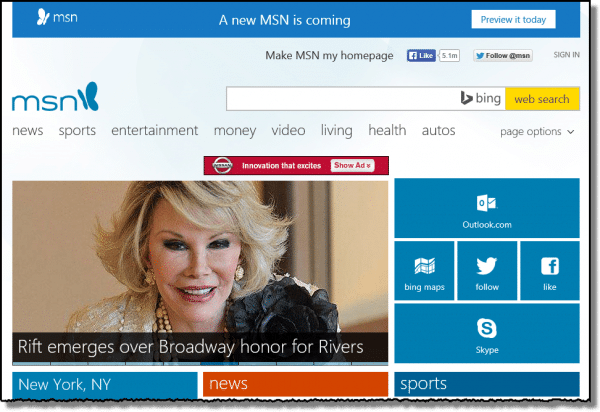
Notice the preview announcement banner at the top. Click on Preview it today and you’ll get a little promotional pop-up telling you how wonderful the new MSN will be:
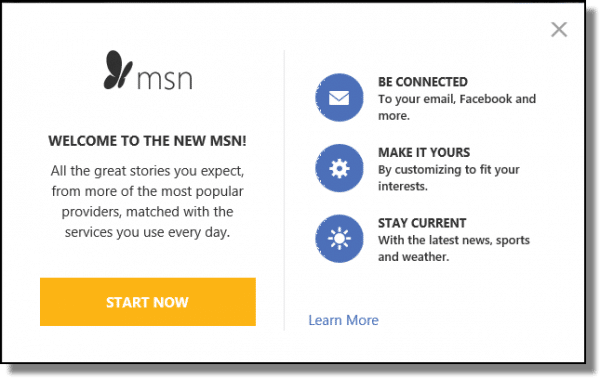
Click Start Now, and you’ll switch to the new MSN look-and-feel.
The new MSN
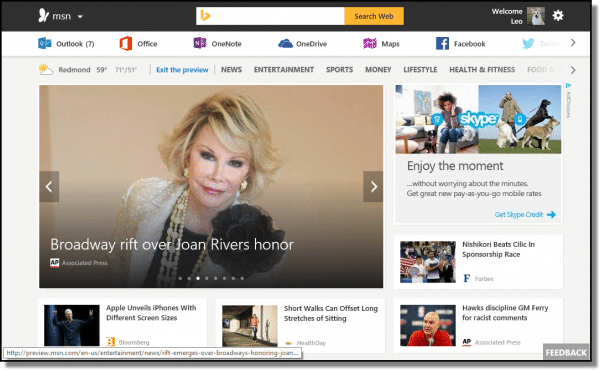
As you can see it’s quite different.
Note that there is a Feedback button in the lower right. Click on that, and you’ll get a “Send Feedback” form that you can fill out:
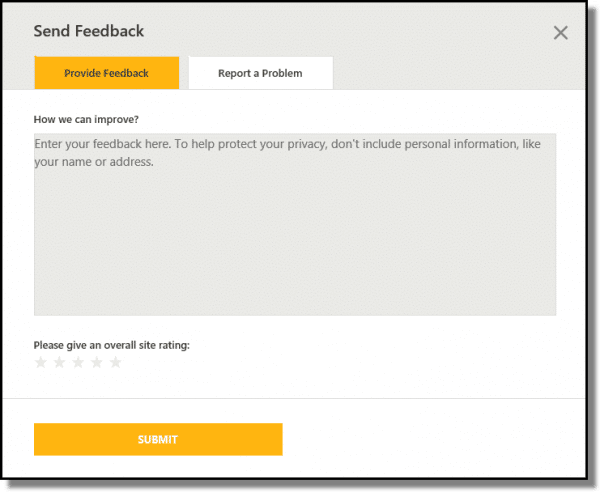
So you do have a way to get your comments on the change back to Microsoft. However, I don’t want you to get your hopes up. As I’ll discuss in a moment, it’s extremely unlikely that changes like this can be avoided.
Reverting the preview
While this new look is in “preview” mode, you can go back to the old interface. Click on the gear icon in the upper right of the MSN home page, and you’ll get a drop-down menu:
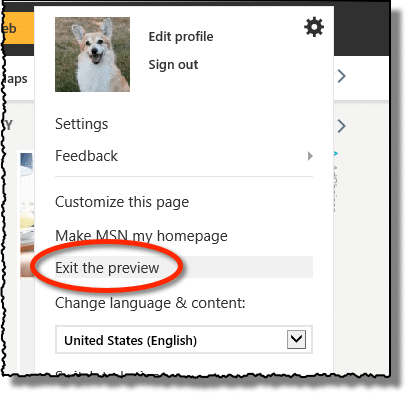
Click on Exit the preview and you should end up back with the old MSN interface as it was before this most recent change.
Important: if the “Exit the preview” item is not present, then it’s very likely that the preview period is over, and the new interface has become the interface for MSN.com.
Why change?
Simple, really: the internet almost demands change. Competition requires change.
The fact is that many sites must update their look and feel periodically to move to more current design standards, to look “fresh”, to learn from usability issues encountered in previous versions, and ultimately to remain competitive.
Change is absolutely inevitable. I’ve written about it before.
The design of a website is also a matter of taste. What’s important to some is unimportant to others.
I disagree with your comment: “everyone” doesn’t hate it. Perhaps most of your circle of friends and contacts, but almost certainly not everyone.
I’m sure that as many people will love the new msn.com look and feel as will hate it. And many others will simply not care. In fact, if Microsoft has done their usability research properly – as they likely have – the number of people who like the new MSN will far outnumber the people that don’t.
I realize that means nothing if you’re one of the people that don’t like it.
Offering a choice
Unfortunately, having Microsoft maintain all versions of every web site forever and allowing you to choose which version you want to use is simply not an option.
The old look of msn.com will disappear eventually. It’s unrealistic to expect Microsoft to maintain both the old version and the new simultaneously beyond the trial/preview period. Especially for a free website, the expenses of doing so simply don’t come even close to justifying it.
And we’ve been here before. Hotmail changed its look, and then later changed to Outlook.com. Eventually the old Hotmail disappeared completely as Outlook.com became the new official interface.
Your options
If you don’t like the new look and feel of MSN, the news isn’t good. It’s likely that the old interface will also disappear forever.
Your choices at that point are limited:
- Live with it
- Find another site to be your browser home page.
Personally – I have no strong feelings about the change. It’s just another website, and its design is just another, using what are current design practices. I can take it or leave it, so I expect as needed I’ll simply adapt.
But, as I said above, it’s all a matter of taste and that’s just me.
And no interface, old or new, will please everyone.


Coke also did consumer studies before introducing the New Coke. Mass consumer dissatisfaction made them revert to the old Coke. I know many people who can’t get used to the Office 2007 ribbon. An option to use the older interface would make everybody’s life easier. Like MS did with Office 6 when they included the Word Perfect keyboard shortcuts.Yahoo gives you a choice between the old and new interfaces which is great for netbook users. One problem is that MS doesn’t feel they have to try as hard to ease their own users into the new system as they did when trying to win people away from a competitor.
It is a great many years now since I converted to the third option: No Coke.
:)
I agree! I HATE the new look! I wish there was a way we could go back. The “Feedback” is a joke. I think they have to put that there. I doubt they read it. Time to move on to a new news site. :( I really liked MSN.
I will agree with all of you Microsoft screwed up “Royally and while they may no thinks will loose at large because once people switch to Google or Lenox is is going to be along time before they return. it is needless to say that I am fed up with this new crap. as it was with XP I was getting hang of it but this new shit is for the birds.
I AGREE. MSN NOW IS USELESSS. DUMP IT ALL.
I cannot even view the page as it continues to flash at me. Testing other web sites for a new home page.
Agreed – I hate that you can’t even pause it. Sometimes I have it open in the background behind smaller-window emails, and the constant movement is distracting. Also, can people not read anymore? I don’t know why MSN thinks we need a slideshow for everything. And, don’t give me the option to “customize my page” if as soon as I click refresh it will revert to the default.
:)
http://askleo.com/why_is_everyone_on_the_internet_so_grumpy/
The new home page wastes time and connections to what you are doing online, previously there was a connection that didn’t disappear so you would have to start all over again. I certainly will be looking for a new homepage that is easily connected to the programs I use
The Coke change was all part of getting free advertising and more shelf space. US Coke and Canadian Coke are two different recipes. Coke simple switched the recipes and called it new Coke. After the uprising, they re-introduced ‘Classic Coke”, switching the recipes back and gaining extra shelf space. Great marketing ploy.
This new Web interface Sucks!
I Hate its bland new look and if i cant get it back the way it was before I Gone Hello Apple Browser or FireFox…
I don’t know how such a big Company like Microsoft can hire the most Retarded Designers and take
ALL the Choice from there customers?
[edited]
People Hate change tossed down our throat when we have nothing to say about it…..
For the Mean time Goggles Homepage seems to be my new sweetheart.
Excellent Job there just give a big ol Pat on one of the Designer NERDS that Pooch this one up..
Windows 7 is Finally a Great Os lets see witch one of those Lonely boys in Redmond slap some lipstick on the Pig after after this Home Makeover Botch job!
The new MSN home page is terribly done. My 14 year old son could have designed this in computer class! What a joke! For MSN to not give a choice for this is ridiculous……Bring back the old msn home page and tweek it a little at a time if the designers have to justify their jobs!
Unhappy,
longtime MSN user
Oh, I see, so we’ve all been ‘randomly’ selected to be inconvenienced with this lousy ‘new look’. I can’t find the articles that I need to find, as quickly as I could before AND I NEED THIS FOR W.O.R.K. Folks, we are not getting our old pages back- I’ve asked 3 times now in the last week and a half, so get it out of your head.
I loathe Yahoo and AOL and now, MSN is no better. We got our ‘old’ home page back at home, but perhaps only because we are MSN paying subscribers there. If you’re using it for free, like we do at work, I think we are stuck.
As of today, MSN does not get to use my opinion and track my usage. I’m changing to another news oriented home page and I’ll come back to MSN when they come back to their senses. If you REALLY want to protest this, YOU MUST NOT USE THE PAGE– AT ALL.
No activity on the page means no feedback. No feedback means that people have abandoned the page and maybe then they will recognize the loss of millions of users and connect the dots, so to speak.
Not all ‘change’ works out for the better…And, that’s all I’ll say about that.
It sucks … I am now using AOL but will look at google …. color me gone …… MSN …..
When I clicked on Safety and went to in-private
browsing, I got the old homepage back. Maybe
for just a little while, but at least I can
now enjoy the old style. Hope it works for you.
The New version is taking me a while to get used to, but what I miss is the weather option. The last one gave us four cities to choose from and did a rotating cycle and this one only gives you one option. Otherwise, I think it’s not so bad, but another change to get used to.
They should fire the entire team who made the new MSN. Where’s all information that I had on the front page, like my WX list! Could they have made fonts be any lighter. I can hardly wait to try to read them in a coffee house on a 10″ screen. Very Very ugley!
Hate it! These are the same people who bought us Vista. To bad Apple didn’t put them out of business by making their prices realistic. They missed a great opportunity.
I want my old home page back. This new page is ugly, and can’t live up to the old MSN home page. What happened to the old MSN videos? There was such a great selection. The new doesn’t compare. I will be shopping around for something better.
I got the “preview” MSN I can not find anything.
If they keep this I’ll have a new homepage!!!!!
The new homepage is cold, ugly. They could have designed something else, if they felt it necessary (why actually?) to change the page. But not this one for God’s sake! If I cannot have my old home page back, then please design something tasteful.
I don’t like this new page. It’s disorganized and cluttered. I usually don’t mind change, but this one seemed to be poorly done. Next time ask for user suggestions on what we want the page to look like.
I don’t like the new MSN look either. However, I believe it DOES have all the same information as before – just rearranged a bit. To all the people complaining – it is THEIR web site – they can do what they want. If you want the old one, make your own!
My homepage is about:blank. Nothing there to offend anyone. ;)
I don’t like change, but I live with it, I don’t like it when they move everything in the market, or on a web page. I stopped reading the news on one TV site it got too flashy and not enough substance. Now I have a different homepage on 3 browsers. I love the BBC one. I have one that is a local news station and the third is the msn, which I spend the least time on. I really hate what they did to CNN. Oh well.
They dare NOT change mine unless I give them permisssion – which I WON’T! I’ve been with MSN since 2003 and I pay an annual fee to have it just as it is. Should they tamper with it illegally, I’ll have no recourse but to drop them, and tell everyone else to as well.
I too subscribed to MSN for many years. They use the MSN Explorer browser (NOT Internet Explorer). They never updated this browser and soon you were getting lots of “your browser is outdated–you must update your browser to view this webpage” error notices. There were the accompanying browser crashes and slow to load pages too. I got so sick of it and the lack of support (they told you to downgrade your browser to I.E. 8) that I cancelled the whole thing-even after 10 years loyal subscriber. They never even said sorry or that they were working on the problem (you can only communicate with them by email and the responses obviously don’t come from this country). Now maybe its time to look at Chrome ?? Or, I hear that in the last month or so, they have finally updated the MSN Premium browser. Is it worth going back and trying for $100 per year???
FWIW: “MSN Explorer” was simply a version of Internet Explorer that had been rebranded with a different name. I would use IE, Chrome or Firefox and disregard the “MSN Explorer”.
This just goes to prove what I’ve been saying for decades: There’s waaay too many MBA’s at the top of the Corporate Food Chain looking to justify their salaries.
This new and improved bersion is simply horrible. I am switcuin to a local area web page. too bad. I have been with MSN since I can remember.
Good – bye
Horrible. I spent 4 hours trying to see what was “wrong” with my computer after they sprung the new version on me. I don’t like the white background color or the expansion of the page. In fact, I just switched over to Yahoo for tonight but am sure that isn’t going to last. Oh my, CNBC is a possibility but no fun stuff there and too much of it on the new MSN. Too bad. They lost me. Also, John Valerio, do you have a son named John Hyde?
I don’t like it either. It looks washed out and boring. Please give it some color. Too much white bothers me.
I had just got use to the last change, now they go and change again. I know that everything will change at some point. The fact is that most sites will give you a warning that a change will be made, not MSN they never have, not that i can remember. I also have to agree i don’t like the color they should have left it to where you could change it. They may still be working on it time will tell. This will in no way stop me from using msn. It will just take time for me to get use to the new look again. By the time i get use to this look they will change it again lol.
So…MSN changed their web site…BOHOOO !!
GROW UP and LIVE WITH IT !!
no!!
I would love to go back to the old MSN homepage. Is their even any way to customize the new one like you could the old one?
How about MSN # 1 and #2 WHY WHY WHY
I’m exhausted fighting with the Microsoft bully software in IE8. Leo, you have just barely toughed the surface. Sure, you can change your hompe page with the internet tools, then manually set your favorites and those quick links to appear on the favorites bar (I have Vista basic 32). The problem is this: RunDLL32IEDKCS32.DLL,BrandIE4 SIGNUP is triggered when you sign in (It doesn’t matter if, like you said, IE8 was downloaded without defaults and only with a custom installation as you proposed). This causes a folder called SIGNUP to be accessed. Inside of SIGNUP is an infernal file called INSTALL.INS which contains all the MSN web links, home page hijacking and orders to knock google out as a search engine and replace it with bing. The MSN butterflys are forced into your favorites bar and list (about FIVE of them). Then some MORE MSN sites are added along with “suggested sites”, bing traffic and other junk.
I opened the INSTALL.INS in a text editor, saved a copy with a different name and modified the branding to my home page and wiped out the MSN, MSNBC and Fox news favorites packing as well as keeping the welcome page from coming on. I saved it and reloaded it an it had been changed back to the “optimized”IE8 with all the defaults even though I downloaded a custom settings version. What now? Do I have to alter the registry so the guilty DLL won’t run?
Don’t like the new MSN page one iota! I will now use a google home page….
I agree with all above, the new MSN homepage is absolutely aweful!!!!! Too washed out looking, way to much white, looks like a boring news paper, please listen to the people and bring back the old version. I too will give it a couple weeks to see what happens with MSN and if nothing I will consider Yahoo and others, too bad, not recommending MSN to anyone at this time.
Adios MSN. Hate the new layout. Would rather see just about anything else.
Time for a change too. I don’t like being controled
new msn page is garbage. first time i saw it i thought i had timewarped back to 1996 or something. the old one was better for one simple reason– everything was there “above the fold,” with no scrolling down required. the way it’s arranged now is RIDICULOUS. HUGE images? why??!? to make us have to pgdown 5 times to see it all?? no thanks. i was close to eliminating msn from my life after the recent horrible redesign of hotmail, and this is so much worse even than that… definitely the end of the line for msn and me. i’ll go with yahoo or something.
and for notenboom to say “Personally – I actually prefer the new look. I find it cleaner and simpler.” shows that either he is A) a microsoft suck-up or B) has absolutely NO taste. “simpler”..?? after smoking what?? having to scroll down and down and down and down to see what used to be immediately visible is the farthest possible thing from “simple.” notenboom is either shilling or is blind.
I agree with all the people who HATE the new MSN page as I do too!!! I’m VERY computer literate and live online constantly. MSN has ALWAYS been my homepage and I’ve been very happy…until now. I really don’t want to switch homepages but I really hate this new layout and design…I’m considered one of the new “previewer’s” but I don’t want to be…I really really wish someone I could get my OLD classic view, everything in the right place for me, home page…MSN if you’re listening or reading PLEASE think of myself and ALL these other people who want the version they’ve become accustomed too back!!!!
I hate it!!! One viewer suggested switching to “in private viewing” and got her old MSN homepage back. I just tried it and although I got the old page back, there are no photos and they will not load. The new page is very confusing, I’m going elsewhere.
Easy fix. I just did it. Didnt like the new look. What you need to do is clear/delete browsing history. Under tools, internet options. Select Delete and Delete all.
Cheers
I am all for change, especially when the change is for the better. Not only is the new MSN homepage different, it is inferior to the previous homepage. The changes may appear “simplified” but to me it looks a bit chaotic and washed out. The white page looks so simple it is akin to something a beginner would create at home. Someone needs to “Bing” these executives back into reality and fix this fast, because my personal hompage will no longer be set to MSN.
Please, Please give us back the old homepage. It is much easier to read and visualize. The new page is very bland and hard to read.
Thank you.
GT OLD PAGE BCK. MIGHT AS WELL DUMP MSN.
To change it back do what the guy above said. It’s Dec. 7th 2009 and I just did it to. It WORKED! Go to Tools at the top, Go to Internet options, and delete all. Close your wedpage, open it back up and it’ OLD BLUE :-) To keep it go to tool’s again and click on “use current” Thats it. I hat the new one two and will fight to keep old blue :-)
Adios, MSN. I do not like the new look and don’t have to stay around. For those interested, I’m changing to iGoogle and adding FoxNews and FoxNews Headlines to it. May add more later to really customize it for me. So long MSN…it’s been a pretty good 6 years.
i have being with msn for ever. Simple the new home page is bad and i will change to another that i like. good by and to the people responsible, good luck you will need it when you are going to be out of the job.
I do not like the new MSN homepage and have already switched to another homepage. I read your article that you will be changing to this new format eventually no matter what anyone else wants because you find this change demanding to keep up with the changing internet. But if your old page wasn’t good would so many people have MSN as their homepage? The older version with the blue background was easier to read, I had everything setup I needed, now I can’t find anything on this new home page. I’m sorry MSN, I love the hotmail live, I love MSN messenger but will no longer have MSN as my homepage.
Please understand I am not MSN, I am not Microsoft. I am not changing anything. Microsoft is. This web site is not associated with Microsoft and/or MSN.
14-Dec-2009
I was so glad to see the comments on how to get the old MSN.com home page back. Will definitely give the suggestions a try. I agree that the new look only looks cluttered; the old was so simple and easy to use. I hate to lose another favorite thing.
I also don’t like the new page. tried the deleting cookies same new page Dec. 16.
Well, I appreciate the honesty of the article as I know I must now “deal with it.” But, like many others here, the MSN Preview looks so dull and plain.
Here is one way to save money — don’t change the homepage look, and you will save tons for graphic artists, program to maintain two separate sites, and PR issues associated with change.
Keep the old look — it have more info and was as interesting as reading a newspaper.
I doubt this message will get through Microsoft’s thickhead, given the terrible Microsoft Office 2007 interface that will be maintained in the 2010 edition.
It really is sad that a company would feel so inferior that they would pursue the last 2-3% of the population that cannot just adapt to the current interface. Instead, MS continues to put out garbage products in an effort to make things ‘simpler’.
I have changed to Google for my homepage, and am using Google docs as much as I can – even though I own Office 2007.
The new page is chaotic and washed out. I also have vision problems which prevent me from seeing the gray font whis is used instead of the crisp black font. Did MSN consider this at all? I’m afraid that unless that issue is addressed, MSN has lost themselves a loyal customer.
NOQ WAY TO DEALWITH IT. DUMP MSN NOW.
To get your old MSN homepage back, just delete your cookies. It will work until Microsoft decides everyone should have the new one and the old one is no longer available.
I HATE YOUR NEW HOME PAGE I WILL CHANGE IT TO YAHOO HOME PAGE
Change is NOT inevitable and it is also NOT desirable at all times. By the time I get rid of the things I don’t want, there is nothing left to see. Google search is my page of choice.
Forget changing homepages. All you have to do is visit derk.yolasite.com/acess-it to get full instuckions from to get it back!
Leo,
I read your response as to why the MSN Homepage changed. I have this same problem using IE7. However, when I open the Firefox browser on my computer, I get the old DellNet.MSN homepage. Why is this the case?
the white page hurts my eyes.the past selection of color selection was more relaxing to the eyes…….
The new home page absolutely SUCKS. That is the trouble with the young minds. They lack insight. Leave this page alone. If not then I will move on like you said. Take a hike Bill.
Don’t fix it if it ain’t broken – Remember Coke’s rollout of NEW Coke ? Wake up MSN ! Listen to your users – not your designers.
I dont like the new MSN.home page. It lacks the info I had at my finger tip on the old one. Its is stark! What a waste of time and money on the new one.The all white is hard on the eyes! Bring back the old one!!!
I dont like it either. I cant find things. And logging on to hotmail from here is a pain in the behind, as opposed to a simple click on the hotmail link.
I hate the new page and your attitude. I don’t hate change, just THIS change. Like another post said, it burns my eyes. So if I can’t get the old page back I will find a new home page. Yahoo here I come!
This new page format sucks! I really prefer the old one and I feel Microsoft should give us a choice. Foisting it on us without our consent, is really unfair. We should have the option of retaining the old layout. Nuf said!
I do not like the New look… “SUCKS” ….
I found a way that works for me. I don’t know how long it will work but it DOES work. Go to your tools bar, then go down to internet options. When the window comes up, click on delete temporary files. I delete cookies, temporary internet files and websites that I’ve visited. After that is done, hit the refresh button. The old MSN comes back. I hope this is helpful for some of you.
When I go to MSN home page why does it come up as on the left side of the screen?
Everything is being designed for people who either can’t read or are too lazy to read. Notice Windows 8, lots of boxes with pictures. MSN: same thing. Lots of pictures, no headlines, nothing to read. Look at your smart phone. Yep, the phone is the smart one, the user can’t read. That is the trend nowadays. We have quit teaching our children and we are now designing the world around their lack of education. That is the way of the future, so if you don’t want to tackle some big problems, you’ll just have to learn to live with this new universe.
A box popped up and asked if I wanted the upgrade—I said NO–SO THEY CHANGED IT ANYWAY—MUCH TO BUSY!!
I just clicked on the “exit preview” tab in the top tool bar and Presto! Im back to the old msn! I do think the new weather thing is cool however…
I have been using my.msn.com since Micro$oft went away from the original MSN format, which I liked very much. Over time, I was able to get most of what I had with the old MSN format on the my.msn.com site. Now Micro$oft has decided to “improve” once more. Well today I set up my customized Yahoo Page after over ten years on msn pages. Bye-Bye Microsoft!!!!
Just as a heads up – Yahoo! has taken flak in the past for exactly the same kinds of changes you’re now leaving MSN over. I fully expect that at some point in the future Yahoo! will change yet again.
Well it was free so you really can’t bitch. How about you pay to host a site and have someone build you a home page on it and set up your security etc that way it’ll always be what you want. Not prepared to pay.. then quit bitching!
Hate it and I think I have relevant reasons to do so.
The old only forced two very small portions of the screen to be not customized. The new is 100% unchangeable propaganda. Your only choice is on which areas of the sheep’s life they which to receive their intellect-melting-mana from Microsoft-Heaven.
Furthermore the first immovable un-customizable section takes up almost an entire standard screen (forcing you to scroll if in the future there were new sections you could customize your content with. So whereas before I could see news, weather, e-mails, link jump points, and latest earthquakes on one screen (no hovering to see it, no scrolling to see it), now it’s a situation of see NOTHING I want to see and further action to get to only SOME of what I want, while other content is completely inaccessible from this page.
There’s no customizable content. It was my start page because it was MY startpage. For example, if I can’t have the aforementioned section where I can create a custom list of links front and center to common places I go on the web, it’s virtually useless to me. MyMSN was a jumping point to the web via links with things that were relevant to my interests surrounding it that I might check out if interesting.
It offers less that it did before. On the old I could see a list of about 8 e-mails, now I have to hover (which is an added step) and shows one or two which my not be all new e-mails that came in. No access to add any content you want.
Finally you can’t change the top ribbon’s order or items. So I’m forced to scroll though a bunch of items that I don’t, and won’t ever use, nor can I make it more convenient by adding the content there I would want.
DL;DR Old was a customizable “start page” the new is an MSN mobile phone Propaganda splash screen.
I’m not buying it, and no one is going to walk me through anything. If they don’t change it back this time, I WILL find a new homepage, for the first time since I ever first had a computer, around 15 yrs ago. I don’t care how many like it, I literally hate it, and it makes me “see red”. Those HUGE windows up in my face, I can’t stand it. To be comfortable, I have to see what is mostly offered on the entire homepage. I can increase the text size and so on, but I cannot have this mess in my face. I will guarantee you that I am going to change to something else because I just can’t live with this one. It has waaayyy too much “closeness” to it, and so, therefore, does not enable seeing almost anything else other than the one window, plus the fact that I cannot find where to stop the horizontal scrolling. Not much of an explanation there, I can tell you that. This has nothing to do with what the public wants, it has everything to do with Boredom of the Geeks syndrome. THEY are bored, no one else is! Bye bye!
I don’t care what “MSN.com” looks like; I have the log-in for my email account bookmarked, so that’s all I ever see. I’ve had my hotmail address for more than 15 years and I’m very attached to it. The day they invalidate my email address is the day I’m done with Microsoft email products.
You may want to make sure your Hotmail email is backed up if it is that important. Here’s a good article on that: http://askleo.com/how_do_i_backup_my_hotmail_or_outlookcom_mail/
Oh, I don’t care about the actual emails (I have fewer than 30 altogether), it’s just that I like my email address. Wouldn’t do me any harm if the emails themselves got deleted; I don’t keep anything important online.
The preview section fails to indicate whether the links I have on my current homepage are available on the new one. I have searched most of the preview and it seems that there are only one or two links that I desire. Does someone know if I will be able to have headlines and links sections to the WSJ, The Economist and other websites that I want to keep on my homepage?
I can’t get back to the MSN home page, as there is not a cog on the left! I have Xp!!! I hate this!
(Waaah, I like blue better, I can’t cope with anything new,) is the theme of this thread. No one has said this or that facility was removed or no longer operates and I need it. If these comments had been made on a Microsoft website, (which they weren’t,) Microsoft could not identify a problem. Adjust. Build a bridge. Cope. Life, it goes on. You’ll never make it to a ripe old age if you don’t accept new and different. Inside institutions are the only place you’ll find a sheltered existence where people are protected from change so as not to cause upset.
I do not like this new version of msn homepage AT ALL!!!!!
“Exit the preview” works per the above directions to return to the “old” look for msn.com as of Sept. 15, 2014. Who knows for how long.
It takes you to a “new” address for the “old” msn.com: http://www.msn.com/?ocid=betaoptout. I hope this helps those of us who prefer what we are used to.
The great thing about the Internet, and for that matter, free enterprise in general, is you can vote with your feet and your wallet. Why anyone would want “Microsoft” for their home page is beyond me anyway. There are dozens of choices. How about FOX news or Newsmax? That way you don’t have to worry about “managed news.” That said, Leo is performing a great service, and Microsoft has changed greatly changed the world for the better. However, a lot can be said for which news organizations they sponsor and their Corporate Governance – which seems dedicated to infuriating their patrons…
DC
The old reality: websites were designed for large screen computers and mobile devices had special versions or had to get by somehow.
The new (or impending) reality is that mobile devices are (or are perceived to be) the main audience and desktops can handle such sites easily – although they look like crippled shadows of what they used to be.
Get used to it.
I find it utterly hilarious that there is a five year break in the comments, and if the posting date of the comments were removed, you would be unable to tell if the comments were from 2009 or 2014.
It also cracks me up how much people complain when a FREE service changes. If you don’t like the change, move on or start your own service.
In six months (or less) no one will remember what the old MSN homepage looked like.
It wouldn’t surprise me a bit to find out some of those complaining about losing the “old” MSN were the same ones that complained when it was first introduced (in 2009 and 2014 – and all the years in between).
It’s like Leo says, ”It’s just another website” Personally I don’t mind I can adjust to the new version of MSN. For those that do not like it just choose another website.
Microsoft are providing a FREE service; if you feel strongly that the new presentation offends you, well, go find another provider and stop carping on like Luddites.
I have no strong opinions about the msn.com opening page, since hotmail is no longer my primary email service. I will say that the new design is not arbitrary, at least not in 2014. More and more websites are changing their appearance so that they work and display better on a smartphone or tablet. It’s a little sad for me, a lifelong desktop computer user, to note that fewer people are using computers to access the internet. When I’m in discussion with someone regarding an email I sent or a particular article I saw on the web, the person inevitably reaches for her smartphone and uses that to go online. I’m sure it’s more convenient than lugging around even the newer notebook computers, but with my near-sighted eyes I can’t read most text on the tiny screen of a smartphone without expanding it to 200%, which is most of the screen, lol. My issue however is less with appearance than with whether the new format works on a computer. I’m finding a number of newly-designed websites (WordPress, for instance) don’t work as well as the old format, and in some cases the display is awful. I’m not a Luddite, but no smartphone for me please, at least not for writing emails or reading NY Times articles.
It is all about CONTROL and we can do nothing about it.
In that, we actually have a lot of control. There are dozens of web portals to choose from. If you don’t like MSN, look around for one you like. You might even find one you like better than the old MSN. And if enough people who don’t like it switch to another, you can be sure MS will make changes to adapt to the market. MSN is essentially an online magazine and a guide to what you may be interested in on the Web. Yahoo has a portal, AOL has a portal. It doesn’t have to be a portal. Every newspaper and magazine in the world (even Playboy) has a website you can set as your home page. You can even set http://ask-leo.com as your homepage :) . Maybe this is an opportunity to discover what’s available to choose from.
What I don’t like is that MSM.ca decided that because I run Windows 8.1, I must have a touch screen. Now all that’s presented to me is a page of ” tiles ” that cannot be customized so that I can read my regional news. I have already changed my home page to Yahoo, but I am looking for something better at the same time.
It’s possibly an americanisation, Leo, but ”everyone doesn’t hate it” should read ”not everyone hates it”. Like all fish swim in water but not everything swimming in water is a fish. Are you? :-) p.s. it’s not necessary to make changes to be fresh and new for the sake of competition. Decca and Polydor kept the same labels for absolutely decades!!! And Tamla Motown – and look what happened to them when they did change it.
There is one great cure for home pages. Don’t have have one. I use Firefox for my browser and have it start with a blank page.
I believe most browsers have this option, and they also use tabs when browsing.
Firefox has a bookmarks toolbar,I keep the sites I use most often here. This way I always have what I want,when I want and any changes are under MY control. This keeps my life stress free,relating to HOME PAGES.
I actually put some folders in my bookmarks toolbar in Firefox and put some bookmarks in the folders. I don’t use the bookmark menu. All my bookmarks are in the toolbar under some folder. It makes the toolbar work like a menu bar (I also turned of Firefox’s menu bar because I never use it).
Firefox starts with a blank page. I either type in something in the search box, or I pick something from the “menu” that I want to look at.
I have Firefox set up to display whatever I had up when it previously closed.
THIS NEW LOOK SUCKS I’M GOING BACK TO AMERICAN ON LINE GOOD BY.
Dear Leo,
In the article you state: “Especially for a free website……”
I have MSN Premium, for which I pay an annual premium. It is NOT free. Should I (and others like me) have not had a say about what we’re receiving for our money?
Thanks,
Steve
You do have a say. You can take your money elsewhere.
If you don’t like it, go somewhere else. Jack Hewes has summed it well. If there’s one thing people don’t seem to have figured out, yet, is that the old axiom – if it aint broke don’t fix it – still applies. But not to MS. To them, cosmetic changes with lesser or equal functionality are sold to suckers as a ‘new version’ of something that wasn’t broke and didn’t need fixing. Imagine if the new model had the steering wheel in the trunk, the driver’s seat under the hood and the engine in the back seat: who would buy a fresh, new, bells-and-whistles version of that car?
Except that with so many devices today that can access the internet, the old MSN might be broken on one or more of those devices. It is way cheaper to make one system to work on every device than it is to make customized versions for different devices.
I think what these companies should do is a better job of explaining what was broke that needed fixing. Firefox does this every time there is a new version … a tab will open up and provide a link so you can find out what changed and some of the reason why.
How can I change back to the old msn page I do NOT like the new one at all
Read the article you are commenting on. You can’t.
Try protopage.com as an alternative. You can set it up to look like the old MyMSN.
We had this all with the New Improved New-Look Yahoo! After massive protests changes were made and now it’s nearly as good as it used to be, although not quite. A few technical failings remain, in particular the way the originating email address defaults to the root when responding to something sent to a disposable address. I’ve tried to tell ’em but they don’t seem to care.
I like it very much but still prefer a home page that confines it to a single page with no scrolling down required. but I have a feeling I’ll adapt after awhile.
Old MSN content was able to be on just one page for a quick review of topics I was interested in. The new one has it spread over many pages with pictures for each topic. I don’t have that kind of time to look at and read all that info, especially stuff I’m not interested in. Unfortunately this is one baby boomer that will be looking for a new homepage that can have everything nicely condensed. MSN just keeps going backwards. They changed their sports page to something fancy. Just try and find an article reviewing a game. They show all the statistic but no easy way to read a review.
I was wondering what the team that developed the disasterous windows 8 system was up to.
Now I know!
I HATE the new “look”
I’m sure it was a completely different team. Website designers and OS coders have very different skill sets.
I don’t like the changes to some TV shows I watch. It’s pretty much the same difference. If I hate a show after the changes, I switch to a new channel. Otherwise, if it’s still good enough, I continue to watch and get used to it. Same with a web portal. Unlike TV which only has a few hundred channels to choose from, on the Web, there are thousands to choose from.
If this is the way MSN works, I am completely out. I will change to anything to get away from MSN!!! I hate it!!
Well, there’s no way of knowing. But, I’ll bet the dislikes/likes run across the generational lines. To be told, “you have to get use it,” begs the question of just what one has to get use to. MyMsn is a great idea and practice. However, if not great ideas being generated what may be at the core of this is revenue from sources who aren’t paying much or, anything at all to MSN to get downloaded to MyMsn websites world wide. Still, we are the customers from whatever the generation and, being one, I don’t like the new MSN since it hardly gives me the links to my favored sites. It would appear sites are being picked for me under the illusion of choice. Some of us have been with MSN and IE since the start. Don’t forget!
I understand everything today must change. The problem I have with change is, well, it’s change. All change means is it’s different. Is it for the better? Or is it actually worse? Companies such as MS feel driven to adapt to almost constant change because other companies feel the same compulsion. But where in all this are the people who must actually adapt to the change? As pointed out in Ask Leo! you can protest, but MS is still going to jam the new MSN down your throat. Just as in 2007 they jammed the new MS Office down your throat. Even today I can do far more with my Word 2003 than I can do in Word 2010 (haven’t tried 2013 yet). IMO all the changes made in MS Office are just differences, made to make MS more money selling S/W. I simply don’t see how they are actually superior to Office 2003. And I’m sure I’ll say the same about the new MSN interface. A frustrated user of MS products. Do they care about people like me? Just corporate BS shoved down our throats.
I just have question about trying to go back to old msn page, most have said to go to settings and exit preview, I don’t know if they took that out or not but I don’t have that. But yea I agree with most every one else. I too don’t care for the new look and one thing that really bugs me, like every one else says, you get hit with it w/o any notice. Today I was on the old msn page all day, then when I closed the page and later went back, out of the blue here’s the new msn page out of no where with preview as part of web address, The only notice you have is they keep advertising that its coming, but until they physically change it, I don’t think we should be forced to be shown preview then be stuck with. At least let me enjoy old msn before the make the permanent change jeeze. My only thought is back when they made the tiled version of msn from the much older version of msn I didn’t care for the tiled version either but after a while I got used to it and was starting to be ok with it. I can only hope that later on maybe I just might get used to the newest version. Well any way, thanks for allowing to share my thoughts
It’s not really a question of getting hit with it without notice. The simply changed the format of their web page. It’s not much different if you went to the magazine stand and found they changed the layout of your favorite magazine.
EXIT THE PREVIEW to go back to old MSN is no longer an option.
Any other suggestions to get back to the old MSN?
Thanks
No. If the exit is gone then it’s no longer a preview – it’s the new – one and only – MSN. As I mentioned in the article you just commented on there will be no going back.
ok so just a quick question then, if you say that if exit preview is gone and that means that it is the permanent version, why in your opinion do you think they still have preview as part of the web address? :D
So that people that bookmarked the link will continue to work.
I have a different wrinkle to the problem. For years, I have used the US version of MSN as my browser’s home page, even though I live in Canada just across the border, because I do most of my business in the US. Now, with the change to the ‘new’ MSN, I am automatically diverted to the Canadian version, even though I still have the US version listed as my ‘home page’ under my ‘Internet Options.’ Does anyone know how I can remedy this?
‘
…….and this too shall pass.
Indeed. It has before, and it shall again. This is no less than the third major change to the MSN.com home page in the last ten years or so. It will pass … until it changes again (which, someday, it will).
How can such an enjoyable MSN turn into the worst ever is amazing. The old home page was something I looked forward to every day, now there is nothing good. Sometimes companies should leave well enough alone. Let’s all pray for the new MSN to turn back to the old usable one.
typo when i click on the gear dont see exit the preview what to do ?
More than likely that option is not available any longer. As Leo mentions in the article, “It’s unrealistic to expect Microsoft to maintain both the old version and the new simultaneously beyond the trial/preview period.”
Read the article – it’s expected that the “exit preview” will go away. At that point it’s no longer a preview, but simply the way that MSN works. What to do? Get used to the new layout, or look for something other than MSN to use in its place.
Unfortunately Steve, the MSN Masters of decision have made their choice because a extra-normal revenue’s need is more compelling. The fact that the status quo format worked for investors has no bearing on the shift to marketing schemes that copycat competition’s cash streams. I could not agree more with Steve’s accurate view…”something I looked forward to every day”… I am sure the professional managers who worked the old format with intense due diligence hour after pain staking hour, day in & day out are greatly disappointed. I wish to thank those professionals who helped me increase my gains & lessen my losses of pain, but I can not thank those who brought this about new look!
They just really screwed up my living that I do by computer on a daily basis. THIS SUCKS – SUCKS – SUCKS!!!!! Please revert back to the old homepage. Why is it they think they can just do it whenever, whatever etc etc. Don’t they realize people work on the computer at home for a living. What the h—–
What is WITH Microsoft that they seem compelled to depict everything in primary colored generic squares?
The overall appearance is both aesthetically unappealing and childish. It looks, for all the world, to be aimed at illiterates and the mentally challenged?
Is THAT how they view us?
Word to the (hopefully) wise folks – Leave MY MSN alone!!
Msn has thrown in with the devil it seems and has gone the way of so many other websites in requiring readers to have a Facebook account in order to comment on their “new” site. Facebook has become the biggest impediment to a free and obtainable Internet. More and more sites seem to demand people login with Facebook and so be exploited by this untrustworthy entity that has basically ruined the Internet experience for me and so many other people who refuse to be used, not to mention spied upon and have everything I do there reported to the government. It is funny, because just the day before I wrote a comment about how Facebook has taken control of the Internet with so many sites requiring people to login using Facebook – and here it is yet again! Another site has fallen and in doing so, has become useless to me. So, I will no longer be visiting Msn and seeing the advertisements that pay for the site.
I’ve seen many sites which allow you to comment or log in with your FaceBook credentials, but I’ve yet to see a web site which requires you to use your FaceBook credentials to log in. I don’t believe many If any) web sites would do something like that as it would preclude anyone who doesn’t have a FaceBook account and that would be bad business prctice.
Well, so far, every time I have attempted to make a comment on Msn, all I am asked for is my Facebook login, nothing else. There are other sites like this as well, Hulu for example only permits you to comment on shows using Facebook. I refuse to get a Facebook account and be exploited and reported on to our government who, if you’ve read any of our founding documents, are not supposed to be spying on the citizens of America, making our government an illegal entity.
One of my design sites recently insisted that it could only be accessed by having a Facebook account. The outcry was quite loud, and changes were made.
Just because something is inevitable (THOUGHT to be certain to happen; THOUGHT to be unavoidable.)
doesn’t mean that it ACTUALLY is, It is only THOUGHT to be.
~ The day we let computers decide what is inevitable, is the day we give up free will (the ability of agents to make choices unimpeded by certain factors.)and self-determination ( the process by which a person controls their own life.)
God save us all.
It SUCKS you can have it I am gone
Come on MSN! Don’t force this new layout on people! I have enjoyed the old method for at least 10 years +. Give us the option at least to go back to the old way. Not a fan on this new stuff…
The “old” look isn’t even 10 years old. This article is a revision of an article I did when the previous look changed to what we now call the “old” look and people got upset. Now they’ve changed again and people are upset again. In a few years they’ll change it again I’m sure. The previous look didn’t last 10 years, and neither will this one.
It is not so much the look, although, I don’t really care for it, it is way too busy with all those pictures. I can read a headline faster and decide whether or not I wish to read an article than I can look at a photo and decipher what a story is about and see if I am interested. What gets me is that Msn will only allow people to comment using Facebook, a site I have been strongly against since its inception. A site that exploits people’s information and one that I do not trust with my information. More and more, I have been denied easy free use of the Internet because of Facebook and I have come to think of Facebook as Internet terrorists.
not tooo much problem with the change[gonna take a bunch of getting used to]…EXCEPT I no longer have the MYMSN pages feature!!!!!!!!!! [I find NO link for it on the new junk]
wow!, what a low blow….THAT was a LARGE part of why I have used msn for last 15-ish yrs!
“new and fresh” ???? There is nothing new or fresh about this new msn.com appearance. It looks like everything microsoft, which is the design of “How many boxes can we fit like photo frames on a screen” look. Their xbox system has this design, windows 8 has this design. Personally, I think its a crap design and hope they get over it fast.
The Classic was the best, It look like a 10 yr old made the new one.
I would never give him a job.
I hate this new page it sucks I will be looking for a new one
I like MSN’s new design; I think the style is clean and uncluttered. It’s a lot easier to find information that’s for sure, and it was time for a new look anyways. One of the main reasons I stopped visiting MSN was because the site just looked outdated, not to mention it wasn’t as easy to locate information because the info seemed to be tucked wherever it would fit. I don’t plan on making MSN my home page though (my homepage is my own website’s homepage), but I will be visiting MSN’s site at least daily now, thanks to the fresh new look.
All those pretty pictures slows down my computer more than those pretty pictures are worth. I can read, you don’t need all those pictures. I need a new “news” related homepage. One that I can comment on without needing Facebook which I refuse to get since they exploit you, your email account as well as report on you to the government – that illegal entity which is not supposed to spy on its citizens! I wait for the day Americans stop being so pacified like cows standing in line to be slaughtered. So, does anyone know of a better news site?
If Microsoft keeps on being this stupid….designing cluttered home pages, and cluttered Windows 8, I shall sell my stock. Put your mouth where your money is.
I hate it, I really hate it, I absolutely beyond a doubt HATE IT
I am totally upset, I hate the new page. I agree with all above it is absolutely terrible. Change it back!!!
Just checking… You all realize that Leo can’t change it back. And that he, personally, didn’t change it in the first place. Right?
what is the easy way to get the old my msn . com
There isn’t one.
Notice all the positive comments. The new MSN is horrid functionally and visibly. So you want access on your small screen cell phone, great. But for use on a PC………MSN just screwed the world of PC users. And they won’t change………the only thing “streamlined” about this is the way it is forced down our throat without any comment from MSN. Embarassing.
The new MSN Auto section has a very nice new/used car data section where all the years of a make/modle would be listed for comparison of all kinds of data. That is gone as now it’s just a big add for Motor Trend online with nothing but 100% MT articles. Guess MYT paid them the most money. It’s was the best now it’s useless for car buying research.
Correct ” The old MSN had a very nice…….”
Agreed, DC. Bring the old MSN Autos back. That’s primarily what I used MSN for…to search the autos. Now the Autos page is a bunch of crappy articles that I’m not interested in reading and I can’t find the search feature anywhere. You could search by make and model and see a bunch of photos, specs, etc. I will be removing MSN as my home page and trying to find another page where you can search for the autos like the old MSN once had…seriously disappointed.
I do not like the new MSN and will find another site one which you can find more information and less pictures. I loved when you could scan most of the page and find an article that interest you click in and then click out to view the others. I loved the editors picks. I am very disappointed and will NOT use the new site!!! Now MSN just looks like every other site. Thanks MSN for screwing up my after work news hour!
WHY can you not leave well enough alone??? As you can see by the many comments, almost NO one likes the new look. I have used MSN as my home page for years, with this new look I can not find anything, My watch list is gone in the market, Facebook is no longer where it was, in other words if I can not get the old look back, I will look for someone else other than MSN
New MSN homepage is plain jane and took a huge step backward. AWFUL.
Does anyone know a comparable site to msn? I need a new homepage!
This is such a matter of personal taste it’s hard to make recommendations. This page has a list of possibilities: http://alternativeto.net/software/my-msn/
I absolutely HATE the new MSN page. Microsoft, PLEASE MAKE AN OPTION TO USE THE OLD MSN, RIGHT NOW!!!!!!!!!!!! This design is not user friendly. I’m NEVER going to live with it and I am not switching home pages. It is not fair Microsoft. I want the old page back (as an option) NOW!!! >:(
I’m not Microsoft. I can’t do a thing. Best I can suggest is to use their feedback form, but as you can tell from my article I’m not hopeful that will have any affect. My recommendation is to find a new home page.
I know you are not Microsoft, but I’ve tried TWICE on the feedback page. The idiots at MS need to listen to peoples responses, which they usually don’t. This is incredibly outrageous. You think they should put the classic page as an option? Anyone?
Like every change, I try it to see what the advantages might be, at first I liked the fact I could hide categories I was not interested in, like sports, however I cannot hide categories on my S4, then the news layout is so categorized that I have to scroll all over to find the stories I am interested in.
So I switched my homepage to Yahoo
Not perfect, however much better….
I agree with all the comments of why people do not like the new MSN home page. If it is our Home Page, why can’t we customize it the way we want and make it feel and look like the original home page. At least give us that option. I always say , if it’s not broke don’t try to fix it. If there isn’t an option to customize MY HOME PAGE then I will seek another to suite my needs. Oh by the way, did I mention that the new home page is nothing to be proud of. For the people at MSN. What a mistake you are making.
The new website is terrible. The one feature I liked about man.com was that you didn’t have to scroll yourself an RSI wrist to be able to click and see what you wanted., Well that is gone, it’s scroll scroll scroll to …. oh not there anymore
What happened to all the home improvement, garden, before and after, maintenance checklists.. all gone
Well guess what ?
I’m gone also… if a website annoys me I will not go there anymore.
The new website is terrible and the worst I have ever seen – Is it to late to fire the people that designed it. My grandkids could have designed something better. Were there any complaints about the old website
That’s an excellent question. If you’ll notice “This is an update to an article originally posted : November 18, 2009” so the answer is a resounding yes. Just check out the comments and their respective dates and see for yourself. The comments section in this post is a testament to the constant changes, complaints, getting used to the changes and then it changes again cycle. That’s the cycle of technology since the beginning of time.
… Damn smokey horseless carriages. Nobody’ll ever use them.
I never thought I would live to see the day that I am saying take your changes and shove it. I am feed up with NO FREEDOM OF CHOICE ON ANYTHING anymore yet charging me big $$$ and shoving stuff I do not like or want up my nose and out my toes. If it ain’t broke don’t fix it. As far as me and several of my boomer friends are concerned we lived with the computer for a very long time and all this changes is going to get microsoft is a lot less sales because we are feed up. In the day we would have protested or picketed and Microsoft and all the other companies would never have gotten away with the crap they get away with today. That includes GS services that are paid to keep your computer up to date and in addition to having to wait for literally house and wasting your life the tech are not properly trained and have no idea as to what they are doing especially if dealing with an older computer say a two year old computer. The GREED exceeds the NEED and I can definitely see a computer a thing of the past. We got a long without computers for a lot longer than we have had to live with them. As for the resentful comment you have to adapt or keep up that attitude is what go us to this extent of total lack of service and courtesy in the first place. I can assure all the greed mongers you are not getting any more of my $$$.
A quote from Leo:
“I’m sure that as many people will love the new msn.com look and feel as will hate it. And many others will simply not care. In fact, if Microsoft has done their usability research properly – as they likely have – the number of people who like the new MSN will far outnumber the people that don’t”.
Leo, what makes you “sure” as many people will love the new msn.com look and feel? Are you really so sure they did their usability research properly? Undoubtedly SI didn’t with their new look and feel and now they are feeling the pain: less traffic, sports writers jumping ship. But they made a decision and would rather go down with the ship than to fix the gaping hole they’ve created.
Another quote from Leo:
“Personally – I have no strong feelings about the change. It’s just another website, and its design is just another, using what are current design practices. I can take it or leave it, so I expect as needed I’ll simply adapt”.
It sounds like you do not regularly use MSN’s site, so why the $%#@ would you care. Your response is idiotic. I think I will change to another source on the Internet for news and entertainment just like I did by switching from SI’s site to ESPN’s site. I think I will take your advice and find another site. Concerning your site, I’ve never heard of it before searching for how to get classic MSN back, and I’m sure I will avoid it in the future because your arrogant and assuming opinions.
I doubt you’ll be back to see this, but for the record:
What makes me “sure”? Decades of experience with exactly this kind of scenario, and dealing with the people who are both accepting of the change (who, by definition, will not flock to sites like this to complain) and who hate it (who obviously do). This is in no way a new scenario to me. We’ve been here before, and we’ll return again … I’m sure.
Why would I care? Because some of my readers (obviously) care.
Sorry I’m not your cup of tea. Best wishes.
This sucks. I kept all my links on mymsn and now you’re telling me they are gone forever? So how in the hell am I supposed to find my links?
I can’t believe that I cannot take the bar off the page that goes directly into my email Skype and what ever else you think I need help finding. This really sucks if I don’t sign out of everything when I get off my computer anybody that would like to use my computer has access to my stuff this sucks.
I understand change and I agree with change when things change for the betterment of the clientele. An obvious warning would have been appreciative stating that we will lose everything on the website when the new site would be in effect. I lost All my favorite links to various sites and the number of links I had in MY MSN. Is there any way I can get it back for only one day, so I can make a note of all that I have????
The new design fits in to the dumbing down of america. We used to teach kids to read with lots of pictures and few words, now that is the reading level of the average american. I notice they took away the links to favorite websites which, along with stocks and weather was my start page. Now it is ruined and I will develop my own home page or move to Yahoo or another start page that isn’t a home page for dummies.
Bye bye MSN
DISLIKE!
Where are all of my frequently visited websites I had links saved to click on????? I needed some of those!
I’m in the same boat!! I used my msn homepage to store some important links/bookmarks that I use ….and now they are gone! anyone know if they still have this box some where hidden?
I can’t get mine to stop coming up in Spanish and auto translating and then I fix it and reverts. I am about done with MSN
I hate the new page. IT will not work right it keeps translating to Spanish no matter what I do
I have a question…..I realize msn has changed now to the new look as I am getting used to it, today some thing happened out of the blue, my msn page changed back to the really old version but with a black strip, does not look any thing like the new page they just came out with, my question is, is there some thing in settings or some thing that can get me back to the new page they just came out with?
so idk what happened but the normal msn is back out of the blue but idk what makes it switch back and forth like that
You might try clearing your browser cache.
I’ve never really used the MSN site before, but after seeing all the complaints about it on Ask Leo!, I decided to check it out. From the looks of it, MSN has been transformed into a clickbait* site. Unfortunately, the Web is being overrun with clickbait links which is lowering the general quality of people’s Web experience. The solution would be to resist the urge to click on clickbait links and avoid sites which use them extensively, and they would eventually have to change. Unfortunately, I don’t think enough people will do this to make much of a difference. In fact, it’s not only MSN, I’m beginning to see a lot of clickbait links for previously reliable sources such as Time Magazine. I’ve had to work harder to find good content, but it’s out there.
*Clickbait is a pejorative term describing web content that is aimed at generating online advertising revenue, especially at the expense of quality or accuracy, relying on sensationalist headlines to attract click-throughs and to encourage forwarding of the material over online social networks. — Wikipedia
I’d be able to tolerate the new msn.com if it really would allow me to customize it. I need my personally added links and also the ability to delete sections. When I’m given the option to edit, all I’m permitted to do is add sections. I have changed to a homepage that is totally blank, and using my favorites or bookmarks to link to sites I use frequently. I made a separate favorites folder just to hold my own necessary links, and I don’t have to see teeny-bopper style photos on my blank homepage.
This is exactly the problem. The new look and feel is fine. My complaint is that the great functionality is stripped out. Beauty is only skin deep.
BTW – There is a replacement: PortalPanel. However, it’s more like PortaPotty. It’s clunky, I don’t like the look and feel, it often crashes, and it’s not secure.
Leo,
Apparently you still work for MS.
Love,
Doug
Nope. Haven’t for over a dozen years now. Not sure why you’d think I did.
Because you caved in too easily:
“I can take it or leave it, so I expect as needed I’ll simply adapt.”
Does anyone prefer the new homepage? I certainly don’t and by reading all the comments, it appears to be unanimous. Why are they trying to tick all their customers off. The New / Original coke-a-cola comparison is certainly on point. Everyone continued to complain so vociferously that they realized there massive mistake and reintroduced classical coke. So lets all keep the pressure on them and maybe these marketing geniuses will recognize that they made a huge faux pas and revert back to the beloved old homepage.
People that like the new home page wouldn’t look for this article, and wouldn’t find it to leave a comment in support of the new look.
Maybe MS will display all positive and negative comments on the new homepage (ha ha ha ha ha ha ha ha ha ha ha ha …).
Nope. I takes you to the new one.
The new MSN sucks, I want my old MSN.
I miss some of my old personalization’s. I “NEED” the local traffic map. Any ideas how to find it?
The new MSN is really horrible. Bring back the old “my MSN”
I AM SO DISAPPOINTED WITH THE NEW BING PAGE, I WAS ABLE TO CUSTOMIZE THE OLD PAGE WITH SEASONAL HEADERS, ALSO TO
HAVE A CALENDER, HEADLINES AND EVERYTHING ELSE AVAILABLE WHEN I OPENED UP. THIS IS A VERY CONFUSING PAGE
NOTHING THAT WAS AVAILABLE IS EASY TO FIND
I disagree with your calm acquiescence to yet another MSN bludgeon. The obligatory need to often use a Facebook account to comment sucks. The new format sucks. I was under the impression you could revert back to an ealier IE version by removing IE11 in programs and thehn do a bit of searching for an older verision. If not, Firefox is better anyway.
The browser you use is unrelated to the MSN homepage you see.
I’ve used MSN for quite a while. I loved the personalization to it. I had each section showing the news that I wanted to see. I had the Sports sections with the NFL & NCAAFB teams that I wanted to see. Now there is no personalization at all — unless you want to count moving a section up/down or deleting is “personalization”. I dislike the changes. Not because MSN decided to make changes to it, but because they took away all that was good about the My MSN page. I have changed my home page on my main computer and will be doing the same to my laptop.
The is so little to customize. They make my MSN according to MicroSoft because WE know what you want.
Is anyone else experiencing the issue that when you right-click to get the context menu it not only opens the context menu but also launches the URL in the existing tab?
I hate this new MSN. Every time I click on a link with the camera icon, I get a black screen and no article, SO frustrating!
Me too. What I’ve done is right click on the article’s title and then watch it copy into my google search bar. From there, I just choose the article again from the list and I can read it. It’s a couple of extra steps, but I get to read it. Hope that works for you.
time to find a user friendly home page. Why change something that worked and worked well. Always screw up the better home page. off to find a different company for my news. I had o favorites except the old home page, the entire page was my favorite….it had all YOU wanted and not what MSN wanted to push on you.
I wish MSN would stop making so many changes. I find it frustrating to try to go to mymsn and continue to use mymsn. WHY can’t you just leave well enough alone:(
I don’t understand WHY msn always has to make changes. I like mymsn just the way it was. Frustration is called MYMSN.
holy cow! why change a good thing? I use to love msn money with stock scouter and most of all easy to read ten year financials…..now no more 10 year financials. its horrible now. i guess ill pay for morningstar which still only has 5 years
msn your screwing up!
I used the MSN feedback button to state that I dislike the new webpage, but you’re right that they probably won’t change it or even read my message. I don’t mind changing to update and stay relevant, but this change is oppressively controlling. They’ve changed the format to compress content and increase the size of dead space with their large banners containing their logo, sign in, search, bookmarks, etc. I don’t want them, but I can’t remove them or even shrink them. Even when you click on an article there’s an inch or two at the top that won’t move and can’t be deleted, making the article or video viewing area small. I also told them I dislike clicking a link expecting the read an article and instead having to click through numerous slides to try to get the information. It’s all about stockpiling our data (data mining) and trying to force as many clicks out of us as possible. Long ago in a universe far, far away there was a thing called responsible, unbiased journalism…
I try to add negative feedback at least once a day.
I hate the ‘roll down pages!! It is 2017 & every once & a while MSN? puts the pages in this awful Roll down crap. I have complained over & over & had it changed back up to 5 times. Then boom! Here it is again! I lost my Google tool bar, can’t see my Icons & Have to min. the page to get to my ‘speaker’ icon & mute or unmute> It is awful & totally not useable!!!!!!! It sometimes take 3 minutes or more to get the stuff to Drop down!! A total waste of MY time!!! Can you tell me Leo who is responsible for this mess???Thank you Sir
A website is similar to a TV program in that when they no longer provide content to your satisfaction, you should switch to another show, or in this case, website. There are hundreds of web portal websites to choose from. I personally have Google News set up as my home page. It’s far from perfect, but it’s very no frills and gathers news mostly from the news sources I click on most and subjects I’ve shown an interest in.
i dont like the new windows 8 look for msn. just looks big and messy. plus they removed the details on the hourly weather. it used to tell you the humidity and other things per hour. now it doesnt. looks like msn just lost ad revenue since i am now forced to go to another site.
Maybe MSN could give me their code for the old MyMsn and I maintain it for everybody :)
I hate it !! I’ve had nothing but trouble since it changed. It sucks !!!!!
It really messed me up to have msn change again, last time when we changed to outlook, then face book sneaked in to change my business and work contacts and other normal friends to all face book friends, who mostly I don’t know, never met and I would not really care about. Then came this new page to mess everything up for me. I had ” mymsn ” set up just the way I want it, with all what is important to me, to get replaced by stuff I consider junk. TOO MUCH advertising and crap I don’t even glance at. No more mymsn, it is so sad, now I just check my email read some, delete some and get out .
I Absolutely think this new MSN Homepage is just annoying. The other was set-up much better. This always happens& I am sick of the computer all together. I miss the 80’s for the reason everything was much simpler then. Times are not changing for the better in this area.
I’ve been a software engineer for over 30 years. I love computers and the internet and what they’ve done for our lives. I also love change. I like to think of myself as a Futurist. However, the new MyMsn, is most definitely not a change for the better.
I don’t mind the look, I just hate not getting the story that I click on or touch on my iPad. I can click on one story to read and up pops something totally different. It’s annoying!
I get “Ask” and I do not like it. I want the old MSN home page, which was easy and quick to use. Now I have to go through several clicks to get what I want. How do I get rid of Ask and revert to MSN, which is listed as my home page?
The Ask toolbar and switching your home page to Ask is usually the result of a kind of malware called foistware. It is installed along with freeware if you don’t uncheck the install Ask during the installation process. Here are a couple of articles which should help:
How do I remove PUPs, foistware, drive-bys, toolbars, and other annoying things I never wanted?
How do I change my browser home page back to what I want?
As for getting the “old” MSN back, only the new MSN site is available.
If MSN really is “listed” as your home page, and yet not showing up as that, then it’s likely you have spyware or adware. I’d run up-to-date scans. More in these two articles: https://askleo.com/how_do_i_remove_malware/ and https://askleo.com/how-do-i-remove-pups-foistware-drive-bys-toolbars-and-other-annoying-things-i-never-wanted/
Its B.S. I would like the old msn back
I hate the new page and will have to see about getting some other server. The weather stinks . It was great before ..It was great when I could decide what I wanted not you people. I can’t find another E mail address I had. I don’t like Facebook for all it does is get people in trouble. Why were we not given a choice To stay with My MSN.
WHO IS DREAMING UP THIS CRAP?
The new MSN scares me, I am always looking for “user friendly” changes. My “old msn” suddenly says MSN UK (www.msn.com/en-gb/) and I’m now looking at news and stuff from UK, not interested in rugby or soccer and that stuff over there. It scared me because I thought I pushed a wrong button and now have some kind of infectious thing.
How do I get rid of the UK thing and stick to the US stuff?? Sure was nice to turn on the computer, sign in, hit Explorer and wola my news happenings.
Anyone??
Al
Why are my msn comments. being displayed horizontally…
L
I
K
E
T
H
I
S
?
I’d suggest that you try clearing your browser cache as described in this article:
What’s a browser cache, how do I “clear” it, and why would I want to?
http://askleo.com/whats_a_browser_cache_how_do_i_clear_it_and_why_would_i_want_to/
Sometimes a browser’s cache can become corrupt or just somewhat confused and as a result can cause a variety of issues.
Not only do I hate it. It was done without my consent. And when you call on MSN chat support, they are worthless than a piece of shit. Three time I tried to get help to customize my homepage. Like there posting it tells you to go to the Tools setting. click on customize my page, wait for the subcategory to open and select what you what on your homepage. Three different agents couldn’t even do that. One practically call me a liar and the other two did a remote clicked around and said do I see the connection now? I told him no. And said he was all done.
Now based on your article, I now know why I can’t make the changes. MSN has changed the whole style and there is no more personalization.
If I new of a new browser to take MSN place I just might switch.
I have used msn as my home page for about 10 years, every time you change it gets harder to use and the information I need and want is harder to access and sometimes it’s not even available. I have had enough, I’m changing my home page !!!! You should consider getting rid of who ever makes these decisions while you still have some patrons who aren’t totally fed up like I am..
The use of the word you in your comment seems to indicate that you think Ask Leo! is associated with Microsoft. Leo hasn’t worked for MS in several years and has no influence on their policy. If you don’t like MSN, hopefully there is a website which you will like better than MSN. I personally use Google News. This isn’t an endorsement, as it’s far from perfect, but it gives an idea that there are alternatives out there.
What are those alternative, Mark? So far about all I see are pages that are either similar to the disaster into which MSN has descended (i.e. Yahoo, AOL) or ridiculously convoluted (i.e. Netvibes and so forth). Even the old MyWay is history. So… can you list a few alternatives that are similar to the older styled MSN page? Thanks.
I can’t tell you what is similar to MSN as I haven’t ever used that page. I personally use news.google.com as my home page. It may not be perfect, but it gives a no frills page of news articles from different news sources around the world.
yes i’d had it on but all sudden it won’t come back on again so can you fix it please why does it goes out every 2 weeks
Ask Leo! doesn’t actually manage the MSN page – this is just an article *about* msn.com.
If you are noticing weird results every two weeks or so, it might be the browser cache. This article may help with that: https://askleo.com/whats_a_browser_cache_how_do_i_clear_it_and_why_would_i_want_to/
Please give me my old system back. It isn’t fair when we have paid for our service to have this change and cannot get our favorites people to show up.;
Please help us revert back to our old system.
I am not the only one that is unhappy.
I can do nothing. I am not Microsoft. I am not MSN. I will tell you that change happens, and it’s HIGHLY unlikely that they will revert.
I HATE THE NEW E-MAIL SET UP ALSO I HATE WINDOW10 .I REALLY WOULD LIKE MY OLD E-MAIL BACK ALON WHIT MY OLD SET UP .
Outlook.com is the website which handles Hotmail email addresses. If you don’t like the changes, it was a change on the website not a result of Windows 10. There’s no way around that layout if you access your email on the website. Alternatives are to use an email program like Thunderbird or Windows Live Mail, or switch to a different email service provider which has an interface you prefer.
https://askleo.com/thunderbird_a_free_open_source_and_powerful_email_client/
One way to tame Windows 10 and have it operate more like Windows 7 is to use ClassicShell.
https://askleo.com/classic_shell_regain_your_start_menu_in_windows_8_and _much_more/
I have hit every freaking button on the page and still can’t find my outlook mailbox !!!! can’t take care of important things like paying a bill or finding someone i talk to with email.
I’ll just KILL MSN OUTLOOK and do everything in CHROME OS. Which is the system i have been using for a couple of years but it also allowed me to keep my email with msn, now i can’t even get into it !
MSN, go @#$! yourself !!!!!!!!!!!!!!!
Omg i didn’t even get choice to change it back i dislike the new please change it back or give us a choice
If you read the article, you’ll see there is nothing we can do do change it.
I am the winner of your msn Microsoft sales promotion contest on 2011,and you offers prize money regarding the email from mr terry smith.But did not get any money yet please make an antiquary about this.
Thanking you and looking forward.
With regards,
Vijayaraj k
email:(removed}@gmail.com
We have nothing to do with Microsoft and can’t do anything on their behalf. If you received an email or message in any other way saying you won a sweepstakes, the chances are overwhelming that it was a scam. Just ignore it.
I am not Microsoft, and I’ve never had a Microsoft sales promotion. My guess is that there never was such promotion, only spam or a phishing attempt that lied.
I like the new change . It kind of reminds me of they layout MSN had a few years ago .
I have lost msn.com why?
You’ll have to explain what happened and how you were trying to access MSN when it stopped being accessible.
I have forgotten my password so i cannot acsess my e mails microsoft will ask if i have forgotten my password but will not let me back in only on a new e mail address which i do not want to do as it would then mean having to tell everyone what it is can you imagine that. any help would be much welcome.
Please follow the instructions and options available in this article. Those are the only ways possible to get your original email account back. It’s a bit of work, but as you say, it’s way better than starting over with a new email.
this sucks. i want to go back to my original homepage. no “X” to exit
Msn is my default, but Firefox has access. I have been having trouble with both, they both have a new format and it’s been driving me crazy… really screwing up my computer! I was thinking it was Firefox so I read that I should uninstall and then reinstall. I did, and I lost my bookmarks and I had a ton of them!!! My husband told me to restore and I did ( a date in October 2017 ) and THAT’S when my bookmarks disappeared! My husband uses IE and he still has his Favorites… (same computer) sound confusing? Yep…. it’s driving me nuts!!! I really don’t know what to do? I’ve tried to get my bookmarks back, but no such luck and I still have trouble with my computer… lots of freezing, different Windows popping up out of the blue, and other abnormal things happening!
Been constantly scanning for viruses… none showing up! Help… I want my bookmarks back!
I appear to have an MSN email address which I never use and some of my incoming mail gets directed to it. How do I get rid of it?
The easiest way is to simply ignore it and it will eventually be closed automatically after a length of time. An email account you don’t use really doesn’t do any harm. Keeping it and occasionally checking for the stray email which comes in isn’t a bad idea. The account will remain open but again, it can do no harm. I have an old Yahoo account which I stopped using but I now use fro newsletters to prevent cluttering and possible spam on my main account. I’ve gotten emails from people I haven’t heard from in years.
https://askleo.com/how_do_i_close_my_hotmail_or_outlookcom_account/
1) If you want them to still be able to reach you, tell the people who are sending to you to use your real address.
2) Ignore the MSN email address further. Seriously, just pretend it doesn’t exist. Never login to it, never look at it. That’s the simplest way. It does no harm.
I am discussed with the new MSN home page. Restore the old style
I’ll assume you mean “disgusted”, and sorry a) I’m not Microsoft, I can’t change anything and b) they’re unlikely to move backwards.
If you read the article, you’ll see it can’t be restored. It’s a website and they show you what they want. It would be the same as trying to get a TV program to revert to their old format.
you can still access a somewhat old msn with static news by using a browser like ie 4 5 6 7 (8 uses new design) end old ff versions, and a old bing version too
but make sure you use HTTP version and not https,
unable to get anything to work and wasted a lot of time with NO RESULTS. Please fix this
It’s not ours to fix, I’m afraid. What specifically isn’t working for you?
If you mean fix it so you can get the old MSN page back. That’s impossible. It’s exactly the same as if you don’t like the new format of a TV show. It’s set by the creators and there’s absolutely nothing you can do except write the creators (Microsoft) and complain.
If had read the article thoroughly, you would have seen this:
Your choices at that point are limited:
the current MSN. home page is showing articles with pictures that are close to porn and may as well be– and there’s no way to get it off… If you can’t get this off our home page we will be leaving MSN>— this stinks!!!!!!!!!!!!!!!
today’s pix are a perfect example— the star in the red bathing suit– way too suggestive– heck not even suggestive- just plain indecent!!!!
We at Ask Leo! have nothing to do with MSN. If you don’t like what you see on that site, you can find another news and internet portal website which better suits you.