
There are two possibilities for this happening: the homepage setting in your browser has been changed, or the content at the homepage you’ve selected has changed.
I’ll look at both, and what you can and can’t do about each.
Become a Patron of Ask Leo! and go ad-free!

In most browsers, you can set the home (or startup) page by going to Options or Settings, looking for the homepage setting, and configuring the URL of the page(s) you want to open on browser startup (or Home button press). Homepage settings can also change as a side effect of some software installs or malware. Homepages can appear to change if the content of the page is changed by the website owner. You can be more productive and even avoid ads by taking control and making your own choice.
What’s a homepage?
 A “homepage” or “startup page” is the page your web browser opens when you first run the software, and the page it returns to when you click on the “Home” button in the browser’s toolbar.
The default behavior is often set to display a new tab page on startup. This built-in page varies from browser to browser, but is often some combination of search box, shortcuts to common websites, and possibly news and other information.
On the other hand, some browsers are set to open the URL of a webpage out on the internet. For example, many people have their Microsoft browsers set to display https://msn.com1 as their homepage. When they fire up Edge, the page at that URL is displayed.
Different people choose different homepages. Some use a bookmark service as their homepage; others, a sports team or local news website; still others, a search engine. Another possibility is to use “about:blank” as a homepage. This quickly displays a blank page on startup.
Setting the homepage
You can set the homepage in your browser by telling it what URL — like https://msn.com or something else — you want to use.
Naturally, finding the setting in each browser is different.
Microsoft Edge
Click on the ellipsis (…) in the upper right corner of the Edge window, then click on Settings in the resulting menu. In the left-hand column of the resulting page, click on On startup.
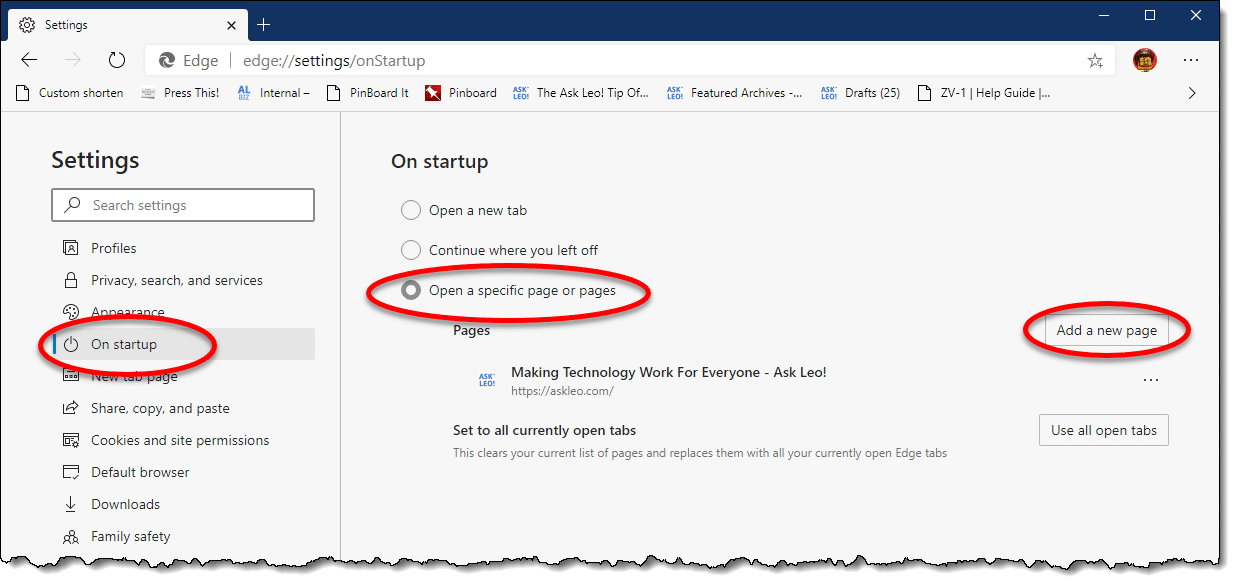
Click on Open a specific page or pages, and then Add a new page. You’ll be presented with a small box into which you can enter the URL2 of the page you want to be your browser’s homepage. Click OK, and it’s set. In the example above, I’ve set https://askleo.com as my browser’s homepage.
You may also want to show the home button on your browser’s toolbar, and you can have it go to the same page, or a different one if you like.
Still in the settings page, click on Appearance in the left-hand column, and then under “Customize toolbar”, click on Show home button, if it’s not enabled, and then click the circle in front of the box below “New tab page”. This will allow you to enter the URL that you want the Home button to bring up. Click Save.
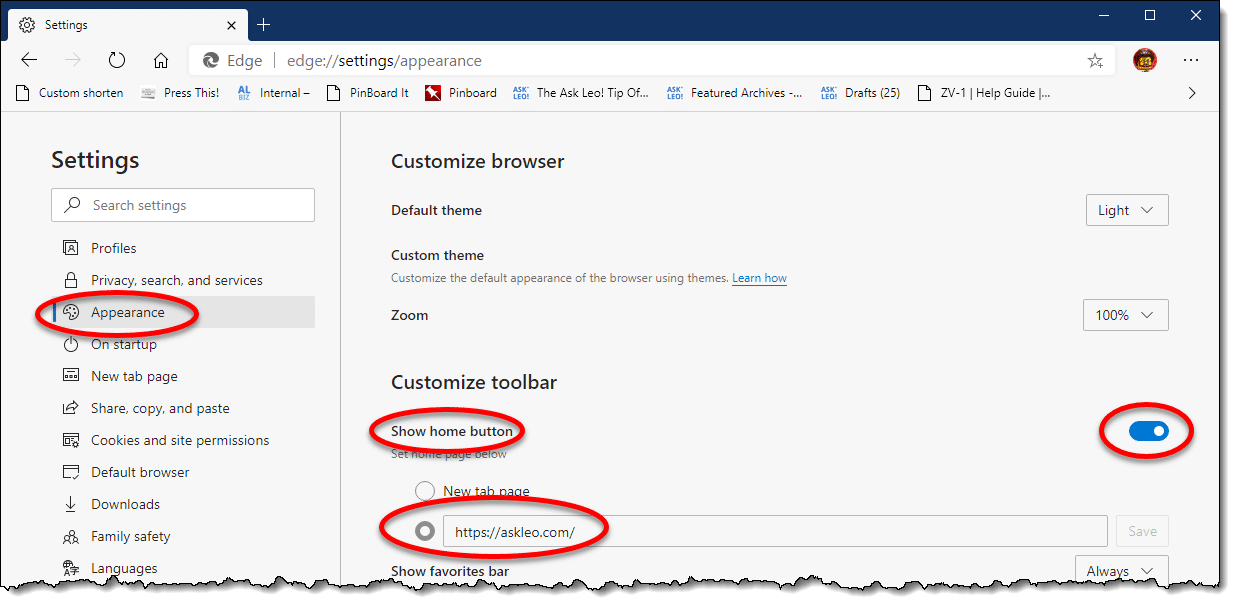
In the image above, I’ve enabled the home button and set it to bring up https://askleo.com.
Firefox
Click on the hamburger menu on the far right of the Firefox toolbar, and click on the Options item in the resulting menu. Click on Home in the left-hand pane. Click on the dropdown menu next to “Homepage and new windows”, and click on Custom URLs… . This will expand to include a box into which you can enter the URL of the page you want to be your browser’s homepage.
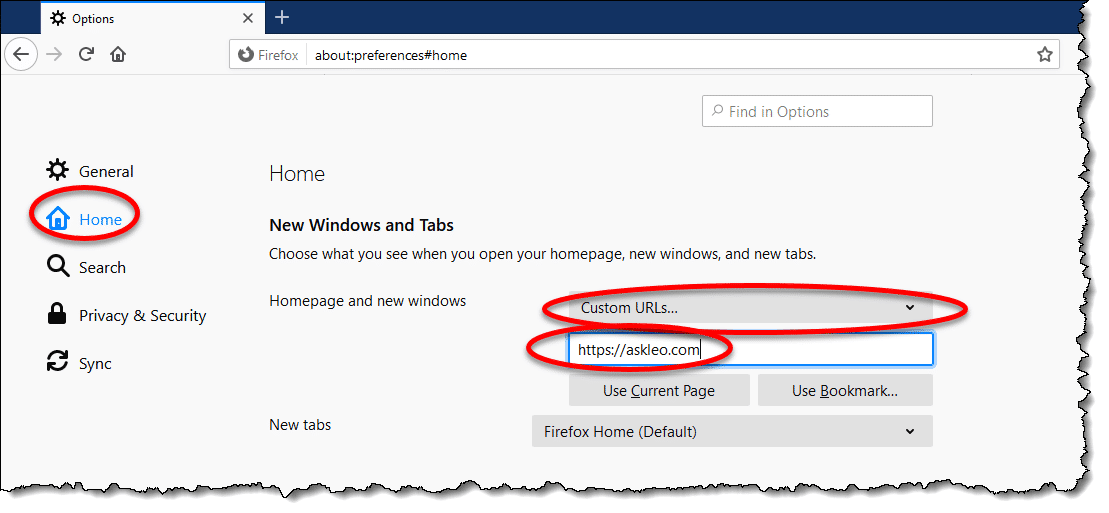
I’ve entered https://askleo.com to be used as my browser’s homepage.
Close the options tab, and the setting is saved.
Google Chrome
Click on the vertical ellipsis (⋮) on the far right of the Chrome toolbar and click on Settings. In the resulting page, scroll down until you find the “On startup” section near the bottom.
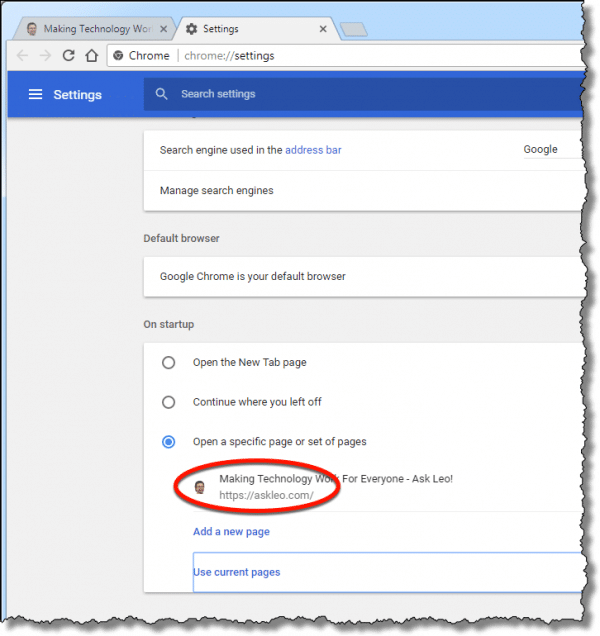
Click on Open a specific page or set of pages, and then Add a new page. You’ll be presented with a small box into which you can enter the URL of the page you want to be your browser’s homepage. Click OK, and it’s set. In the example above, I’ve set https://askleo.com as my browser’s homepage.
In Chrome, the Home button is separate from the page the browser opens on startup. If you want the Home button to be visible and take you somewhere specific, scroll back up until the “Show home button” option becomes visible.
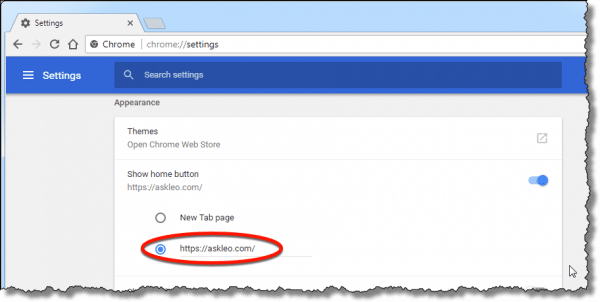
Make sure that “Show home button” is enabled, and then type or paste the URL you want the home button to take you to.
Close the Settings tab, and you’re done.
One page or multiple?
Each of these browsers support having multiple homepages that all open on startup. For example, you could have Google.com and askleo.com and msn.com all open in separate tabs each time you open your browser or hit the Home button. Personally, I find this cumbersome, and set a single homepage only.
Rather than entering a URL, you can use the “Use current” button in browsers that have it. This typically saves all the tabs you have open as your homepage setting, so before making this setting change, make sure only the pages you want to open on startup are displayed.
How homepages change
There are typically four scenarios in which your homepage can change or appear to change.
You said yes
This is perhaps the most common scenario: you unintentionally approved the change when installing a new program.
When installing software, never accept the default settings. Always choose the “custom” or “advanced” set of installation options. The reason is simple: sometimes, much like a PUP, one of those default options is to change your browser’s homepage.
Make sure you pay attention to all the options offered when you install or update software, and take care to opt out of any changes you’re not interested in receiving.
You weren’t asked
Some installation programs don’t ask. They simply assume they have the right to change your homepage as they see fit because you’re installing their program.
In my opinion, this is evil, but it happens. Watch for it as you install software, and prepare to revert to your preferred homepage using the instructions above if it does.
Malware
Malware — specifically spyware — is notorious for hijacking homepages. Typically, it’s not to something benign, but to more questionable sites.
Make sure you’re running a good security solution to protect yourself from this scenario.
The setting didn’t change, the content did
This is the scenario with which we started this discussion.
No settings in your browser were changed. The homepage setting is unaffected; it’s still exactly as you set it or left it. However, the content of the page at that URL has changed. For example, you’re happy with the MSN.com homepage, and one day Microsoft changes how it works and what it looks like.3
Unless an option is made available by the owner of that webpage, there’s nothing you can do to get the previous page back. It’s their page, and they can change it at will.
You have two options: live with it, or find a new homepage and use the instructions above to set it as your default.
How setting your own helps
I know many people leave the homepage setting to their browser default.
To me, that’s wasted productivity. Rarely is that page what I want. It’s often full of random things I don’t really care about, including ads.
That means there’s at least another click or two to get to something useful.
Take control. Set your homepage to something that’s immediately useful to you. Perhaps that’s a news page, a social media site, your choice of search engine, or your own page of curated links.
Whatever you chose, it’ll likely be much more useful than whatever the default was.
Do this
Subscribe to Confident Computing! Less frustration and more confidence, solutions, answers, and tips in your inbox every week.
I'll see you there!
Podcast audio

Related Video


Footnotes & References
1: It may also include additional information after a “?” in the URL that lets the webpage know why or how it was visited.
2: You may find it easiest to navigate to the page you want as your homepage in a different tab, click in the address bar, type CTRL+A followed by CTRL+C to select the contents and copy it to the clipboard, and then return to these settings to paste in the URL by typing CTRL+V.
3: This is the single most common example I run into. Microsoft has made major revisions to the MSN.com homepage at least twice in the last ten years. People get upset each time.
[al_/footnotes]


The msn.com page has changed and there seems to be no way to revert back to the original of before Nov.13th. You can use the customization and make the selection mymsn.com and then rearrange the page to suit you – but this is still not the same as the original. Why does microsoft impose this on people without giving a choice? Everyone I know just HATES the new version of msn.com. Is there a way to revert to the page as it was before Nov. 13th?
18-Nov-2009
I entered uk.yahoo.com into IE8 & it brought up m.uk.yahoo.com. I followed your instrucions & clicked on Use Current, followed by clicking OK. I also changed the small browser window at top-right of IE8 from Microsoft to Google. Next time I brought up IE8, up came the old uk.msn.com/?ocid=iefvrt & the browser window again showed Microsoft instead of Google.
When in Yahoo! I have more than once clicked on “Make Y! your homepage” which offers uk.yahoo.com “as your only home page”, but next time I bring up IE8, I’m back with msn.com.
This homepage hijacking happened several months ago. At the time I was using MS Windows Dedender, & I have since switched to Malwarebytes, but neither has picked up the unwanted msn homepage & browser. I have run a full scan of MS Malicious S/W Removal tool which didn’t detect anything.
However, when I click on Mozilla Firefox,up comes m.yahoo.com and Google in the browser window.
You are my TOP MAN. I have been messing about for the last couple of hours to no avail. Ten minuets after reading your notes, HEY PRESTO, bring out the champagne, you have solved my problems. HAPPY NEW YEAR to you all over the water, from all us LIMEYS.
Your answer worked! Thank you
Thanks Leo! My homepage was changed and it was driving me crazy til you helped me fix the problem.
Living in Greece I am having a worse experience. I had msn.usa until a couple of days ago something caused it to be redirected to msn./el-gr, which is the Greek version coming with all sorts of ads and animated ads of the most nauseating type that Adblocker does not stop. If I manage to make msn.usa stick to my pc, then IE does not find the page. Worse, microsoftsupport.com keeps going around in circles, so no contact possible with the masters of change. I just use aol, so I get away from all the garbage, no difference from the old msn indeed. By the way, the wheel in the upper right corner that you mention does not appear, so I can’t even try your advice. Youtube keeps reverting to the Greek version in the last few days, but that gets fixed in two steps, a pain in the neck for sure, but I get away from it with two clicks. I can’t wait for congress to pass a law preventing certain e-companies from imposing their way of seeing things to billions of people.
One thing that causes web page settings to revert like that is if you clean up cookies. One use of cookies is to remember things like language and other settings when you return to a site.
You are amazing. I arrived at this page because I had “about blank” This is the first time I have ever been able to sort anything like this for myself…woo hoo!
I required a tracking method from fed ex and received a toolbar powered by ASK, which I am unable to deleate. I want to go back to my homepage of Yahoo Please Help me with instructions. Thank you
This article should help. https://askleo.com/how-do-i-remove-pups-foistware-drive-bys-toolbars-and-other-annoying-things-i-never-wanted/
AdwCleaner and MalwareBytes are often very effective in removing that kind of malware. As for going back to your desired homepage, once you’ve removed the malware, the instructions in this article should work.
That wasn’t from FedEx – that was a scam email. You now have malware on your machine. I’ll point you at these two articles: https://askleo.com/how-do-i-remove-pups-foistware-drive-bys-toolbars-and-other-annoying-things-i-never-wanted/ and https://askleo.com/how_do_i_remove_malware/
I DON’T EVER WANT TO SEE THIS PAGE AGAIN WHEN I BOOT UP. YOUR ARE A VIROUS
I’m a virus? Sorry, this is just a web page. I don’t do anything to make it come up when you boot up. Read the article you just commented on to set your browser’s homepage back to what you want.
I want my pc back like it was I don’t like this and I didn’t ask for you’ll to change anything.
We actually didn’t change it. :)
I didn’t change anything – I’m just a tech support site and guy. When did it change, from what to what?
You change it and you change it back. Why should we go thru this whole thing and still not work.
PUT IT BACK NOW!
I am not your browser, nor am I capable of doing anything to your machine. Please read the articles for instructions on setting your browser home page to what you would like it to be.
I downloaded software to get rid of malware. they changed my browser to Internet explorer. I was using Mozilla Firefox. I don’t know how to turn it back.
I loaded foxfire but the 2 don’t like each other. now it says I’m not protected . Could you please help me to continue to use firefox instead if Internet Explorer.
To change your default browser back to Firefox, run Firefox and click on where it says make Firefox my default browser. If that option doesn’t come up, in Firefox click on the hamburger (3 horizontal lines) at the top right of the browser. Click Options. At the top of that screen, it should give you the option to make Firefox your default browser.In the future, when you install a program, choose the advanced or custom install, or something similar and be very careful not to accept their defaults which are not in your interest. Unfortunately some of these offers are very tricky and make it look like that offer is essential to the program working, so it pays to study each screen closely before accepting.
my computer is now usng google chrome I want yahoo
Google Chrome is a browser. Yahoo is a web portal, and email service provider and a search engine. The two are completely unrelated. What exactly do you want?
I want to close this page! I paid my monthly fee. Now let me out of this site!
I don’t understand — is something preventing you from leaving Ask Leo!? Close the browser tab not working?
If Ask Leo! has somehow mistakenly been set as your home page you can use the instructions in the article above to set your home page to whatever you like.
I do not remember my old homepage. Is there any way of finding out?
Depending on how long it’s been… you might check your browsing history.
Hi Leo, I just want to say thank you, I have been up since 9pm it is now 12 midnight trying to change AOL back to Google. I got highjacked. And I clicked on every linked that claims to know how to help me do it, but it did not work. I’m tired and sleepy and pissed. They had me going to add ons and wrenches that I could not find by the way. They had me in control panel and remove programs, none of that mess worked. You were going to be my last one to try. And omg you nailed it and it took all of one minute. I love you.
I want the messenger removed please, its something I never asked for.
You’ll need to be more specific about what you mean by “messenger.”
There is a chance that the following article may answer your question: http://ask-leo.com/how_do_i_uninstall_windows_live_messenger.html
The browser that I have used to promote my business has been changed so that I am no longer able to promote or correspond with customers . Your changes have ruined me. I am 90 years old and you have stolen the last few years of my life in business “wogrinart.com I have also, lost my ability to correspond with family and friends.
First of all, Askleo.com didn’t do anything to you. Second, your browser is simply a program used to access the internet. My suggestion is that you find someone, locally, who can come over and help you sort out what is happening with your computer. It is probably very simple.
I installed Firefox and now my tools cog which i had with IE as disappeared can anybody please help cheers
you can reply to this email
regards
With Firefox, you need to look for the hamburger icon at the top right, just under the close button. (unless you moved it elsewhere) It’s the 3 stacked thick black lines.
The look is different, but the function is the same.
You now have two browsers. You can launch one or the other, or even both at the same time.
When you installed Firefox, it asked if you want to make it your default browser, and, apparently, you answered yes. If you want to make IE your default browser again, you need to do it from the Internet options.
If you want to use IE, just use it’s icon, it did not change and still work as before.
Hi Leo, first, I really appreciate your efforts on our behalf, helping those of us that may be a ‘little’ technically challenged when it comes to this computer stuff, and second, is there anyway to change the news feeds on MSN to other than the feeds that come up when you start the browser… mostly I like Edge, and its content, but sometimes their take on some subjects are a little more ‘liberal’ than I like…
Again thanks for the service you provide…
I know of no way to change the content of the MSN.com home page (other than, perhaps, making news :-) ). All I can suggest is selecting a different home page that’s more to your tastes.
I am somewhat forced to used to use Chrome because my browser of choice won’t open the compose window on webmail. I chose my home page on Chrome, but Chrome always opens on a search page. I don’t get to my homepage unless I click on the icon. What is wrong?
Chrome is unique, in that there are two separate settings. See the instructions above.
Thank you Leo. I am very new to all of this but I’m intent upon mastering this medium and learning from the best and brightest. I believe i have found that in you LEO! I AM HOPING I CAN SAVE ALL THE ABOVE IN THIS ARTICLE. I AM SURE I NEED TO WORK WITH THE VARIOUS WAYS TO CONTROL MY HOME PAGE TO UNDERSTAND WHAT IS BEST FOR ME. ANY SUGGESTIONS ON THE BEST WAY TO PROCEEED TO REALLY UNDERSTAND IT WOULD BE MUCH APPRECIATED.
THANK YOU AGAIN
Leo is it true as Chrome advertises that it is a safer browser than Firefox?
Both, Firefox and Chrome are constantly working to patch vulnerabilities. The safest browser is something which is constantly changing as vulnerabilities are being patched.
It depends on what they mean by “safe”. I consider them equivalent in general.
Golly Leo, you have the power to chose life or death for someone! I have a question for you but first, on behalf of mankind, I am sorry for that eldest gent who accused you of changing his browser & “ending his life”! Angry elders!
I am just sick of CORTANA BEING NASTY TO ME! I TOTALLY GET UPSET & ARGUE BACK! IT’S NOT WORTH THE UPSET; THEN WHEN I ASK FOR BING.COM WELL YOU CAN’T JUST IMAGINE WHAT I GET!! I HAVE A WINDOWS 8.1 PHONE THAT HAS HAD TONS OF PROBLEMS BUT RIGHT NOW ALL I WOULD LIKE IS THE BING Dashboard & I was going to have Bing as my home page but guess I don’t need to if I could find a Windows 8.1 link with Bing dashboard. Have tried a few already but now, my phone only offers google(Android) or iPhone. I also feel I’m being “pushed out the Windows” & I don’t know how to fight it any longer, I don’t have an actual computer. Sorry msg is long, but that elder ruffled feathers!!
sir,my operating system is ubuntu.I went to google in fire fox and searched for how to install play store app in pc.And after returnig to the home page of my fire fox it has changed.Now what can i do sir
You can follow the instructions in the article to reset the home page to what you would like it to be.
remove me from your mailing list. it is an insult and my privacy
I don’t see how it affects your privacy. It’s only an email which you requested at one time. You can unsubscribe from the Newsletter by clicking on the unsubscribe button at the bottom of any newsletter.
Win 10:
What you say is correct Leo, however, when I click on links in emails that I know are good, many open to about:blank BUT then when I click on that in the nav bar it changes to the correct but will not load…it just spins.
I was advised that it was a virus and i think it was called eicare? I was told to find it in c:/test/eicar.com but it was not there even though I have hidden files and folder checked? I also have read that malware bites will remove it?
i want yahoo page back
That’s not a lot to go on, but I’d read the article you just commented on for a start.
Last night I was searching and found something but before that link would open for me it asked the ‘allow or don’t allow’ questions. Not sure what I was allowing, like a dummy, I allowed. Now my search page is all different. How do I get it back???
Not knowing what you allowed, it’s not easy to say. If you include which browser you used and what was originally on the page and what it was changed to, it might be possible to help.
Check your browser settings for the search engine being used and set that to whatever search engine you prefer.
What is more problematic is getting new tabs to open the home page. Then there’s pinned links that won’t let you return to your home page either.
“Still in the settings page, click on Appearance in the left-hand column, and then under “Customize toolbar”, click on Show home button, if it’s not enabled, and then click the circle in front of the box below “New tab page”. This will allow you to enter the URL that you want the Home button to bring up. Click Save.”
Leo – Is there a way to have 2 or more URLs for the home button? I use 2 for my startup & would like my home button to do the same. There is only a single field on the Appearance page to specify the home button URL. Thx.
It depends on the browser but most allow you to assign multiple pages.
OK…
First: I used to be a “programmer”, meaning that I worked with software engineers who told me what they wanted. It was mostly up to me to figure out how to do the specific coding.
Second: I retired about 15 years ago, after being laid off and unable to find a position that could use my specific skill set.
Third: I am.finding that it is more and more common for new programs, or “apps”, to completely disregard all of the ways things should work. If a 15 year-old with 2 thumbs can make sense of it, it’s “good” for everyone.
Now, having said that, I tried to reset the home page on my W10 PC browser ( EDGE?) shortly after my son got it for me last year. I believe that I did what your article said to do, but it didn’t work. I will try again later today, following your instructions to see what happens. It’s not that I mind seeing some “news” on the home page, it’s that it NEVER ENDS, and then starts repeating itself.
I have loaded Chrome, but that one is causing me other problems that I can’t quite figure out.
I also use a Kindle Fire tablet, but it has its own set of problems. The browser ( Silk ) doesn’t have many options that I can find, but I have learned how to make use of it.
There are times when I start to think that the main purpose of all this is to drive us totally crazy. The problems are like Hercules’ Hydra; every time you dive one problem, 2 more pop up in its place.
No reply is really needed to this, it’s mostly a rant.
I would, however, like to find out what happened to all the programming rules we used to have to follow when writing software. They don’t seem to exist any longer.I
( I apologize to any typos or nonsensical words in this. I am finding that on-screen keyboards are not used friendly those of us with larger fingers. :( )
Your frustration is understandable. It’s unclear what programming rules you’re talking about, but there is no reason for any programming rule you may have learned will be used by anyone else, especially in a browser. A browser’s design is more of a marketing and social engineering exercise rather than applying common-sense programming or user interface rules. Especially in Windows 10, where features and controls are circuitous and deliberately hidden. Besides, they can change from one update to the next. So, what Leo said may no longer be precisely applicable to your version. If you had said what didn’t work and how it didn’t work, perhaps someone here could have helped. The part about the news page never ending is a “modern” browser design feature. It’s done deliberately so that you remain on the same page longer, thinking there is something new coming up next. That’s controlled by the website designer and the browser settings can’t help. They may tell you the website has some setting to change that, but good luck finding the setting and hope it doesn’t reset itself (it will). So, if you’re looking for rational rules, there aren’t any; at least not any that are implemented for your benefit.
I would suggest try using the Firefox browser. It may be less temperamental and less subject to self-modification with every Windows or Chrome update (if you set it up correctly).