Hotmail was replaced with Outlook.com. You probably already know this; that’s where you now go to access your Hotmail email.
You can create your new new email account using Outlook.com – and maybe even make it a Hotmail.com email address.
But first, there’s a step that is apparently not quite as obvious to as many people as we might expect.
Become a Patron of Ask Leo! and go ad-free!
Step 1: Sign out
The thing that often confuses people is that they have some form of “remember me” turned on. That means you may never (or rarely) see the Outlook.com login screen after your first login. That means you’ll never see the options to create a new account.
So … sign out.
When logged in to Outlook.com, near the upper right, you should see your screen name:
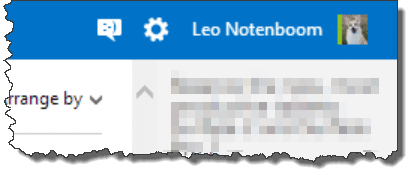
Click on your name (or your photo) and you’ll be presented with a menu of options:
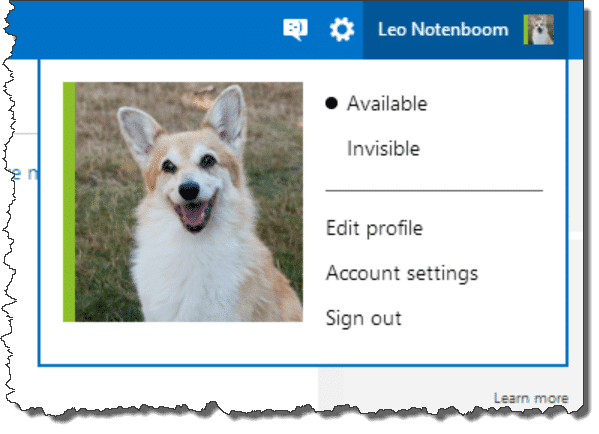
Click Sign out, and you’ll be taken to a page that confirms you’ve been signed out:
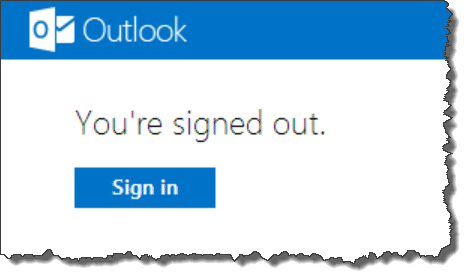
Step 2: Sign in – but don’t
Click Sign in. That brings you back to the login screen for Outlook.com:
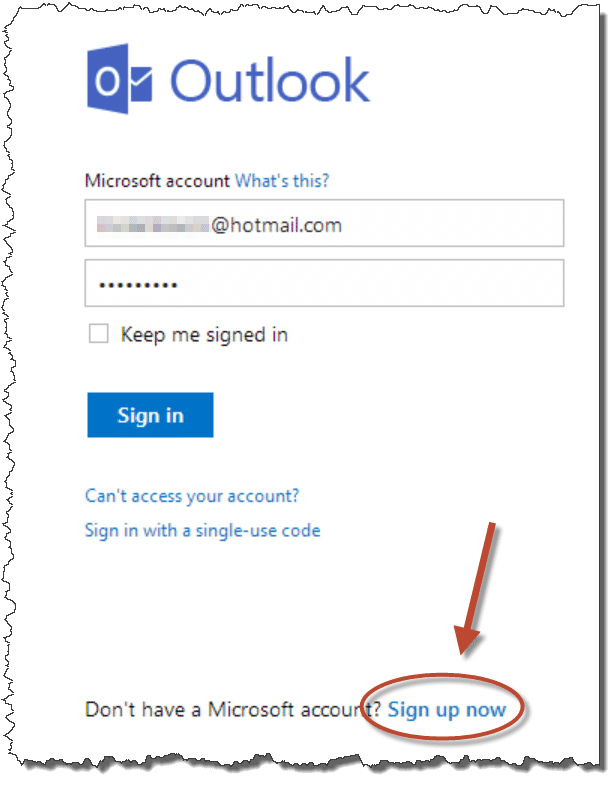
Don’t sign in! Instead, click the “Sign up now” link near the bottom.
That will take you to the start of the Microsoft Account setup process:
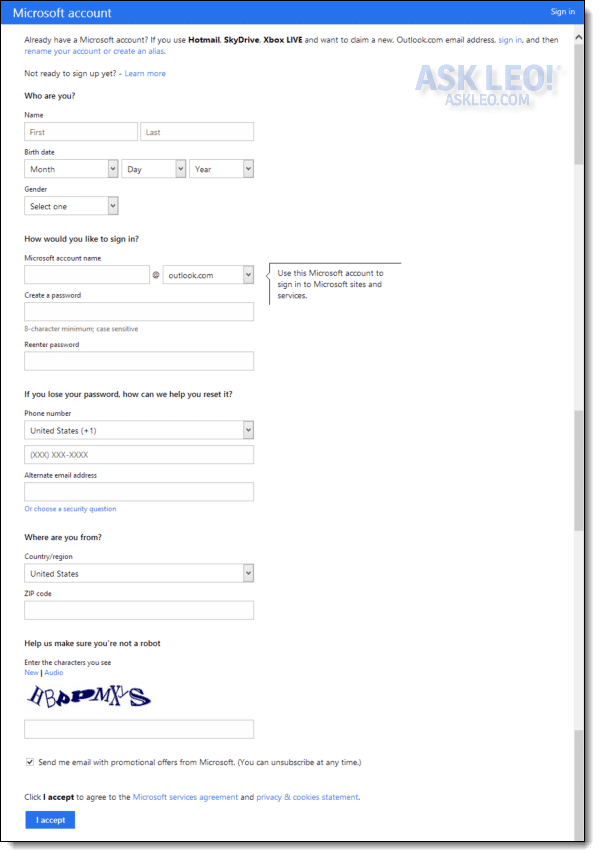
The page begins by explaining that if all you want is an Outlook.com email address, you can simply add an alias to or rename your existing account.
Assuming that you want a completely new account unrelated to any account you may already have, simply fill out the form to begin the process of setting that up.
Outlook.com, Hotmail.com, & Live.com
As of this writing, the setup process actually allows you to select from three different email domains for your new account:
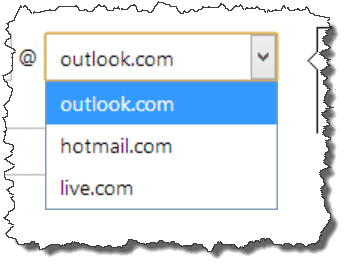
As you might expect, you’ll still need to select an email name that isn’t already in use, but at least today, you can try against those three available domains.
It’s still a free account
A few things to remember about your new account:
- There’s no way to transfer your existing information from your old HotMail account to your new one.
- Outlook.com is a free service and you get what you pay for. Customer service is almost non-existent if you run into a problem.
Because I see so many people run into problems using and relying on free email services such as Outlook.com, I strongly recommend that you never use this type of service for anything important. In particular, it shouldn’t be the only place where you keep something important.
If your email is important to you, if keeping your contacts is important to you, and if having customer service to help you when (not if) you run into a problem is important to you, then I strongly suggest using an email account from your ISP or other paid provider.
If you’re planning on changing your email address anyway, now might be the perfect time to do so.


When Leo asked obvious . . . the one thing that glaring stood out to me was using a first and last name. Never, ever use a first and last name in concocting an email address (or filling out profiles and such on the Internet).
Data mining is a trivial game and an address like first.last@msn.com is going to leave tracks all over the place . . . tracks you may wish you’d never left years from now. Reside behind some layer of anomynity; your first name reveals your gender, your posts to forums might reveal your interests, what part of the country you live in, age, etc, etc. Your last name is an invitation to be looked up in any numerous online directories. Piss someone off? You may have given them enough to find you in person. Spurn an online boy- or girlfiend? Do you really think they need to know your last name?
Rick
(who teaches this stuff for a living)
Leo : if so many people jump in the river, isn’t it right ?
Of course not.
People should not be asking how to make a Hotmail/Yahoo account with their real first and last name.
The article is as funny as people using Hotmail/Yahoo for a business account.
Everybody knows how unstable hotmail is, if an isp email isn’t available I suggest GMail, it seems more stable and is more user friendly. IMO Also, instead of first and last names….maybe initials like I use davidlw2005. Just a suggestion…lol
I have Comcast as my ISP and have a email account with them. I got so much spam from someplace that didn’t have an opt out at all that I quit using it all together. I sent the spam to them and they sent me back this lengthly form of hoops to jump through to just get them to read it. That’s when I got my gmail account and have had no problems with spam.
I’ve got no need for anonymity, I’ve been online for 10+ years and Fidonet before Internet was mainly about being yourself and not hiding behind pseudonyms. All these supposed _bad_things_ that will happen if you use your real name and details online have never happened. Junk mail is part of life – create a new email addy whenever you want as in the article. BTW in relation to being looked up: surely that’s a *benefit* of a large network?!
Dude to transfer ur contacts from ur old account press contacts in the main messenger window, then save instant mesaaging contacts. Save it somewhere that u can find it Then sign into the new account and press contacts menu again, but this time you will go import, and then go find where u saved the contact list, select it then press import or open
i want to create a new hotmail account like I wanted. What do I do?
I’d start by reading the article you just commented on.
Step 1: read the article you just commented on and follow the instructions therein.
i think its great a new way to comunicate with friends.
many more people should use msn
my cousin has an msn and she uses her first name for her msn.
Hi, I wanted to know how to make a msn.com acount or a passport.net one. I do know all this that you explained but when you push the “Sign up” button, there’s only the hotmail.com acount.
Thanks a lot, great site!!!! Kissis from Argentina…
hey leo i have made a new hotmail account and i have hundredsof friends on my old one is there an easier way than typing each address into “add contacts” to add them all the my new msn account
You can try this if both accounts can be accessed using Outlook Express:
http://ask-leo.com/how_do_i_transfer_hotmail_contacts_to_another_account.html
Since MS is phasing out Outlook Express access, you may not be able to, in
which case I know of no easy way to transfer contacts.
Leo
If you have Windows 7 or 8 you can save your contacts on your hard drive. When you have created a new account then you can import your hard drive contacts to new account.
Outlook.com also allows you to create a few aliases for your email account, so that you can receive email sent to a few different email addresses which are all associated with the same account. You can mix and match domain names. For example you can have firstname.lastname@hotmail.com, firstname.lastname@outlook.com and lastname.firstname@outlook.com etc. They have a limit to how many aliases one account can have. I think it’s 3 or 4.
I agree with Mark. I have done that myself – set up an alias – and set up folders for those alias emails to go to – so they don’t get mixed up with my other mail (not that you have to separate them out – but you can if you want).
Regarding the “need” for a first and last name, you don’t have to enter your real name. I have one Hotmail account where my last name is “X” and another where it’s “Anonymous”.
No one from Hotmail will come to your house demanding to see your ID, so use whatever names you want.
I have had a gmail.com account since the days when you had to be invited in. It’s now grown to over 10 Gb — I pay a nominal $5 per year to allow up to 20 Gb — a legacy plan, unfortunately, as it’s now more expensive to exceed the free allowance. I’ve never had any problems with it and often search for old items through the excellent search engine. I do keep really important information in the outlook account that I use to access the gmail, and of course I have an offline contact list, although I do use the gmail contact list to sync to and from my phone. The spam filtering is amazingly good. Every now and then I use the web interface to check the spam list and once in a while I do find something there that isn’t spam, but very, very seldom. Similarly, only a few times a year does spam get through to my outlook account.
I am thus a very happy gmail user. I hate to be endorsing that huge monopoly, but for this service it’s fantastic.
Leo, in all seriousness, how might I come undone? Have you had reported disasters with gmail? I know that you, particularly, have to be measured in making what are perceived to be endorsements but a comment would be appreciated.
Any email account can be hacked, so it’s a good idea to protect your emails by backing them up. What is IMAP? And how can it help me manage my email?. This article recommends using IMAP, but using IMAP, if you delete an email in your email program, it will also be deleted from the GMail server. To avoid this, you can use POP3 and instruct your email program to leave a copy of the downloaded email on the server. That way all emails are downloaded, and emails deleted from your email program will still remain on the server. You can periodically log on to your GMail account and clean up your inbox if you want.
And BTW Google isn’t a monopoly. They have competition, and just have the market share by virtue of doing the job they do. I’m not defending Google per se. I’m also an English teacher, and I’m correcting language usage, one mistake at a time. The word you are looking for is Oligopoly. ;)
Mark, I thought you were a computer teacher?
I teach It courses and English for IT in addition to working for Leo and doing freelance computer work.
This single biggest issue with ANY free email account is this: what happens when you’ve been hacked?
Say the hacker goes into your account and deletes all of the email that you had saved. There is no guarantee – none – that Google will help you get your account back, or that if you get your account back that they will help you get your email back.
That’s the risk that remains for people that otherwise use their account properly.
I use Gmail for my primary email, routing all of my non @gmail.com email addresses through it, specifically for the filtering. But I a) use my non-@gmail.com addresses as my email address so that if needed I can change my gmail account in a heartbeat, and b) I back everything up – twice. If I lose my gmail account tomorrow losing my email is actually one of the least of my worries.
PS: I’ve recommended Gmail for a long time: Google Mail – Free Email that works and leaves you in control
If you route from other email accounts through GMail, do you let GMail access them through POP3? If so, if someone steals your GMail account, wouldn’t it continue to gather the emails from those accounts indefinitely, and there would be nothing you could do about it which would effectively render all of your other email accounts useless? Or do you have those other accounts forward them to GMail, which seem like it would be a lot safer?
The other email accounts would certainly continue to be picked up by the hacked Gmail account… until you go in and change their passwords. Then the hacked Gmail account wouldn’t be able to access them :)
That’s what I was saying. If you’re locked out of Gmail, you’re not going to be able to stop it from downloading from your other email accounts.
I get a lot of e-mail messages, and I had my Hotmail/Outlook e-mail account up over 10,000 unread messages (I do pay for this kind of storage). What really helped me was the new features provided on the Outlook.com interface. It took me about eight hours, but I was able to finally clean up my account. The ability to sort and search multiple ways and the ability to schedule cleanup of promotional e-mail messages has me liking my Hotmail account again. It is far superior to my ISP e-mail interface, which I need to tackle next. So, I recommend Outlook.com if you plan to have a lot of mildly important to not-important-at-all messages coming into your inbox.
I need help retrieving my e-mail as I have been away for 6 yeas and really need a way to reach friends and contacts… thank you
If you haven’t used an account in 6 years, you can pretty much consider it lost for ever. Some email services close your account after 90 days of not being logged onto, while the maximum other providers allow is up to a year of not logging in. After this period, that email address may be available for again. If it’s still available, you might be able to get it but you wouldn’t be able to download your old emails.
I want to creat id in msn but i have some problam.
Can’t help you if you don’t tell me exactly what problem you’re having.
Wasn’t what I was searching for(I was searching for why first name and last name gets mixed up in showing my outlook account), but still worth reading.
One thing to point out, although Leo mentioned already, is that creating new address is relatively easier if you just go preference of outlook.com inbox and do add alias menu. Now that all outlook.com has no size limit anyway, creating entirely new address might not be worth the relative hardship compared to alias method.
THANK YOU FOR YOUR GUIDLINE
I really need a new email address which will enable me to get the “read recipient” facility. Aol does not appear to have this. Can you advise please
I’m not aware of any email providers which allow you to request a read receipt when you send an email (there probably are a few,) but you can do this by using an email program such as Thunderbird:
http://askleo.com/thunderbird_a_free_open_source_and_powerful_email_client/
Read receipts work when the people receiving the email allow the receipt to be sent, otherwise, there’s no real proof it’s been received or read.
http://askleo.com/can_i_tell_if_email_i_sent_has_been_read_by_the_recipient/
Here’s how to set up configure Thunderbird to access your emails.
http://email.about.com/od/accessingaolmail/f/AOL_Mail_IMAP_Settings.htm
You mean “read receipt”? As in you get a message when someone reads your email? That feature is broken across all mail systems. It works on some (typically within corporations), but when you start exchanging email with people on differing email systems it’s typically ignore. Why? Spammers used it to probe for valid email accounts – an account that actually send a read-receipt would be considered a “real” account, and then bombarded with spam.
Thank you for providing this info. We needed to add a second email account to hotmail or outlook and could not find out how to do it. Best we could do was find out how to add an existing email account. Your instructions were easy to follow and worked! Only issue is that apparently one is not allowed to be logged in to more than one hotmail/outlook email account at a time. We have sign out of one to access the other. Is this the way it is?
You can get around this by opening each account in a different browser eg. one in Firefox, the other in Chrome. Another possibly more orthodox method would be to use an email program to access your emails. Those can support multiple accounts with the same provider as they log on periodically to check the account for new mail.
Incognito or In-Private browsing is another approach as well.
this is very good and i wont to open my email so i could talk to my friends and for bussines
if so many people meet on hotmail right now some course people asking how to make ahotmail account with their real first and last name
This was a previous address and I don’t want to change it.
Clarice Ross
I wanted a new email address, so by chance I typed in my current email address and it said that it was available, how so when it is already mine? And also, when I use my Ipad, I get a notice from Microsoft telling me that someone is using my email address, when it is me… I am not happy with the service. When I opened my MSN email account, I always had a 7 character password, then when I hacked myself they wanted me to change my password, now its 8 characters, yuk. I want my old password back, is that even possible?
That message that someone is using your account is a warning that someone might be using your account. This often happens when you access your account from more than one device. As for your address being available, I’m sure that if you actually tried to open an account with that name, you wouldn’t be able to.
I can’t access this email, please, I need my email back to me
Ive tried to make a hotmail account twice now and then it never shows up in my current email inbox confirmation getting disgusted in trying to find a new email account some place that really works i will be moving and the cable service will be disconnected and no longer can use that email address will have to find one that is free where i’m going they have yfi hook……..seems everything going wrong…
When I try to create a new account, just as you have outlined, it doesn’t show the verification picture of characters to “make sure you’re not a robot/make sure you’re human”. There is either a never-ending spinning circle where it should be or just nothing at all. There isn’t even the little links for new/audio. I’ve tried in Chrome, my droid phone, downloaded and tried in the outlook app, and even tried with internet explorer on my desktop.
Maybe the spirits are protecting you ;-) But seriously, out of all of the email providers, Hotmail/outlook.com has the most problems and complaints. As for free email providers, I’d recommend Gmail. In this article and others, Leo does also.
https://askleo.com/are_free_email_services_worth_it/
I want to open my face book account but lm failling to because my fone number and my email address has been invaded l want use my number and my new email address
Sir I went make New email account but I am weak in English
I need to know why there is not s line for you to create your pssdword like beforeibfont have a pasdeord
I need my password I have forgot it can you help please thank you
We cannot recover hacked accounts, lost or forgotten passwords. Please see this article for more information on your options:
http://ask-leo.com/would_you_please_recover_my_password_my_account_has_been_hacked_or_ive_forgotten_it.html
If this is a Hotmail, MSN.com, Live.com or Outlook.com account, then this article discusses recovery options for the various ways that these accounts can be lost or compromised: http://askleo.com/what_are_my_lost_hotmail_account_and_password_recovery_options/
I want an hotmail account
Hotmail accounts cannot be made any more. You can only make an @outlook.com address now with Microsoft.
Hotmail was shut down no excuse having cant get back on can I create a new account with my original email but a new password .
If the new account creation process at Outlook.com lets you, sure. If not, which is what I suspect, then no.
Hi Leo, great guide. I noticed that some of your readers have had problems moving from Hotmail to Outlook. I created a website with a couple of friends offering in-depth information and help about Hotmail and all its functionalities. We also cover the Hotmail-Outlook issue. You can find it here: https://accountscreatenew.com/hotmail/. Cheers!