It can be done, but it might take effort.
Sadly, this is all too common. Malware can be pretty sophisticated, and it can work hard to prevent you from removing it. That means you may be blocked from downloading or running anti-malware tools, or be prevented from running tools already on your machine that might help.
I’ll save the “prevention is so much easier than the cure” missive for a moment. We just want this fixed.
There are things that we can try, but unfortunately, there are no guarantees.
Become a Patron of Ask Leo! and go ad-free!

Malware can interfere with your attempts to remove it. Start with Microsoft Defender Offline. If needed, move on to RKill, which kills much of the malware that may be stopping you, and allow you to run the anti-malware tools you have. If that fails, try other anti-malware tools. If still unsuccessful, restore to the most recent image backup taken prior to the infection. When all else fails, the nuclear option of a reformat and reinstall is the most pragmatic, last-ditch effort.
The problem: when malware interferes
What you’re seeing is the malware on your machine actively watching for you to try to remove it and thwarting your attempts.
It’s watching for downloads that look like anti-malware tools, and web (or other) access that might be going to anti-malware sites. It’s even monitoring what programs you run. When it sees you doing anything that could lead to its removal, it steps in to cause the operation to fail or to redirect you to sites of its choosing.
You’d love to download and run up-to-date anti-malware tools, but you can’t.
So you have to get creative.
Run Windows Defender Offline
I recommend that you begin by running an offline malware scan. In previous versions of Windows, this involved downloading and running Windows Defender Offline,1 but it’s built into Windows Security in Windows 10.
Click the Start button and search for “offline scan”. Click on Virus & threat protection when it appears. Click on Scan options, select “Microsoft Defender Offline scan”, and finally click Scan now.
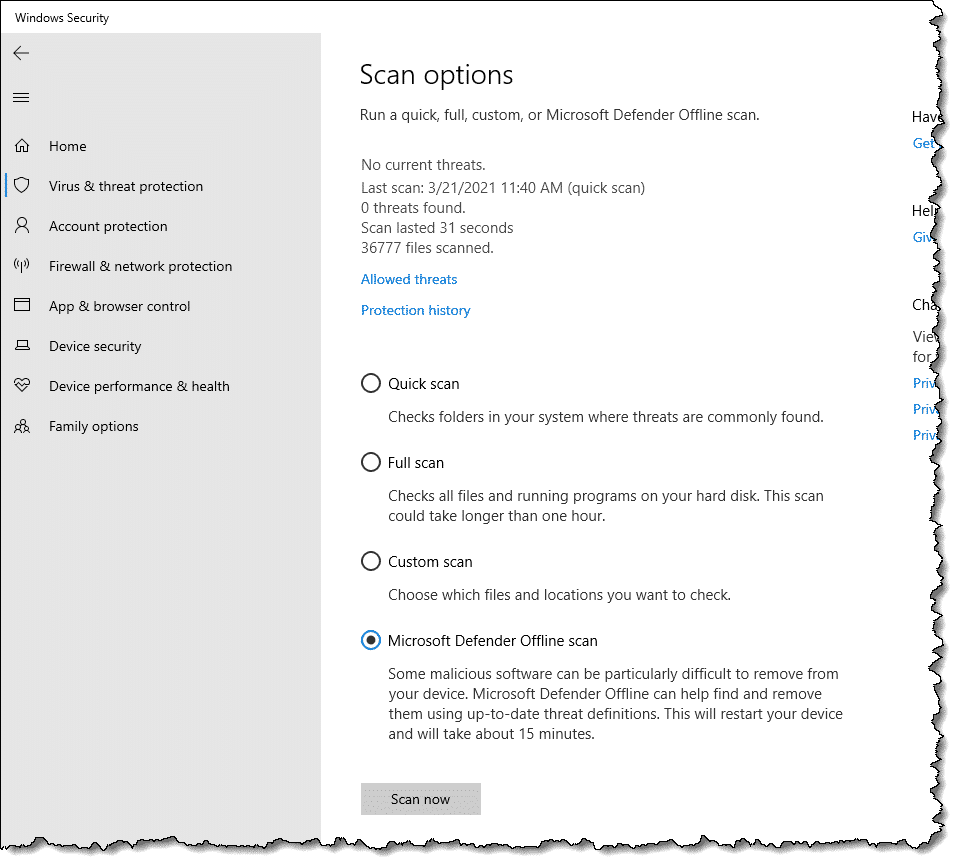
Your computer will reboot and run Microsoft Defender Offline.
Let the tool perform a thorough scan of your machine. Hopefully, it will detect and remove the malware that’s causing your problem.
If it doesn’t detect and remove it, or if you can’t run Windows Defender Offline, or if you just want to keep scouring your machine with additional tools, there are other tactics.
Temporarily kill the malware
One possible solution to the blocking problem is to temporarily kill the malware. This won’t remove it, but it may allow you to download tools that will.
The folks at BleepingComputer.com have created a tool called RKill that does exactly that.2 You may need to download RKill on another machine (because it may be blocked on the infected machine), but you can copy it to your machine using a USB thumb drive.
You may also need to rename RKill.exe to something else (like “notRKill.exe” or “leo.exe”). Once again, malware may be paying attention to the name of every program being run and may prevent the software from running if it recognizes the name.
Run the program, and do not reboot. Rebooting will “undo” the effect of having run RKill. Any malware RKill killed will return if you reboot.
Download and run Malwarebytes Anti-Malware
With the malware temporarily killed, you may be able to download and run anti-malware tools.
Malwarebytes Anti-Malware is currently one of the more successful tools at identifying and removing the types of malware we’re talking about here.
Download the free version, install and run it, and see what turns up. Once again, you may need to download the tool on another machine and copy the download over, as you did with Rkill.
Try other tools
After running RKill, you may (or may not) be able to run some of the other tools the malware was blocking. You can try your already-installed anti-malware tools, registry-editing tools, Task Manager, Process Explorer, and others.
You can also try your other anti-malware tools. Either they will be able to download an update that catches this problem, or you can download another tool that will.
But in general, my money is on Malwarebytes.
What if nothing works?
If none of what I’ve discussed so far works, then things get complicated.
You may consider these options:
- Boot from another bootable antivirus rescue CD. There are several, including from several anti-virus vendors. If you have a favorite anti-malware vendor, check with them to see if they provide a bootable scanning solution. These are interesting because they boot from the CD or USB, not your hard drive. That means the malware doesn’t have a chance to operate and block you. You can then run a scan of your hard disk and hopefully clean it off.
- Remove the hard disk and place it in or connect it to another machine. Hardware issues aside, this needs to be done with care to prevent the malware from spreading. Just like booting from that CD, however, this boots from the other machine’s installation, not yours. You can then run anti-malware tools against your drive and hopefully clean it off.
Restore from backup
One of the best — and often quickest — solutions is to restore your machine using a recent image backup.
Assuming you have one, of course.
Regular backups are wonderful for this. They return your machine to the state it was in prior to the malware infection. It’s as if the infection never happened.
This is one reason why I so often harp on backing up.
It does have to be the correct type of backup: a full-system or image backup. Simply backing up your data will not be helpful in a scenario like this unless you are forced to take the final solution (see below).
For the record, my opinion is that Window’s System Restore is pretty useless when it comes to malware infections (assuming System Restore hasn’t already been completely disabled by the malware). Give it a try if you like, but I don’t have much hope for its success.
The final solution
That sounds dire because it is.
As I’ve mentioned before, once it’s infected with malware, your machine is no longer yours. You have no idea what’s been done to it. You also have no idea whether the cleaning steps you took removed any or all of the malware on the machine.
Even if it looks clean and acts clean, there’s no way to prove it’s clean.
You know it was infected, but there’s no way to know it’s not now.
Scary, eh?
The only way for you to know with absolute certainty the malware is gone is to reformat your machine and reinstall everything from scratch.
Sadly, it’s often the most pragmatic approach to removing particularly stubborn malware. Sometimes, all of the machinations we go through trying to clean up from a malware infection end up taking much more time than simply reformatting and reinstalling.
And reformatting and reinstalling is the only approach known to have a 100% success rate at malware removal.
If you don’t have a backup of your data, then at least copy the data off somehow before you reformat. Boot from a Linux Live CD or DVD if you must (Ubuntu is a good choice). That’ll give you access to all of the files on your machine and allow you to copy them to a USB device, or perhaps even upload them somewhere on the internet.
Aftermath
After things are cleared up and working again, take a few moments to consider how to prevent this from happening again, as well as what you can do to make the next time easier:
- See if you can identify how the infection occurred and then, to whatever extent you can, never do that again.

- Make sure you have the most up-to-date security measures to stay safe on the internet.
- Invest in a backup solution of some sort. Nothing can save you from more different kinds of problems than a regular backup.
As I said at the beginning, prevention is much, much easier than the cure.
Do this
Subscribe to Confident Computing! Less frustration and more confidence, solutions, answers, and tips in your inbox every week.
I'll see you there!
Podcast audio

Related Video


Image backup. Image backup. Image backup. Oh, and make image backups :-)
The worst case is NOT that you pay money to the extortionists and they do nothing. In the worst case they take your credit card information and use it for identity theft.
There are a couple ways to make the infected hard drive visible to a clean machine on a LAN without physically removing it: (1) Boot the infected machine using Linux (2) Boot the infected machine using the Ultimate Boot CD for Windows. See ubcd4win.com. Either way, after mapping the network drive to a letter, you should be able to use your favorite antimalware software over the LAN.
The solution that I use to kill malicious processes that maybe preventing me from installing or running free tools (Malwarebytes or CCleaner) requires another computer with access to your home network (wired or wireless)
I use the program “Remote Process Explorer” from Lizard Systems. It is a free (for personal use) program that allows you to access “Task Manager” on another computer. It requires a computer name or IP address, an account in the Administrators group and it’s username and password. When you added a computer to monitor, it shows you the process name, user account that started the process, the location of the process and other things.
The key thing is the ability to kill a process. Find the process, right-click it and select “Kill Process.”
After that, from the infected computer, you should be able to open CCleaner. Once in CCleaner, go to the “Tools” section and click on “Start Up.” In this area you can easily disable or delete “rogue” entries. I recommend disabling entries because if you accidentally delete an entry that you need, it hard to recreate the entry and CCleaner currently can’t do that for you.
Try restarting the computer and then run Malwarebytes.
Two portable tools I’ve used with great success are SUPERAntiSpyware Portable Scanner
http://www.superantispyware.com/portablescanner.html and Kasperski Portable, available at thia address: http://www.kaspersky.com/virus-removal-tools. Super Anti Spyware Portable runs from a flash drive, while Kaspersky Portable installs in to a folder on your desktop, and uninstalls once it has done its job. I generally run Super Anti Spyware Portable as my first option, then Malwarebytes, followed by Kaspersky. Finish up with Windows Malicious Software Removal Tool http://www.microsoft.com/security/malwareremove/default.aspx and you should be done. That all amounts to at least three hours work on the average hard drive, and there’s no guarantee that what ever infection your computer has picked up has not permanently damaged the registry. As Michael Horowitz states – Image Backup. There’s plenty of free imaging tools available, and the good ones will give you the option of running a backup as a scheduled task. Your only problem then becomes retrieving documents and e-mail created after your last image was taken. I recomend using a ‘Live’ disc such as Puppy Linux http://puppylinux.org/main/Download%20Latest%20Release.htm for this purpose. Boot from the disc, navigate to your profile, then copy ‘My Docs’, ‘Desktop’ etc. to an external drive. Shut down and reboot using your ghost imaging boot disc, rebuild, then return your ‘My Docs’ etc, from those you’ve retrieved.
I had this same problem & found (free) Malwarebytes an excellent fixer. Had to download it from another computer & run it from a thumb drive but it killed the nasty along with loads of others my paid-for virus scanner missed.
One fantastic tool, as Duane has said, is SuperAntiSpyware; it sounds cheap but it works brilliantly.
If you choose the portable version from their site, it will download with a randomly generated name so that malware can’t detect it as a removal tool. If you still can’t get it directly onto the infected PC then just copy it across from another via a USB drive or similar. Run it (it’s a single file, no installation), make sure to update the definitions database, and then run a scan – it should deal with most things pretty swiftly.
I would always then follow up with MBAM, that Leo mentions, and/or a commercial tool of your choice. The more scans you run, the better, and the surer you can be that you’ve removed the infection.
All of these tips are right on. I have used MBAM (excellent at getting those hard ones) and Avast (it’s free and has a pre-boot scanner that catches a lot) and Kasperski. I invested in a USB HDD docking station that allows me to remove the infected HDD and attach it to a computer that I have all of my antivirus-antimalware tools and run it as a USB drive. This does not allow the operating system of the infected drive to load up and I can hunt down and kill those deep rooted infections. Not saying that I get everything 100% of the time, but it has worked many, many times. I also ask (first) if there is anything worth saving on the HDD (usually is), because if there isn’t, I just reformat from the beginning. I only go through the trouble if there are files that need to be saved. Microsoft’s Security Essentials is also good at identifying viruses (sometimes not as good at getting rid of them, i.e. Alureon.B virus). At the minimum, run at least three different scans to make sure you get everything.
Leo, you’re right on with this one that a full HDD image of C: should be taken first before doing else, and like you I have Acronis. BUT!!!!! If you’re counting on this for an emergency restore, your user will lose all data files which have been saved on C since the image was taken.
I use a better approach which is to put in a big HDD as drive d: [aka, D for data.] Then, your software has to be trained to place its data files in a suitable directory there. Generally, I like C to be about 80gig
and D about 1TB, since all so cheap now.
C is backed up with Acronis, placing the image file on D.
Then, you also have to back up D regularly, but Acronis imaging will take too long, so I use 4DOS and [1] first time copy all files, thereafter [2] copy only new files back to a chosen date… to an external HDD used only for backups.
Hope this is helpful, but maybe too complicated for beginners.
— j
I have had success removing the bogus Windows Police AV 2010 (rootkit) with TDSSKILLER. Hard drive was completely cleaned and running normally within minutes. I had to re-format and re-install 2 other computers before I learned about this free program.
How come NOBODY has mentioned combofix? It is very quick and works for me. I am unable to figure out how to misuse it, so it is safe. It has two options run or cancel. If your internet is still down, just simply turn off the proxy server, if you do not use it. You may have to rename combofix to get it to run and of course download it from another PC to a USB flash drive. Use safe mode for really nasty infections. Does safe mode stop all viruses and spyware? Combofix is also from bleeping computer.com
In the course of being a PC repair tech, I often come across this problem. It seems the first thing these Virus ‘designers’ do is disable your anti-malware and block Windows Installer so no new protection can be added. I have found two solutions that work 90% of the time:
1. Most virus’ ‘designers’ apparently don’t think about the context menu. If you have any ‘respectable’ Anti-virus or Ant-malware programs installed, they most likely have entries in the context menu (‘right-click’ menu). Open ‘My Computer’ and ‘right-click’ on drive “C”, and when the context menu opens just ‘left-click’ on “Scan with AVG”, or whatever program you have installed. If you have more than one option listed – use them all! This forces your (AVG or whoever you have) Anti-virus to scan ‘only’ drive “C”, but don’t forget that “C” is your main drive and is where the Virus lives. This works 90% of the time.
2. Download A-Squared Emergency Kit (it’s free). It’s best to do this on a friend’s computer and then put it on a USB drive. This version of A-Squared doesn’t actually ‘install’, so it won’t be blocked and is also the most effective Anti-malware tool I’ve ever used – it finds everything!. It will want updated when it first starts, forget that for now and just scan! When the scan is done, anything threatening will already be checked by default. Just click to ‘quaranteen’ selected objects. (Don’t delete just in case it accidentally grabs a wrong file). After your first scan is done, THEN update it completely and do another full scan. This will remove 99% of known problems.
I had to clean out a computer that would not bot up into safe mode. It would stop at a certain driver. I discovered online that it could be because of a 0kb driver in the “c:windowssystem32drivers” folder, planted by the virus. Used a boot cd to find and delete it and then was able to start up in “Safe Mode With Networking” to run a few scanners to clean it out.
Just recently, someone bought a laptop to me, it was getting a BSOD. I suspected a corrupted hard drive (my experience with BSOD tells me so). I had to run a scan off a boot cd to check the drive. There where a lot of corrupted files.
But it still didn’t help. It wouldn’t get pass the BIOS boot logo. I still suspected hardware issues and decided to run a memory tester cd.
No problems detected. Then I ran a AGV antivirus boot cd. It was severally infected and I now believe that the crap on the system, corrupted the hard drive making it almost impossible to get any control.
The cleaning did give me a little bit more control. Using a few more utilities on a few more cds I was able to finally get the system running again.
As usual this person had lots of pictures not backed up. Her main concern. I burned of her pics, 5 GB, to two DVDs.
The best way to clean an infected drive will be to slave it to a clean computer with a good up-to-date antivirus installed and then clean with it.
Particularly helpful are microsoft autoruns where you can disable all startup entries.
It is recommended not to disable system restore when infected but I would go ahead & disable system restore as pretty much of these nasties make way to hide themselves in the “System volume information” folders on the Drives that contain restore points.
Clean up the temp folders of Windows by typing %tmp% in the Run dialog box. Select all files & hit delete to clear off all the junk. Repeat it until you manage to clear all of the files.
Doing that solves pretty much all of the problems. In case you have avast antivirus installed & you do get infected just in case you left it disabled, No worries. Just select a Boot-time Scan & you will get rid of the nasty most of the time.
Ravi.
Very many thanks, Leo.
My oldest [at 85 years of age] and dearest friend picked up a bug which appeared identical to the one your correspondent described. Knowing he was coming to my home for New Year and thinking I might be able to help my pal told me on Monday and I have to confess that I really didn’t have any words of comfort or encouragement. Then, along came my weekly Ask Leo! fix and, bingo, the answer to the problem! The rkill and Malwarebytes’ Anti-Malware combination worked fine.
The timing of the problem and this week’s edition of Ask Leo is quite uncanny. Once again… very many thanks.
And, a Happy New Year.
I have ran across this problem a few times. I hook the hard drive up to a USB connection on another computer. I use a computer that is mainly used for this purpose. I then click scan on the computer. It ask what i want to scan. I click drive F which in this case is the problem drive. It scans the drive
every time. I scan it with Avast, AVG, Superantispyware, Iobit Security 360 and Advance System care 3. Have not failed to cure one yet. I use an outside power source and a hard drive connector. This can be done while the hard drive is still mounted in the other set but i usually just pop the drive out an the only connection to the repairing computer is the USB plug. I have never had the repairing computer get infected from the bad drive. Do not under any circumstance open up the problem drive until replaced in the original set.
Works every time for me. I would guess that more than half the drives thrown away as bad were only full of viruses an spyware. Check Ebay, the outside connection kit can be had for anywhere from 8 bucks to 25 bucks depending on how hard you look.
Good luck. An thanks Leo. We don’t learn all this stuff by trial an error. We read Ask Leo. You pull a whole lot more of us out than you can ever know.
You are appreciated.
re the above problem i also had this virus ( system tool) it rendered my laptop totally useless.what i did / could not do are.
start in safe mode / get into task manager ( it flickered crazily) / open another user name/ load rkill / click “run” MSNCONFIG etc/ get a restore point plus some others i cannot remember / run superantispyware / run malwarebytes / did manage to load stopzilla, which made a very very small dent in the virus ( it got me into my inbox but it was frozen anyway) tried to download spydoctor/ tried to run AVG9 /.
what killed it stone dead was $39.99 ( which was ok for both of my computers ) spent on http://www.spyhunter.com it blew it right out of the laptop, it is now a pleasure to use it again,it keeps both computers clean , they are running faster and for me ,a great product , not cheap but it does what it is supposed to do.
note i live in a reasonably remote part of australia, i have no association whatsoever with spyhunter at all ( they are in the US ??)
hope this comment helps
One thing which might help to download security items is to reset the HOSTS file as this is one of the things that malware will corrupt – here’s the link;
http://winhelp2002.mvps.org/hosts.htm
It should also help in avoiding some malware in the first place, by blocking access to some of the sites hosting it.
ok, i’ve been scammed. I don’t have a problem with reformating & installing everything from scratch BUT … want to know if it is safe to back up my non-executable files such as outlook express email, picture .jpg files & word .doc files? And can I safely transfer these files via shared files to another computer? Or … will this compromise the other computer? Help ….. dumb then, smarter now!
26-Nov-2011
It worked for me. I powered up the PC without connecting to network and run the rkill program. Then I was able to run the virus program and remove the virus.
Thank you
I have had great luck using Kaspersky Rescue through a bootable USB thumb drive. Failing that, recently I had to remove the HD and connect it though an external USB adapter and scan it from a separate PC (which cleaned it). I had connected the drive that way to get data files off before a factory wipe. My system saw the infected drive and cleaned it.
Your suggestion to run renamed Rkill with combination of Malwarebytes’ Anti-Malware succeed!
Thanks a lot!
We use Sophos for our Antivirus package, and they have a linux boot disc, so that windows is not running when you are running the clean up tools, so any windows based malware or virus is not running and stopping you from cleaning it out. But +1 for a malwarebytes solution as well.
How about using the HiRens CD. It boots up in linux but has umpteen utilities including ClamWin and MalWareBytes. It also has browsers, file managers, plus too many others to mention. There is even a standalone mini XP. You don’t need to know anything about linux just follow the menus.
One more reason to have a BOOTABLE clone [NOT an image!] second drive, either internal or exterior and you faithfully keep the clone up to date. When infected and nothing works, enter Setup, change boot sequence to cloned drive. Scan and fix the original drive. Simple. The key is making a bootable second drive and that’s the major failure of image backups.
Tried all suggestions above, but laptop still extremely sluggish. Found one Svchost.exe process using 80% cpu cycles. Read somewhere that this is symptom of rootkit infection. Downloaded Malwarebytes Anti-Rootkit ( http://www.malwarebytes.org/products/mbar/) and ran. It found and deleted rootkit. Laptop purring like a kitten.
Svchost.exe is a Windows host process which runs other applications which are in the form of .dll files. Some viruses install themselves themselves to be run by Svchost.exe, but Svchost.exe itself is not malware.
As an OAP who still browses quite fearlessly I would like to share one point about malware. It seems to be the norm that when ya even mention a virus people in general will chorus “PORN”. In my experience more viri are downloaded from casual browsing than any other source. Sites that show you how to type for instance can be very dangerous. 4 years ago I decided to do all casual browsing in a sandbox, since then I have had absolutely no prob’s. As you often say Leo prevention is better than the cure, so why do not more people use a sandbox, and there are a variety available. (I use 2 normally)
On my own comp. I can access my Image Backups before Windows starts so was just thinking as reading article “Am I getting too confident”. On reflection that is now a possibility ????
I use Sandboxie any time I get on the web for anything. I LOVE IT. Whatever any malware does stays in the sandbox and CAN’T infect my machine. Delete that sandbox and it all goes away. I got one of those FBI warning BS thingies not too long ago. No problem. No hassle. Presto Chango! Bye bye.
Nothing, I’ve encountered to date, has gotten through.
I got in early – I think Steve Bass (who wrote for a computer mag) told me about it. Thank you, Mr Bass!
Is my computer safe? I think so.
You are not paranoid. THEY are out to get you. “Put your clothes and your weapons where you can find them in the dark.” A. Clark.
Good luck and remember, you have to trust somebody. Choose who carefully.
If this post has made you think I’m a nutsoid, you’re thinking!
Leo, you’re the man. Been spending weeks trying to fix this. I have a back up computer in the box but it was bugging me. Couldn’t download anythig. Started when my downloadhelper on firefox wasn’t working so thought I’d uninstall and reinstall. That’s when I found coldn’t download ANYTHING because it had a “virus” After many searches and tries I came across your site. Finally did the rkill and ran the essentials and it got rid of a bunch of evil sounding stuff and I just got firefox back. Crossing my fingers on the rest but just wanted to thank you for a very promising start. Have a good one!!!!! Gary
This one of the easiest removals, simply crate a standard user, we’ll call him “bob”, now bob has no documents at all no saves, nothing, so after you’ve identified the location (locations can be shown when identified with windows defender or an antivirus) then move it into the bob’s documents, which it can’t stop you from doing, now deleting an account is different from deleting files, file deletion is done not by deleting but marking the space as “free” so other things can put in its place, but when you delete an account you crush and force those files to death, so , delete the account, the malware has no chance of stopping or overiding you.
Setting up another user account wouldn’t help in the case of a virus. Viruses operate on the system level and would affect all user accounts.
Removing an account doesn’t wipe infected files.
The way to bypass those viruses would be to boot up windows in a way that the malware isn’t executed on startup as suggested by this article. Windows Defender offline and rescue discs created by other AV programs can accomplish this.
Well If you have a Secound Computer Or Laptop that is not Infected Try Downloading Avast There and Then Download Rescue disk from the software and it will scan and Remove Viruss On Boot And Avast has a Good Database Founds EvryThing
No anti-virus/anti-malware tool finds everything. But Avast is one of the ones with a good reputation and one I list on my recommendations page.
Ask Leo! no longer recommends Avast.
The Cost of Avast’s Free Antivirus: Companies Can Spy on Your Clicks
Would it work to download the suggested .exe files on a mac, put them on an ftp server, and the owner of the infected computer can download them via ftp with the infected computer using filezilla, which is installed on the affected computer and seems to work? I faintly remember that macs used to do weird things with win files, but maybe not any more. My mac is a current one running 10.9.2.
You don’t need to use an ftp server. Use your mac and transfer the files on the network, or using a flash drive. Should work just fine.
oh, replied while typing, thanks. Yes, the USB version is not possible because it’s 10000 miles away. If ftp is an option, that would be great.
FTP should work unless somehow the malware happens to prevent it from downloading. The malware might also block the creation of a bootable CD or USB stick, but it’s worth a try. Those rescue disks aren’t actually full OS clones. They’re limited purpose Windows OSes which are limited to removing malware. Clone or image are normally used to refer an exact (more or less) copy of a bootable system drive, although image is also used to refer to any bootable media.
ok, I’ll upload it and maybe my friend will try it. Yes, I understand that the rescue stick isn’t a full system. I was referring to the possibility that the computer might have come without true system installation CDs, pointed out here http://askleo.com/i_dont_have_installation_media_for_windows_what_if_i_need_it/ , which would be difficult for me to judge. So I’d rather not suggest to wipe the drive. thank you for answering.
(trying to be of assistance half way around the globe with someone with almost no computer knowledge. I got an email that installing firefox was kind of weird, followed by the link copypasted – well. 50+ “virus removal” sites for this thing with instructions, downloads, fake computer experts etc. I am comfortably using Windows since NT but have no knowledge apart from that. I didn’t even know one could make a bootable clone of win (is an image like a bootable clone?). On mac I’d just zero the drive and reinstall the system, but here it is difficult for me to even figure out whether my friend has real installation CDs or not. Leo sites are great, thanks.)
quick question, i can leave my antivirus (360 internet security) ,malwarebytes antimalware and super anti spyware on my computer as long as i only have 1 real time monitor(or i can on all 3 real time monitors as they cover different aspect?) or do i have to uninstall antimalware and antispyware after use?
The Spybot that u recommended in the antispyware section now includes AV too, do u still recommend it? or is Super Anti Spyware better?
Please help me with your suggestions and/or guidance as I have absolutely no knowledge about the 3 types of Anti softwares.
This article will help: http://ask-leo.com/how_do_you_use_more_than_one_antivirus_program.html
Great article and great recomendations! I’m new here and thought I’d throw my 2cents in. I had this exact problem with an XP laptop 3 years ago. Some pseudo MS security malware was preventing any actions from being performed in windows. As soon as windows stared I’d receive an ‘at-risk, buy now’ popup. I could ‘X’ out of it or hit canel but as soon as I clicked anywhere on desktop a new popup appeared.
I managed to remove it with NO additional removal tools but it did take a bit of persistence.
Cntl,alt,del would open task manager fine but the popup kept me from ending the malware task. There was about a 0.1-0.5 second delay before the new popup would appear.
Solution- place mouse cursor where ‘End task’ button is (because the malware was the most recent program it appears highlighted at the top of the list in task manager awaiting task managers command), use tab key to highlight the cancel box for popup, click ‘Enter’ key then left click mouse as quickly as humanly possible. It took 50-100 tries before I was able to successfully end the malware task but once I did I was able to easily restore XP to an earlier version and all was well.
When you don’t have access to an outside computer to retreive clean downloads (or the vast knowledge base I’ve since found here) sometimes you just got to get creative ;)
I downloaded the install.exe virus. I Realized it right away and uninstalled it in less than 10 minutes. But My computer was already affected and I wasn’t able to download any antiviruses. I ran the computer in safe mode and loaded rkill from a flash drive. I then loaded hitmanpro from a flash drive too. It showed me 3 malicious files, which I deleted manually. They were in temp folder. Looks like mu computer is free of malware now. Malware bytes doesn’t pickup any malware. Thank you. rkill has been my savior.
Thanks Leo: For all you do for the rest of us, on this world of computer communication.
My comment and question are: I have my laptop service recently by the so call experts at Bes Buy”
Everything seems OK now, but every time I post a question on the search bar, on how to do something, or find a particular
site. I immediately get the virus that supposedly had been remove, one that says ” Alert your computer has been infedted
with a virus, dall this no. 1.800…
What to dothanks for all your help
robert
Sounds like you still have malware or a toolbar of some sort. I’d start you here: https://askleo.com/how_do_i_remove_malware/ and here: https://askleo.com/how-do-i-remove-pups-foistware-drive-bys-toolbars-and-other-annoying-things-i-never-wanted/
This happened to my computer before. A friend of mine that knows how to edit the registry, took my hard drive to his house and worked his magic. Reading your question, I see you can’t get into regedit. My computer was acting in the same way. I don’t know what he did but he told me he got in, and cleared the virus I had. I didn’t know much at that time about computers, so I started to learn to edit the registry myself. “I guess” I’ll never be as good as he was, but, I tried and tried, and had to reformat again and again. ( MAYBE ) that’s what he did to my computer years ago, “ME” not knowing any better, would have never known the difference. So: If worse comes to worse, you might want to try what my brother did years ago, and get NORTON anti-virus. My brother told me they took control of his computer remotely, made a folder, sent all the bad files to it, then deleted the folder. He never had a problem since. “OR” you can get rid of everything on your hard drive by formatting it. Best Regards: A long time reader of Leo.
Leo, I’ve never been able to get a hold of the Windows installation disks for my PC’s, so for me the “final solution” will have to be restoring from a disk image backup. How likely is it that malwares can prevent users from even doing that (restore from a backup)? Thanks…
Actually extremely UNlikely, as long as the backup image you’re restoring TO isn’t, itself, infected.
The solution is similar to what this article suggests about bootable AV discs. If you boot from a rescue CD or USB, the malware would not be able to execute and interfere with the restore. As long as your system backup is virus free, there should be no problem.
The only way in which that could be the case, is if your machine firmware (BIOS, UEFI) is infected. In that case, you have a REAL problem, and probably the best is to dump the machine all together. But this is still extremely rare…
Leo,
Under the subtitile “What if it doesn’t work?” you have indicated that connecting the infected hdd to another machine shoud be done with care to prevent the malware from spreading. Is there any specific procedure to avoid that from happening. That happened to me once while cleaning up my friend’s laptop using my USB flash drive containing the anti-malware. The USB drive in turn infected my laptop. An image backup helped me without any problem. I have decided to use only optical disks if neded in future.
“Under the subtitile “What if it doesn’t work?” you have indicated that connecting the infected hdd to another machine shoud be done with care to prevent the malware from spreading.” – Unless you were to actually run open/run files on the compromised HDD, there’s zero risk of that happening. That said, I can’t see why you’d ever want to do this. It’d be much easier to simply boot from an AV rescue disk, like:
http://support.kaspersky.com/viruses/rescuedisk
Some folks still have “auto run” enabled. Plug in a USB drive and … stuff happens.
A Kaspersky rescue disc doesn’t allow you to copy files off a drive. In that case a live Linux like Ubuntu or Mint would work to copy any data files off an infected drive. You didn’t actually say that it does, but the fact that you posted that comment in answer to the question on how to safely copy files, people might get the wrong idea.
Copying the data from the hard drive would be necessary in the case of an infection which is so bad that it requires a format and reinstallion of the OS.
I do agree that using a second bootable rescue disc is generally a good idea.
“You didn’t actually say that it does, but the fact that you posted that comment in answer to the question on how to safely copy files, people might get the wrong idea.” – That wasn’t asked, or am I missing something?
Most important is to make sure that any form of “auto run” or “auto play” is turned off. Malware once infected readily when software was automatically run when a device was plugged in. I think more recent versions of the OS aren’t doing that, but I do hear of it happening.
When this occurs, I get out my trusty Linux-based Macrium Reflect rescue disk and the stored images and 5 minutes later I am back to when the system worked well.
Hey- I try to reset my computer, it reaches like 32% and then it undoes changes and then says A problem occurred. No changes were made. And every time I boot up my PC it mounts more viruses. Will I need a new hard drive? It also blocks all antivirus in existence.
You wouldn’t need a new hard drive, but if you don’t have a malware free backup of your system, you’ll have to reinstall Windows and all of your programs from scratch. Even though your system is corrupted, it’s still a good idea to take a system image backup so that you can restore your data files. To back up an infected system drive, it’s best to boot from the rescue disk and run the backup from that to avoid spreading the malware to the external drive.
https://askleo.com/how-should-i-back-up-my-computer-before-an-operating-system-upgrade/ (The title is How should I back up my computer before an operating system upgrade?, but it applies similarly to any OS installation)
https://askleo.com/creating-easeus-todo-emergency-disk/ (Create this bootable rescue disk)
https://askleo.com/creating-backup-image-using-easeus-todo-free/ (Boot from rescue disk and create the backup)
https://askleo.com/restoring-file-easeus-todo-image-backup/ (for restoring your data files from the backup to the newly installed Windows)
Depends on how you’re “resetting” your computer. You may need to simply back up and perform a clean install. You might want to also look at this article: https://askleo.com/how_do_i_remove_malware/
The only safe advice when someones computer is at that level (because obviously, at that point a bunch of bad stuff is on the system), and might end up saving time in the process, is to clean install Windows. because it’s the only way I would trust using that system again, especially for doing anything sensitive online like logging into ones email or ordering stuff with credit card etc. ignoring this basic advice is just asking for trouble.
but to state what the higher ups already know around here… the best protection is not getting infected in the first place (because once infected, I would just assume the computer is compromised and default to a clean install of Windows. so using a bit of common sense by not being too trusting when it comes to installing software/browser extensions etc on your computer (in short… if you don’t absolutely trust it, assume it’s bad and don’t install it!). generally the less stuff installed the better.
following that simple advice should keep your computer in good running order for years to come.
NOTE: but assuming ones system is compromised and they have important data on their computer that they need, then in this case my advice… boot to a Linux OS (say Linux Mint) and then copy the data off of the compromised drive to a USB stick or external HDD etc and then clean install Windows once again. so it’s a good idea to have already made a bootable Linux USB stick (or CD/DVD) in case you system is compromised you can simply reboot and boot directly to the bootable USB stick.
p.s. but articles like these are trying to fix a already compromised system as I get many just want to take the easy way out but is it worth risking having sensitive info stolen from your computer? ; that’s why I just assume the worst and clean install because with a clean install (as in completely delete EVERYTHING (so any partitions etc so it’s totally blank like when you first buy a hard drive) on the drive Windows will be installed to) you can be nearly certain your safe since it’s very unlikely the average person would have a BIOS type of virus on their computer.
If you have system image and incremental or differential backups, you can just restore from an image taken before the computer got infected.
If you haven’t taken an image backup, you should take a system image backup of your infected drive to preserve any files you might need before reinstalling everything. It would be safest to boot from the backup program’s rescue disc to avoid spreading the malware. Once the OS is re-installed, re-install all of your programs and mount the backup as a virtual drive and restore your user files. A mounted virtual backup drive wouldn’t pass the malware on to the restore system unless you copied an executable file. The most common executable files are
.bat
.bin
.cmd
.cgi
.dll
.com
.exe
.gadget
.jar
.msi
.pl
.py
.scr
.wsf