Defragmenting a hard drive makes sense to me because the hard drive read arm has to jump around the disk for fragmented files; but what about flash drives? If all the data is just stored in solid state memory, it seems like accessing those memory addresses won’t take any longer, whether they are consecutive or spread in different places.
You’ve hit one nail squarely on the head: flash devices and SSDs don’t gain significant performance benefit from being defragmented.
In reality, things could get worse. Much, much worse.
In my opinion, you should never defragment a drive based on solid state memory.
Become a Patron of Ask Leo! and go ad-free!
Defragging 101
Traditional hard disks are rotating disks of magnetic material with a read/write head that has to move around to find the data. Files are stored in pieces – frequently in 512 byte “chunks” which may or may not actually be physically next to or even near each other. That means a file could have its contents spread out randomly over a hard disk’s physical surface.
You normally never see this, because the file system – that “NTFS” or “FAT32” thing you may see referenced from time to time – takes care of locating all those chunks when you read or write a file.
There’s a physical read/write head that moves around on the media when data is being accessed. Much like the laser in a CD player (or the needle on a record player), the disk spins underneath while the head moves in and out to locate the proper “track” that contains the next chunk of the file being accessed.
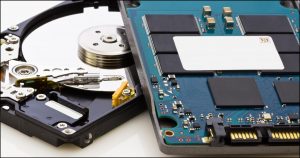 While it moves very fast, moving that read/write head still takes time. If you can ensure that all the chunks of a file are next to each other rather than spread out all over, the head doesn’t need to move as much, and reading the file is faster.
That’s defragmenting, or “defragging”, in a nutshell: rearranging the chunks so when the time comes to access a particular file, they’re all together, and the read/write head doesn’t need to move as much.
Solid state disks
The “magic” behind flash drives and SSDs (Solid State Drives) is that they’re built using electronic circuitry with no moving parts. There’s no disk to spin, and no read/write head to move around. Everything that makes it look and act like a hard drive is actually done by mimicking the characteristics of a hard drive in the solid state drive’s circuitry.
The difference in performance can be dramatic.
Many machines now come with SSDs as their primary disks, and one of the cheapest approaches to speeding up an older machine is to replace its older mechanical hard disk with an SSD.
Flash versus SSD
Both USB flash drives and SSDs are solid state drives.
USB flash drives, (also called thumb drives, USB sticks, or any number of other things), are, in essence, SSD’s slower, cheaper cousin.1 They both use what’s referred to as “flash memory” to act in place of traditional hard disks’ magnetic surface.
The difference is that SSDs are larger, faster, and longer lasting – which, as we’ll see in a moment, turns out to be important in a surprising way. Also, SSDs are typically designed to be a component installed in your computer, like a traditional hard drive.
Defragging solid state drives
Defragging a solid state drive will typically gain no performance benefits2. Since there’s no head to move, there’s no additional time cost in fetching one chunk of data from a flash drive over any other. It doesn’t matter how the files are laid out; it’s all just as fast.
Here’s the part where things gets worse.
Writing to the flash memory used in SSDs and thumb drives causes it to degrade ever so slightly. Reading does not.
Thus, the more you write to a solid state drive, the shorter its lifespan will be.
Now, don’t get me wrong, “normal” usage should be just fine. And the technology continues to improve almost daily. As I mentioned above, SSDs tend to be higher quality than inexpensive USB thumbdrives. They’re at a point now where under normal usage, they can outlast the machines into which they are placed.
But still … solid state drives wear out.
Defragging hurts solid state drives
Defragmenting a drive is all about moving the data around on the drive. That means reading it from one location and writing to another.
If you’re regularly defragging a flash drive, you’re adding thousands upon thousands of write operations each time you do so. Whatever the expected lifespan of the device, you could easily be cutting it in half, or worse.
For no benefit.3
So defrag your hard drives every so often, but never defrag your flash drives. There’s little to gain and much to lose.
Defragging and Windows
Recent versions of Windows do just the right thing. (Or rather, they won’t do the wrong thing.)
Windows will note that you have a solid state drive and actually not allow you to defragment it. Even better, once a week Windows will automatically defrag the disks that need defragging, and not defrag the drives for which it’s not appropriate.
You need do nothing at all.
Except … don’t defrag that USB stick. At least not without a proper backup of its contents … which you should do anyway.
Forcing the issue
It’s funny. Immediately after I say, “Don’t do that”, someone will ask, “How do I do it anyway?”
Fine. Windows won’t let you, but most third-party defragmenting tools assume you know what you’re doing when you ask to defrag a drive – any drive. Piriform’s Defraggler is the tool I use when I want something a little more extensive than Windows’ own defragging tool.
And yes, I took a sacrificial thumb drive and defragmented it. No, it didn’t immediately fail or burst into flames.
But that’s kinda the point. The defragmenting operation shortened its life. It will fail sooner, and without warning.
Which, naturally, brings me back to backing up.
Which you should be doing anyway.
Do this
Subscribe to Confident Computing! Less frustration and more confidence, solutions, answers, and tips in your inbox every week.
I'll see you there!
Podcast audio

More for Patrons of Ask Leo!
Silver-level patrons have access to this related video from The Ask Leo! Video Library.
 Defragging a USB Thumbdrive or other Flash-based drive

Hmmmm… makes me wonder how many MacBook Air owners may defrag their new SSD drives, potentially reducing the lifespan of the device. Using Flash for hard drives (Solid State Drives) is still an expensive, limited storage medium that is slowly gaining momentum. As more manufacturers (such as Samsung) throw their weight behind the technology we should see lower prices and increased capacities. The next couple of years could yield some very interesting drives in this arena – low power consumption, fast boot times, and potentially better performance that disk based drives.
The magnetic hardrive is a -mechanical- device that is, by orders of magnitude, the slowest* component in a modern PC of which all other components are solid state (CPU, RAM, GFX etc). File fragmentation increases the work that this mechanical device has to do, thereby worsening an existing performance bottleneck. Hence the need for defragmentation. In addition to preserving overall system performance, defragmentation may also improve the life of the drive in the long term, improve chances of file recovery (if the HDD crashes) and a defragmented drive may also reduce battery consumption in laptops. Infact, in the corporate space, unattended intelligent automatic defrag of workstations and servers is becoming the norm since it eases the workload of the IT people yet reduces user complaints of poor performance.
However, as Leo has so precisely explained, flash drives derive none of the benefits of defragmentation that are applicable to mechanical HDDs. So, there is no use defragging your thumb drive or ipod nano.
IMO, even with the rising popularity of SSDs, there is still a long way to go before they can seriously threaten the trusty magnetic-mechanical workhorse in our homes. As of now, the SSDs simply cannot compete on the price to performance ratio for home users.
* Excluding optical drives, that are infact even slower, but are only of peripheral interest (pun unintended) compared to a HDD.
“Hmmmm… makes me wonder how many MacBook Air owners may defrag their new SSD drives, potentially reducing the lifespan of the device.”
Fortunately for OSX users, fragmentation isn’t much of a problem. HFS+ (the standard file system for MAC users) uses a combination of methods to reduce fragmentation.Such as aggressive read ahead and write behind caching, journaling, and delayed allocation. not to say that files don’t get fragmented, but there is much less of a performance hit from the few files that do get scattered across the drive.
That being said, great tip. Never, ever, ever defrag a SSD.
Connie Ramirez –
In the May 1, 2008 edition of Windows Secrets several anti-virus programs were evaluated. The results were obtained from Virus Bulletin’s April 2008 edition and tested 37 antivirus solutions. The tests were run on Windows Vista PCs and included a list of viruses known to be circulating in the wilds of the Internet as of January 2008: worms, bots, polymorphic viruses, file infector viruses, and even legacy virus strains.
Five products notched perfect 100% detection rates (prices include one year of virus-signature updates): Avira Antivir Personal (free for noncommercial use), ESET NOD32 ($40), Fortinet FortiClient ($28), Frisk FPROT Antivirus ($29 for up to five PCs), and Symantec Norton Antivirus ($40).
You can install and register free copies of Avira on each of your 4 computers from http://www.free-av.com. Understand that AV products seem to change rankings with each other depending on latest updates, test authorities, etc. As Leo has said many times, better to use something rather than nothing at all.
http://ask-leo.com/whats_the_best_popup_blocker_antivirus_software_antispyware_software.html
interesting article leo, i totally agree about the wearing out of flash/solid state storage.
But i have been testing numerous SD and micro SD cards and the read/write benchmarks show a noted improvment after a defrag! how can this be explained?
@ Henry Cossak:
You might be noticing a performance increase in regards to file writes; it’s been proven to my personal satisfaction that writing to fragmented free space will be slower than writing to contiguous free space. The bigger the file being written, the bigger the performance impact. No noticable difference in read time, though.
Personally, I defrag my heavily written flash drives once every 6 months or so.
I have an ocz 64gb SSD, which when new windows reported as 56GB. everytime I do a diskclean up I lose space not gain it. Last time I checked it I found I had 26GB installed inclunding hidden system file. 56-26 = 30GB of free space, but windows reported it as 20GB. I had lost 10GB over a few weeks. I decided to defrag the drive and got all the space back. Is this a windows or drive problem. Vista 64bit btw.
Actually, defragging your flash drive can have some benefit but only if your hardware needs it. For example, the CycloDS and many other MicroSD to DS adapters require the card to be mostly unfragmented to work properly. There is even a debate on the official forums about whether it is best to use a defragmenting program or to simply copy everything off, reformat, and restore everything.
14-Oct-2008
Facinating. I did not know that they can wear out. I thought that they would work until some catastrophic failure, like a static spike or chip failure would render the whole device useless. What are the symptoms? Should they just be disposed of after a certain time?
07-Nov-2008
Leo, I saw your article about flash drives not necessarily needing defragmentation. I have a 750 gig maxtor usb I use for storing my Norton Ghost backups. After doing a backup, my 750 gig shows to be 99% fragmented. Running XP Defrag program takes up to 6 days running continuously. After it has been defragged, it’s time of my next weekly backup with norton ghost, and I’m back to square one…it’s 99% fragmented again. Is this a problem leaving it this fragmented, or is there a better and faster way to defrag the 750 gig?
Defragging isn’t entirely about seek time — many of Firefox’s leaks were tracked to memory fragmentation — as in, RAM.
There’s also the issue of space — it’s an extreme, pathological case, but modern filesystems store files in extents. If a file is contiguous, that’s one extent — just the location on the disk, and the file size — which has to be stored. If it’s more fragmented, each fragment is stored as an extent — which is at least a few extra bytes of space, and very likely some extra time and RAM to access.
For most cases, that’s really not going to matter — certainly, for a little 8 gig thumb drive, the life of the thing is a much bigger concern. But I wouldn’t say never defrag, just don’t do it weekly like you might with a hard disk.
Also, Ray: A 750 gig external flash drive? Are you sure? Those are absurdly expensive — I paid $300 extra for a 128 gig internal flash drive. You’ve probably got a USB hard drive, which absolutely will benefit from not being fragmented.
Similarly the extent thing doesn’t really make sense either. Files use no more disk space whether they are fragmented on disk or not.
Finally, I stand by my statement: there is never a reason to defrag a USB flash drive. If, for some reason you want it “defragged” (and I see no real reason to), a) copy the files off the flash drive to a location on your hard drive, b) delete every thing from the flash drive, c) copy the files back. Same results with a lot less flash/disk writing.
28-Nov-2008
I accidentally started to defrag my flash drive, then cancelled. Now I’m having MAJOR problems with certain files. I used to be able to use the files, now I get error messages that the files are corrupted, and such.
My problem is that it’s an OLD flash (1.0?) I’m using it on a Win98 computer at work – transfering needed files into a newer computer. It’s the only flash I have that will work in this computer.
So…if I copy the files onto the hard drive to where it’s empty and paste them back in, do you think this would take care of the problem? Should I reformat or scandisk (or defrag anyway – to let if finish?) the flash before putting files back on it?
I know it wears it out, I just need it to live long enough to transfer all the files out.
(Does anyone know where I can get an older type flash/thumb drive that will work on Win98, first ed.?)
THANKS SO MUCH!!
Another reason to avoid it is that it may just stop working! I defragged a flash drive, and now I’m told that it’s unformatted! To make matters worse, after I discovered this, I remembered doing exactly same thing and having the same problem a couple of years ago. Alas, life’s tough when you’re thick.
im not understanding as to why defraging is so bad for the flash drives..these flash drives,they contail the same memory chips as our pc memory itself uses..and pc memory never goes bad..unless you put it in backwards or somehow manage to fry it lol..in a way it makes sense,,but on the other side..memory is memory ..weather its being written to or used in I/O cycles..just a thought i had in my head…i could be wrong lol
24-Sep-2009
Defragging flash media DOES reduce its life-span, however, your reasons are slightly off. The life-span of flash drives are NOT reduced by writing to the drive. Flash memory uses a phenomenon (known as Fowler-Nordheim tunneling) to send electrons through a floating gate transistor where it remains even after power is turned off. This process does not “wear out” the media. Flash memory gets its name from the technique used to erase its data. To write data, an electric charge is sent through one transistor, called the floating gate, then through a metal oxide layer, and into a second transistor called the control gate where the charge is stored in a cell until it’s erased. To reset all values, a strong electrical field, called a (yep, you guessed it) “flash”, is applied to the entire card. Flash drives have two limitations: The bits can be erased only by applying the flash to a large block of memory and, with each ERASURE (not write), the block becomes less stable. In time (after 10,000 to 1,000,000 uses) a flash memory device will no longer reliably store data.
http://operation420.net/forum/viewtopic.php?f=45&t=1129
Great article, may I have permission to post it on my forum instead of just linking to it? I prefer reposting instead of just linking because there are times I posted links to articles that went down.
05-Dec-2009
I have accidentally deleted some of my important data’s from MacBook’s USB Flash Drive.Can I get it back using MacBook Data Recovery software, as defragmanet it before the data loss. Please help.
You might want to explain all this to Microsoft. When you read their help page about fragmentation (Windows Se7en), they mention Flash as being prone to fragmentation and sort of encourage users to defragment them also…
Defragging my flash drive makes sense to me..i have a 4GB flash drive which was infected by some viruses..i had no way of recovering my files in it so i decided to reformat it, but to no avail..for some reasons, i cannot reformat my flash drive. I checked it with windows defragmenter,and defragged it..after doing so i easily reformatted my flash drive, and up to now is working very fine for more than 2 years.
I purchased a 8gig thumb drive from corsair. I believe it has like 10 year warranty. My goal was to make a mega boot able devices that would launch into several OSes. A Multi-OS on a stick. I came found a good article that would let me do so using Grub4dos. The problem I encountered was that the large ISO files became fragmented and would not boot. So in this case I must defragment the drive many times in order to boot off all the boot able OS ISO files. After which no more write should be done to the USB thumb drive. In this one case I think it is acceptable, and if it does degrade Corsair will mostly likely send me a new one.
Thank you for the article, I was curious to see if there was any reason to or not to defrag a flash drive. I honestly wish I had come across this sooner, LOL. I will remember this for my next flash drive. Keep up the great articles. You have a new fan.
This article’s points are contradicted by the following pretty persuasive article: http://www.wizcode.com/articles/comments/flash_memory_fragmentation_myths_and_facts/.
Hi!i accidentally defrag my 4gb flash drive, but i cancelled it right away.Then when i try to open it,windows asks to format it. But it fails.All of my files were gone. Is there any way to recover or at least fix my flash drive? Thanks :)
Think outside the box. While defragging a flash drive may not improve performance, it is not the only reason that someone may be interested in doing it. For example, my DVD player that is connected to my TV, accepts usb flash drives. When playing music, it plays the files in the order that they were written to the flash drive. But I want it to play them in alphanumeric order. Some defraggers, such as Ultimate Defrag by Disk Trix will write files to disk in alphanumeric order. Unfortunately, that program won’t defrag a usb flash drive.
Different people opine, that is not easy to buy research papers. However, I guess that is easy to determine good custom writing organizations and you need to just seek hard them.
I appreciate your thought close to this topic. I would like tell that I have not find such kind of master dissertation writer until now. Could you accomplish the very perfect dissertation (topthesis.com) and thesis example?
I suppose this article could be followed up with “Why do SSD drives slow down over time and what can I do about it?” Leo.
As always, I enjoy reading your articles, some of which i learn from and some perhaps not.
This is almost off-topic, but I’ll try anyway: Does formatting a flash memory, such as an SD Flash card in a camera, shorten it’s life more than deleting the pictures on the card? I assume both tasks involve writing to the memory, involving more data or less data, and writing less data would mean longer life in the flash memory.
While I agree with Leo’s advice not to defrag an SSD, there are different issues for memory cards. The secret is not to defrag, but to NEVER delete files from a camera card. It has to do with recovery. If you start with a freshly formatted card and write images to it — and never delete — then in the unlikely event that something goes wrong, recovery will be much faster and more likely to succeed. And while I have yet to have an SSD fail, I have LOTS of experience with camera cards getting garbled. It’s not that the card is failing, but that the file structure gets scrambled. My recommendation: Take pictures all day long. At the end of the day, copy all of them to your hard drive. On the hard drive, delete the ones you don’t want. Then back up the edited folder to an optical disc or an external hard drive or a NAS unit or whatever else you want to use for backup. Once you are sure you have two copies of all the files (one on your hard drive, the other on your backup device), reformat the camera card in the camera and you’re ready to take more pictures tomorrow.
If you delete images as you go, the memory card ends up badly fragmented. As Leo noted, that has almost no consequences for performance. But if something goes wrong, it has huge — potentially insurmountable — consequences for recovery.
A quick format simply overwrites the directory entries, so that’s pretty close to deleting everything manually. A full format would indeed write the entire drive, and is typically not neccessary.
Leo, what about *shredding* sensitive files on a memory stick or SSD? That also adds wear, but is unavoidable for security reasons. However, wouldn’t a single pass suffice for solid state devices?
Secure algorithms (multiple passes) are typically used for magnetic storage media (conventional HDs) because a simple overwrite may not prevent recovery. I just wonder if the equivalent phenomenon exists in SSDs…(?)
A single pass should be enough.
@Engineer10388
Shredding files on SSD actually doesn’t exist or work due to the wear leveling process,
writing to the same location repeatedly doesn’t happen, and isn’t allowed
the SSDs firmware prevents repeated writes to the same location
a multi-pass “shredding” operation will simply cause data to be written to different cells each time the write is sent to the device
with a TRIM enabled SSD aware OS, there is no need for shredding as the TRIM Garbage collection will clear the cells after the file is deleted.
one caveat which is the same as HDD, remapped sectors (HDD), remapped cells (SSD), once a cell becomes unreliable and is retired, the cell becomes locked with whatever data was in it at the time
however actually reading the contents of said retired cells requires specialized tools which aren’t readily available to the general public.
conclusion, there is no need for performing shredding operations on deleted files on an SSD
In Windows 8 and later, it seems that Trim is done instead of defragmentation when the OS recognizes it as SSD.
THIS MAY HELP THE DISCCUSSION, HOW DO USB AND SSD DRIVES RETAIN THEIR CONTENTS WHEN THERE IS NO EXTERNAL POWER AVAILABLE TO THEM? I’VE ALWAYS WONDERED.
So the same for M-2 drives and internal SSD’s, I assume?
Yep. “M-2 drives” are SSDs (M-2 is the interface to the drive, as opposed to SATA, for example). Internal or externals, don’t defrag SSDs.