Removing digital pests and vermin.


Ending up with random software on your machine you never wanted in the first place is annoying as heck.
So-called PUPs (for Potentially Unwanted Programs, although there’s rarely any “potentially” about it) are tools, settings, utilities, browser toolbars, extensions, and more software installed on your computer as a result of installing something else. PUPs are rarely even related to what you’re installing.
I’ll talk a little about prevention, but first, let’s walk through the steps I recommend when you suddenly realize you’ve been saddled with software you didn’t ask for and certainly never wanted.
Become a Patron of Ask Leo! and go ad-free!

Removing PUPs
To remove PUPs (and other unwanted, unexpected software), start with an Uninstall via the settings app, then run Malwarebytes free version, then run AdwCleaner. This sequence catches the most common PUPs. You can also simply restore to a backup taken prior to the PUP’s arrival. Remember: always choose custom installation to avoid PUPs in the future.
Start with a backup
The steps we are about to take have a small chance of causing problems.
Whenever that’s the case, I strongly recommend you take a full image backup of your machine before you do anything else. That way, you’ll have that backup to restore should anything below go wrong.
Uninstall the somewhat well-behaved
A number of unexpected toolbars and other applications that show up on your machine are “relatively” well behaved. By that I mean they are somewhat easy to uninstall using official mechanisms.
Start in the Windows Settings app, and click on Apps.
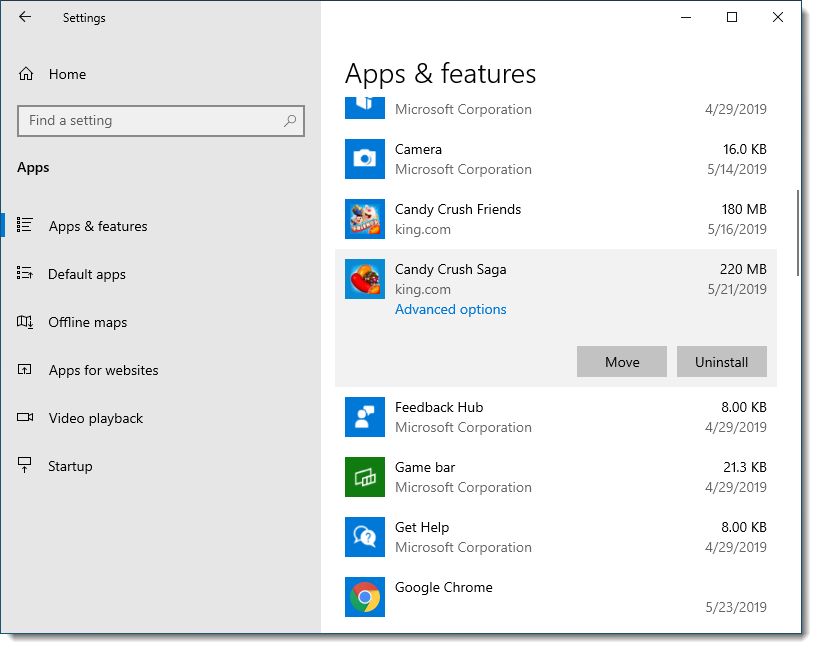
Look for the item by name. Sometimes this can be tricky, as some applications intentionally use obscure names to make them more difficult to remove. The well-behaved items we’re looking for here should be relatively clear. Look for names including the words “toolbar” or “extension”, in particular, as those are some of the browser-behavior-altering pests often putting us in this scenario.
Click on the item you want to uninstall and click Uninstall when it appears.
We’ll do the next steps even if it appeared to work, because in many cases there will be traces left over. Sometimes those traces can reinstall the PUP.
Run Malwarebytes
If you don’t have it already, download and install the free version of Malwarebytes Anti-Malware.
Important: The free version is, at first, a free trial of their paid version. It will nag you to register/upgrade/license the product. You do not need to do so. Simply use the product as described here. After a period of time (two weeks, at this writing) the trial will revert to the purely free version. It may continue to nag you, but it will keep working.
Run the program, if it hasn’t started automatically, and click Scan to perform a scan.
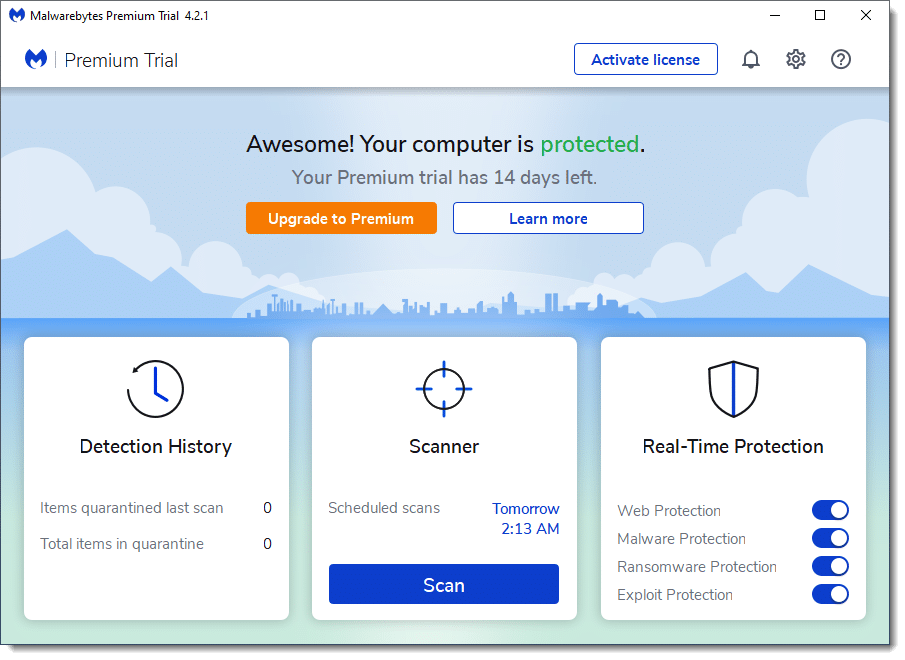
The Malwarebytes scan may take a while.
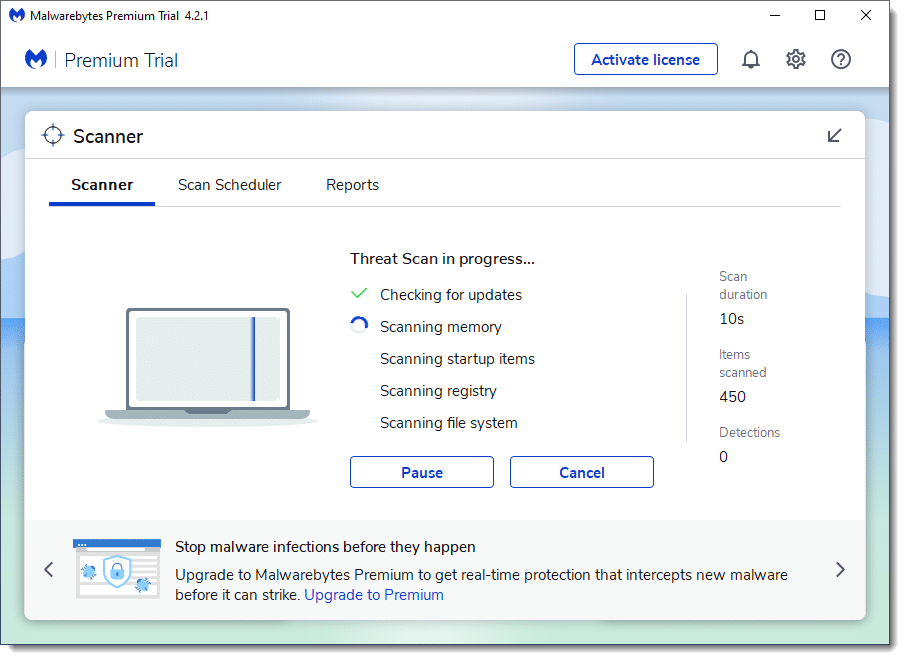
When it’s complete, you’ll get a notification if you have malware or PUPs.
Even if no actual malware is detected, potentially unwanted programs may still be found. Malwarebytes will show you the entire list. You can review the list if you like, but in general, the next step is to simply quarantine everything. You will likely need to reboot.
A clean scan is your goal.
Note that you may want to uninstall Malwarebytes, as its trial version will have disabled Windows Defender in Windows Security. This isn’t really a problem; you shouldn’t have two fully-featured security solutions running at the same time, and Windows Security knows to step aside when Malwarebytes is installed. That being said, if you don’t plan on keeping Malwarebytes, you’ll probably want to remember to uninstall it when all is said and done. If you don’t, after the trial period it will step aside; Windows Security will resume full real-time protection, and Malwarebytes will remain available for on-demand scans.
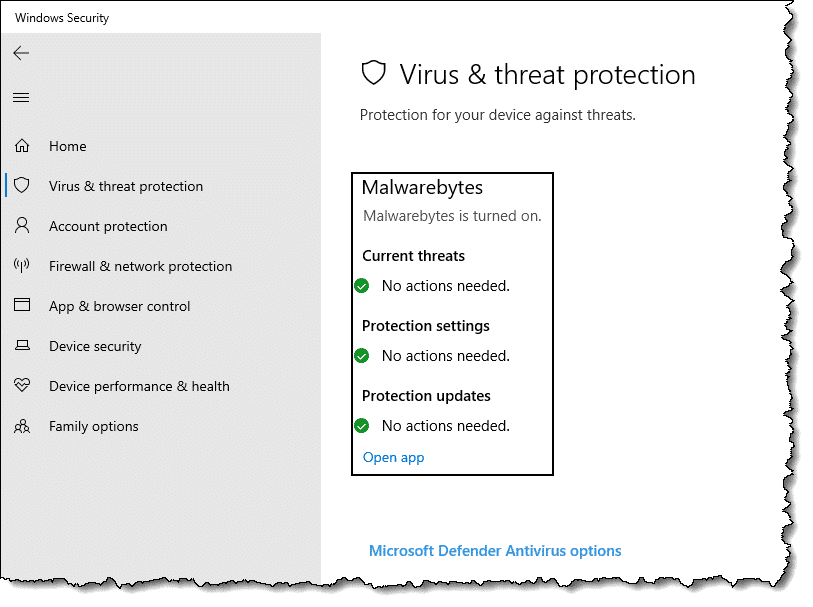
It’s possible Malwarebytes may be unable to remove some PUPs. If that’s the case (or even if it’s not), I want you to take one more step.
Run AdwCleaner
AdwCleaner is perhaps best downloaded from our friends over at BleepingComputer.com. (AdwCleaner was purchased by Malwarebytes in 2016, but remains a separate tool.)
Speaking of being careful, remember to avoid advertisements that say “Download” or “Free Download.” Those are not the programs you want. The button that I used simply read, “Download Now @BleepingComputer.”

AdwCleaner has no install. Once downloaded, simply run it, and answer Yes to any UAC prompt.
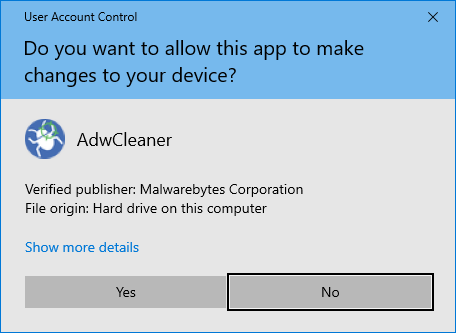
Also click I agree to any licensing terms agreement. Click Scan Now.
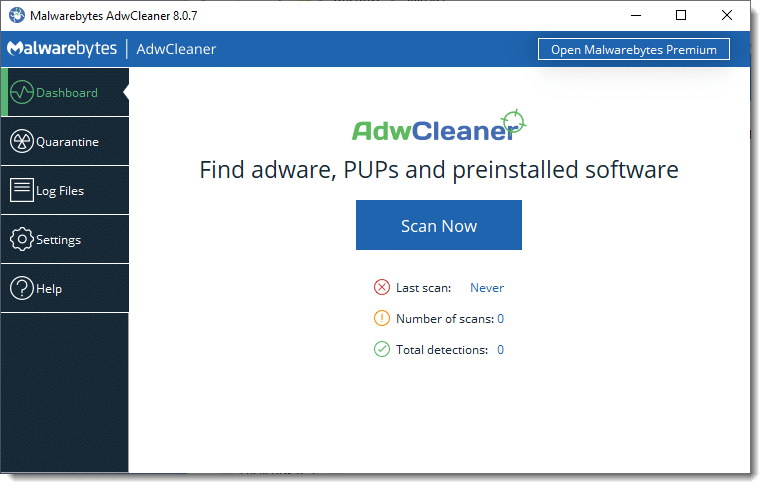
Once the scan is complete, AdwCleaner will present its scan results.
If you’re not certain about what AdwCleaner finds, go ahead and let it clean up anything you don’t recognize by clicking Clean & Repair. (It first warns you that all programs should be closed.)
The ultimate removal
Even with the tools I’ve outlined and other tools that may also be used or come along later, there’s a real possibility that the unwanted software will still not be completely or successfully removed. This often happens when the PUP is new and the security-software makers are catching up to the latest tricks.
It’s worthwhile to consider restoring to a recent backup image. Restoring will make these things go away every single time.
If you have a backup image of the machine as it was prior to these pests getting installed, you can simply restore your machine to that image, and they’re gone. No fancy tools are needed, and you needn’t just hope that it works. Restoring to a prior backup works every time.
Presuming, of course, you have one.
Prevention
PUPs and related pests arrive in several different ways, but most commonly, they are “offered” to you when you install or even update something else.
The offer is often hidden and defaulted to “Yes”. The technical loophole is, by choosing this default (or not unchecking the appropriate box) when you install a program you’ve downloaded, you’re requesting this other software be installed.
Don’t do that.
Whenever you install or update any software — even software you’ve purchased or already have installed — always choose the “Custom” or “Detailed” option. Choose whatever option is not the default option.
Then pay very close attention to every option you’re presented. If it offers you something that is not clearly related to the software you want, uncheck it. If it offers to change your search page, uncheck it. If it offer to install some toolbar, uncheck it.
You get the idea.
The bottom line is, if you’re not careful when you install software — even software from reputable vendors — you may end up with things you never expected or wanted.
There’s nothing “potentially” unwanted about it.
Do this
Subscribe to Confident Computing! Less frustration and more confidence, solutions, answers, and tips in your inbox every week.
I'll see you there!
Podcast audio

Related Video


I had some PUPs that showed up in Malwarebytes. They were all registry entries. I had Malwarebytes remove them, but they always came back. This is what prompted me to try a few other solutions. When I ran Adwcleaner, it found a few .exe files scattered around in different folders which it removed. After that, the PUP never came back. So even if an antimalware program tells you it removed the problem, It might not have removed all of the problem, and running a few different antimalware programs might be necessary.
Restoring from my backup would have been a lot of work as I wasn’t sure how far back this PUP had been on my machine, so I wouldn’t know which backup I would have had to restore from.
I’m a firm believer in Revo Uninstaller. It seems to do a decent job in removing unwanted BS. But not always. So, against advice from people that know more than I do, I open Regedit and hunt down anything that looks like it has anything to do with my headache, delete the bastoid and anything to do with it and reboot. There’s multiple places where the insidious sucker install a register entry – delete all – reboot. Oh yeah, save your registry somewhere on an external (thumb) drive JIC.
Editing the registry can be dangerous unless you know what you’re doing, but if you understand what you are doing, it’s usually ok. A backup is the key.
SuperAntiSpyware, Junkware removal tool (JRT), and Root Killer (RKill) are my go to’s. Malwarebytes is good, but SAS finds things it misses and vice versa.
A couple of other things to watch out for. Sometimes the PUP authors will put in a screen with the box checked which uses confusing language which can lead you to believe that it is an important component of the program you are installing and will put in something like Recommended to fool you into thinking it’s necessary or useful.
Also, if you have Java installed (generally unrecommended), Oracle and Adobe try to install this kind of crapware on your system every time they updates. So be very careful when installing Java and Flash updates.
Another program to consider is Adobe Flash Player: I have seen it offer Google Toolar+Chrome or McAfee security scan plus: Potentially unwanted software that obviously can’t be removed from a tool. (although I believe McAfee has a removal tool on their website in addition to add/remove programs, or on vista/7/8, programs and features.)
The Adobe Flash player is particularly tricky, because you make the choice of whether to include the PUP before actually downloading the installer. It’s a check box on the download web page. Since this is uncommon, even seasoned “custom installers” can get bit by it. I have downloaded the PUP version a couple of times. Luckily you still can stop the install once you realize you don’t have the choice to exclude the PUP installation, and go get the correct version. But it’s very tricky and sometimes alarming to see that “McAfee scanner is going to be installed” without the option to say no.
I’ve been using MalwareBytes for some time now and have a lot of confidence in it so was intrigued when you mentioned AdwCleaner. I downloaded and ran it on my XP machine (yes, I know) and reviewed what it found and didn’t see anything that seemed to be interesting. Ran the cleanup and rebooted then got this error: Bootmgr is missing. Restarts a few times same problem. Luckily I had a Macrium recovery CD and was able to repair the bootup but I’m concerned that this product could have deleted something that rendered the machine unbootable.
I too suffered an unexpected “deletion”. I ran Adwcleaner and because I didn’t recognize any of the 12 items it picked out for quarrantining, I duly quarrantined them. After the reboot my text reader NoteTab lite stopped working. More exactly I couldn’t open any txt document by my usual method of double clicking it. I read the quarrantine log even more carefully and could not decipher a related, deleted item. So, I restored all the quarrantined items, rebooted and my txt reading came back. I have no idea why, the program did not explain, and I wonder if other facilities had been lost which I hadn’t found.
One thing about AdwCleaner is that it works in a way similar to antimalware programs and therefore relies on antiadware definitions. AdwClenaer will not run if it is 10 days old: it will link you to it’s homepage. Bleeping Computer must keep up as well.
I was unchecking boxes before I was old enough to grasp the concept of advertising: I declined things in a very mild “No Thank you” kind of attitude without questioning why the products was offered. For years I took unchecking completely for granted, but recently I found out that people fly through installations without thinking.
This might be of some interest to you:
http://www.microsoft.com/security/portal/mmpc/shared/objectivecriteria.aspx (How Microsoft antimalware products identify potentially unwanted software)
I like their number one unwanted behavior, “Lack of Choice.” That takes it right out of “potentially” unwanted and straight into unwanted!
Unwanted behavior: The software runs unwanted processes or programs on your PC, does not display adequate disclosures about its behavior
Advertising: The software delivers out-of-context advertising that interferes with the quality of your computing experience, regardless of whether you consented to this behavior or not.
Advertisements: The advertisement should not mislead you into visiting another site or downloading files.
All of these examples could be used to describe the GWX campaign MS is running on everyone’s PC.
My thought exactly, Brian McD!
I use both Malwarebytes, and Revo Uninstaller. Revo will find all of the registry entries and remove them for you. When using MWB and finding that the problem is not solved when you reboot means that you have to restart in ” safe mode Without networking ” and run the program again. This almost always works.
Leo, I have never thanked you for the many wonderful articles that you provide to help us be more informed users. Today, I just couldn’t help myself from responding to your fun alliteration (Pesky / Problematic / Painful / Potentially Unwanted Programs or PUPs). You make what could be dry, unappealing information into stuff I want to read – aw, shucks – couldn’t do an alliteration myself :(. Anyway, thanks again and again!
Doesn’t everyone have System Restore? Leo, I’d have thought that should be your first solution. Assuming one spots the foistware as it comes in or very soon afterwards . . . Whenever I click on a link that takes an age (about 1 minute before anything comes up) – and the computer totally jams up so I get ‘Not Responding’ all the time – I get the sinking feeling in my stomach that the computer is being hijacked so I’m inclined to run System Restore every single time. Apparently it works (though I never actually see what’s been added or removed!) . . . So isn’t S.R. the complete solution for everyone? Isn’t it on everyone’s computer? . . . (Or is it just a feature of X.P.? – In which case, yet another reason for staying with X.P. I would have thought!!)
System Restore is great when it works, but it has so many problems, that it’s not good to rely on it as a solution. Even if it works, it won’t necessarily remove every kind of foistware.
http://askleo.com/why_i_dont_like_system_restore/
I’ll point you at this article: Why I don’t like System Restore
Another terrific article Leo, thank you. I will definitely be saving this one.
Thanks Leo for the update. I’m currently using MSW 8.1 non-touch on my new computer. I use Malwarebytes because for some reason manufacturers are bundling in quite a lot of ridiculous programs on new computers right out of the box. It took me a few days to set up using Defender, CCleaner, and Malwarebytes. I also used Microsoft’s forums to figure out how to fix the display.
After reading the update on this page, I tried downloading AdwCleaner, but my computer stopped the installation. Should I turn off real-time protection and install anyways? Or should I simply rely on the software I’m using sans AdwCleaner?
AdwCleaner is a standalone program that doesn’t have to be installed. Just run it and it should work. If it doesn’t I’d download it again and see if it runs. There should be no need to disable your real-time protection unless for some reason your AV complains about AdwCleaner.
I had to turn off my virus scanner to let Adwcleaner run. If it wasn’t for my longstanding trust for Leo’s advice, I would have hesitated. It actually found a few minor things, but it also deleted my OpenDNS software. So it isn’t totally foolproof either.
Restoring from backup is the best solution; if not the only solution, certainly the safest. But it may not be easy to get your data back to where you want it. Step one in any restore is to take a new backup of all your data, and preferably a full image backup, in case you don’t know exactly where all your data resides. Then restore the whole system from an older backup, then restore your data from the immediate backup. Depending on what applications you’re using, if you don’t know exactly what you’re doing you could really make a mess of things. Outlook or Live Mail alone can be nightmares. Proceed with care, take precise notes, test everything, and be prepared to start over.
I also use hitman pro and scan my computer. You can get a one time usage. There is one for system 32 and 64. I also download Web of Trust and put that in each browser.
This kind of thing is so prevalent anymore that I take the sandbox approach. I use Toolwiz which is a good freeware program that has several good tools and features, but the best is their Timefreeze. Start it before installing anything at all questionable, if the results from the install are not what you expected or wanted, just roll it back to before you did the install. If the install was OK you can turn off the timefreeze and continue. As with everything else this is not a perfect solution but seems to be the best approach for me.
Leo, I commend you for your information on PUPS and Malware, it has been most enlightening. I have been assisting retired folks computers for some years now and your recommendations are most helpful in assisting me in maintaining their PC’s, mine included.
Many thanks.
Thank you for this article. I thought I had cleaned my PC of this stuff but your suggested program found more of it!!!! May I suggest a free software app which runs in the background called “Unchecky” it unchecks all those unwanted bits before you instal. If you try to instal anything with checks in it it will warn you.
I never heard about Unchecky till I read your comment. I Googled it and one of the results was CNET. I wonder if CNET bundles it with malware :-).
One thing I have learned over the years, is that CNET ( or it’s derivative Downloads . com ) are not to be trusted at all. Almost everything at DL.C is infested with malware. Do the extra work, and find the original sites for any free programs that you think you might need.
Spot on…lots of questionable stuff on CNET. I try to use the software publisher’s site.
I’ve written on this before: Is it safe to download from download sites?
The way around Unchecky would ve for some wise-guy PUP-maker to say, for example,
[ √ ] No, DON’T install my marvellous FoistWare Pro v 18.42 (10-Day Trialware, $482.17 USD/month afterwards) !!!
So, Unchecky “does its thing,” and the next thing you know, you’re shelling out $500 a month for software you never wanted!!!
I have seen options worded that way, (though without that particular pricing ). Never thought of as “Unchecky bait”.
I don’t think any PUP creator or bundler would go to the effort to create Unchecky bait. Those sound more like distracted user bait.
Agreed.
Did the above and adw cleaner wiped out an important program packed with needed data and now google chrome won’t open. More fool me I guess.
I love ninite.com for installing and updating program like Java. No toolbars, no clicking next, just installs. I use the pro version to push out these updates at work.
Leo, one commentator stated, “Ran the cleanup and rebooted then got this error: Bootmgr is missing.” I don’t think that AdwCleaner actually caused this problem. Do you think so? Also I have read many reviews on AdwCleaner and the only consistent negative item that many people have stated is that it wipes out the settings for the Chrome browser. I don’t use Chrome. Firefox is my default browser so I am not concerned with that one negative aspect of AdwCleaner but I would be concerned if it deleted my Bootmgr.
I don’t have enough experience yet with AdwCleaner to rule it out, but I agree – it seems unlikely. But of course I don’t have another explanation since we don’t know the entire story of what’s been done to the machine or it’s overall state of health.
THANK YOU. I was having an issue with unwanted pop-ups and hyperlinks and found out it was PureLeads causing the problem. I was able to uninstall it with the control panel, as you did.
Download Unchecky it Works
Thank you for the great information on PUPS and other malware. My computer was clean but my wife downloads games and recipes with the result that it sometimes took 30 minutes to get online because of the ad-ware. Once installed the two free programmes you recommended did a fantastic job. My wife is happy to have a useable computer again. I always look forward to receiving your newsletter. Thank you again.
Bill.
takes it a few steps further,,,, remember to run every update the MS offers,,,, you can also get one of the program checks/update programs like patch my pc,,,, at least it will check flash and Java if nothing else,,,, AND REMEMBER AFTER YOU CLEAN OFF THE JUNK,,, DELETE THE PREVIOUS SYSTEM RESTORES AND MAKE A COUPLE OF NEW ONES,,,, :)
http://malwaretips.com/blogs/malware-removal-guide-for-windows/
I’m glad it worked.
MalwareBytes ALSO misses alot that MSE misses…most of the time when I run either, nothing shows up be it a virus, PUP etc…where other programs that are well known and Ask Leo has recommended DO find and I am able to remove.
Looking forward to receiving the newsletter
The AdwCleaner can remove things that you don’t want removed and there isn’t a choice beforehand. AdwCleaner removed a folder from my Favourites folder that I had put together for finding things like reverse addresses, telephone numbers etc. I think I made the mistake of calling it “Search” and it was a subfolder of the Favorites Bar. Other than that it seems to have done no other harm and removed a couple of things that mbam missed.
You mention CCleaner somewhere. I use it regularly, but only the upmost (“wipe”) option. I have been a little hesitant to use the “register” option. Can you recommend that I accept all the corrections to the register which CCleaner suggests, without having to be afraid that problems result (never got problems with the “wipe” option) ?
I tend to avoid registry cleaners as a rule ( https://askleo.com/whats_the_best_registry_cleaner/ ). If you must run one, BACK UP FIRST. :-)
“If you’re not certain you need it, leave it checked. In other words, go ahead and let AdwCleaner clean up anything you don’t recognize by clicking Clean.” – Sorry, but I think that’s bad advice. While AdwCleaner is certainly effective, it also seems to be somewhat aggressive and I’ve seem numerous mentions of it causing problems, especially when used incautiously. And those problems can be quite serious – for example, I’ve seen several mentions systems being rendered unbootable by AdwCleaner. Even one of the comments above talks about it causing problems: “I downloaded and ran it on my XP machine (yes, I know) and reviewed what it found and didn’t see anything that seemed to be interesting. Ran the cleanup and rebooted then got this error: Bootmgr is missing. Restarts a few times same problem.”
A better option would be to research items detected by AdwCleaner prior to deletion to make sure that they are indeed things that should be deleted. And, of course, to create a backup prior to running it.
I agree with you Ray. I’m no techie and I have no idea what these folders and registry entries mean. Leo cautions about registry cleaners, but then says to go ahead and let AdwCleaner do its thing. What?!! AdwCleaner found so many registry entries I was afraid to let it clean anything. So I’m back to square one. My question is this: How does a “regular guy” not a “computer whiz” know which folders/files/entries are important and which are not? I’m not ready to gamble and find out my computer won’t work after running AdwCleaner. Due to my ignorance I always err on the side of caution, hence I’m sure my computer is loaded with PUPs.
In your shoes, I’d back up the data, restore the system using the recovery partition, reinstall the software and then restore the data from the backup. This is the #1 best option. The #2 best option is to create an image backup – using the utility that comes with Windows or an app like Macrium Reflect – and, once you’ve done this, let AdwCleaner do its thing. If it doesn’t work out well – and likely will work out well – you can use the backup to get your computer back to the exactly how it was prior to running AdwCleaner.
That said, you really need to think about how this stuff is finding its way onto your PC and stop it from happening. The vast majority of malware infections – more than 99% – happen due to 1) carelessness with email attachments; 2) the operating system or apps not being kept up to date; or 3) being installed side-by-side along with some other application. If you take action to address each of these things, there’ll be a close to zero chance of your PC being infected in future.
The backup technique I use, especially now that Samsung SSD are more affordable, for all your readers to consider. FIRST, use Leo’s recommended cleaners, update all programs, and optimize your primary SSD. NEXT, in my case, I unplug the SATA DVD burner, and plug in a new SDD. (120Gb is right size for me [@$70 Amazon]…I use a large, standard, back up internal hdd: Therefore NOTHING is saved in C:\ W10 Libraries!!). THEN Computer Management to partition/format new SDD. FINALLY using free Macrium Reflect I simply CLONE my primary SDD onto the back up SDD!!! LAST, sticky-note the date on the back up SDD, put it in the box it came in, and store it in a safe place. IF my primary SDD ever crashes, all I have to do is plug in my back up SDD!!!
Side note: My wife’s laptop hdd died so I put in my back up SDD and away she went!! FORTUNATELY she saves all her IMPORTANT files on a thumb drive. Ordered my another Samsung 120Gb SDD and repeated back up technique I describe above!!!
i must be pretty careful because there was nothing in the box after the scan. but i run an MBAM scan and an MSE scan 3 or 4 times a week. and i also clear my cashe and cookies and do a disk clean too almost daily after logging off everything. so that`s probably why.
Thanks Leo, i`ve been with you for years and don`t regret one minute of it.
“I also clear my cashe and cookies and do a disk clean too almost daily after logging off everything. so that`s probably why.” – You know, while there’s nothing wrong with doing this, there’s really not much point in doing it either. It does nothing whatsoever to prevent malware infections and isn’t the reason that your MBAM/MSE scans are coming up clean. Nor does clearing the cache speed up either your PC or browsing. In fact, it’s probably slowing things down somewhat. Windows caches stuff in order to speed up your browsing and, if you clear the cache, you prevent that from happening.
Clearing cookies might prevent some tracking cookies from showing up in MBAM, but those are harmless and in a way a kind of false positive. Clearing cookie is rarely a good idea as you will be forced to log in again to all of your websites.
I’m not sure that MBAM even detects cookies, does it?
I could be wrong, but I thought it finds tracking cookies.
It doesn’t and never has detected cookies. SUPERAntiSpyware does, but does not do well at detecting actual malware.
Tried ADWClearner twice and both times it locked up my computer when it was supposedly doing the clean. Didn’t have that much to do, so I’m not sure why it would do that, but I had to do a soft reset in order to get the computer to do ANYTHING. Deleted…
CAUTION using AdwCleaner: Before you scan, check the Options drop-down menu and UNCHECK EVERYTHING, otherwise many important settings on your computer can be reset. Another caution: After first use, AdwCleaner creates a settings.ini file under C:\AdwCleaner. If this settings file is deleted by accident, AdwCleaner will start again with the default options and can possibly reset your computer settings. So, check Options every time before a scan.
I find SpywareBlaster is a real help, stops a lot of nasty stuff getting there before hand.
Also, be aware some supposedly “reputable” companies add PUPs to their offering. I’m looking at you, NVidia!
In Windows 10 when you click on the Windows logo (start button) and then click on All Apps, note if there is the word NEW. This means that something new has been installed on your computer. Go down the list of Apps until you come across NEW beside an App. If you didn’t install this yourself, it very well could be a PUP or other unwanted software. If there is an uninstall, uninstall if you don’t want it then check in the Control Panel, Programs and Features to see if it is there. It very well could be even if you had chosen to uninstall. You may or may not be able to uninstall from the Control Panel. If that is the case, give CCleaner a chance to uninstall the App. Items show up in CCleaner that do not show in Programs and Features. Use the uninstall supplied by CCleaner.
An example of the above was installed during Windows Update (it wasn’t there previously). It was called Microsoft Solitaire Collection. I did not ask for it, have not visited the store, but there it was in my list of apps. There was no uninstall nor did it show up in Programs and Features. CCleaner however uninstalled it. At the same time I uninstalled Xbox as I don’t have one and never will as far as I can see. Xbox was not available to uninstall in Programs and Features but CCleaner showed it and uninstalled it.
I know you tend to emphasize free programs but I just thought that I’d put in a plug for Acronis True Image Home. I’ve been using it quite happily for six years
Leo used to recommend Acronis TrueImage. This article explains why he switched to Macrium Reflect.
http://ask-leo.com/acronis_trueimage_home_backup_software.html
Hi, This is the maximum that one could get away with nasty tool bars. But i do not know about some programs which would ask you to close your browser, and installing something, of which we do not know what it involves.It will also sidetrack you by giving some attractive dubious advertisements. Once you downloaded , it would have injected and the program icon would not be shown anywhere.
By the time you search with the exe file, you may find your computer is having changed search engine, and also malicious programs that disguise as svchose.exe , ultimately connected to the computer and do the herculean task of repairing all your applications .
Just do not download anything from sites like {removed}coms. Those are waiting you to click and suffer
Another vote for ‘unchecky’. Has saved my life more than a couple of times and seems infallible, despite my deliberately having done some VERY naughty downloads (immediately after a full backup of course!!) by way of a test.
Adwcleaner removed RegistryCleanerKit by Uniblue and YouTube Downloader. Had to re-install both But it did delete many other programs of which I was not aware.
Those are often confused as malware, as they comes bundled with some nasty PUPs, and if you don’t carefully read the misleading installation screens, you’ll get the foistware.
I’d advise against using RegistryCleanerKit or, for that matter, any registry cleaner. Such apps do not improve performance and nor do they usually solve problems. They can, however, create a whole bunch of problems by deleting things that shouldn’t be deleted. In other words, the benefits are pretty much zero and are far, far outweighed by the risks.
Malware Bytes AntiMalware: Once I downloaded the “Free” version you recommended, it installed it as a “trial Free” version and then gave a message later after some time (I do not how long) that my trial period expired and it did not run. I restarted, uninstalled, ran Registry Scan cleaner, then restarted and downloaded the “free” version again, but it did not work due to same message above! I even ran from an older stored image, and that also did not work as it recognized the current date, so I removed that “older” copy.
So, it is not really FREE as you described it! Your comment?
It appears that you downloaded the free trial version instead of the free version. There is a completely free version. It should be available using this link:
https://www.malwarebytes.org/dl-confirm/
It’s the same download for both versions. You simply choose whether to run it in trial mode during the install – and if you select that option, it automatically reverts to free mode at the end of the trial period (unless you pony up, of course).
There’s free and paid versions of MBAM: the paid version runs in real-time; the free version is simply an on-demand scanner. When you first install MBAM it, you have the option of choosing to run it in paid mode for a trial period (which is what I assume you did). At the end of that trial period, it automatically reverts to the free version.
On a separate note, registry cleaners aren’t really a good idea. They really don’t serve any useful purpose, but can cause all sorts of problems.
There is a truly free version, and that’s what I intended for you to use.
I was glad to see *prevention* emphasized. But the purveyors of PUPs are getting very creative and I’ve inadvertently ended up with an unwanted toolbar (or worse) after an installation. That’s why I also rely on Ruiware’s WinPatrol Plus. It has many useful features and alerts me to PC changes, providing opportunity to deny unwanted programs/changes before they actually install. They have two other helpful programs, WinPrivacy and WinAnti-Ransom. These supplement whatever security suite is on board.
An abundance of caution is always needed about software installations. And program updates — especially those tagged as being for security — must be done religiously. I don’t like the fact that Windows 10 updates on its schedule, not yours. In the past I’d frequently initiate Windows Update manually, select what seemed to be warranted, get the download, and let it install-reboot before continuing with my engineering work. Now it could be days between a critical update being released and when my PC gets it.
Finally, I’ve used your recommended MBAM Free and CCleaner Free for years and consider both of them to be essential PC tools. THANKS for the info on AdwCleaner, as I was not familiar with it.
“I don’t like the fact that Windows 10 updates on its schedule, not yours. In the past I’d frequently initiate Windows Update manually, select what seemed to be warranted, get the download, and let it install-reboot> – You can still check for updates manually and schedule the restart.
http://www.howtogeek.com/221903/how-to-schedule-restarts-for-updates-in-windows-10/
Before doing any process that looks at every file on the drive, I run the free version of cCleaner (www.piriform.com) to get rid of thousands of unneeded files. Fewer files to scan=faster scan.
I downloaded AdwCleaner using “Download Now @BleepingComputer” as recommended. However, before I executed it I had the file scanned by VirusTotal at https://www.virustotal.com. This resulted in findings of “Malware.Undefined!8.C-HzyytRqxDXR (Cloud)” and “Trojan.Generic ” and now I am afraid to run it.
Are these true positives indicating an infected file that should be eliminated or false positives meaning I can use it, or something else entirely?
It’s a false-positive, for sure. That said, I’d recommend not using AdwCleaner unless you believe that your system has been compromised. As I said above, while it’s certainly an effective removal tool, it does have the potential to cause problems.
When I used to run gmail on google chrome I always ended up with 7 or 8 pups. Never hardly ever have them when I run gmail on Firefox. Needless to say I never install chrome anymore.
I’ve just run Adware Cleaner. It found one problematic program, Freemake, which I don’t think is malware and was left alone.
Then I ran Malwarebytes. Took MUCH longer, and found five problems, none of which were Freemake, but all of which looked unsavory and were OKed to be deleted/quarantined.
My conclusion: Forget AWC, stick with MWB. I’ve twice now seen MWB find about 500 PUPs on client computers, after which they ran much faster.
AdwCleaner gets some adware that Malwarebytes misses. Freemake is legit, but it comes bundled with garbage. That’s possibly why it was flagged by AdwCleaner.
JRT (Junkware Removal Tool) catches a few things that neither MBAM nor AdwCleaner does.
Some time ago, I had a long-running battle with a certain toolbar. It was so dubious even Windows Defender recognized it and disabled it. This was fine – I could find it and remove it (manually, it had no ‘uninstall’ as such) until one day I tried to install an anti-virus program from a company I had previously trusted and used. Lo and behold, this toolbar got installed again, and got disabled again by windows. Trouble was, the anti-virus program refused to run without it. This effectively destroyed this company’s reputation for me, and I found a different company to protect my system.
What’s the deal with uninstalling bundled software; how did it get so complicated? On a new Dell PC, after I login as the main user and uninstall a bunch of stuff, like MS Office Trial (which Dell installed) or Skype, News, Weather, Sway (which I assume Microsoft installed) the next user that logs in to that PC sees everything I just uninstalled. Very frustrating. I know there’s Powershell hacks out there but I refuse to use them because they typically don’t work and frankly, it’s too many hoops to jump through (meaning, I can teach other users to do it). Any opinions?
I have decided to move away from Malwarebytes. I can install in if I have any problems with PUPs and then remove it afterwards. Malwarebytes seemed to cause problems with Windows Defender after I updated to Windows 10 version 1903.
I will use Microsoft software like Windows Defender, the Windows firewall, The Malicious Software Removal Tool, Process Explorer at Tech.net, RKill and AdwCleaner from Bleeping Computer, and the ESET online scan.
Also there is a way to have Windows Defender be more effective against PUPs. I saw an article about that at Howtogeek.
Although I have my doubts about “Unchecky,” I do confess to being intrigued by it. Anyone care to furnish a link to it, or must we all muddle through with Google®©™[Pat. Pend.]???
Thanks Leo. I wish to suggest that there is a program named, “Unchecky”. It ferrets out the hidden and insideous foistware and forces the subject (owner) to choose whether he wants he foistware. <>
Here is an article on “Unchecky”.
<>
Unfortunately your link didn’t come through (not everyone gets to do html), but unchecky can be found here: https://unchecky.com/
Malwarebytes is an excellent ‘Second Opinion’ virus scanner.
I don’t think Microsoft disables Windows Defender when Malwarebytes is installed; Malwarebytes claims it ‘works with’ your anti-virus for better security. I don’t believe that, but then again I only run the free version. I neuter its more obnoxious behavior by 1) Open it and click the gear (settings) icon, go to the Account tab and click deactivate, and 2) right-click Malwarebytes icon in the system tray and uncheck “Start with Windows.” That way it does not run all the time, only when you ask it to scan something.
I ran the test. For the two-week trial of their full version it does replace Defender. When the trial is over it behaves properly: it becomes an on-demand scanner and Defender is re-enabled.
Hi
I don’t think this has been picked up by anyone yet, but I could be wrong!
My experience with MalwareBytes and now AdwCleaner is that it finds Iobit software like Advanced System Care as a PUP, and it’s really difficult to stop everything relating to ASC being quarantined. There are some articles about this on the internet.
I understood that ASC was a useful utility to install, but is that not the case now?
Registry cleaners and system boosters often do more harm than good. ASC makes changes to the Registry and programs which do that are considered by some antimalware programs as a potential danger. Here’s what Malwarebytes has to say about it and how to whitelist ASC.
Malwarebytes on whitelisting Advanced System Care
And here’s what Leo’s said about registry cleaners and system boosters:
Do “Fix All Your Windows Problems” Utilities Work?
What’s the Best Registry Cleaner? What to Use, and Not
Thanks Mark
I used to use Malwarebytes free but now the freeware version has become the nagware version. I’ve uninstalled it as I rarely used it and I figure that if I ever need to run it, I can install it run it and uninstall it again. After over a year, I haven’t needed to use it.
I’ve got it installed on my Windows 10 Home demo virtual machine, and honestly it hasn’t been nagging that badly. I installed it here just to see what it did after the two-week trial, and in my opinion so far it’s been behaving quite appropriately. Perhaps they had to learn a lesson or two along the way?
Next time I need to run it, I’ll leave it installed :-) .
I am a little concerned about the advice to restore an image to get rid of a PUP. While it will certainly do that, for users who have their data in My Documents or elsewhere on their system drive, it will also wipe out any changes they’ve made to their data since the image was taken–letters, spreadsheets, emails, etc., will all vanish. Seems to me that a warning like that might be in order when suggesting that an image be restored, maybe with a suggestion that recent data be copied elsewhere and then copied back after the image is restored.
That’s one reason that step one is “Start with a backup”. Any files you care about can (carefully) be restored from that backup image.
But copying all the bits and pieces of changed data from their various sources in Program Data, Users, Application Data, and Documents is definitely non-trivial. The need to restore images is a good argument for keeping one’s data on a different drive from the system drive. It does require a bit of planning to make sure that various data which is not in Documents (e.g., profiles, email, calendar, etc.) is maintained on the data drive, but that’s a one-time effort. I’ve done this for years, and I can pretty much restore an image with impunity. I know you’ve covered this in past articles, but it might be worth a repeat discussion, with some how-to info and a discussion of the trade-offs.
In addition to following the admonition above to always use the “Custom” or “Detailed” option, when offered, to deselect PUPs (and PUMs — Potentially Unwanted Modifications) when installing software, for well over a decade I’ve also employed a nifty little free utility named “Unchecky” that I install on every Windows box I service: https://unchecky.com/ (also see
https://www.softpedia.com/get/System/OS-Enhancements/Unchecky.shtml).
Good program. There are a few comments to this article recommending Unchecky.
AdwCleaner can also be downloaded from the Malwarebytes directly, https://malwarebytes.com. Just select the “For Home” and then “View all products”.
I’ve been running the paid version of Malwarebytes for a couple of years in tandem with Windows Security. There is a setting in Malwarebytes that toggles off registering Malwarebytes with Windows Security Center. I haven’t noticed any problems with the two fighting each other, but have been bemused when one picks up on something that the other doesn’t catch. In those situations I search online about the culprit to see what it is and usually just go with the recommended actions.
I’m also grandfathered in with Malwarebytes at the old subscription rates. I would follow Leo’s advice and just use the free version if I were asked for a recommendation today.
Another good article, thanks, Leo.
Good advice but before resorting to a clean reinstall and after doing the other advice mentioned, run SuperAntiSpyware (free). If that doesn’t do it, go to Revo Uninstall. But be very careful when running Revo to check only the bold items!
Hi Leo,
Just a tip. You don’t have to wait until the two-week trial period of Malwarebytes Premium is over after updating the program. You can click on the settings/cog icon in Malwarebytes, click the Account tab and deactivate the license at any time. It immediately reverts to the free version.
Awesome, good to know. (I wanted to actually test its behavior at the two week mark, and it behaved well.)
I use older Thinkpads with Win7 that run 99% of all software fine. I have found that the nagware in the free version interferes with using SnagIt on video calls when Malwarebytes goes out to the web to prepare for its next nag. No more Malwarebytes for me ever again. Got to be a better free alternative out there by now when I need to check for malware.
Windows Defender is a fine antimalware solution.
This article already out on Ask Leo! has recommendations for anti-malware tools, including free anti-virus, anti-spyware and more:
http://ask-leo.com/what_security_software_do_you_recommend.html