Related but different terms often used incorrectly.

No, it’s not.
And it’s a common enough point of confusion that I want to clarify exactly what each is and why the difference might matter.
Become a Patron of Ask Leo! and go ad-free!

Router vs. access point vs. wireless router
- A router is an intelligent device that routes data to and from the devices connected to it and often serves as a firewall and central connecting point to the internet.
- A wireless access point provides wireless access to an existing network, nothing more.
- A wireless router combines the functions of a router and a wireless access point into a single device.
Router
A router is a networking device that … well … routes. 
Its job is to take data coming in one connection, or “port,” and send it to a device connected to another port. One example is when it receives email from your email provider and routes it to your PC.
Routers are considered intelligent devices. They can inspect the data being transferred and change it. One example is when routers perform NAT, or Network Address Translation, which allows multiple computers to share a single internet IP address.
Note that I’ve not used the word wireless. The functions of a router have nothing to do with wireless networking, and many routers have no wireless capability at all.
Wireless access point
A wireless access point, or WAP, provides wireless access to a network.
That’s all.
A WAP acts very much like a hub because it pays no attention to the data crossing it. Its job is simple: send everything that comes into the wireless connection to the wired connection, and vice versa.
Note that I have not used the word router in this description. A WAP is not a router and does not perform the functions of a router.
Wireless router
Here’s where it gets confusing.
Because most people want both a router and a wireless access point, many manufacturers make devices that do both. They place two separate devices — a router and an access point — into one box.
It’s typically referred to as a wireless router because it’s a router with a wireless access point built in.
Unfortunately, wireless routers are also frequently referred to simply as routers. By now, you know that’s technically incorrect. It describes only half of what’s inside, and completely confuses the situation when you don’t know which of the two — router or router-with-wireless-access-point — you’re referring to.
Why it matters
If you have a router — wired or wireless — and you want to add to or extend your wireless network, you don’t want another router.
You already have a router. You only need one router, and adding a second can confuse your networking.
What you need is a wireless access point.
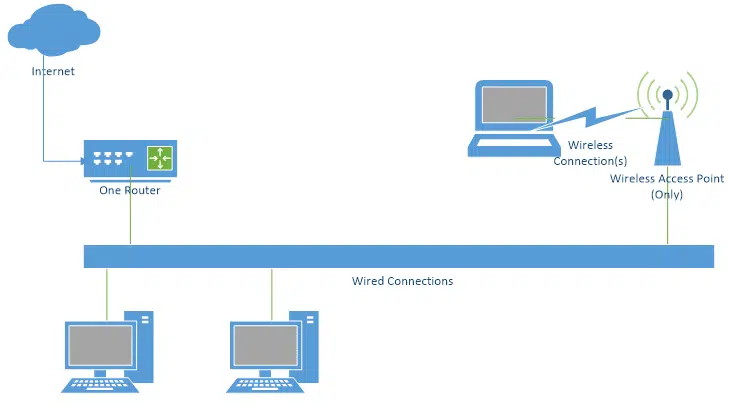
You connect the wireless access point to your existing router using a cable.
Here’s the really confusing part: you could use a wireless router instead of a wireless access point. It would work — sort of.
Here’s where it might or might not sort of work. The problem is the second router would act as a firewall, preventing machines on one side of it from seeing machines on the other side.
It would also cause what’s known as “double NATing”, where the technique a router uses to allow multiple computers to share a single IP address would happen twice, once for each router. Some things would work, but others would not.
Some wireless routers can be dumbed down to act as if they were simple access points. Whether that’s possible and how you would configure it depends on the specific model of wireless router you’re working with. Typically, it’s more confusion than it’s worth.
If you’re just extending your wireless network or adding wireless capabilities to an existing network with a non-wireless router, an access point is what you want and all you need.
Do this
Make sure you understand what you have so you’ll make the right choices when extending or upgrading your network.
These are the kinds of things I talk about often in my weekly newsletter. Subscribe to Confident Computing! Less frustration and more confidence, solutions, answers, and tips in your inbox every week.
Podcast audio

Related Video


So, by definition, whenever some says access point, then they’re automatically talking about a wireless capable device, because an access point is, by definition, a wireless device. Right?
I mean, otherwise, a non-wireless access point is just a switch. Right?
31-Jan-2012
It really wasn’t part of the question but switches and hubs add to the confusion for people and this would have been a good place to include them.
See this article:
What’s the difference between a hub, a switch, and a router?
Good article – I bought my first laptop last month and has to wade through lots of manufacturers info to know I needed a wireless access point. I’m happy with the access point I chose, but maybe I’ll regret my choice in the future if my old faithful router fails. I wish you’d expand your “Some things would work, others would not.” comment further re using a combination wired – wireless router.
Thanks Leo. Your answers make more sense of this issue to me now as I have a wireless router in my office at one end of the house and a (hard wired) access point at the other end to provide better wireless signal at that end. Interestingly, my laptop in the office picks up both signals but understandably (perhaps) uses the stronger signal (I think) from the wireless router in the office. Pretty clear to me now I guess. Thanks again.
Some Wirless Access Points reguire that a antenna, be purchase separtely. And there a various type of antennas (such as omni and bidirectional, etc.).
Anything that is wireless requires an antenna. Your phone, a GPS (receive only), your RF remote for satellite or cable box, garage door opener, etc.
With the higher frequencies that many of these devices operate at, a functional antenna can be small enough to hide in the case of the device.
A separate antenna can be larger and send/receive a stronger signal so that it works at a longer range.
Most access points want an omnidirectional signal to cover everything near it. The other patterns extend the distance by aiming the signal. If you are in the direction of the beam, you get more distance. If you are not in the direction of the beam, you loose distance.
Leo –
I’m assuming I can go into an electronic store today and buy a wireless access point-only device. If so, what does a WAP-only device typically look like? I thought I found one at Frys.com. It’s called “Netgear Dual Band 802.11ac Wireless Access Point” — but it looked a lot like a router. Is that actually a wireless router?
Also, is there any advantage to having the wired router and WAP as two separate devices instead of having them combined in a wireless router?
Thanks.
A WAP can look like anything. It’s often a small box which looks like a router or a modem. Looks don’t have anything to do with it. I’d go by what the box says. I have a TP-Link router which has a switch to make it perform as a WAP.
Mark, what model TP-Link router do you have? From a security standpoint, I like the idea of having a switch to easily turn on and off the WAP whenever you want.
TL-MR3020 It’s a couple of years old so you might have to look for a newer similar model. It can also be used like a MiFi (a wireless router that acts as mobile Wi-Fi hotspot) if you plug in a USB surfstick.
Unpluging the device is also an easy way to tun of WiFi access.
It’s very important not to have 2 devices running DHCP and handing out network addresses.
Fortunately the common way people (incorrectly) use two routers doesn’t cause this scenario. But yes, if present it can break your entire network.
I have wireless internet and I got a mini router but don’t know how to book it up and 2Roko boss and its high speed internet but my tv to off and can you help
There is a use for a wireless router being used in place of a WAP. You can protect the computers connected to that second wireless router from the computers connected to the main router because the second router serves as a firewall against anything outside that wireless router. For example, if you have kids or visitors using your main wireless router, they cannot access any computers behind the second wireless router, so if your kids download malware, it wouldn’t cross into the protected network.
How Do I Protect Myself from Other Computers on My Local Network?
Mark, Maybe I misunderstood, but please clarify for me if you will..
Your statement: ‘kids or visitors using your main wireless router, they can access any computers behind the second wireless router’ seems to contradict the firewall concept of those devices behind the second wireless router. Did you mean to say “they can not access…” ?
Thanks.
Yes, it was a typo. I fixed it.
I am in the market for a wired router. Of course, doing searches on the internet brings up hundreds of choices. What is disappointing is that not only does Google not distinguish between a router and switch (even with +router -switch), but neither do all the major electronic retailers. Their product pages often label switches as “routers”. You only realize the marketing hype when you dig into the details. One way of not accidentally buying something you don’t want is to know that a switch will cost at least $100 less than a router of the same class (e.g. number of ports, speed).
I can understand why Google would do that. They often link to similar items in case those are what you really want, especially as someone Googling a wireless router might actually want a wireless access point. Product dealers have no excuse.
One area seems to be miccing. That is “Gateways”. I have a Verizon FIOS Quantum Gateway Model FIOS-11000 GreenWave Gateway-Router. It connects to the internet and routes signals via cables and wireless to my devices. It seems your article is not complete by not including a Gateway. It seems a Gateway is all of the things your article includes “plus”. An update would be nice.
Tacoslammer
The term “gateway” can refer to different functions or devices.
In modern usage it is used for any box that connects you to the internet, which is often a router. If you connect your computer directly to a modem (without a router) then the modem becomes your gateway. If you go into the network settings of a device that’s connected to your router, such as an access point or printer, you’ll see a setting for “default gateway”. The IP address for this gateway will be the IP address of your main router, typically something like 192.168.0.1 in a home.
The term gateway used in the traditional (old school) sense is a device that does protocol translation (not the NAT discussed in this article). An example of protocol translation would be going from TCP to NetBIOS or AppleTalk (sort of).
There is yet another usage of “gateway”, which is a combination of a router and modem in one box, which is what your Verizon box is.
As Leo’s article hints, the naming of these boxes has become arbitrary and you really need to know what you have and what function it performs.