And where do wireless routers and modems fit in?

In a word, intelligence.
Hubs, switches, and routers are all devices that connect computers to other computers, networked devices, and networks. Each has two or more connectors called ports, into which you plug the cables to make the connection.
Varying degrees of magic happen inside each device… and therein lies the difference.
Become a Patron of Ask Leo! and go ad-free!

Hubs, switches, and routers
- Hubs are “dumb” devices that pass on anything received on one connection to all other connections.
- Switches are semi-intelligent devices that learn which devices are on which connection.
- Routers are essentially small computers that perform a variety of intelligent tasks.
- Wireless routers and access points are devices that add Wi-Fi support to your network.
Hubs
A hub is the least expensive, least intelligent, and least complicated of the three. Its job is very simple: anything coming in one port is sent to the others. That’s it.
If a message1 comes in destined for computer “A”, the hub sends that message to all the other ports, regardless of where computer “A” is.
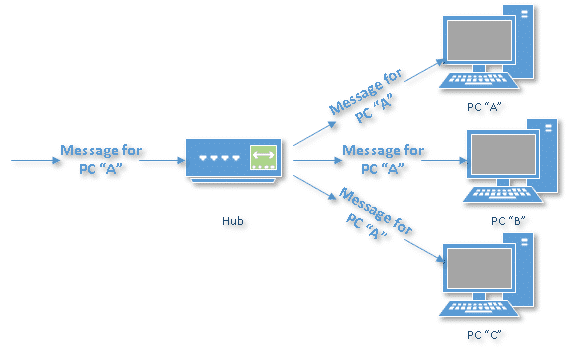
When computer “A” responds, the hub send its response to every other port on the hub.
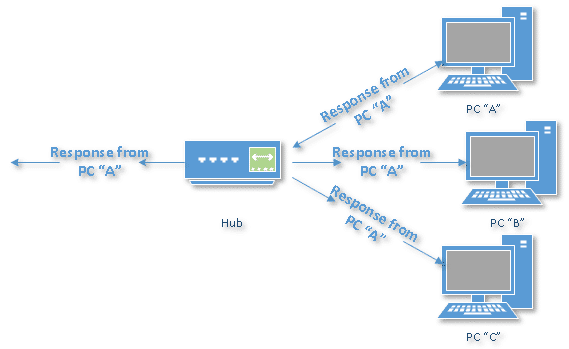
Every computer connected to the hub “sees” everything every other computer on the hub does. It’s up to the computers themselves to decide if a message is for them and whether or not it should be paid attention to. The hub itself is blissfully ignorant of the data being transmitted.
For many years, hubs were quick and easy ways to connect computers in small networks. In recent years, hubs aren’t as common. Switches have come into greater use.
Switches
A switch does what a hub does, but more efficiently. By paying attention to the traffic that comes across it, it learns which computers are connected to which port.
Initially, a switch knows nothing, and simply sends on incoming messages to all ports, just as a hub would.
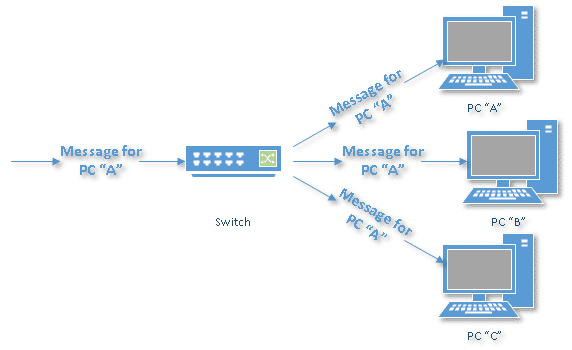
Just by accepting that first message, however, the switch has learned something: it knows on which connection the sender of the message is located. Thus, when machine “A” responds to the message, the switch only needs to send that message out to the one connection, not to “B” or “C”.
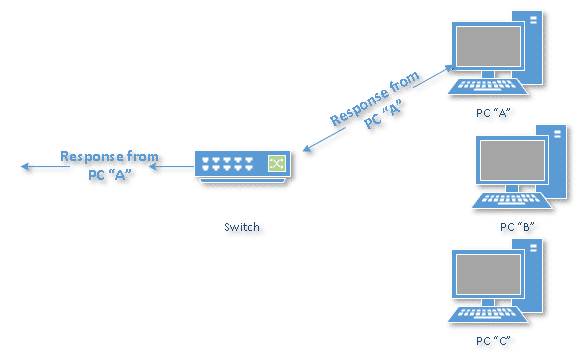
By processing the response, the switch has learned something else: it now knows on which connection machine “A” is located. That means subsequent messages destined for machine “A” need only be sent to that one port.
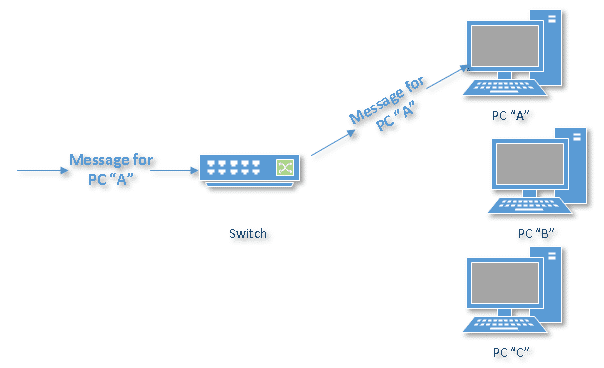
Switches learn the location of the devices they are connected to almost instantaneously. As a result, most network traffic only goes where it needs to, rather than to every port. On busy networks, this can make the entire network significantly faster.
Routers
A router is the smartest and most complicated of the three. Routers come in all shapes and sizes, from small, four-port broadband routers to the large industrial-strength devices that drive the internet itself.
One way to think of a router is as a computer2 that can be programmed to understand, manipulate, and act on the data it handles.
A router operates as a switch for basic routing: it learns the location of the computers sending traffic and routes information only to the necessary connections.
Consumer-grade routers like yours and mine perform (at a minimum) two additional and important tasks: DHCP and NAT.
DHCP — Dynamic Host Configuration Protocol — is how dynamic IP addresses are assigned. When it first connects to the network, a device asks for an IP address to be assigned to it, and a DHCP server responds with an IP address assignment. A router connected to your ISP-provided internet connection will ask your ISP’s server for an IP address; this will be your IP address on the internet. Your local computers will ask the router for an IP address, and these addresses are local to your network.
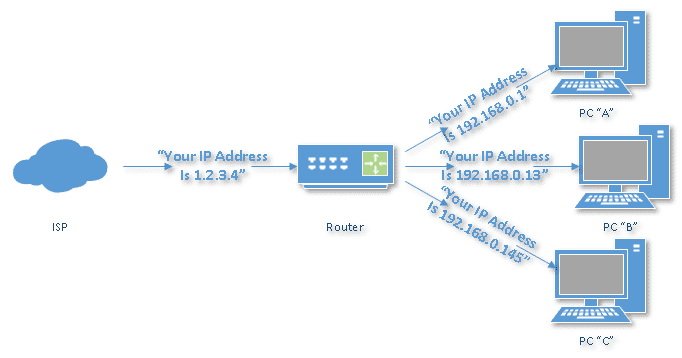
NAT — Network Address Translation — is the way the router translates the IP addresses of packets that cross the internet/local network boundary. When computer “A” sends a packet, the IP address that it’s “from” is that of computer “A” — 192.168.0.1 in the example above. When the router passes that on to the internet, it replaces the local IP address with the internet IP address assigned by the ISP — 1.2.3.4 in the example. It also keeps track so if there’s a response, the router knows to do the translation in reverse, replacing the internet IP address with the local IP address for machine “A” and then sending that response packet on to machine “A”.
A side effect of NAT is that machines on the internet cannot initiate communications to local machines; they can only respond to communications initiated by them. This means that the router effectively acts as a firewall.
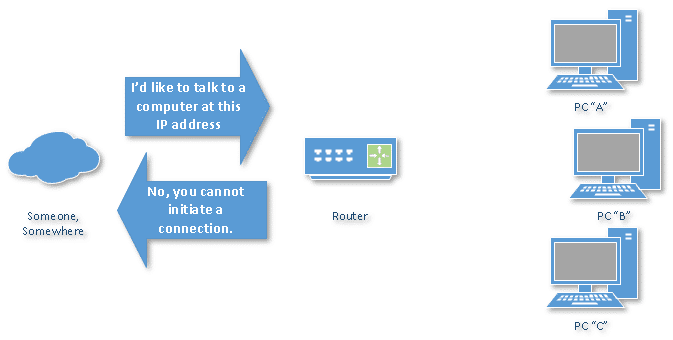
Malware that spreads by trying to independently connect to your computer over the network cannot do so.
All routers include some kind of user interface for configuring how the router treats traffic. Really large routers include the equivalent of a full-blown programming language to describe how they should operate, as well as the ability to communicate with other routers to describe or determine the best way to get network traffic from point A to point B.
There are two other devices that can be associated and/or confused with hubs, switches and routers. They perform some of the same tasks, but wirelessly. While we’re here, let’s define wireless access points and wireless routers.
Wireless access point
A wireless access point, or WAP, is similar to a hub or switch. It has no complicated intelligence.
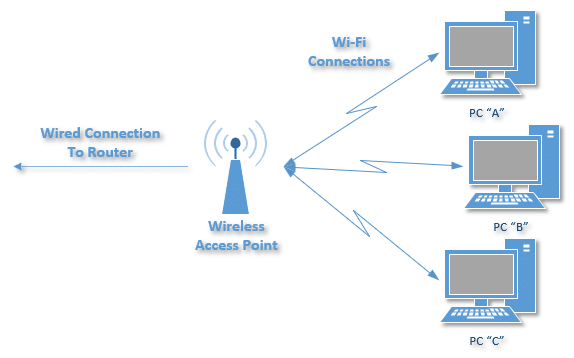
Its job is to exchange messages between the wired connection — usually to a router and one or more devices connected to Wi-Fi.
Wireless router
A “wireless router” is just a router and a wireless access point combined in a single box.
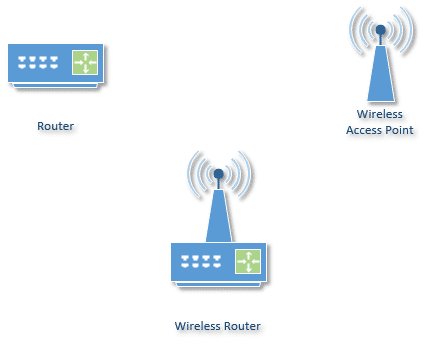
It’s important to understand the difference between a wireless router and an access point. You really only want one router on your network, but you can add as many access points as you like.
Beware: The term “router” is often used to refer to both routers and wireless routers. Make sure you know what you’re dealing with when purchasing or configuring your own.
A note about speed
One other thing often mentioned about these devices is network speed. Most devices now are capable of both 100 mbps (100 megabits, or million bits, per second) as well as 1 gbps (one gigabit, or billion bits per second), and automatically detect speed.
Do this
Now that you know all the different devices available and how they relate, you might want to review how your own home network is set up. How Should I Set Up My Home Network? will guide you through the most common home configurations.
Subscribe to Confident Computing as well! Less frustration and more confidence, solutions, answers, and tips in your inbox every week.
Podcast audio

Related Video


Footnotes & References
1: I use “message” here to keep things conceptually simple. The more correct term would be “packet,” as each of these devices operate on discrete packets of information traveling on the network.
2: To the extent that many consumer-grade routers often run a variant of the Linux operating system.

thanks Leo your explanation helped me alot on what the differences are , but one question i have is : can a switch split one internet connection to several computers?
Maybe. It depends on your ISP. Quite often they’ll assign only one IP down the internet connection, so while the switch might get them all connected, only one will actually be able to access the internet. A Router that does network address translation (NAT) allows them to all use the single IP address and still access the internet. A switch will also not give you the safety of a firewall that a NAT router does. My recommendation: spring for a router :-).
Leo
Hi Leo,
I’ve just come across your site for the first time, and it looks like a really neat resource.
If I have a hub with an uplink port, can I just plug in the broadband ethernet cable into that to give all of the other machines access to the net, assuming my ISP doesn’t mind.
Thanks
In a word: maybe. In many cases there’s nothing special about an uplink port other than having it’s transmit and receive connections reversed. So if you don’t have a hub with an uplink port, but just a really really plain one, that might also work. The difference would be whether or not you need a “normal” or “reversing” network cable. You may just have to try the combinations to see which work.
Again, though, you’ll lose the firewall protection of a NAT router, and if your ISP only assigns one IP address per customer, then you won’t have NAT to allow those multiple computers to all see the network at the same time.
You know where I’m headed…. My recommendation: spring for a router :-).
Leo
Hi Leo, I just searched Google for the differences between a hub, a switch, and a router and landed on your site. Your summary is very well done, I still have a few questions:
1. If I have a single cable internet account with a static IP and I want to use the internet with two computers simultaneously, will a router do the job?
2. Will I be able to transmit files between the two computers using an internal network with this setup?
3. Which brand do you recommend for a router? Which one offers Gigabit routers?
Thanks again for your help and keep up this great website!! It rocks!! It really does!! (-:
Thanks for your kind words, John.
1) Static IP: yep, most routers should. You’ll have to configure the static IP in the router, and turn off its attempt to use DHCP, but as I said, most will. It’s actually my configuration here at home.
2) Machine-to-machine behind the router: absolutely. It does require a little functionality out of the router (providing rudimentary DNS and DHCP), but almost all do. And if not, there are alternatives to work around that too.
3) I’m actually not up on gigabit routers yet. As for brands, I’m kinda partial to LinkSys, you can see what I run on my recommendations page at http://pugetsoundsoftware.com/recommend.html. Cisco now owns LinkSys, and they of course do good stuff. I’ve heard good things about dLink and NetGear as well.
Leo
Great site, it helped clear up some misconceptions I had about the differences between the three. I just have one question, is there a difference between a small 4 or 8 port switch like you could buy at your local computer store and the big 24 or 36 or even 100 port switches that are used for networking purposes in businesses and schools? Do all switches work the same and have the same inputs/outputs? Thanks for your time, much appreciated
Heh … neat question. In short: price and capacity. While there might be slight functionality differences (even the pros get the hub/switch/router thing confused — or sometimes functionality kinda blurs the lines), the larger devices should be essentially just higher capacity versions of the same thing you might buy for home or small office. In the truly higher end devices, they can often be joined together, or have additional components added. For example a large Cisco router might actually have removeable components, much like cards you could add to your PC, that allow it to be configured or customized to the application at hand.
Leo
I seem to be in a unique situation, which people say should not be, including the tech support for my ISP. I have a DSL modem running directly to a hub, which has a internet port. I then have all remaining ports available running to individual computers. Yet, somehow, each computer is able to log onto the internet at the same time. I know for a fact it is a hub, and that I only have one IP address. Any thoughts?
That is kind of interesting :-). Look at the IP address assigned to each computer (NT, 2000 & XP: in a command prompt type: ipconfig — for win9x, Start->Run winipcfg). If they’re of the form 10.x.x.x, 172.16.x.x or 192.168.x.x then you’re behind a NAT somewhere (what’s your HUB’s manufacturer & model?). If they all start with you’re ISP’s address range, then the ISP is simply handing out multiple IP addresses down your connection.
Leo
I have a Linksys 4-port hub, with DSL/Cable uplink. All the computers are now running XP, but a couple were running Win98 for a while. One thing I did find out a while ago, was when this ability went away. It took some time, but when I disabled the IPS/IPX protocol, I believe it was, all the computers were able to share again. And I’m not paying extra for add’l IP addresses, so I might be getting some for free? :))
Hello Leo, I found this iste like the other guy who did a search for the difference between a Switch and a Router.I am running WinXp and I have a cable connection, I am using a switch to connect the rest of the computers in the house to the internet. I have 2 network cards in my main machine, one for the modem signal and the other to carry that signal to the switch which in return feeds the other machines and the downfall is that when I turn the main machine off all the others lose the internet connection. I tried hooking using only one net card in my main machine and hookinh the cable modem to the switch and then plugging the rest of the pc’s into the switch and the only computer that gets a connection is the first one that is turned on, the others get no connection. What I did was buy a Router which I am waiting for to come in the mail. Will a router solve my problem? I want to be able to turn off any machine on my network yet have any remaining Pc’s on my network to still have conn
Yep, everything you describe makes perfect sense. And the good news it that yes, an appropriate router ought to be exactly what you need. The cable modem will plug into the router, all the computers will plug into the router, each should be independant and able to connect up, or turn off, without affecting the others.
Good luck!
Leo
Hi,
I have 5 computers with 5 static IP’s assigned by my ISP. I do not want to perform NAT. Which one of the above should I use?
Prat
I guess it depends on the reason you have 5 static IPs. My ISP assigned me 5 as well, though in practice I use only one, and have all my machines behind a NAT router. I tend to prefer that approach.
If there’s a reason you need to hang on to individual static IPS, then there are a couple of approaches: one would be a switch to connect them all (a switch so as to reduce unneccesary traffic on the DSL line), and then appropriate firewalling/security on each machine. Another approach would be a more sophisticated router than most consumer models, or a security device, that will actually act more as a security filter, without affecting the IP addresses of the traffic that crosses it.
Leo
Hi,
As most fellows, I found this site looking for the difference between hubs and switches….
My situation is as follows: I have ADSL account with no fixed IP, allowed to connect 1 pc only. In fact, I have a LAN consisting of 7 PC’s. 1 being used as internet server (and must be on for the net to be reached).This server has to network cards installed – 1 connected to the ADSL modem, the other to the general hub. The rest of the PC’s are hooked to the hub. Now the hub is a no name 12 port 10MPS very old thing.All PC’s get access to the internet any time, and the ISP has nothing to say as he only sees 1 PC 😉
Now – I am about to change the internet plan to 1 that allows up to 10 PC’s (for less money and no time/volume limits 🙂 )As my hub is slowing down the network, I was thinking it is a good time to change it to a 100MPS and connect the modem to the hub thus allow each PC to connect individually to the internet and hopefully get a faster connection. Then a friend suggested going for a switch which brought me to this (and other similar) site, and now I am not sure again what to go for? switch? router? what are the prices for reasonable devises???
I pretty much recommend a NAT router in any case. Hook the modem into it, and connect your computers into it, and you should be good. The reason I recommend it is that a switch will not provide the same level of security. Your choke-point is the speed of your DSL anyway, so the additional work the router does will not have any appreciable impact on speed. 100mb will increase your machine-to-machine local speed, but of course your internet can’t go any faster that your DSL allows.
IF you are getting 10 static IP addresses you might read my response to Pat above. If possible I’d use a NAT router anyway.
If, for some reason, you do need the machines to be naked on the internet, then I recommend a switch – remember that a hub will echo all data to all ports – possibly including the DSL line, and may send a lot of unnessary data up that pipe, slowing down the legitimate internet traffic you want to have.
BTW, most NAT routers will allow you to “forward” certain ports. So your web server may not need to be directly on the internet. I have one here behind my NAT router, and it can be accessed from anywhere on the internet. Forwarding port 80 was all it took.
Leo
real quick question, will a switch automatically adjust for the use of a straight through or crossover cable or is it till necessary to get the right cable when upgrading from a hub?
Autosensing it pretty rare, and not specific to hub, switch or router. Occasionally a specific brand or model of any of them can or will. But I’d certainly not count on it (or look for it, for that matter). Just make sure to have the right cables. I mean, why ask for problems? 🙂
Leo
Leo,
Is the use of a switch or router complicated by using a PC and a Mac sharing cable for the Internet? My girlfriend and I shared the Web in this way (she had a separate IP address assigned by the cable company) and we were constantly losing connection and having to re-set the cable modem and re-start our computers.
To complicate matters, she bought a new IBM laptop and shortly after we connected the RJ-45 to her laptop “it burned out her Ethernet” (according to IBM). Now she won’t be in the same room with a switch. Is this possible? I thought the current going through a modem cable was pretty harmless.
Appreciate any light you can shed on our situation (in fact, that’s why I’m here: trying to make sense of the hub-switch-router world).
Thanks,
Gary
Well, all the concepts should be very much PC or Mac agnostic – it shouldn’t matter, it’s all TCP/IP over ethernet.
What might matter is how IP addresses are assigned. For example many ISPs will allow only 1 IP per connection, so only the first computer to ask for an IP address will get one. That sounds kinda-like the restart scenario you outlined. The solution there is a router – it only uses one, as far as your ISP is concerned, and you can have many computers behind the router.
This “burned out the ethernet” thing sounds really fishy to me. I can’t think of a way for that to happen. Certainly a misconfiguration or even a misconnection to a switch or a router can’t make it happen.
Leo
Leo, first thank you for being so kind as to answer to us (should I say newbies???)
My situation is as follows:
internet connection via wireles access point with a crossover cable to the lan card and win xp. I am thinking of giving my neighbour a share of the connection, so I want to limit his bandwidth. Can this be done with another lan card? Is it better with an old 486 computer as a server (I heard about some Linux progz that can do the job)and than a 10/100 hub? Which is the best and the fastest solution? As for security I am using software firewall (Norton internet security). how about a bluetooth lan ( i have 2 cards) between us? is it fast enough?
I’m not aware of any options in Windows to throttle bandwidth – though I could be wrong since it’s not something I’ve looked into before. Ditto for Linux. In the past I’ve seen bandwidth throttling performed by higher-end routers, which are probably overkill (and over price) for what you are trying to do. As for bluetooth – you didn’t say how far away the neighbor is. Bluetooth, by definition, has a very limited range.
You also didn’t say how fast your internet is – if it’s DSL or slower, a 486 box could certainly handle the job ok, depending on the software. I’d probably want it to be a faster 486, which will still seem slow compared to todays machines. I used to run a older Windows 2000 box as my “router” by using internet connection sharing, and it performed the task quite well.
To be honest, if I had to do this myself I’m not sure how I’d approach it, without a lot more research first. Your comment about having heard of Linux based solutions intrigues me, and I’d probably head of in that direction to see what’s available.
Leo
My question is: What is the functionality of NAT sofware?, I know that is for multiple computers access the network (eg: internet) only using single IP address, but How is the translation?,
Another questions is How many softwares has the router? I know: NAT software (act as a firewall), DHCP software, etc. Thanks.
Here are couple of resources that might help answer what I believe your questions are.
How Routers Work: http://ask-leo.com/r-31119a and
How Network Address Translation works: http://ask-leo.com/r-31119b
Enjoy!
Leo
What is the difference between a router and a gateway !
A router is a type of gateway. A gateway is a device that connects (or serves as a gateway between) two networks. In the cases we’ve been discussing here, a router acts as a gateway between your local LAN and the internet.
Leo
Thanx for the answer !
The reason that I asked the diff router/gateway is that I noticed somwhere on the internet a very good deal about home wireless networking :
http://www.maincomp.com/shop/product.jsp?id=607&pw= !
Does it worth buyng it or should i look for a router in order to network my 2 desktops and 2 laptops ?
I don’t make any hardware recommendations, other than what I’ve actually used or recommend here: http://pugetsoundsoftware.com/recommend.html – in this case I can’t tell if the device supports NAT, which is key to the security of sharing an internet connection.
Leo
You can share an internet connection on a network without using a router, by having a piece of software called a ‘proxy’ installed on the computer connected to the internet. You basically point all your other computers at the internet-connected computer. I do this at home using Analogx Proxy. http://www.analogx.com
You have to be careful to secure the proxy to the internal network only otherwise you end up with what’s called an ‘open proxy’. This is where any random person on the internet can use your proxy. Any bad things they do will appear like your computer did them.
I also use port forwarding. Which allows me to have another computer (my linux box) as a webserver. Port forwarding forwards port 80 (used for webpage connections) down my network. It’s completely transparent.
With this proxy method. it does mean you have to keep the internet-connected-computer on most of the time. And using port forwarding I end up having two computers on all the time.
Hi I have 2 computers and was going to go buy a hub. I have a cable connection. I really dont care about security and my main concern is keeping speed and the money spent for a hub. If a hub is going to slow down the connection i was going to pick up a router but i am cheap and want to know for sure if a hub will be ok. What are the disadvantages of a hub?
hello friend,
actually I would write in here to tell you I think switch is batter then Hub have look what is the reason behind
Hub:-
it’s works on a half duplex,
Hub can connect different media type
such as twisted pair and coaxial cable and also if you want to share your data one pc to six pc so it will doing the data multicast
SWITCH:-
switch it’s a full duplex media nowadays switches are mostly used in LAN due to their superior throughput performance higher lower per- port cost and greater flexibility,
It’s a point to point working supports multimedia
Thanks
The cheapest hub is going to send anything coming in one connection out to all the others. So if your two computers are talking to each other, all that data will also get sent up the cable connection, possibly slowing down you internet access. If you really, REALLY, don’t care about security, then I’d get an inexpensive switch which will at least prevent the unwarrented traffic on the cable. It’s possible that this might also be packaged as a “smart hub” (further confusing the terminology, I know).
Good luck!
Leo
I’m doing an assignment based on the differences between Hubs, Routers and Switches. I need to know what is the many differences there are and your site helps me in understanding the basic knowledge of them.
But i need to know more about the differences. Is there any way you can simplify them like how you did in your site. I seem to understand your words clearer than the rest of the sites. It definately helps me a great deal. Thanks!
A very good resource for that kind of research is the site “How Stuff Works” (http://ask-leo.com/d-hsw ). Very informative, and very readable.
Thanks!
Leo
Hi Leo, and have a question for you: My friends have a network in his house, the components are: a switch, Modem DSL, and 3 computers. He connected all the device to the Switch, and all the computer have internet, I thinked that He has a router (NAT support – single IP) instead of a switch, How all the computers could have internet in that network?, thanks for help :).
Well, I think you’re right, either his switch is providing NAT & DHCP, or his ISP is allowing multiple IPs to be assigned down the single connection. It’s easy to tell … if the machines all have private IP addresses (probably 192.something), then it’s probably the switch. If they each have their own “real” internet address, then the ISP is being generous.
Leo
Leo,
I have a problem /w my hub. I have a 12 port hub and Im using it for xbox system link games /w my friends and ftp stuff to my xbox and streaming movies in it. Everything was fine in a few months and it slowed down my internet cable connection. Streaming movies to my xbox was hell coz the movies stutters sometimes it does not play at all.
My internet connection is ok but with my hub it slowing everything down. I did everything and still ends up slow. Is my hub down to it’s last breath? It just 2 months old and now it slowing everything down. Please help! Thanks in advance.
If it’s truly a hub, it could be clogging your internet connection with local traffic uneccessarily. I’d be really tempted to replace it with a switch. Slowdown kind of problems are rare – failures tend to be more catastrophic (though of course it’s possible, just rare.)
Leo
Hi Leo. I have 5 PCs and a printer conected to a hub, which is connected to the network in my company (I don’t know but I thint it’s a LAN). These computers share a lot of traffic. In fact, we use one as a server, and usually all of us work on the server’s documents. We also use VNC to see each other’s computers remotely (and take over them from time to time), so there’s a lot of traffic between the computers in our group.
My questions are:
1. I think that if I buy a router, the computers connected to it will be making a smaller network, freeing a lot of space from the company’s network. Is this really going to happen?
2. I think that a router will enable us to be a separate, independent network, right?
3. If we are, then, will it be possible to work on the server’s documents, even when the company network isn’t working?
4. I’ve seen in some forum that there two types of routers, and that most people talk nowadays about the routers used to share an internet connection between several PCs at home (Cable/DSL routers). What is the other type?
5. I have a Cable/DSL router at home, and the hub we’re currently using. I tried usting the router at the office, but didn’t seem to work.
Will a cable/dsl router work for me, or should I be looking for the other type of router? Or maybe I was doing something wrong…
6. Does a router need an IP address? It seems hub don’t.
Thanks in advance for your reponse, and congrats for a great site. Very enlightening!
Those are all great questions, but unfortunately the answers rely heavily on how your companies network works. For example, using a router might allow your little network of machine to work just find … and not be able to see the companies machines. I’m sure it could be configured to do so, but again exactly how depends on how the company network is set up. I would ask your company’s IT people or whoever is responsible for network operations most of the questions you’ve asked here.
For #4: there aren’t really “two types” of routers – there’s dozens or more :-). What most conversations seem to be about are the NAT routers that most people have in their homes. “Other” routers vary in their capabilities, often include NAT, sometimes not, and are often quite programmable. What’s appropriate for your situation is, I’m sorry to say, not clear.
Leo
Hi,
i am having internet cafe with a no. of 20 PCs i have the adsl line connection and it is divided to all the PCs with a hub. my problem is i am alloted the speed of 256 Kbps and this speed is shared by all PC. if sombody downloads something on any PC the speed gets slow. i want to know what i have to do so that the download dosent effects the speed of the internet on the network… puzzeled from this situation please help me..
What you need is called “bandwidth throttling” – essentially it allows you to restrict the rate at which any single connection can send or recieve data.
Unfortunately I don’t know of any cost effective solutions off-hand. Higher end wired routers can do this, I believe, but they’re *very* expensive.
The good news is that your situation is not unique.
The wireless community in particular has grown, and there are a lot of people providing wireless hotspots who are facing the same kind of problem. I believe that this will lead manufacturer’s to bring that functionality to your market in some cost effective way.
Best of luck!
Leo
its a very good site and i got my basics cleared about routers,hubs and switches.thanks a lot leo.you have indeed done a great job.
Hi Leo,
I have two PC’s, in one I have Red Hat Linux while in the other Windows XP, I want to use a router to conect them both to Internet and among them eventually, however, looking at all the variety of routers, I can see that not all of them support Linux, which router do you recomend me to buy?
Thank you very much for your time
Herbey
It really depends on what you’re doing – by that I mean what services you expect your Linux box to be access over the internet. If it’s standard stuff (web, ftp, telnet, and so on) most any of the routers that work with Windows should work just fine for you.
Leo
Regarding the questions about using a 486 as a router,
Linux routers, and “throttling” bandwidth –
There is a tiny Linux distribution called “Coyote Linux” that
fits on a floppy and makes a real nice router.
Like most Linux distros, it’s a free download.
The Windows based disk maker tool makes it easy to make a floppy
that will turn your old 486 into nice cable / DSL router.
You should have 16 MB of memory in the router, but 8 MB wil work.
No hard drive needed.
As of the time I write this, the development version includes “quality of service” (QoS), the Linux term
for bandwidth throttling and priotitizing.
QoS is available as an addon for the release version.
As of early March 2004, there is not yet an easy to use interface
for setting up QoS, you’ll have to do some studying.
What’s a ‘floppy’??
A floppy is a 3-D print out of the save icon 😉
PS – The explanation of hub vs. switch is missing one
key detail. When connected to a hub, all of the network
cards in the computers or other devices have to listen for
something called “collisions” when they transmit (upload).
That means that they can’t send and recieve data at the same time.
When connected to a switch, they can run in “full duplex” mode,
meaning that they can send and receive at the same time.
That is one major key to the increased speed with a switch.
This is absolutely necesary for me if you want to use something
like a Vonage phone on your LAN, which I do.
If you haven’t heard of Vonage, it’s something that most people
sharing a high speed internet connection will want to look into.
It’s an internet based phone that plugs into your switch or router
and gives you local phone service with unlimited long distance
for around $30 per month.
I think they give you an even better deal the first month
if you mention that you were referred by an existing customer.
Ray Morris
Execelent forum!!! I gained a lot reading all the FAQ section.
I’m opening an internet cafe soon, with around 40 PCs and might go for 60 PCs or 80 PCs if the business run well.
My questions are:
1. I wonder which kind of router should I get? NAT router?
2. Should I buy 4 individual 12-port-router in order to connect all the 40 PCs together? Or what is your recommendation? (I want high speed–100Mbps, security, reliable and cost effective)
3. If one day, my internet cafe’s server is down, and all the PC cannot connect to the Internet, what can I do to overcome this situation?
4. Any other recommendation of the network for my Internet cafe? (Basically for gaming purposes)
Thank you very much LEO. Your help is very VERY much appreciated.
The bigger question you need to ask yourself first is how fast will your connection to the internet be?
Then I’m curious if you’ll be supporting wireless, or if you’ll be entirely wired?
Certainly a NAT solution makes sense, but how best to arrange it really depends on the expected usage and traffic. Will the heaviest traffic all be local, or internet based?
Leo
My connection to the Internet would be ADSL.
The trafic would be Internet base and LAN base, meaning gamer can play games in LAN as well as in the Internet. We would like to provide gamers to play games in Battle.net (Warcraft, Starcraft, Diablo, World of Warcraft). The connection, I would say it’s entirely wired.
Thank you again, and apologize for the unclear questions. >.<
Well, first realize that with that many machines, if there’s any serious internet gaming, surfing or whatever going on you’re going to saturate your ADSL very quickly. However using ADSL means that any decent NAT router capable of handling that many machines is not going to be your bottleneck – the ADSL will be.
SO, while I’m no expert in this size of installation, I see it heading two ways: a single NAT router handling your internet connection, and then enough switches to handle the local traffic. There are NAT routers available that will do fail-over … when the connection drops they can actually make a different connection, or dial up a backup connection via ISDN or reagular dialup. But if you thought your ADSL was slow… the dialup solutions are even slower.
The other direction this could go is to get a single high-end router. This is what most IT departments would end up with … a single peice of equipment (perhaps a redundant pair) that would handle both your NAT, as well as appropriate routing, and have the 40+ connections you need. This would probably be your most reliable/robust situation, but would be expensive, and would need a network engineer to come in and set up properly.
Highering a network engineer to come in and consult with you might be some money well spent anyway. Especially if this is critical to your business. As you point out, you’ll have a support issue should anything break down, and it would be critical for you to have a relationship with someone who knows your setup, and can help you resolve issues quickly as they arrise.
Best of luck!
Leo
Thanks Leo, thanks a lot for your advice. I think that was the longest answer you made in this section. Again, thanks for your time and thanks for your luck, really needs that 🙂
Be your website the best in Internet.
hi leo, great site, thanks for the help.
my current network consists of a dsl modem connected to the internet, a 4 port (ethernet router) with NAT, and a 4 port switch (i needed the extra ports as i have 5 computers hooked up plus a living room dvd/divx/mp3 player which is ethernet capable as well.
now i want to add wifi. i was planning to hook up a wireless access point via ethernet. but for about the same price i can get a wifi router/accesspoint/4port switch, with better features. can i hook up the second wifi router to my existing network, perhaps “dumbing it down” to act as an access point/switch, but not do any of the routing?
Depends on the brand, of course, but almost certainly. Turn off the feature that provides DHCP. You may also have to not use the uplink port, but rather connect everything through the regular ports.
Good luck!
Leo
Hi Leo.
Thanks for your great site. My question is if I have a router and i log on with only one of the computers will then they all have acces to the internet? and won’t I need a different configuration in the nic for loggin in and for sharing files in the lan?
The logon question is dependant totally on how your ISP works. You’ll have to ask them. File sharing among machines on your LAN should simply work … at worst you might have to install the NETBUEI protocol, but most times that isn’t even neccessary. Regardless, you’ll need only one configuration for your NIC.
Leo
Hey Leo,
Thanks a lot for this explaination. I always thought I knew the difference between a hub and router, but I guess not. 😛 Now I know. 🙂
-PcH
This is a great resource site, Leo.
We are moving from a 6-computer office all running through an 8-port router connected to a cable modem. Our new offices are already networked to a closet where all 24 network lines terminate. We are continuing the Cable modem connection to the Internet, but I am thinking we will need a switch in addition to our router to accomodate all these new computers.
Am I right, and would it be wired this way — cable into the cable modem, modem into the router, router into the switch, switch distributing to the computers?
Thanks for all your very helpful advice.
I would like to know if a switch would improve are perfomance at work instead of the Hub we currently have. I work in a hospital in maintence and due to are location the systems office ran one internet connection to our office since all of the computers are assigned IP’s by the hospitals network we use a HUb to share this one connections with 5 computers. Could we use a switch instead of a hub and get our IP’s from the hospitals network or would they be assigned by the switch.
A switch *should* just optimize the traffic, and not hand out IP addresses. A router (with DHCP or NAT) would hand out IP addresses. I typically don’t recommend that in a corporate environment, just because it can sometimes interfere with site-specific configurations & applications.
Leo
Laura: yep, that’s the approach I’d take if I were doing what you describe.
Good luck!
Leo
Hi Leo, AWESOME SITE!
OK, I am curious as to when it is necessary to have a Router AND a Switch at the same time. I am basically setting up an office that has 3 computers, a printer, and a wireless access point. Would the best route be to go:
DSL –> Wireless Connection Router–> Computers & Printer?
If I want a LAN and access to the internet, should I include a switch in between the router and the computers/printer?
Thanks.
Ed
Thanks Ed :-).
The scenario you outlined doesn’t need an additional switch. A router with enough ports to connect everything should handle the job just fine. I might add a switch is a) I ran out of ports on the router AND b) there’s a lot of traffic between your computers. When b) isn’t true, a switch will still work, but a hub would be fine as well.
Leo
leo, thanks so much for spending the time in answering all these queries. It really proves that the internet is an awesome place with some amazing people.
i have a config issue concerning 20 Pcs, 2 Servers and a Router / Firewall (Smoothwall(linux))
I am upgrading the network to switches;
3 x 16 port switches.
To connect these three together should i look for ones that have gigabit uplink connections. I can see that a bottleneck would be using 1 x 100mb port to connect to the other two switches in a daisy chain. Cost is an issue.
Also, whats the easist method of setting up a DMZ against my ADSL line? This would be to host apps to the public domain but not let them access the rest of the network.
Thanks again.
Nick
Actually, unless you expect VERY heavy traffic between your machines, 100mb should be just fine. Remember your internet side is limited by your DSL speed anyway.
DMZ would depend on the router. Typically they have a setting that allows you to specify the IP address of one machine to act as DMZ.
Leo
I have an ADSL connection with a dynamic IP. I wanna share 2 computers which can have internet access even the other pc is not powered on. I already have the ADSL modem. So will a switch do the job ?
It depends on your ISP. If they’ll allow you to have more than one IP on your line, then a switch, or even a hub, will do. However it’s more likely they’ll only give you one IP at a time, so you’ll need something like a NAT router in that case.
Good luck!
Leo
hi leo,
ok my situation is different from all of these [I believe, I didn’t get to read all of them].. me and my brother own a PS2 each, both of us want to play Final Fantasy XI together, but we only have one connection.. I’ve been thinking of getting a router and going wireless..[i’ll be in my room, while he stays in the living room]..what should we get? what’s the best option, and how can i go about setting up my network? [any help is appreciated]
Actually the very simple setup illustrated in http://ask-leo.com/archives/000086.html should do you quite well.
Leo
hello leo, i have a lynks system router and cannot get my computer to communicate with my alesis adat hd-24 I don’t know what im doing wrong. i’ve tried almost everything and its not working. When i use the internet explorer or try to ping it in command it keeps saying that it timed out and wont communicate back and forth with each other. what do i do???????
In looking over the manual for that device, it appears it’s 10mb only … does your router support 10mb? (Linksys probably does, but you should confirm). You’re connecting with a normal ethernet cable, yes? Have you configured it’s IP address to something that does not conflict with another device? The address you configure should start with 192.168. It looks like that device must be in ftp mode to operate on the ethernet … I assume you’ve placed it in ftp mode? I’m not convinced IE or ping would work … but ftp might … it looks like this device has very limitted ethernet capability. Is your router connected to the internet, and if so, can your computer connect to the internet through it?
Hi, I have a Cable Internet connection with 2 IPs
I have a 4 port Router connected at the modem, and then out of one port I have it run into a hub which shares with 4 other computers, (the other 2 0f 3 ports are in use directly in another part of dwelling, When I try to bypass the HUB and plug directly into the PC I get nothing, It will only work with the Hub. Now I have unplugged all the other ports and tried running directly from router to PC and still nothing, the only thing thats works is this cheapo HUB I have had for 5 years. Any ideas. The main reason for all this, is the slow speed I get when I test my connection compared to the other PCs connected on the other ports is nite and day.
My *guess* is that it probably has to do with the speed of the hub and network cards. I’ll bet that the hub is 10mb fixed speed, and that both the card and the router are auto-sensing 10/100. I have seen some cards get confused when both ends of the connection are autosensing. If you can, configured the network adapter to be 10mb fixed speed and see if that clears it up.
Thanks for your help, I configured it to work as
10Mbps Half duplex and I was able to connect directly to PC, speed didnt improve but atleast that issue is solved. Thanks again.
Hello,
Can you have hubs and switches in your network at the same time, or do you need one or the other?
Thanks!
It’s quite possible to intermix them as appropriate. In fact most large networks will have a combination of routers, switches and hubs.
Leo,
I looked through the questions and answers here, but didn’t quite find the answer I was looking for.
Here’s what I have:
1 PC with ethernet network card and XP Pro,
1 printer,
2 laptops with wireless network cards and XP Pro,
1 Linksys Wireless Access Point Router w/ 4 Port Switch,
1 cable modem with service but no static IP address
Here’s what I want:
To have the printer connected to the main PC, but to be accessable by the two laptops wirelessly. To have the PCs and laptops to be able to share files wirelessly. To have each computer use the cable internet connection separately.
Here’s what I have now:
Cable modem connected to the Wireless Access Router. The Router connected to my PC via ethernet. The printer connected to the PC via USB. The separate internet connection works fine, but I can’t share files back and forth between the machines, nor can I add the printer connected to my PC to my laptops so I can print wirelessly.
Am I doing something wrong?
Thanks!
I’m assuming all the computers can see the internet just fine.
You do need to make sure you have File and Printer Sharing for Microsoft Networks installed, as well as Client for Microsoft Networks, both of which are part of the network connection configuration. You also want to have the XP firewall turned *off* (your router is providing that functionality).
And then, of course, make sure that the resources you want to share have actually been shared out (i.e. on the desktop with the printer, make sure the printer has, in fact, been shared).
Those are the top items that come to mind.
Hi Leo.
Great site and very informative and very quick with your responses!
Here is my situation: I want to host 2 websites. One on a Linux box and the other using Windows SBS 2003. I have 1 static IP from my ISP. I have a Netgear 4 port router. At the present time I am running 1 website on the Linux box on port 80. I want to add the other site on the Windows SBS 2003. Is this possible with the set up I have now? Can I use the static IP that I have now and just do port forwarding and use the same domain name that I have been assigned? I want to try do this without having to buy a hub and pay for another domain name?
Thanks for any help!
There needs to be some way to identify which web traffic is supposed to go to which of the two servers. Port 80 is, of course, the default for web traffic, and you have it configured to go to the Linux box. You *could* configure the Windows box to put the web server on a different port (say 8080), and then used the router to send that traffic to the correct box. But that does mean that URLs would looke like:
http://whatever/page.html – for your linux webserver
http://whatever:8080/page.html – for the windows web server
If you can live with that, you’re done. If not … I can’t think of a solution off-hand that doesn’t involve just getting another IP address.
Thanks Leo! I can live with having to enter the port number, but am having some difficulty in getting that to work, I believe I have something configured wrong in Windows setup.
For web connections in windows, wouldn’t I use all my the IP settings that my ISP assigned me, such as DNS, and their gateway?
I guess I’ll keep working the issue, at least now I do know that’s it’s doable.
Thanks again
Maybe :-). It often depends on the router as well. In my case gateway and dns settings for windows are the router, and then *it*, in turn, has my ISP’s settings. Also in my case my computers are picking that up automatically when they get their IP address from the router.
But your milage may vary.
Thanks Leo,
I have decided to get another IP, I think that’s going to be the easiest way to configure the servers 🙂
Thanks for all your help, this really is a great site!
Hi Leo
In our area broadband is only a dream. I already have my primary PC set up as a server with a wireless PCI card, and my wifes laptop with a wireless PCMCIA card is able to share my POTS dail-up internet connection. I want to connect a 3rd computer for my kids. Is it possible to simply add another wireless PCI card to the 3rd computer without introducing conflicts or requiring the aid of a router? Also, whenever I start shopping for a router, they all seem to specify a broadband connection and none mention compatability with dail-up. Can these routers be used with dail-up also?
I’m sure there are routers out there that can handle POTS (often as a backup to a high-speed connection) but they’re not going to be cheap.
A couple of things come to mind: I’ve not had a lot of experience with an “ad hoc” network (which is what what you’re setting up without an access point), but I *beleive* three is a workable number. I’d be tempted to try it.
Another thought is to go ahead and get that broadband router with wireless access point (or just get a wireless access point), and connect it to the ethernet connection of one of your computers (ignoring the broadband component)… perhaps the most centrally located one. The others would use their wireless cards in the same way (though no longer in ad-hoc mode). One computer could still dial out and share its POTS internet connection, and the rest could be connected wirelessly. There might be a configuration issue or two (such as probably needing to turn off DHCP on the router/access point so as not to conflict with the same service provided by Internet Connection Sharing) but in principle this should work ok.
Good luck!
I have one computer on broadband. I am acquiring a laptop next week. Can I simply unplug from the modem and plug the other in and get the help line to set up the other one. Then I could use either computer on line at will if take the troouble to plug and unplug. Will this work?
Bob
If you’re asking can you “share” an internet connection by simply moving the plug back and forth between two machines the answer is technically yes, though it will be invonvenient at times. Certain types of applications will expect a continuous connection. Simply browsing web pages, however, might well work just fine. depending on how your ISP assigns IP addresses you might need to “refresh” your IP address each time you switch the cable, however.
Wow, I’m glad to see this is still active! Great page. I was wondering, though — in the past six months, I have had four switches of a particular model abruptly stop working (an 8-port HP procurve switch). To my knowledge, they haven’t had a particularly unreasonable load (they’re on a local network). I do assign static IP addresses to each PC on the network, and sometimes a network interface card will have multiple IP addresses assigned.
The specific failure mode: well, the lights are all blinky, and my machines rapidly move between “Network Enabled” and “Network Cable Disconnected” when I view Network Settings.
The question: Am I doing something wrong, or is this just a case of cheap hardware? Thanks! This has really been bugging me. 🙂
Have you checked the HP support site? The only time I’ve seen switches or routers go belly up is under exceptionally heavy load. Does a power-cycle of the switch resolve the issue? Certainly what you’re doing sounds reasonable.
is it possible to set up a network and have different vrsions of windows runign..ie: xp pro one one and me or 98 on the other?
On different machines? Absolutely – you most certainly can have a network with machines running different versions of Windows, as well as other operating systems including Linux or Macintosh’s OS/X or others.
thanks Leo ….got the connection made but once that was done the other computer locks up….main is a dell demension 4300 running xp pro ..the other is a sorta home built gateway……pent 100 16meg ram…running win98…..any ideas? was working fine befor…..thanks again
Before what? Working fine before … you connected it to a network? If so, I’d suspect the network card, or drivers. Make sure you’ve got the latest of those. If you have an extra card, might be appropriate to swap that out to see if it makes a difference. 16Meg of RAM is kinda tight, too.
Hi Leo,
I’ve just purchased a new iBook with an Airport card and I’m keen to set up a small wireless network so that I can roam the house without the laptop needing to be plugged in to my ADSL modem. Do I need to purchase Apple’s Airport Hub or can I go with any other wireless hub? Which leads to my second question: I assume that a hub will be sufficient for my needs, not a router? Thanks!
Any wireless hub that supports the same wireless protocol (probably 802.11b or g) will work just fine.
A router will still give you the additional protection of a firewall. With a Mac you’re not as big a target as a Windows based system, but even in your situation I see no reason NOT to get a router – the added cost just isn’t that great, and if you ever get a second computer and want to share that connection, you’ll be set.
Leo,
Is there any point to choosing a router over a switch, besides the security? My internet connection comes with firewall protection from the ISP, and so besides keeping my hacker family members from accessing my personal files, I don’t feel I need any added security. But is there another benefit to a router, if I can find one for the same price as a switch?
In the short run … not really. It may come in handy someday later when your needs change. A router can almost always perform the functions of a switch, but not the other way around.
Hey,
Just a quick question. If I have DSL and want to set up a home networking (like 3 computers share the same internet connection), will a hub serve my purposes?
Thanks guys
Probably not. You really want a router.
I’m trying to connect 2 PCs to my office e_net port. When I connect just 1 PC and the office port to the hub, everything’s fine. When I connect the 2nd PC to the hub, I lose my connection to both PCs – the light on the hub port connected to the office port actually goes out. Another office has the same setup working using a switch. Why would a switch work, but not a hub?
I’d make sure that one of those connections isn’t going into something labeled “uplink” or if there’s an uplink switch to try changing it. A hub should work.
i saw a comment here that says i really need a router to connect 3 pcs with a dsl connection.
well, i have a similar question…
we have 5 pc’s at home and only mine is connected to the internet. We’re considering having a cable net service and just want to ask if i can network the 5 pc’s using a switch and UTP cables, and with the integrated LAN on the PC’s and be able to provide all the PC’s cable connection. If i can, then how?
I’m good at standalone PC’s (assembly, installing OS, popping in/out cards/drives/processors) but have not really experienced networking. could you email me some step by step guide!? if so… THANKS A LOT IN ADVANCE!!!
I’d have you start with this article about setting up a home network: http://ask-leo.com/archives/000086.html
I want to connect more computers to my network using a 4 port router and have exceed my router ports, if I uplink to a hub, does the hub take on the smarts of the router sending data throught the hub ports or would it be better to uplink to a switch? Thanks.
I don’t think you want to uplink through a hub. That gets confusing. Rather, I would unplug one of the computers from the router, plug a hub in there, and then plug in the unplugged computer and any additional computers, into that hub. Basically you want everything to be “behind” the router.
Thanks, that is what I meant. But does it mattter if I use a switch or hub in this scenario?
Only if you plan to hang a hundred machines off of it, or there’s going to be a LOT of machine-to-machine network traffic. In those cases a switch might be preferable. But in the common case either will do quite nicely.
I have a real quick question. I have a DSL connection (with multiple IPs), and I don’t want/need to connect the computers through a router. I have been using a 4-port 10/100 hub for a couple of years, without a problem. When I watch the hub, the collision light does go off quite often, but I am not sure what effects they really have on the individual computers. My question is, for 4 computers connected to a DSL connection, whould I change it from a hub to a switch? Thanks.
Unless the collision light is pegged all the time, or unless you’re noticing a bottleneck copying computer to computer, I wouldn’t worry. The DSL speed itself is your limitting factor, and collisions are inevitable.
Hey Leo, great job on clearing this up for me. But one thing is still confusing. Most routers I am looking at say they have a “built in” 4 port or 8 port switch. Does this mean I will not be getting “true” routing function out of these routers? Or, does it mean that in addition to routing, it acts as an internal network switch? Also, wouldnt that mean, I can go get a single port router, and a 16 port switch and hook them together and it will funtion just like a 16 port router? Thanks!
It means in addition to routing you get switching. It’s kind of a sales ploy, because really when I think routing it includes switching, but as the article points out the terminology is subject to enough interpretation that it’s certainly clearer to say that the router “includes” switching.
And as to your 16 port router … yes, sorta. The simple router scenario that we think of in the home with a broadband router can certainly be made to happen as you describe … with a small router and a larger switch. In reality, commercial routers can do a lot more that most of us don’t care about. So I’d just be careful – you’re building a 16 port router, of sorts, just not a true, commercial, 16 port router. If that makes any sense.
Hi Leo this is some valuable information. However you failed to state what a hub switch and router are capable of. Now I will ask you this question because maybe I have been lead to beleive something that is not true. I have always been told that if you are attempting to set up a basic network a hub will work great with the same explanation you have in your article however the tech guys have always added a hub will not allow you to share internet. They have told me a switch will and with you same discription above in you article they add that it will allow you to share the internet. Now I have always beilieved this till now when you didn’t mention anything about this. Whats funny about this though is I have tried using a hub to share a cable connectionit didn’t work for more than what the techs told me it would. And the switch did. So is this true?
SO MUCH depends on the specifics of your situation. A hub can easily share the internet if your ISP gives you multiple IP addresses, for example. A switch *might* in some cases (though I can only think of some rather obscure scenarios), but in reality it’s a router that does the job for true sharing of a connection to the internet.
The other problem, of course, is terminology. As I mentioned in the article, the terms “hub, switch, router” and even “gateway” are all used and missused by many people. To me it sounds like you’re working with a router, not a switch.
I have two remote sites connected to the same DSL modem. Each is 300′ away from the modem. At the modem, I have a router. I can use the internet at either remote site, with one computer.
Question 1: To add wireless at the remote sites, can I just get additional wireless routers for them?
Question 2: To use more than one computer at the remote sites, would I need a switch because of the distance? or would a hub do?
Thanks
1) you can, but I would turn off the DHCP / NAT functionality that probably comes with it – otherwise you’ll have two levels of NAT translation which can cause some applications problems.
2) Actually if you put in a wireless router at each remote site, you probably wouldn’t need anything else.
Excellent information here! Very helpful. Here’s my question. I have a DSL modem with all sorts of features (Firewall, NAT, DMZ, etc) and I’ve hooked up a Belkin wireless router (with most of those same features) to it so I can share DSL with all of my home PCs. I have a few issues, though.
First, I cannot share files or printers over this network. For some reason, we’re all sharing internet, but cannot “see” each other on the network.
Second, which should be set up as the firewall? I seem to have issues with programs like IM and Yahoo where I can connect but can’t voice chat or file transfer. Very confusing. Any thoughts/suggestions?
My guess is you have a situation where both of the routers are providing NAT. Only the router connected to your DSL should have NAT enabled … the other should, essentially, play the role of just a dumb huib or switch. Normally that means turning off it’s feature to *provide* DHCP. (How will depend on the specific router.) Then all your machines should see each other just fine.
I have a DSL Internet connection and I want to share that connection between 2 computers. So I connected the Internet to a Unicom 8 port Switch and then I connected my to computers to that switch, but nothing is happening I do not get the internet connection to any of my 2 computers.
Please help me
Thanks Eduardo
Two things: if there’s a port labelled “uplink” you might try plugging the DSL connection into that. It’s also possible you may need to reboor each machine after connecting it to the switch.
I have a home network with a hub and 2 PCs. My broadband internet provider has setup both IPs to have internet access and both PCs have software firewall and anti-virus stuff. This home network works fine, but when I share a file on one of the PCs, it can be seen by others outside of my home network?! I realize I need to replace the hub with a router, hardware firewall, or switch. But which one and why?
In short: How do I share folders (and printers) across my local network without sharing them to everyone else on the same broadband backbone?
Thanks a Bunch,
David
You’ll want a broadband router, because by default it will block the network traffic that is related to Windows network filesharing.
I am attempting to expand my network in my office. We have DSL, then it runs to a netgear router, and then branches off to a hub and/or other PC’s. i am attempting to now split one of the connections from a PC past the router (not the other hub) so that I can branch other connections off of it. i have a linksys router that I found around the office, and so I was attempting to use that. I was able to get the internet functioning past the second router, however, I cannot get the PC’s past router 2 to connect to PC’s past router 1, or past router 1’s hub. It also does not work inversely. I have read your previous posts and disabled the DHCP on the secondary router, but that has been to no avail. Would it be simpler for me to just replace the secondary router with a hub (there are only two computers being connected into the hub, and 1 is rarely used, so would be no traffic conflicts) or is there a way to make the second router act the way I want. Thanks
I guess it boils down to how much time you want to spend on it. I’m certain there’s a way to get the router to “act dumb”, but exactly how, and what features to turn off will depend on the specific router. Might be easier, in the long run, to pick up a cheap hub.
I have cable and two computers one is xp the other is 98, I want to know whether I should get a router or a switch. I want to be able to use the internet on both of them. Thank you
I would get a router.
I want to know if I can go Modem->>Switch–>Router
I am having some IP address trouble with the computer I have so I am going to plug that into the switch, along with the router. I connect fine on the PC but I cannot connect using the Router.
It can work, but normally you’d connect modem->router, and then only if needed would you add a switch connected to the router.
i recently had three computers connected to the network it looked something like this
NTL broadband-usb-[PC1]–rj45–[PC2]–rj45-[PC3}
Note pc 2 had two network cards installed.
now the 2nd pc is upstairs and we have now got two ps2 consoles with “network adaptors” istalled and i have purchesd a hub… what do i do i need to buy to connect the all together?? do u recomend i buy a dsl/cable router?? thanks Josh
Broadband router is probably the easiest in the long run, yes. This article may also help: http://ask-leo.com/how_should_i_set_up_my_home_network.html
I now have cable DSL with a hub and two addresses one for each computer. I now have a third computer with wifi. Would it be better to get a router with wifi and direct all traffic thru that and get rid of the second address.( call me cheap but I would save a few bucks here)
Thanks
vibert: yep, that’s the approach I would take :-).
Leo, I have two computers linked by a wired(RJ45) switch and an ethernet interface ADSL modem/router connected to the switch with a crossover cable. I just got a laptop and want it connected wireless. Keep in mind I want to share all the files on all the computers, share a printer connected via USB to one of the desktops, and share the broadband internet connection. What should I get, or do I need all new stuff? Items I have:Switch,2 Desktop Computers (XP), 1 Laptop Computer(XP), Printer with USB connection, and an ADSL modem/Router(Ethernet Interface)
You’ve got a couple of options…
1) get a wireless access point, and plug it into your switch (assuming it currently has unused connections).
2) replace the switch with a router that includes a wireless access point.
Personally, I vote for #2 as being easier to manage in the long run, and probably cheaper anyway.
Hi, Im trying to decide what to use a hub,switch or router. I have one computer hooked up to a cable modem and I also have another computer I want to hook up to the net. Im just wondering which one whould be the best, I whould have 2 ips and Im worried about how the download speeds will be affected sharing the connection. Could you help me decide which whould be better to use? Thanks
If you are getting two IP addresses from your ISP, then a switch or hub will do just fine (make sure your machines are firewalled some other way, then, though.)
But in general I recommend a Router. I have 5 IPs assigned to me, and I use only one – I have a router installed and all works well, AND I get a firewall. Your broadband connection’s speed will be the limitting factor, not the hub, switch or router.
hi iam getting a DSL connection in my home and i need to make a network of three computers which is better for me a switch or a router
Router. This article has more: http://ask-leo.com/how_should_i_set_up_my_home_network.html
Hello Leo..
Have read article, but afraid I am a bit confused still. I have a LAN between Laptop and Desktop using straight cat5 cables into a 10/100 ethernet switch. I am about to get broadband and don’t seem to be able to get a straight answer from prospective ISP’s about the hardware needed. Basically, I want both computers to connect independantly to the internet (eg I don’t want to have to have one pc always on for the other to connect) 1 company have said that they supply a modem that is usb, but has a rj45. Can i plug from this into my 5 port switch and make it all work.. in which case, is does the internet become a place on my ethernet LAN, or do I need a router – sorry for the confusion..
Appreciate any help.
Sadly, the answer depends on your ISP, and it sounds like they’re not being very clear.
I don’t think the USB doohickey will do what you want. What you really want is for them to provide you with a modem that provides you with an RJ-45 ethernet connection.
If they will provide you with multiple IP addresses, then you could just plug that into your switch. Otherwise you’ll need to get a router instead.
This article has more info also: http://ask-leo.com/how_should_i_set_up_my_home_network.html
Hi,
I need some help… Just when I think I’m starting to get it, I realize that I’m completely confused!
I just moved into an apartment with a fiber connection and a pare-installed CPS switch (http://www.packetfront.com/cps.hp).
Currently, the CPS will assign separate dynamic IP address to each of my computers. Now, if I understand it right, the CPS doesn’t make it possible for me to have an “internal” home network. Or does it?
If not, the idea I have is to connect a simple switch or a router on one of CPS ports and then connect computers to the switch/router. Will that work (and what about the IP addresses then)? Or is there a better solution?
What I’m trying to achieve is simply to be able to share files between computers (file server, work station, media station) and control all three from the work station without any traffic leaving my own network…
Thanks,
Mladen
I have a Linksys broadband router connected to my computer, wireless lap top and playstation2. My connection with the wireless lap top is fine and no longer getting disconnected (I think, due to wireless phones on the same freq.). But, my playstion2 still experiences lag during online gameplay when connected through the router. I don’t experience the lag when directly connected to the cable modem. How can I decrease my lag, but still get online with my other computers?
-Ken H.
Typically a standard (straight) ethernet cable with RJ-45 connectors. Can vary, though, and it’s possible you need a reversing cable. Also check to make sure that if there’s an “uplink” port on either device you’re using it properly (“properly” depends on the device and the exact layout of your network).
I have a DI-604 router connected to the internet thru a DSL modem. The question is… can i connect the DI-514 im thinking about buying to a port on the DI-604, and have all computers under the DI-514 appear to be on the same network as the DI-604?
Possibly. The most imporant thing to do is to turn off DHCP on the downstream router (the DI-504 I think in your case) so as to avoid what’s called “double natting”.
Hi, I only have a laptop, what do I need to have it wireless? I was thinking of getting boadband or install DSL from Bellsouth, what do I need after that? What kind of router, and what kind of card. Thank you in regard to this matter, I am not very laptop savvy.
Lily LaMonica
A wireless broadband router, and if your laptop doesn’t already have a wireless adapter built in (many newer ones do), then an 802.11b or perhaps better, an 802.11g, wireless pccard (aka pcmcia crd). Make sure your laptop has an available pccard slot for the wireless adapter to go into. If not, there are also USB wireless adapters that work as well.
I am looking for a device to connect my enire home network, two computers and an xbox(for xbox live). I was just wondering if I would need a router or if a switch would do. If it matters at all I’m running a 100mps dsl system.
I almost always recommend a router.
I am getting ready to purchase a wireless router and laptop card. Question, what is the difference between a “B” and “G” router? Also, which one is better in the long run.
thank you,
Gene
B and G are two different protocols. G can be faster. The good news is that G routers and network cards also support the B protocol. I’d get the G.
hiiiiiiiiiiiiiiiiiiii
HUB:
Hub basically a equipment to connect the hosts on physical layer .And having a no ports 8,16,32 etc and data send to any port can pass to all the remaining ports.
SWITCH:
Switch is small intelligent equipment used on the datalink layer .It used the MAC Address to find the the destination(find out d MAC Address of destination host)
ROUTER:
Ohhhhhhhhhhh WAT a intresting thing is a router .A very intelligent box.It uses d ip addresses to send d data to destination .Uses d routing table to find out ip id.It is used on d networklayer
Hi I was wondering what I should get a hub, router, or a switch. I have computer up stairs and I was going to run some Cat-5 wire down stairs to my PS2 so I could play online. I was wondering what the best item would be so I could have my computer up stairs hooked in at all times, and my PS2 hooked in at all times. Please help me out.
I almost always recommend a router.
What type of Router would u recommend for having my PS2 and Computer hooked up at all times?
Any inexpensive broadband router should do. I’m partial to Linksys myself.
One major distinction needs to be made clear: Routers separate different networks. Switches and hubs do not. Switches/hubs simply extend the network that they are already a part of.
This place seems to be exciting? I am using a router Linksys. I have two questions:
1.I have a problem in blocking the unauthorised telephone lines. Can you please suggest how to block the unauthorised tel lines. I have got the single IP from my ISP provider.
2. Does every hub come with uplink port? If not how can i provide internet facilities on four PCs at the same time using two hubs(without uplink port)and a switch?
Waiting for the reply.
Thanks
I have a hub that I bought so I can LAN up my X-Boxes. Is it possible to use it to connect two of my computers to the internet at the same time using that? I hooked the uplink port to my cable modem and my other computers to the hub. I could only get one computer to work at a time. Could it possibly be because of my modem?
Pramit: I don’t know what you mean by blocking telephone lines. Most hubs come with an uplink port, but you can also connect two hubs using a special “reversing” network cable between them.
Bender: chances are your ISP is only giving you one IP address, so only one machine will work at a time. Using a router instead of a hub will most likely resolve that problem. This article may help: http://ask-leo.com/why_does_my_home_network_only_work_with_one_computer_at_a_time.html
HUB–is like your extension cord. No intelligence at all.
SWITCH–is like your traffic light. It has some form of intelligence to direct traffic.
Router—It is the combination of both with the highest form of intelligence. It remembers who sent what and where to direct and connect what?
hey, nice site u host!!! im a pc technician and im familiar with all these things…. but just like the others have one question:
i have a router which i use to share my internet connection, can my isp find out that i share the connection thru packet managers or any other software or watever??? or am i safe befind the router.. can u pls write to me on my email… thank u
I would assume that in most cases it’s quite possible for someone monitoring your internet connection – like, say, your ISP – to be able to at least make a very educated guess about how many computers you have behind your router. Or at least how many of them communicate on the internet. It would take an understanding of the types of traffic that is common, and examining the packets to identify machine-specific characteristics.
Not common. Not trivial. But possible, I would think.
As you have said, it’s quite possible for someone monitoring your internet connection. What if i am using msn to chat with a hacker, will the hacker be able to trace my ip address and hack to my computer? If yes, how do they do that? Can you reply me through my email address?
a) you should be behind a firewall … that will eliminate 90% of the threat, b) most chatting services do NOT share your IP address. You and your chatting partner communicate with, for example, MSN’s servers, not each other.
There is one exception … AIM I think has what’s called “direct” connection which may expose your IP address. Use that only with people you trust. But that firewall above will also protect you in this case as well.
I’m not sure about audio, video and file transfers … they may expose your IP addrss, but I actually don’t know if they do, and which services might.
hi 🙂
my bf and I are a sharing an internet connection at the moment. Both of our machines and the modem are connected to a switch and he is running a proxy server on his machine. We can both surf just fine but have problems connecting to world of warcraft. he connects perfectly but i do not connect at all.
how can we fix this?
an interesting snippet of information is that when my machine connects to the internet, it uses his machine as a proxy and not the proxy server itself
I have a dsl line and connect to a 4 port router. I have 4 computers connected to the router and I want to connect 2 more. Not all of these computers will be on line at the same time so is it possible to connect a hub or a switch to one of my router ports and be able to use one of the computers connected to the hub or switch to go online while any of the other computers connected to the hub or switch are off or off line?
You should be able to connect a hub, as you describe. I do it myself, actually. In one case I believe I have a hub, connected to a hub, that finally connects to my broadband router.
hey one Q ppl
If i want to connect 4 PCs to the internet via router.. then do i need to make one PC a server( and keep it on continously).
One more thing, is it possible to connect 4 comp to the net using switch or hub, without keeping at least one comp as proxy server.
Nope. The computers would connect through the router, and wouldn’t care about each other being on or not.
It’s possible to connect them with a switch or a hub, but I really recommend a router for connecting to the internet.
I have a netgear fs516 switch that has an uplink port going to my netgear wgr614 broadband router. The router has autosensing uplink ports, but for some reason, I cannot get computers hooked up to the switch access to the internet. My wireless connections work great. I have uploaded the new firmware and have manually configured the IP addresses. Any thoughts would be greatly appreciated. Thanks! dn
I got it! Straight through wire, port 8, uplink set to normal.
Finally, all my work in the attic has paid off! Thanks, dn
I have a router but is not working properly. It shuts down itself every other minute. I have a hub. Can i use it to distribute my internet over my computers instead?
The best I can say is … maybe. It depends on how you are connected to the internet, and how your ISP would handle it. You’d also want to seriously beef up your internet security by enabling firewalls on every machine, since that’s one of the big benefits of a router. It’s might be both cheaper and easier to simply replace the router with another router.
hey leo
great site!
im currently in dubai,UAE and I know people have asked you this many times before but i need your help
i have 3 pc’s all windows.
and i have a 1mb adsl connection with no static ip.
i want all the pc’s to be connected and i don’t want to switch on my main pc (pc1) just to give internet access to the other pcs
also i want to run a file and print server on pc2 and a webserver on pc 3
i also want them to be
what do you recommend I get? can you be specific, it will help 🙂
thanks
tom
I’d grab a router, probably one of the 4 port LinkSys devices. It should do everything you need.
By “webserver” – do you mean locally, or visible on the internet? You may want to consider a static IP to make that work cleanly on the internet.
hey thanks leo for the advice!
but theres a new problem
i went out to buy the router but forget to mention that i have a usb dsl modem given to me by my isp here.
and that the linksys router only has a port for ethernet modems!
is there anyway i can use the router by using a cable with one usb end and one ethernet end?
or do i have to get another model?
thanks for everything
tom
No USB and ethernet can’t really be converted with just a cable. I would see if your ISP can provide you with a regular ethernet based DSL modem.
Surecom 8 port 10/100 switch (EP-808SX)
[1767-4712544003817] Any chance you can tell me if this hub is compatable with adsl or cable internet if it is compatable with cable than any info would be great.
kind regards
Peter Cookson
Hi Leo,
Thanks for your site. I have some questions. What do I need to do to transfer files from my old laptop to my new one. My old one don’t have any USB and ethernet port, so I don’t know if I can set up a network between my two laptops. I have big files store in it, it is just impossible to transfer it using diskette. It don’t have a CD writer too. Please help me.
Thanks,
Del
You might check into a product called LapLink … they used to have a technique using a special cable that connected two computers using thier printer or comm ports.
which one do i need? i have a home pc and a playstation 2. when i want to playthe ps2 i hae to, unplug the power to reset the isp from the pc, and visa versa. What can i do to sole this problem?
I typically recommend a router for these types of situations.
Hey,
I have 2 PC s in my home. I simply want to connect both of them for sharing files and printer, and playing multi player games.
And physical distance between both the PCs is approxily 25-30 metres.
I have on board Lan 10/100 mbps on one system motherboard but not on the other. But I recently purchased a Bluetooth Dongle which shows a network adapter(Bluetooth PAN network adapter) in another computer’s device manager.
Could you tell me for connecting both the computer for the above purposes what necessary hardware should I purchase? Could i make use of ethernet of first PC and Bluetooth PAN Network Adapter of another one to make connection…..
Is there any device(like switch, routers) which supports wired and wireless connection at the same time.
If not then suggest me details for both the wired and wireless connection and details of initial investments too….
Thanks
Regards
Joysa
What experience I’ve had with Bluetooth on PCs has been spotty, so I have a hard time recommending that. I’d get a “real” network card for the other machine (they’re inexpensive these days) and set up a normal network. This article has more: http://ask-leo.com/how_should_i_set_up_my_home_network.html
Hi Leo, great advising and we trully appreciate it.
Now, I have a question as to if I should use a switch or a router for my situation. I am able to connect a regular ethernet cable from my computer to a wall jack provided by my apartment for broadband internet access. My problem comes in that I want to hook up additional computers/laptops, but there is no modem provided. I was wondering if a router would be able to work connecting directly to the wall jack (which I believe is probably connected to a network itself throughout the complex)? If not, would a switch work here?
There is also one option I thought of: can a router be connected to a router in this case and still function properly?
Thank you for your time.
It depends on your your building is distributing the internet. If your IP address begins with 192.168. it;s likely that you’re already behind a router, and can simply use a switch or hub. If you have “real” internet IP address, then I’d advise a router.
The simplest answer for all the above. If you are connecting multiple computers (including game consoles) to a cable or dsl modem then you need a router. If you are already connecting through a router, then you need a switch with WAN capability and a network card in each computer. If you want wireless, you need to get a wireless router (either a,b, or g or all the above depending on what kind of wireless adapter you have on the computer.)
Hubs should only be recommended for use if you are connecting multiple computers without external WAN access. It is also possible to use a computer to share an internet connection without a router, but you need two nic cards in that computer in order to do so (or your modem may use usb in which case I believe you can cross between usb and your nic.
I have a router and a switch. The linksys switch user manual said to hook up this way: Internet->cable modem->router->switch->pc
I want to hook up this way:
Internet->cable modem->switch->router->pc
One reason I want to do it this way is because I have a second router and hooking it up to the first router prevents VPN from working. (I guess because it’s going through two routers.) If I hook it up in the second configuration, I can hook each router to the switch and VPN will work on both routers.
Is there any problem with doing it the second way beside not having any kind of firewall protection until the routers are reached? I plan to hook a vonage voip box to the switch (instead of the router) as well.
Well, if it’s working for you, that’s pretty much your answer right there. I’m guessing you could put the router up front, but you would have to configure some ip-forwarding on the router to make your other applications work. And yes, the Vonage box will need to go as close to the internet as possible, I believe.
I did some more reading and evidently if I hook up this way Internet->cable modem->switch->router->pc then the ISP will attempt to assign multiple ip addresses whereas a router has one IP address assigned and then doles out IP addresses on the other side to the various ports. A switch only has the ability to assign MAC addresses. Therefore it appears the router must come before the switch unless the ISP is wiling to allow multiple IP addresses.
We are having trouble getting internet for our house. We have 6 PCs that need internet but do not need to share files. We have one cable modem and two 4 port routers. The idea was to connect the cable modem to one router and then 3 PCs to that router, then conect the other router through the remaining port for the other 3 PCs. However, only the 3PCs connected to the first router can access the internet. Is is not possible to connect two routers one after another? Do you have any recomendations?
Thanks for any help you can provide.
I don’t recommend the router-to-router configuration. To make it work you need to turn off DHCP on the router the “furthest away” from the internet, and possibly make some other changes to it as well. The simplest is to use a hub or a switch instead.
hey,
i am having a problem. i have 3 three computers connected to a hub and the cable modem connected to the hub. when i tried getting online only two of the computers could and on the third a message would pop up indicating low connectivity. why is this happenning and and how can i fix it.
Thanks for your time
Your ISP is probably only allowing you two IP addresses on your connection. The quickest solution would be to replace the hub with a router.
i have in my home two macine p4 and i have internet connection in one of thiem and i want to link the two machine with us to make ICS
how i can do this??
You can use ICS, but really a router is MUCH simpler and not very expensive. This article would be a start: http://ask-leo.com/how_should_i_set_up_my_home_network.html
So, do hubs have IP addresses assigned to them like switches and routers?
No they do not. (And not all switches do either.)
I want to connect a pc and a laptop/pc together to the internet what would be best a hub, switch or router.
The speed is 1meg and windows xp. will the computers share the speed like 512k each or will it remain 1meg and what about dual connectors what do they do
thanks for any replys
A router. The speed will depend on what you are doing, but it will not be “split in half”, it’ll be based on what traffic is happening on your network. And I have no idea what dual connectors you might be refering to.
Ok I understand the difference I think, my question to this and it might be a seperate issue. When setting up A home network from a cable modem. I bought a wireless router with 4 ports attached. I want to connect
1) laptop wireless
2) computer (cat 5 wired)
3) Computer (cat 5 wired)
Would I need to buy a hub as well?
Nope…sounds like you have everything you need in your one router.
I have a leftover switch that I have placed at the end of a single cat 5 line going to the other end of my house. Essentially I am trying to use it as a spliter so I can put two computers at that end of a single cat 5 run. There is a router on the other end of the house that connects to 3 other computers. Will the switch slow down the entire network or just the two computers that I connect directly to it and would I be better off putting the switch right below the router in and running new cat five to accomadate all the computers.
hello sir
i am naveen i am having a problem we have three dsl line from airtel of 256 kbps there are three floors in our office each line is connected in each floor and if we connect different different line in each floor we cant acces the data in Lan means first floor person wants to access the data from second floor so how can he access so give the suggestion for this and some related website
ai am eagrly waiting for ur Reply
To naveen,
Well I think you would have to get a main router with 3 or more WAN ports for the internet connections (one for each dsl line) then connect the computers to the LAN lines.
Hello:
Need a little help on what to get. I am hooking up two seperate networks that will feed both audio and video I need to then hook up each network so that both can be viewed from two seperate locations. Do I need to use a router or switch for each one or can I just use one to view both? There will be no Internet connection on either network but I am concerened about the integrity of each network. I was thinking a router for each due to only having one uplink I don’t know of any other way to do it and keep them seperate. Thanks.
Jim
Mark: what you’re doing sounds fine. The only time I’d be concerned is if you were planning on very heavy data transfers between either of those two remote computers and one of the others. But what you’ve described is very close to what I have in my own home.
I was just wondering if a router can make a home network connection speed faster in anyway?
It can, but it’s very rare. If there is are machines communicating with each other on your local network, and they’re using LOTS of bandwidth, a router or a switch can isolate their traffic so that it doesn’t impact other machines. But 99% of the time you’d never notice.
hi should i use a hub, router or switch to connect computers on a 3rd floor to computers on the 1st floor, i am also wanting to run a web server with a pemanent link to the internet
Thankyou
Freddy
Has very little to do with the floors – it depends more on the number of computers and how much traffic you expect, and what kind.
well i own a mobile phone shop and want to connect PC’s together for account purposes (7 to 10 PC’s
Sounds like simple setup very much like that outlined in the article. Use a router to take in your internet, and then if you need to add more ports, use a switch as well, and you should be fine.
Hi, I have a Lynksys broadband router that has the typical four LAN ports to connect four computers on the network. If I want to do some LAN gaming with more than four machines, can I connect two routers? Connecting two routers with a standard ethernet cable did not allow the two groups to “see” each other. Do I need to connect the routers with a crossover cable? I want to avoid doing things wirelessly, so any help would be appreciated. Thanks
S. Watson: you really want either a hub or switch to extend your network when you already have a router.
Good Info, but I still do not understand why the
Hub I got on Ebay ( 3Com 100base-tx hub for small
networks model-3c16722 ) would not work on my older 1998 compaq w/ windows 98 but works fine
with newer Hp vectra w/ windows xp pro sp2 on it.
Both computers work fine with the Westell Wire-
speed dsl modem by their selves…Is the Compaq
too slow or is the Nic not going fast enough??
My guess would be that your older computer has a 10mb ethernet port, and that the hub only supports 100mb. I’d check the capabilities of both.
I’d like to know if a person loses alot of connection ping when using a router. I’m using a wireless router and a wireless network adapter for connecting to XBox live. I don’t seem to get a very strong connection to the XBox. I was thinking about connecting direct to the XBox. Can I just remove the XBox network adapter and hook it up direct , using my wireless Base Station as a straight router? This won’t cause any conflict with my main computer will it? I just want to get into some serious gaming, with a stronger ping. I’m using a Microsoft wireless base station.(G) not (B).
Great site!!
I have a home network configured as follows:
Cable modem TO
8-port Router TO
5 Ethernet Ports (RJ-45) and 1 Wireless Access Point
I’d like to make two printers accessible to computers on the network at all times. However, the room in which I’d like to place them has one ethernet jack and already has a computer.
Based on your site, I think that one solution in this room is to plug a switch into the ethernet jack and plug the computer and a print server into the switch and the printers into the print server. Thus:
Wall ==> Switch ==>
PrintServer ==> Printer
==> Computer
Sorry about the Garbled message earlier. Hit the “tab” key and hadn’t realized it until it was too late. Please ignore my attempt to graphically depict my arrangement.
My two questions are:
1. Will the arrangement I described work?
2. Does the wired arrangement with a switch/print server have any advantages over simply attaching a wireless print server to the printers?
Thanks for your help!!
Charles
Plugging a switch, or even just a hub, into the ethernet jack and the other devices into that hub/switch is how I’d approach it.
I have a cable connection going into my modem which then goes into my Linksys wireless router. Due to different statements made by different representitives of my ISP I recently ordered four static IP addresses. I now realize that since I am only connecting to the Internet (and nobody is connecting to me since I dont have a server or anything of the sort) that I only need one IP address and that the router will dynamically issue IP addresses to all of the computers hooked up to my router. The problem is that when we use my 3Com router through wired ports all three computers can access the Internet but when we use the Linksys wireless router we cannot access the Internet. I understand that the wireless device (in this case hooked up to an xbox 360) will be primary since it connects to the wireless port on the router first, and then all three of my computers that are hooked up to cable ports in the wireless router will draw 2nd, 3rd, and 4th. What should I do to get all four devices connected to the Internet? My son really wants to use that xbox 360 online but I am not able to get a cable to it so we must use the wireless for it and the cable for the three computers. But, again, we have not been able to get online with the wireless router from any device when it is hooked up. Sorry for the long set-up and for jumping around so much but its late and Im tired. Any help you can give me would be much appreciated. 🙂
P.S. I still have all four IP addresses and my ISP says it is the routers fault because it should be assigning dynamic IP addresses and Linksys says I should get the static IP addresses from my ISP and enter them manually… in effect they are blaming each other…but maybe it is I that should be blamed??? 🙂
Well, in a sense they’re both right.
The WAN (Internet) side of the Linksys needs to be configured to use one of the static IP addresses your ISP has assigned you. Different models have different interfaces for this, but on my Linksys that’s on the “Setup” screen of the configuration UI -> internet connection type is “Static”, and you must fill in a bunch of information relating to your static IP manually.
On the LAN (local) side of the Linksys, it needs to perform “DHCP” which is the protocol that hands out IP addresses to the local computers. On my Linksys’s UI, that’s on the DHCP tab, and you simply need to make sure that’s Enabled.
Hi, first and foremost what a great site, but I have a question…
I currently have a cable connection that is connected to a linksys wireless router. The wireless router has a hub connected in the uplink port on the router. When looking at the router DCHP table, I can only see the wireless connections, but not any of the PC’s connected to the hub nor the single PC that is connected directly to the router. The router has 4 ports but I am running at any given time 6 different PC’s some wireless and some not. So, based on this configuration my questions are as follows.
Is there a better configuration that I could use so that I can see all of my connections?
And from time to time, i am getting slow response or disconnected from my wireless connections, is the configuration contributing to this?
Thanks any help would be greatly appreciated!
I am concerned that the hub is connected to the uplink port. Normally that’s where your internet connection would go. I’ll point you at this article: http://ask-leo.com/how_should_i_set_up_my_home_network.html
can I connect a cable modem to the uplink port on my hub,then connect pc #1 to port 1 and pc #2 to port 2 (on a 5 port hub) and get internet on both computers.
in return being able to use the internet on both computers at the same time?
please help (could you email your reply)
Yes. You want this article: http://ask-leo.com/how_should_i_set_up_my_home_network.html
Thanks for explaining difference between hub, switch & router. That brings up a couple of other questions. I’m about to sign up with a satellite internet service, My son & my neighbor who are on either side of me want to share the cost of this service with my wife and me. I had planned that the four computers would be connected to this service via a four port router. None of us wants to share what is on our computers. How can we block access to our individual computers? The second question has to do with the distance a signal can be carried on the CAT5 cable. I’ve read the max distance is 328 feet. Is this per cable from my router or is it collectively (my son & neighbor are about 200′ each from my wife’s office where router will be located and my office would be about 75′). thks, Steve
The CAT5 distance limit is per cable.
The security issues … well, it depends on how paranoid you want to be. Normally, when you’re behind a router, I advise people to turn off the Windows Firewall. In your case, a very good, basic and free approach would be to turn ON the Windows Firewall anyway, and make sure that File and Printer Sharing was turned off. That’s a fairly reasonable level of security. Not perfect … well, nothing’s perfect … but reasonable. It’s what I’d do :-).
Stronger security would, I believe, involve a more sophisticated router that would give you much more control over what types of network traffic is allowed to go where. This gets really ugly really quick, and people make careers out of cofiguring these things. But some level of additional hardware or more advanced hardware would be required.
(Of course everyone could have an additional broadband router, and that would be secure and work for simply email and web browsing, but other things could break. That’s this article, if you’re interested: http://ask-leo.com/what_is_double_natting.html)
hi, your posts didnt leave very sure. so a router is the only thing you can use to connect a lot of computers together to a single modem? or can a switch do that too?
A switch can, but it will only work if your ISP provides multiple IP addresses. AND you will not get the protection of being behind a NAT router.
hub is operated at half duplex mode n by default in hub loopback ckt is on so possibility for collision.
In switch it operate at full duplex mode n by default loopback ckt is off but it has one internal s/f called AASIC is on so no chance for collision.
n Router is networking device used for connectiong diff networks.
I want to start a web server, so that it can be accessed from all parts of the world. I have an IP adress which is given from a VPN( I dont know whether it is STatic or Dynamic IP). So can i start the web server using this IP ad what are the requiremnts. Please Help me in this regard.
Yesse, u asked “Why doesn’t everybody use routers instead of hubs?”
The answer could be just one, the “Cost”. Hubs cheapest while Routers expensive. People buy this network things based on their spending capability and minimum needs.
the easiest way i’ve always looked at it is that a hub and switch operates within a network and a router connects two networks (usually the lan and internet); its a little more complex than this in pratice but thats generally how it works
I have an internet connection thru satelite, can I use it on 3 computers all in the same time? I have a cnet switch but when I tried to network it thru the switch it only gets directed to the providers site and keep asking me for password for each pc. I had luck once when I put an extra lan card on the server, the built in had the net connection and the other to the port but when I plugged it to the switch it did not see it but when I plugged it on another pc it can surf the net. I also used a straight to cross connection for the two, does the wiring also affect the conectivity on any of the pc, switch or the IP’s? do I need a router for this?
Excellent explanations! Very thorough.
I have a cable modem and a switch with 2 computers on the switch. I want them both to have cable internet. Can i use a switch or do i need to purchase a Router in order for both computers to get internet connectivity? My friend insists I don’t need a router and that the switch should be assigning individual IPs. My research into this is leaving me doubtful of my friend’s networking understanding. A regular E cable has been used between the modem and switch as well as a crossover. One computer gets internet and the other does not. Would a switch/router work better, if they exist? Thanks!
It depends on your ISP. THEY are the ones assigning IP addresses … if they’ll assign more than one, the switch will do. If they’ll only assign one, then you need a router.
i have two pc at my home , i want to connect them , but with out using any networking device, like hub ,switch ,etc ,plz reply thanks
James – Assuming both PC’s have an ethernet card installed, all you should need is a Cat 5 Crossover cable.
It is possible to connect 2 PCs with one hub. To do this you need to NICs(Network cards) in your main PC. It now acts much like a server. I am using this setup. Server being my main PC. Although im not using 2 PCs. Just 1 PC and my Xbox360. [ISP -> Server -> HUB -> Xbox] Works fantastically. My problem is in order for my xbox to stream media from my pc i need to open certain ports. and i dont know how to do that.
On my home network, I have 4 computers/devices that must be wired, 4 that I connect using wifi, and 2 laptops that can (and must be able to) use both wired and wireless connections. I am looking to add a Mac Mini and and AppleTV, and I’d prefer to wire them, though they are capable of Wifi.
I’d like to secure my network, especially the wireless components. Trouble is, everytime I fiddle with the wireless router settings, everything goes haywire and my network goes down. I think it’s b/c I don’t have my network set up in the best way to begin with. Right now, my cable modem feeds into a wired Linksys 4 port router and that feeds into a wired/wireless D-Link 4 port router. The various wired devices are actually plugged in to both of these routers.
What do I need to buy to simplify this set up and allow room for expansion? I think maybe a switch, but I’m really not sure.
Sorry if this was asked and answered already, but I couldn’t make it through all the comments.
I am on the fifth floor and there is a linksys g router on the first floor. I bought a second exact same one for the fifth floor and I ran a 100′ cable to downstairs through the floors OK, tested the line is 100Mbps when directly plugging into my laptop. I just can’t get an IP, how do I get an IP seperate for the second one upstairs now if you have to or not, I read that your not supposed to hook up a router inside of another router because you cause something called double NAT’ing unless you supposedly change the IP range on the second one somehow? It’s not working, I just want to plug in a second router and use it as a range booster for the first one without having to have a second computer upstairs. I’m supposed to use a DHCP assigned IP address or something. Why isn’t this working and why do I even need a second IP number for it? Shouldn’t I just use all the same settings for both linksys routers? WAW?
I’m trying to setup a network for a small office that consist of 20 computers. I have 1 DSL line already installed. I have a Router ADSL, a hub and also another router which in installed to strengthen signal for remotely located computers. We do have a server in the factory which is not operational yet. We will soon host a web page in it for external suppliers to have access over our data. My main issue is the subnet, i would like to know how should it be done properly, so as to permit the remote computers to have access to the computers connected directly to the hub. Thanks for you reply. Questions are welcome.
We have an 8 port Linksys wired router in one room, connected to cable modem and various computers, voip , and 2 gaming systems. In our office I would like to add a Dlink ethernet hub to be able to connect a mac and windows box to the network.
Thought I could just plug in the hub with a patch cable to the hub’s upload port and to the ethernet jack going to the router, and then just plug in the computers to the ports on the hub. Did not work. The windows computer could not connect to the internet.
My apologies if i’m cross-posting or off-topic here…
I think the subject of routers, which of them have good hardware firewalls [do they all???], and, most of all, which brands are best for malware protection, needs addressing.
I’m using “only” a software firewall [Online Armor], Sandboxie, AntiVir, Threatfire, HiJackThis, BOclean and AVG antispyware yet i still get virusses, mystery service dropouts etc. So, tho i’m supposedly an Advanced User, it doesn’t much help. I don’t want to, but i’m thinking of cancelling my home isp service- it’s scary and gradually getting scarier!
What am i saying? Even tho you identified internet security as your single topic I think you should still increase your coverage. Since information on hardware routers is sketchy and dense [it seems an especially nerdy subject], i’d really love it if you answered my above questions.
Thanks for your time.
M. Lutz
Skeleton walks into a bar, orders a beer and a mop.
re: your comments that a switch can “learn” where particular addresses are: is the “learning” process a matter of seconds or hours?
—–BEGIN PGP SIGNED MESSAGE—–
Hash: SHA1
Depends on the network traffic. As soon as the switch sees
traffic coming *from* a particular IP address it then knows
which port that IP address is located on.
Thanks,
Leo
—–BEGIN PGP SIGNATURE—–
Version: GnuPG v1.4.7 (MingW32)
iD8DBQFHjSusCMEe9B/8oqERAtAJAJ9BRZeug9jMTMsoYks3i2tXQSAbVACeOz+r
b5BD3fhNEoL8wo8PRWqqyuo=
=zD+c
—–END PGP SIGNATURE—–
Its a wonderful description of the device.I think its worth mention the differences and on which layer the devices are applicable.This will provide the reader with more precise view of the device that a lay person can understand about the devices and its functionality.
Thanks
Thank you so much! I’ve spent hours trying to reassign an IP address to one computer or the other in my 2 computer “network” because only one can connect to the internet at the time. There are tons of websites about this and I had no luck at all. Then I stumbled across your site and found the problem to be most simple. I have a hub and not a router! Therefore, I’m simply not going to be able for both to be online at the same time. Simple enough solution – go buy a router. I’m glad you had my solution. You saved me from pulling out my hair and strangling myself with it. 🙂
The main difference is that the Hub is half duplex and the switch is full duplex….
I currently have my machines (XBOX, Gaming PC, and Storage PC) running through a switch into a router, and the rest of my families machines (a further 3) are plugged directly into the router. One of my dads friends tried to tell me that with the switch I should be able to get my full bandwidth on all computers. Is this possible/legal? My understanding is that you have a certain amount of bandwidth and the hardware will grab what it needs for the application, when that exceeds the bandwidth you have that creates latency. I would like to disprove or appologise, either way cheers for your time.
It means you can only use a switch to make your network work faster, rather than a hub.
Do you imply that if i use only a hub to connect to the internet i might have less firewall protection.
-Leo
We just recently got dsl at our house and have 2 computers and a Playstation 3 to use onine. We want to be able to use all of these or at least 2 computers online at the same time and I have been advised to go get a hub or switch instead of a router. Im extremely confused about all of this. Ive read tons of stuff about hubs and switches and routers and how they different. I did read your article and it was a little bit easier to understand but i am still very confused. We have 3 people in our home fighting over one computer and one dsl box. So what would be the best thing for me to buy and is a switch basically the same thing as a router? I want to be able to do all the same things i do now, without it slowing down and stuff. I need advice terribly, i have asked everyone and no one will give me a good answer. If someone could please help me I would greatly appreciate it!! Should I buy hub, switch or router? to simplify it…my connections speed is 1.5mbps (100mbps) normally.
Thank you
20-Nov-2008
Re: What is the Difference between Hub and Switch?
Answer
# 1 HUB
1. Hub is a Layer 1 Device
2. Hub is not more intelligent device
3. Hub does not reads the frame
4. Hub provides the always broadcasting in the network
5. we cannot configure Hub
6. In Hub the rate of data transmission is slow
7. hub is a half duplex device
8. the rate of data transmission is divided in hub
9. hub does not provide packet filtering in the network
10. hub is a single broadcast domain
11. hub is a single collision domain
12. Hub does not create any table
SWITCH
1. Generally Switch is a Layer 2/ Layer 3 Device
2. Switch is a more intelligent device
3. Switch reads the frame
4. Switch provides conditional broadcasting in the network
5. we can configure Switch
6. In Switch the rate of data transmission is fast
7. Switch is a full duplex device
8. the rate of data transmission is not divided in Switch
9. Switch provide packet filtering in the network
10. Switch is a single broadcast domain (By default)
11. Switch is a separate collision domain
12. Switch creates a table that Table is called switching
table
Re: What is the Difference between Hub and Switch?
Answer
# 2 HUB
1) It is non intelligent devices.
2) Half duplex devices.
3) Send or receive the data at a time.
4) Single collision domain.
5) Single broad cast domain.
6) Layer1 devices.
7) It is connected small network.
SWITCH
1) It is intelligent devices.
2) Full duplex devices.
3) Send and Receive the data at a time.
4) Single broad cast domain.
5) Separate collision domain.
6) Layer2, Layer3 devices.
7) Large no of port compare than Hub. It is connected
large network.
hi sir leo??what is the best to use in internet the dynamic or static internet connection?
12-Dec-2008
If you have multiple pcs in your house the best way to connect all this with out any effort is to purchase a wireless router. you either need a DSL router or Cable. you connect your modem to router and from router u make one wired connection to set it up. on other computer to get wireless just purchase a wireless adapter usually
Hello Leo!
I have quite a question for you! I am lucky to be connected to the Internet via a Fiber cable, offering me a 100MBit/s download speed and 10Mbit/s upload speed from/to the internet.
I have run a local speed test (bredbandskollen.se) which gives me a speed of roughly 94Mbit/s download speed when connected directly to the LAN outlet in the wall. As soon a I connect one of my routers to the network, routing that internet connection to my computer through it, the speed drops instantly to about 35-40Mbit/s! That feels like an enourmous drop in speed.
How should I share this internet connection in my house and maintain maximum bandwidth? Obviously the router eats more than half the bandwidth as of now.
Thanks for your input in this matter!
22-Dec-2008
Do you have any routers you’d recommend in that range that would do the trick?
23-Dec-2008
i was taking a cisco(router, switch hub etc) class, but i dropped it because it seems all networking jobs are offshore, do you think it is still possible to make a career as a network Tech in the states? thank you
02-Jan-2009
how are IPs destributed to the computers by routers, hubs, and switches?
I have a modem at home with one internet plug but provider says i have possibility to have two dynamic IPs in pararel and for that i have to use kind of switch. I dont get it. Because to the switch or to the router I could connect 5 or more computers. Which of the computers will get which IP?
Thanks for the answer.
I have a friend that has 5 computers in a network. Currently we are using the 2Wire HomePortal 2701HGV to connect 4 computers to each other and the web. My question is how can we connect the 5th with a lan cable to this configuration. Do we need a Switch, or a router? One computer is a file server for Quickbooks so we need all 5 computers to be able to see each other over the network and be able to access the internet independantly of each other. Also it would be good if we could plug a networked printer in the jumble to. so maybe an 8 port switch im thinking but I dont know if that will work. What about if we just used the 2 wire 2071 single port modem, if you plug that to a switch will it work the same????? Any help would be great. Thanks Steve.
Hi, i have a d-link router and when i try to play my games on line it says that i have a fw (firewall) i have turned off all fw’s on my computer and i tried portforwarding. I don’t know what to do, do you think it would be easier if i bought a switch? Please advise thanks Brandon
@Steve
Connect the 2 wire 2071 to a switch. Connect all else to the switch using ethernet cables . All should seamlessly work!
Finally …. simple answers.
I browsed many of the question (but not all) and it still looks my question is slightly different then many of the other question.
My network is very mix; I have machines running wireless, machines connected directly to Fios router and some machines (Xbox) that are connected via powerline extension.
All works just fine (as far as I can tell).
Now, my powerline extensions are connected to my media center where my Xbox is located. I would like to “split” the connection in share it with other devices there. For example:
Blue Ray DVD player have a network port to get information from the web. A TV can also have a network port so it can connect say to Netflix.
Those are more devices then computers. In those cases, what should I be installing next to the media center area? A hub or a switch?
Sounds like I can go with a hub as those machines typically don
Well, as stated in the article, it depends on what devices are going to be connected to the device. If you are looking for speed, I suggest you get a switch. If you are looking for price, I suggest you go with a hub.
Hubs can run you anywhere from five dollars (USD) to twenty dollars (USD). The price depends on how many ports the device has along with what brand it is.
Switches can run between fifteen to several hundred dollars. Once again it all depends on the brand and how many ports it has. A simple four-port switch can run you between fifteen and twenty-five dollars.
In your case, since you aren’t using network-extensive devices or have 10+ computers/devices on the switch/hub, I would strongly recommend the hub. Sure it’s not as smart or as fast as the switch, but it’s cheap and gets the job done. I personally believe you won’t notice a difference in network performance between a hub or switch with those devices connected to it.
By the way, be sure to check all the ports on the hub or switch you get. Sometimes they will come with a dead port. In most cases, you can return the device to the manufacturer who will, or should, replace it for free. You will have to pay for shipping, however.
Also, I have read above that many people question if a hub and/or switch can be connected to a router. Well… they can. You can connect a switch to a hub, a hub to a router, or a switch to a router. This is how many large networks connect all of their devices to the internet. They usually have a single router with several switches attached to it which have switches of their own, and so on. Usually the computers themselves are connected to a hub that connects to a switch. Of course it all depends on the amount of network-requiring devices. You don’t want 50 switches for 50 computers is what I’m saying. Maybe like 5 switches (one for every 10), or something. Maybe even less. It all depends on how fast the connection needs to be and how much money the IT department has lol.
what is the basic security settings we can apply for routers and switches? some sort of security checklist to check whether this devices comply or not.
29-Jul-2009
I have a Pentinum 90 Mhz running Win 98SE and new
Compac laptop running Vista Home with a RJ-45 crossover cable connecting the two. They won’t talk to each other. Will a switch or router solve the problem.
i am having problem with my network.
problem is my modemis wimax which can be connected directly to a computer with rj-45 cable
now i want to share this internet with other computers what to do now?
here the main problem is for this the ip address will be changed for every 20 seconds
a single computer connects with an option obtain ip address automatically
what to do now
a router will help or ethernet switch
But you have not indicated that we also have layer 3,4 and 7 switches which can in some respect replace routers. They are even smarter than routers.
1)Hub is a broadcast unit .Hub is take a data and sending to all conneted networks but
2)Swich is unicast sending data only one machin to connected switch
I have a very interesting setup that I am working on for a client right now. We are located in a very remote part of the world and the client has purchased the fastest speed available in the region – a 512K dedicated line (for $3,000 a month mind you). The client has a network of about 25 users. They are experiencing very very slow internet load times (slower than one would expect even if the slow connection is shared over 25 computers)
Their current setup is as follows:
The DSL modem is connected to a switch provided by the ISP which is then connected to a 24 port switch, which is then connected to a wireless switch. Most computers are connected directly to the 24 port switch and a few connect to the linksys wireless access point.
Does this setup seem reasonable or is there something else we can do to speed up the internet?
Thanks
Well,
The large switch is full and the wireless hub has about 5 laptops connected plus a few desktops. The first switch after the modem only connects to the second large 24 port switch
Quick question. So, disabling the DHCP server on a router does not effect the router’s switch capability?
Thanks
-Eric
01-Nov-2009
Thank You Leo!! I am having problems with all the terminology in my networking class. Once again you’ve answered my questions beautifully! I appreciate your simplicity with such complex issues. I finally understand!
hello,
Iam having problem with my network class,is a network of 11 systems where the first serve as a server unit& running window XP, the remaining 10 systems (6 desktop, 4 laptops)all wired network.
the 6 desktop always run extreemly slower anytime other laptops are being uesd.
My networking connection is modem from the ISP is connected to a 24 port switch,and all the 10 system connected to the switch.
please i can i set up my connection for all to be browsing at the same internet speed
I have a broadband router for my network. For your article it would be good to note whether adding a switch for additional network devices is sufficient, or whether the intellegence of an additional router is an advantage. (I’ll check your “Related” link.) Thanks.
I have a token ring of 11 workstations, and a IBM AS400e server in my shop. I took a lightning hit damaging my hub, and now I cannot get all workstations up, with a new HUB, and I even tried a switch. I have 4 stations working, by running them through a temporary connection out of the server, via parralel plug, into a junction connector, then to the “host” port of the hub. I then run each cat 5 cable out of the few working ports. Any ideas why a new hub would not work?
i have a swicth can i use it to connect my 4 comps to the internet???
25-Jun-2010
Leo I have one question…
How we can Make our own routers for Project in College.. is it more typical.??
I am last year computer science graduate…
1)Hub:-The job of a hub simply is:anything that comes in one port is sent out to the others.
2)Switch:-Pay attention to the traffic that comes across it,ex:sees traffic from mashine A coming in on port 2,it knows now knows that mashie A is connected to that port and that traffic to mashine A needs to only be sent to that port and not to any of the others.
3)Router:-Think of it like a computer that can be programmed to understand,possibly manipulate,and route the dataits being asked to handle
mbs = milli bit second
Mbps or Mb/s = mega bits per second
I have two questions:
1) I use Internet Connection Sharing using two NIC cards. For this I need the master PC switched on, always. I have one IP (with one connection). A hub/switch costs less compared to a Router. Can the hub allow the slave PC connect to internet when master is OFF?
2) I have one XAVI Tech. Corp. X7721r+ router that has WAN and Ethernet ports. Can I use this for the slave PC (I thought of using a parallel socket, connect master PC directly, and the slave thru this router)
My son uses the slave PC and I don’t want to spend too much and at the same time I don’t want my PC to be put ON, when I am away.
(I came to this site looking for differences between the equipments, but could not make out and hence this post)
I have a 4 port linksys wireless router. What can I add to this router to expand my ports. I need another 2 for network printing (eithernet)
04-Nov-2010
whats the difference betwee internet , intranet and extranet
27-Nov-2010
I’m wanting to cite you for some research. It would be nice if you dated your posts.
04-Dec-2010
I have a 16 port d-link switch that will only work behind my linksys router, but not when hooked directly from the modem…is this normal, or is there something wrong with my switch?
13-Dec-2010
can we make a switch by using hub?
02-Jan-2011
Could you clarify what you meant by “It depends on what your ISP provides, but yes typically a router is required” when someone asked why their switch only worked after a router in the chain? I’ve got a d-link 4-port gigabit switch that I got for my xbox, but I can’t chain it after my router due to my Airport Express having zero Ethernet ports. Using this setup, it seems so far that only one device at a time can get a signal from the switch–the switch’s activity lights are on, but nothing comes through. Based on the article, it sort of sounds like the guy at Office Depot was pretending to know something he didn’t know when I asked him if this setup would work before purchasing the switch. Anyway, am I just screwed, or is there something Comcast (or me) can do for me?
21-Jan-2011
Nice article, thanks.
I have two questions. I will start with the dumber one.
How does one physically differentiate between a router and a switch ? The device I received from the ISP has a telephone jack where a cable from the ‘splitter’ (itself connected to wall telephone jack) connects to. As output, it has an antenna for WLAN and four network (RJ-45, I think?) ports. So, is it a modem+router+switch ?
The other one is based upon reading Fully switched networks * . If the switch is not as intelligent as a router, then how come a network can be fully switched ? Or, would a fully switched network eventually connect to a router ?
* http://computer.howstuffworks.com/lan-switch5.htm
We have a cisco switch at the end of our network connected to the wireless router connected to the modem. Our WAN is consistent but our LAN drops frequently. Nothing about the network has changed re: set up or provider, yet the dropping is becoming more of a problem as time wears on. Do you think we have a switch issue? Any suggestions?
hi there, my gigabit modem router connect to a gigabit switch, but consistently drops, i get
The TCP/IP NetBIOS Helper service was successfully sent a stop control.
The reason specified was: 0x40030011 [Operating System: Network Connectivity (Planned)]
Comment: None
when i connect, i look at the lights on my switch and it looks like it wants to connect but dorps. the port thats connected to the router is not solid also, if i connect directly to the modem router it connects fine, im thinking maybe it have something to do with making the modem router to go to “fully bridge mode”, not to sure.
I have a LAN which is connected to a router. My Internet modem with inbuilt router is now connected to this router. this router has a wireless capability, and i want users to connect to the internet using the wireless functionality of this router but i do not want this wireless users to have access to system on my domain or any other system on the network. how do i achieve this?
I think according to the question i understood is one should’t have access to the system over a network.there are two options
one is disable the sharing feature on what system you don’t want to give access even the resources like printer
second is domain.
In a domain using the username and paswd any one can log into any system so if the router that is a system then i know how to stop simply changing permissions to login will stop access but if in case of routers, configuration has to be made through commands using some interface.
Hi . thanks for the article. There is a small typing error in your html code on the section of a router and i quote “Most devices now are capable of both 10mps (10 mega-bits, or million bits, per second)” you types 10mps instead of 10mbps. Just an error i’m afraid might mislead a novice. thanks for the article. rather dont publish just correct.
I have a DHCP Broadbank Wi-fi connection, I want to share same internet speed to all the system., now for the first IP-192.168.1.2 if I connect only to single system without hub the actual speed will come, if I share to hub or switch speed will share to half. Is the way to share same speed all the systems?
Hello Mr. Leo
My question is , let’s consider I’ve 2 internet connection from 2 service providers. Can I connect both to a single router and enjoy the sum of both connection speed from that router when only 1 PC connected to that router?
if i have 1 decorder and several screens,and i want to watch various and different channels,on different screens,what should i do?.
06-Oct-2011
Hello, I have one PC amd I use wave broadband in Sandy Oregon which uses a cable modem. I have a 5 port switch, and a linksys wireless hot spot with only one port which is the ethernet input. I connected it to my switch, along with a Vonage VOIP, and an AT&T minicell. The problem is I can ony get one thing to work at a time, I connect my VoIP, and it works great but no enternet, and so on. Can I use a switch in this way or will I need a roughter? Thanks in advance for you time.
15-Oct-2011
1) assume we have an ADSL connection and we have 3 computers connected to internet via a router, so we have 3 IP addresses now, does the ISP understand that i am using 3 IP Addresses?
2) i checked something (and it was so weird) in my university (where computers are connected via routers) i search the net for “what is my ip address” on two computers, and chose one of the google results, the website showed ONE IP for BOTH computers, it means it didn’t understand that i am using two different computers, so how the website would tell the router that which computer is requesting which webpage?
@SJ
1) The ISP can only see the IP address of the router.
2) The same reason as 1, the address returned by “what is my ip address” is the ip address of the router. The router is a hardware firewall and that’s all that anything on your side of the router can see. “What is my ip address” is coming from from a website which can’t see past the firewall.
@Mark Jacobs
thank you very much. number 1 was clear but about question number 2 …
let’s assume we have 2 computers, computer ‘A’ and computer ‘B’ which have access to internet via a router, i am trying to open my gmail account on ‘A” and X(someone else) is trying to access his account on ‘B’, the router sends request to gmail.
1. how gmail understands that it is from two different computers? i don’t know the answer but i guess it understands in a way which is NOT my ip address did i guess right? if i guessed right HOW does it understand that? (it usually understands because when i open a new tab (in for example firefox) entering “gmail.com” and i had been singed in, it wouldn’t show the “sign in” page, gmail understands that i had been signed in, it knows it’s the same computer requesting)
2.Why my gmail account is not opened in ‘X’ s computer? is the router intelligent enough to trace two similar packages (the only difference is the user and pass entered – isn’t it?) and understands which one is for which computer?
06-Nov-2011
@SJ
That sounds like it would be cookies on the machines, rather than the router helping gmail ‘remember’ your computer.
One thing that is cool is that the cookies are browser specific. If you want to try an experiment: go to the computer that remembers you signed in with gmail, and then try it from a different browser and see if it still remembers. For instance, if you usually use IE, then use Chrome or Firefox. Probably the different browser window will act like it’s never been to gmail before. And then you know it’s cookies.
Well Explained and informative, even i found this link helpful..
http://computerkorner.blogspot.com/2011/12/understanding-hub-switch-and-routers.html
Thanks for the excellent explanation.
Question – Does this mean that if I had a broadband router connected between my laptop and a hotel network cable, that I would be then be behind a firewall and therefore “safe”?
@HB
If by safe, you mean that the hotel can’t sniff out your info, then no. After the router all of your information would be open to whoever can hack into the hotel’s network. Your best protection would be using a VPN or only accessing sites which use SSL encryption.
If you mean safe from hackers accessing your computer, then, yes.
How does a VPN protect me?
Can I daisy chain a router? My hub has no more room and I have an extra Linksys router. The main router is the same make and model.
05-Jan-2012
This Leo has just come in perfect for me. I do voluntary work for a charity helping network the building. We’ve a Belkin play 600n and the DHCP part I looked at the last time I was there. I wanted to give the Hp printer a static ip address. I realised that each time the printer was switched on a different ip address was given by the DHCP server. At 1st we’d got the printer hooked up to the usb port on the back of the router. We then deadicated a pc as a server to increase the speed of printing (mainly for Coral draw), also to stop people from having to ask for the printer back. It worked brilliently until the printer was switched off. Thats then when I looked at the DHCP to give the printer a static ip address. I tried all the other PC’s to make sure they could serch the net, see the printer and the 3TB HHD, I switched everything on and off, printer, router, PC’s and server. All worked fine and then yesterday one person couldn’t get on the net and then another. At 1st I thought it was something I’d done. We’ve now found out even though we turned down a free router from BT telling them that we’re getting a belkin router. They said nothing until yesterday that Belkin router’s conflict with BT. This has angered us somewhat. Reading your articles help me a great deal and reading this article has made me feel a whole lot better and more confident about what I’m doing before contacting BT this morning. I thank you sir and your continued articles.
This is 1 of d best explanation hav ever gotten and i realy thank you for that. Pls, ow can i share a printer /scanner for 40computers using a single router,switch and hub so as to cut cost.
I’m just learning about Networking and so far your explanations are way ahead of the rest! I shall be searching for more answers on your site. Many thanks
i have problem from LAN, that problem is the network is connected but there is not internet access the connection is full but the browser say the connection it can’t connect to the internet.
hi leo i waould like to discuss one thing actually i am using a router of DSL when i connect my laptop with the wifi then after every ten min it is showing limited signals but then i will disconnect the connection and reconnect it then it will work smothly then again after ten mint it could be happened.But if i use the laptop of my friend on that wifi it is not showing the error of limited and there is no need to disconnect with internet.Can u help me out how to solve this issue?i am worried about that…..is there is a issue in my laptop or in my internet?
hello Leo!
I have a problem, im running a hostel n running a cat5e cable from my modem to a 15port router, and from the 15port router to every tenants rooms. the problem is that last few years it was working perfectly, but all of a sudden i cant get the router and my modem to communicate. when it does communicate only one tenants rooms seems to be working non of others aren’t working, plus my office computer that is plug directly to the modem, when i plug in all 15ports i get “page can not be displayed” i thought something was wrong with my router so i replaced it with a brand new one plus the cable that was going to the router, i even called my cable boardband technician 7times and got them to replace their Telstra modem. they got my office computer working but soon as i plug in the 15port router the signal drops.
Your feed back will be helpful.
Thanks
Hi All,
Queries:
1.
I have a switch whose two ports are called in the same vlan.
I connect a device to one port with IP 192.168.1.x/24 and other port with IP 192.168.2.x/24 range will they communicate?
2.
I have a switch whose two ports are called in the different vlans.
I connect a device to both the ports with devices in 192.168.1.x/24 range will they communicate?
3.
I have a switch port connected to a hub in a port called in an access vlan x.
The HUB connects to two end devices one in 192.168.4.x/24 and other in 192.168.3.x/24, will they communicate?
I would really appreciate if the reason behind the same is mentioned too.
Thanks.
My two grandsons like to play Minecraft on their devices and love to see each other in their world.
At my summer home, my internet connection is via a cell tower and very expensive. I bought a router last summer naively thinking I could link the two devices together without incurring data charges from my provider. Nothing I tried seemed to do the trick. Is this even possible to set up and bypass the internet?
It may not be – it’s EXTREMELY dependent on exactly how the software is written. Most multi-player games communicate not with each other but with a central server on the internet that handles all the inter-player communication and visibility.
hey leo , i’m being confused if i use to think about connecting . hub to hub , switches to switches , router to router . can you gave me a explanation with it ?
im using LAN connection and the speed is only 1MB..can i share this 1MB to another laptop using splitter?
By splitter, I believe you mean a router. You should be able to use a router to share your internet connection on more than one machine. You may experience some slowdowns if both are accessing the internet at the same time, but other than that, it should work.
HI Leo,
Is it possible to connect two PC with diff. IP like 192.168.1.11 and 192.168.2.33 with a switch?
It really depends on how your network is configured. If your router is assigning those IP addresses, then sure – you can use a switch.
hi leo, my neighbor is letting me use his wireless internet for a little while mines is off and i was wondering how i can connect to his wifi router and extend the signal range so i can access it from my laptop anywhere in my house instead of having to go to a certain spot for a signal. he has att internet and i am connected to his wireless router.
This article explains how to do that:
How do I best extend my wireless network for laptop access?
All I can suggest is getting a better wireless adapter for your laptop (an external USB one perhaps), or getting what’s called a wireless repeater that could sit in the place that works, and then also be a hotspot you can access from within your home. If this is a short term issue until your internet comes back I’m not sure I’d bother.
Wow, 10+ years of answering questions on this! Yeoman’s work, Leo. If you have already answered my question in a different way, please refer me to the specific answer.
My situation:
– I have a cable-modem/router with 4 RJ45 jacks for 4 wired devices.
– I have 1 of those jacks used for my desktop computer
– I have numerous wi-fi devices on the net (ipads, iphones, laptops, 6 wifi ip cameras)
– my ip cameras have weak wifi signals (spread around property) and I want to convert to power-over-ethernet wired connections.
– each IP camera is accessible over internet, so has a NAT port-forward entry in the router
Questions:
Q1: Since I don’t have enough RJ45’s in the router for all the cameras, can I just plug in an 8-port POE-switch to one of those RJ45’s on the router, then connect each of the cameras to the switch and expect everything to work?
Q2: Will the NAT port forwarding still be possible? Or does the router simply see the switch and not the individual cameras?
Yes and yes! (Wish all were this easy … 🙂 ).
Hi Leo,
I have an ADSL Router connected to my ISP, and I have Windows 8 installed on my Physical machine and it is connected to the Router. Now, I have a Windows server 2003 R2 and Win Xp2 in a Virtual box. When I am trying to join the XP Virtual machine and Win 8 Physical Machine to the Windows Server 2003 Virtual which is installed in the Virtual box after installing Active Directory Services it says “verify that the domain name is properly registered with WINS.
If you are certain that the name is not a NetBIOS domain name, then the following information can help you troubleshoot your DNS configuration.
The following error occurred when DNS was queried for the service location (SRV) resource record used to locate an Active Directory Domain Controller (AD DC) for domain “SERVER”:
The error was: “DNS name does not exist.”
(error code 0x0000232B RCODE_NAME_ERROR)
The query was for the SRV record for _ldap._tcp.dc._msdcs.SERVER
Common causes of this error include the following:
– The DNS SRV records required to locate an AD DC for the domain are not registered in DNS. These records are registered with a DNS server automatically when an AD DC is added to a domain. They are updated by the AD DC at set intervals. This computer is configured to use DNS servers with the following IP addresses:
8.8.8.4
8.8.8.8
– One or more of the following zones do not include delegation to its child zone:
SERVER
. (the root zone)”
Could you please assist me how to assign and configure to move forward..
Hello Mr. Leo !!!!!!!!!
How r u?
My self Jamshed….
Sir can u please tell me if my laptop shows the blue screen than how should I take the backup of my data from laptop??
Is there any solution on this?
What is the main difference between switch & Router in large companies?
please send me the reply on my mail….
Thanks Regards !
Switch versus router is discussed in the article you just commented on.
Getting at the data on a blue screening computer depends on why it’s blue screening. First, you should have had a backup – so learn from this and start backing up in the future when things are working again. Some backup programs (like Macrium) will allow you to create a backup using the recovery disc – boot from that, create a backup image of the computer, then fix the computer and you can access your data from that backup image. Another approach – particularly if the computer is damaged or not worth repairing – is to take the hard disk out and put it into an external enclosure. COnnect that now external hard disk to another computer to access the data.
Hello sir great article… loved it
No I am in a bit of situation, I have a static IP say 174.xx.x.4 and default gateway as 174.xx.x.1
I have two PCs and 1 switch, now i know switch doesnt do NAT automatically but is there a way to overcome this using shared connection or something else.
One runs on XP other on 8.1 Pro.
Thanks in advance
HI sir fantastic articles i want 2 know if a router IP address changed 4 example 192…x,…2 this is router IP address and we want to talk with other computers ad there ip address dont have similarity would router or computer accept there request in other side there ip address are different
hi leo.. why crossover cable used to connect difference devices like switch and hub as well as workstation and router?
Crossover cables are used only to connect computer-to-computer.
hello,
i have small setup in my shop with 12 to 14 pc, i m using hub, always having a issue program has stopped again and again after sometime it’s starts automatically.
don’t know what is real problem, i think switch is more convenient then hub. give me suggestion asap. thnx..
Not nearly enough to go on, but in your situation I’d use a switch, for sure.
Hi Leo
You recently bought a router/ADSL model and connect it to your phone socket. Your ISP assigns
the router one IP address. Assume you are five other devices in your home. How are IP addresses
assigned to these devices and comment whether a NAT is needed.
If you have a router then it is a NAT router.
http://ask-leo.com/how_do_i_know_if_im_behind_a_nat_router.html
Your router assigns an internal IP number to each device attached to the network in the range o 192.168.x.x. Any device on the Internet will only see your router.
https://askleo.com/how_does_nat_work/
Leo – this blog has gone on for years – impressive. Thought I’d recap and offer my own thoughts.
– If you want to connect more devices to the Internet than IP Addresses your ISP is providing, you NEED a router
– To connect 2 or more computers, you can use a Switch or a Hub; when this blog started, Hubs were cheaper than Switches by a large margin and therefore it depended – if you wanted to maximize your network speed, a Switch was better and more expensive; my opinion, today the price difference between a Switch and a Hub is small – I wouldn’t consider using a Hub today 2015
– Most devices referred to a a ROUTER that available for the home/small office user – I prefer to call these POP’s – Piece Of Plastic – inside the cover of these devices are typically (a) a Router (surprise), (b) an n port Switch, and (if the POP does wireless) (c) a WAP (Wireless Access Point)
– a WAP converts wireless to Ethernet (“wired”) and vice versa
– inside the POP – the WAP is connected to its Switch – this connects your Wireless Devices and all of the devices plugged into the POP – they are now all connected together and can communicate with each other
– in order to connect all of these devices to the Internet, in addition to each other, you need an Internet IP Address for each; if your ISP is only providing you ONE IP Address (this is typical), then that is where the POP’s Router comes into play; each device has its own IP Address but these are NOT Internet IP Addresses (typically 192.168.x.x or 10.x.x.x); they convert each of your devices non Internet IP Addresses to the single Internet IP Address provided by your ISP and then back when data comes back in from the Internet, returning the reply to the originating computer, using a process called NAT (Network Address Translation)
– If your POP does not have enough Ethernet Ports (on the POP’s Switch), you can add a “stand alone” Switch – your ISP’s Modem is connected to the POP’s “WAN” Port (this port goes to the POP’s Router; the other side of the POP’s Router is connected to the POP’s Switch, along with all of the Ethernet Ports on the POP and the WAP); you’d plug the stand alone Switch into one of the ports on the POP’s Switch; if you have no ports left on your POP, disconnect one device and plug it and any additional devices into the stand alone Switch
– If you want to be able to run SERVER software on your home network (be able to connect in from the Internet to a computer in your home), you will need to connect into your POP’s Configuration Panel and define what (various names) Port Forwarding Rules
– If you use a Router, the additional use of Firewall Software on your PC may not be necessary, since computers on the Internet will not be able to access them; you may still want to use a Firewall Software on your computer to block other computers on your home network from accessing the computer
– Routers add an unnoticeable delay usually; you can’t go faster than your Internet connection and whichever computer at that split second that needs bandwidth on the Internet will get it all (up to your ISP’s provided speed); the only slow down comes if multiple computers are sending/receiving data at the same time – this is where you’d share the connection; most (all?) home equipment will share the connection equally – no one gets priority; some do allow QOS (Quality Of Service) which can give priority to certain devices on your home network (such as IP Phone Services such as Vonage, which really benefits; if your data download/upload gets a split second delay here and there, you won’t notice; if your telephone conversation gets choppy, you won’t like it)
– You CAN use a 2nd POP as a Switch only, rather than buying a stand alone Switch by (a) plugging one of its LAN ports into a LAN port on the first POP, and (b) Disabling its DHCP by connecting into its configuration screen and turning it off – this is typically all that is needed; most people who try to use 2 POP’s connect the 2nd POP’s WAN port into a LAN port on the 1st POP – this results in double NAT’ing – very confusing to non network savvy people and should normally be avoided in most configurations
– Stand alone WAP devices can be added to an existing configuration to add wireless to a “wired only” network – simply plug the WAP into a LAN port on your POP or your stand alone Switch
Most of this info Leo (hats off) has already said, but I thought I’d post this to put a lot of the information that many people are asking into one location. And I feel for Leo – people asking the same question(s) that have already been answered in this blog (yes its getting long).
Hope my 3 cents are beneficial.
One final thing – after making any substantial network changes, if you are powering up your various devices – always power up your ISP’s Modem first and wait until its finished booting (1-2 mins max) before powering up your POP or Router. Almost all home devices that are marketed as ROUTERS (as I’ve explained) are actually combination Router, Switch and WAP. All home devices marketed as ROUTERS are a combination of Router and Switch. If it does wireless too, it also includes a WAP. Put all of these together – a Router, a Switch and a WAP inside of a plastic cover and I call it a POP (Piece Of Plastic). POP is NOT a term others use – it is my stupid attempt to explain that that piece of plastic you thought was (only) a Router is in fact, a combination of devices. May help others understand.
Dear Leo and Garry,
Just to be completely sure…
1) I have only 1 ip address from my provider.
2) I was sold a switch to be connected to my modem (POP with cable-in and 1 single ethernet out) as an option to increase the number of computers can access the internet. It sounds wrong from what is written in the blog.
Or there are some option to set manually the “fake” ip to my different devices? If it is the case, can you suggest me a place where I can get the right set up I require?
Thanks for the help,
ema
I would expect to have to fix the ip to all the machines, and then change the
You need a router to share a single IP address among multiple computers. It handles it automatically.
hello Mr leo
thanks a lot for your blog and the useful content
I have problem sir with my work group. i have two wireless router and one modem server that share the internet in my work place( school ).
the problem is :
I can’t see and monitoring my 15th computer that are in my work group in the same time . i should to change my WiFi connection from one router to another to see all of them . for example i connect to router number one I can see only three or four of 15th computer (only that client that connect to this router).
what i should to do to see all 15th client at the same time. by the way i use net support school program to monitoring the 15 computer in my work place.
thank you for every thing’s
Hi Leo,
I’m not tech savvy but why would anyone use a hub instead of a router. Is there an application where you would require in conjunction a hub and router.
You’d use a hub or a switch when you don’t want the “smarts” and features of a router interfering with or modifying your network traffic.
Great job on this thread. My question: I recently installed a new router in my office. My modem is bridged to the router. My router is connected to a zygel switch. My switch handles about 30 devices. I noticed during install my router, and switch, have the same default ip address. At times typing in the ip will give me the router, and sometimes the switch, it seems whichever was the last device to be powered on and off. Should I leave this the same, or change the ip of the switch? And if I change the ip, do I just randomly pick the last number?
Second question: In trying to set up Qos in my router, when I apply it, it shuts down all my devices. Any clue why this occurs? Thanks in advance.
You definitely don’t want them the same, though I can’t say what the last number should be. It really depends on what jobs they’re performing. Modems often act as routers, and hence you may actually have two routers, which is bad and could lead to all sorts of network issues.
Hi Leo, great work, thank you for doing this. My question. I have iptv (tv supplied over the internet) I want to add a switch after my cable modem to split the data between my router and my TV Box. Will this work?
Hi Leo, i have a net port comming from a router and i want that this port will be shared by three computer by a hub. is it pooible?
Yep. Exactly as you describe.
Hi
According to me the backbone of a computer network relies on 3 types of devices to interconnect computers:
1) Hubs,
2) Switches and
3) Routers.
You have explained all three in a very full fledged manner.
In very simple terms, i would like to describe ‘hub’, ‘switch’, and ‘router’ functions that they are often used interchangeably and misused as well . In fact, the devices are quite different.
Hubs are used to simply interconnect individual computers. Switches do the same (but more efficiently).
However, routers interconnect different networks (as opposed to individual machines). All of this basic information i ahve aqcuired from {questionable link removed}.
I would like to say thank you that have shared this technical info with us. I am sure many people like me who are not tech savvy will able to better understand the difference between the three in far better way.
Hey Leo!!! Your explanations were really good.Leo,I was thinking that could you just tell me the difference between Tree Topology and Ring topology and also what the term ‘hybrid’ means.
Regards,
Hussain.
P.S Hope to get your reply soon.
So you said that switch will dynamically learn about the device addresses on different ports. After switch gathers this information for the first time, it makes a table and etc. etc.
My question is what happens when after this job is finished by switch and two computers of the network swap their ports.?
How will switch avoid the mistake of communicating to wrong computer?
The MAC addresses won’t match and it’ll go back into “learning” mode.
In response to John, January 8 2004, you said that the router would have to have the ip address (of the computer). I have 3 computers with 3 separate static ip
addresses., and two printers each with a static IP address and my router works fine with all of them It can also handle wifi. This is a Western Digital N900
with 7 ports. Comments?
Please advise me by email of your answer.
Thanx–dm
That’s really informative. I was reading on https://www.libertycenterone.com/blog/routers-vs-switches-whats-the-difference/ that fixed switches are not expandable. Is this always true? I haven’t found much other information on the topic.
“Always” true? Hardly. Depends on what they mean by expandable, but I’ve certainly done it and seen it done.
thanks Leo
A very clean and helpful explanation. One thing that I want to point out though, maybe you should use Mbps instead of mbps, as upper-case M refers to Mega and lower-case m refers to mili (0.001). Same thing with Gbps, although there’s nothing relates to lower-case g. Other than that, thanks for clearing everything out!
Hi . l found these pages very informative but am looking at different options for internet at our cottage. Its a typical cottage that will see most of it use in summer and probably none during winter
months. Having said this because l checked different options and a hub type internet is least expensive as its a user based pricing. The more you use the
you pay. A router has monthly rent costs on top of the data costs. l guess the question is , is a hub good enough for a monitored security system(video) and
how much data does these system need to operate. We’re thinking we’ll need about a gig a month with moderate wifi use . Also do you know the range of these hubs ( how far from hub can you go with laptop and get signal etc). Maybe a switch is what l need but my provider never suggested this and do they have flexible plans. Thankyou
A wireless router is the simplest way to connect your laptop via WiFi. There are relatively inexpensive WiFi routers you can purchase.
I have one question that I really need help with. I currently live in a dorm with two other roommates and there are only 2 Ethernet ports on the wall. What should I get in order to get access to the Ethernet?
Also, I don’t have access to the router. There are simply 2 wall ports that Ethernet cables connect to. Thank you.
I’d get a switch.
Thank you leo, you are the good explanatory
very good explanation, clear and easy to understand. Thank you
Leo: I have 5 IP addresses assigned by our ISP. I have their single port modem connected to a switch and behind that switch I have 5 routers each with the WAN port IP address that matches each of the 5 public IP addresses assigned by the IP. Recently one of these routers, the last one I added, keeps disconnecting the WAN port, so users behind it lose internet access but can still hit the router and have to power off and on the router to regain internet access. Tried replacing the router twice, with same result, replaced the switch, cable and connectors, same result. Scratching my head for ideas on what the problem is and how to resolve it.
I’d check everything unique to that router — including the cable on the WAN side, as well as even the socket it’s plugged into the switch. (Diagnose by swapping ports on the switch with another router, and see if the problem travels to that other router or not.)
Leo
Hi Leo. I have 1 PCs for teacher + 48 PCs for students connected to a switch which is connected LAN system. These computers sending and receiving messages. The teacher PCs we use like a server, and usually all of us work on the server’s documents.
My questions as this time this Language laboratory’s does not send or receive a message. Please tell me the problem.
I’d have to know the exact software being used to send messages, and whether or not it ever worked.
Based on what you already know about networks, what are the different layers you think would be necessary for communication to be mapped to a model? Consider direct connections between host devices and connection that require other routing equipment, such as a hub, switch, or router.
This sounds like someone’s homework or test question.
I tried the VPN router setup David used above (Internet->cable modem->switch->router->PC) and using the WAN settings here: https://privacycanada.net/vpn-router-basics/, but as soon as I change the settings I lose my internet connection and need to reset everything without the VPN. I also disabled the firewall of my primary router (ISP modem), switched between different protocols (PPTP and OpenVPN), and switched between different servers… but still no dice.
I double checked to ensure that the protocols are supported by the router, and Asus AC3200 powered by Sabai OS, but still no luck. Any idea how to diagnose the issue?
i have a fios g1100 router. verizon is my internet provider. i want to connect 2 tvs to my router but the ports are all taken. i’m not a fan of wireless and wire every device i can (tvs, home phone, computer). i’m buying 2 ethernet cables and running one to my 1st floor (router is on 2nd floor) and one to my third floor. they will outside my house and then back inside on each floor. should i buy a switch? another router? i’m not that tech savy so i don’t know how to change addresses in routers (if i went with another router). can you help?
A switch is what you need.
Dear Sir,
Can we connect the network printer in a Hub?
Sure.