They both are.
Your machine really has only one IP address, but it isn’t necessarily the IP address that’s used to connect to the internet.
The IP address that appears really depends on who’s looking and from where.
Let me explain the who and where that I’m talking about.
Become a Patron of Ask Leo! and go ad-free!
Your computer’s IP address
Windows doesn’t come with any great utilities to make finding your computer’s IP address easy. (Before you object, I’m talking about the IP address of your computer. As we’ll see in a moment, that’s not something that you’ll get from a website.)
The simplest explanation is to run a Windows Command Prompt (Start -> All Programs -> Accessories -> Command Prompt, or type the Windows Key +R, type CMD and click OK), and in the Command Prompt window, type ipconfig followed by Enter.
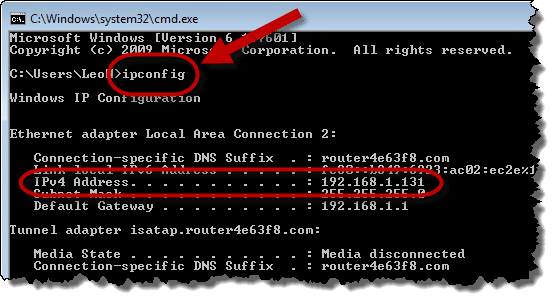
I’ve highlighted the IP address assigned to the computer’s network adapter. This is the computer’s IP address.
Your computer’s internet IP address
Calling something an “internet” IP address feels redundant. IP actually stands for Internet Protocol. As the Internet Protocol is often used even when not directly connected to the internet, it’s not really that silly to talk about an IP address on the internet or it’s internet Internet Protocol address.
There are several sites on the web that you can visit that will tell you your internet IP address. Rather than send you somewhere else, I’ll just tell you: your IP address is 5.161.193.197.
So why is it different than your computer’s IP address?
It’s very likely that all of the computers in your home will show the same internet IP address.
How IP addresses are born
Let’s back up and look at how IP addresses are assigned.
In most cases, internet addresses are assigned dynamically:

In this example, your computer uses a protocol called DHCP (for Dynamic Host Configuration Protocol) to connect to its ISP or network provider. It asks for an IP address and the ISP assigns one. From here, that IP address identifies that computer on the internet. Now, the IP address may change. When the computer connects again, it may be given a different address. That’s why it’s called a “dynamic” IP address.
A static IP address is … well, static. Your computer doesn’t ask the ISP for an IP address. Both the computer and the ISP are configured manually to “know” the IP address from the start and the computer that it refers to:

I’ll now leave static IP assignments behind. Most of the rest of this applies equally well to static and dynamic assignment, except in the details of how the IP addresses are actually assigned. Dynamic is what most situations we’re trying to clarify here involve.
So, let’s insert a router into the mix. It sits between the computer and the internet. When you turn it on or attach it to your ISP’s provided connection, one of the first things that it does is ask for IP address:

Note that the router asked and received an IP address; that now identifies it on the internet.
At some point, you may turn on your computer, which is connected to the router. It must also ask for an IP address:

The computer makes its request of the router this time and receives an IP address back from the router. Note that the “192.168.” address is special. You’ll never see that on the internet. Those are reserved for local networks, like the one we’re building. In fact, if you connect a second computer to your router, you are building a local area network:

Note that the two computers each have a unique IP address assigned from the router.
And the router has its own IP address connecting it to the internet.
Network Address Translation at work
Now, what happens when one of those computers makes a request that accesses the internet? The computers get to the internet through the router, so the first step looks like this:

The router must then pass on that request to the internet:

To the internet, it looks like the router is making the request. Remember, the internet cannot see your internal IP addresses, so the router translates from the internal address (192.168.1.100) to the external (1.2.3.4 in this example). When the response arrives, the same translation happens in reverse:

The router keeps track of which computer on the LAN side that the request belongs to and routes the response appropriately.
That’s what’s called NAT (Network Address Translation). The router manages the IP addresses on a LAN, or Local Area Network, and then translates to the appropriate IP address as connections are made across it.
Why NAT?
There are two major reasons why NAT is used, even when only one computer might be connected to a router:
- All of the devices behind the router appear to use exactly one IP address on the internet. You may have heard that the internet is “running out” of IP addresses and this technique was initially developed as a way around that. It’s a way to connect a large number of computers to the internet while using only a single IP address.
- Connections can only be initiated outbound. This means that your computer behind the router can make a connection to a server on the internet, like perhaps https://askleo.com. Once established, that connection can then transfer data in either direction, but it had to be initiated by your computer. A computer out on the internet cannot by default initiate a connection to your machine – there’s simply no protocol to traverse the router in that backwards direction. This is why I so often refer to a NAT router as a firewall, because that’s ultimately what a firewall does as well. It prevents outside computers from randomly connecting to yours.
Even if the first issue weren’t an issue, I’d still recommend using a NAT router as a firewall. It’s that simple and good.
IPv6?
Internet Protocol version 6 is designed to eliminate the problem of running out of IP addresses. Each device on the planet can have its own IPv6 address – they can have several, if that turns out to be useful. There are just that many. (340,282,366,920,938,463,463,374,607,431,768,211,456 theoretically, although I’m sure the practical limit is somewhat less.)
As I mentioned above, even without the need for IP addressing games, Network Address Translation provided by routers turns out to provide such an important security benefit. I don’t see that technique going away any time soon. And it’s certainly still possible do NAT with IPv6.


And if you ever want to try any nasty hacking, exploits, or denial of service attacks, aim them at 127.0.0.1. That’s Microsoft’s main IP address.
No Greg, as far as I know 127.0.0.1 address simply means “local computer”, while additionally 0.0.0.0 means “any computer”.
best regards,
Ivan Tadej, Slovenija, Europe
http://www.tadej-ivan.tk
Ivan,
It was a joke. :-)
But in case someone had found some script kiddie nonsense on a newsgroup or hAx0R site, thought they’d do some evil with it, but didn’t even know what the IP address for localhost was… I figured I’d leave off the smiley and let them attack themselves.
– Greg
Hahahaha!!!
Ahhhh, I should’ve noticed that, i.e. that it was just a joke …
best regards,
Ivan Tadej, Slovenija, Europe
I have a question for you we recently called direcway to ask then to set me up with a static ip address. So they did we did what they said but if I go to whatismyipaddress.com it still keeps changing. But I need to be the same because I need have it stay the same because I bring work home . That was the main reason for asking my ISP to add a static ip address. What should I do. Is there something that I forgot I have to configure. Right know I am running XP on my computer. My ISP is connected to a Linksys and the Linksys is connected to my computer. Please try to help me figure out what I need to do.
Your linksys probably needs to be configured to use the static IP address – I suspect it’s still using DHCP to get an IP, even though it may not need to. Check with Direcway for the specifics – I’m not exactly sure how they manage that kind of thing.
If I am somewhere besides my house and I want to access my computer, which is behind a linksys wireless, what ip address would I connect to?
Say mine is 1.2.3.4 I would connect to 1.2.3.4 being my router but how do I get from my router to my pc??? Help!!!
I got quite good knowlege from this article but my problem is i wana use ftp and due to router or seomthing my comp get a local id. how can a user at other end acces my server.
Zane: this requires that you know what ports you need to use, and then configure the router to forward those ports to the specific computer you want to access. You would use your IP address as it appears on the internet.
Could anyone help me with a problem i have. I have the same physcial network topology as the one shown in the tutorial above but the problem is that my pc is receiving the same ip address as the router-ie its not getting a lan ip address.Does this mean that my pc is not ‘sitting’ behind my router and that my pc could be exposed?
Yes. It sounds like your machine isn’t behind your router at all. Check the topology in this article: http://ask-leo.com/how_should_i_set_up_my_home_network.html
hi i have similar problem as stated above..i want to stream my media over internet using windows media encoder and the url address to connect to my stream is http://10.1.1.12:8080 where 10.1.1.12 is static ip from LAN and 8080 is port i am using for straming..i already opened this port in my router .but i am confused with my url address as someone on other end cann’t access my stream with this url.and i tried to the dynamic ip given to me by my isp(http//:203.X.X.X:8080) and its not working aswell..my question is how can someone on other end can access my computer and what url they need for it?
hi
how can i send my message to all user .
i want to know some funny tips and tweaks about Lan.
I would like to use netmeeting to “ring” my home PC being behind NAT router. Normally, I would use an IP to do that. However in this case, it won’t for obvious reasons. Is there a way how to solve this?
i’ve set a apache server on my machine..i’m usin’ a router to connect the internet…i’m trying to connect to the server usin’ the i.p. address given from the internet..i understood that this is the router i.p. address..but how can i link to the server that is on my computer?!
I have a problem with my email system,, probably stmming from spam spewing from my “internet server”. The 1.2.3.4 is what has been blocked by spamcop. But I have a “static” IP assigned by the ISP (or I thought). I therefore cant send out emails, they just bounce.
I connect to the net through a telephone line, using ADSL US Robotics Modem. Though it is said to be secure, I haven’t heard tme to explore how I would avoid such problems with it. The machine has been running Kaspersky internet security, and am now trying AVG Internet Security, but all havent yet managed to stop the problem of almost 2 months now.
How may I sort my self out once and fo all?
I knew how these work; I stumbled upon this by accident. I’d like to say though, kudos on the CLEAREST explanation I’ve EVER seen on this topic. You really managed to break it down just right for people.
Keep it up!
I have made a tcp ip program but I am able to connect from my laptop to my office computer. ie laptop runs server and office runs client but I am not able to connect wise versa. I showed the demo but it does not work for any one else as we need server at office. please any one can respond…
That was a great article indeed. I am new to networking and this was a good stepping stone.
I have a question:
I am having a wireless broadband connection at home and connect to the internet via a modem which my service provider has given me. I have 2 laptops connected to the broadband network. Can this be called a Local Area Network. That is, if i want to access my other Laptop through say Remote Desktop Connection, would that be possible?
28-Feb-2010
So, does that mean if I’m on a LAN and I sign in to my Facebook page on different machines, Facebook will simply see that “1.2.3.4” is logged in, but not detect that each machine’s unique address and/or name is logged in? It sounds like you’re saying everything gets filtered/stripped by the router, so that when it reaches the internet, only the IP address provided by your service(say, w.x.y.z.) is recorded.
Thanks.
My question is that if I go into Whatismyip.com I get one ip address when I access it through AOL and a different address when using internet explorer……..Cant explain it, can you…..
28-Feb-2011
Spot on – simplist and best expalnation of a topic I’ve seen anywhere on the net – ever. Thanks.
Good work Leo, simple explanation for something that so many people have problems with.
Thanks so much, very well explained – now I finally got it ;)
ok so if I understanded correctly the ip that you find on the web is your routers ip and the one on the cmd is your computers.
If I would rob a bank with my computer using a public internet connection there would be no way they could find me?
I wouldn’t recommend it. I think nowadays most public places have security cameras which would get you.
Running XP desktop. Was using Cisco wireless router. Worked fine, hardlined for one day, now I’m connected via modem, but cannot get online. HELP!! Thanks. Charter tech help was totally useless.
Hello I am with BT and have a fibre connection of usually 45-48 mps. It has been slow (less than 2 mps) and when I tested the IP address it showed that My ISP provider was with Tiscali!
How can this be?
I don’t know. You’ll have to contact your ISP and ask them.
Ok, yes, I did actually read the article, but I am still stuck! I have a Comcast modem/router combination. When I type in “what’s my ip” on my Ipad, I get a number like this “260X:284:820X:2dec:18de:7b12:5fe2:ad87. Now, I know enough to recognize that part of the address is the Mac Id of a device, trouble is I can’t figure out what device it is showing. It is no the Mac ID of the cable modem/router and it’s not my wifi Ipad ID. So exactly what is this? I wanted to log into the cable modem/router remotely, but I can’t figure out how to get to the true external IP.
I don’t think that’s a MAC address – that looks more like an IPv6 IP address.
Yes, I’m sure you are correct. However, how can I log into my router remotely without an actual IP address? I don’t think it’s possible. Comcast says you can access it by accessing your account, but that doesn’t allow me to view security cameras on the remote network. Any ideas?
Leo – Thanks – great simple explanation for a student of all this
I have a Building energy management system , the system communicate tru a router, and this router has a ip add of 172.26.1.4 ( static ip), I am trying to connect this router to a remote site server with ip 192.168.200.5 ( assigned ip which I cannot change), I cannot connect tru, however I can ping tru, how I resolve this problem.
rgds
wtai
Hi on is it normal for my Google security alerts to give me different types of cell phones name location and different type of ip numbers ??? And how can I and where can I go to find my real ip number and do know how and where and is it safe to put my real ip cell phone name and location on google security alert settings???
I always wondered what makes IP address so important but this link http://whatsmyrouterip.com has supported me in learning the importance and certain details.